Repository navigation
Releases: MikeTat1988/HuntersAtlas
Release list
Hunter's Atlas 3.0 - all maps baked, independent runtime

Windows players: download Hunters-Atlas-3.0-Windows.zip. About 241 MB. The Source ZIP is for developers.
All maps baked once, ready to play
Hunter's Atlas 3.0 is a self-contained update. All 16 supported areas and 602 floors are precompiled once into compact vector map data and included in the download. There is no first-run map generation, collision extraction or map triangulation during gameplay.
Atlas 3.0 is the only supported version. All previous versions are legacy and no longer supported. Please update to 3.0 before reporting an issue.
The package includes its own tested Windows runtime, Python and DLLs. It works independently of the version of any separately installed Bloodborne launcher.
Install
Close the game and launcher. Extract the entire Windows ZIP into a new permanent folder, run Install.cmd, and select your CUSA00207 Bloodborne 1.09 folder if asked. Open HuntersAtlas.exe; Atlas is enabled by default under Mods & patches. Press Play, then Continue, and press M for the map. Keep/select your existing save folder in the launcher. Game files and saves are not included or overwritten.
Controls and scaling
- Camera too slow? Inputs → Mouse look → Sensitivity → Save. Try 2.0 instead of the default 1.0. Right-stick emulation retains the game's maximum turn speed.
- The map scales proportionally and preserves world coverage when resized. Ultrawide and taller screens use a centered layout without distortion.
- Wheel, keyboard and controller zoom now use matching resolution-scaled limits.
Checks
The owner confirmed manual ZIP installation and in-game use of the compact maps. Renderer checks covered all 602 floors at 4K, 36 hidden heavy-map cases, and seven output sizes from 1280×720 through 4K and 5120×1440, including resizing and wheel zoom. These are renderer checks, not a claim that every live game/display/GPU combination has been tested. Spoiler images are not included.
Hunter's Atlas 1.3 - LEGACY (unsupported)
Legacy — no longer supported. All versions before Atlas 3.0 are legacy. Please upgrade to Atlas 3.0 before reporting an issue.
Windows players: download Hunters-Atlas-1.3-Windows.zip below. The Source ZIP is for developers.
Atlas 1.3 includes its own tested Bloodborne for Windows 1.9 runtime, Python, Tk and required DLLs. Updating a separate ordinary launcher no longer replaces Atlas or triggers launcher-adapter rebuilding. The familiar desktop shortcut, launcher UI and native in-game Map tile remain the way to play.
- Fixes the reported missing Python module, missing GPU helper, adapter-elevation and in-use installer-folder paths.
- Supports Windows redirected/OneDrive Desktop locations for shortcut creation.
- Reuses compatible prepared maps and preserves game, DLC, save-folder and preference selections.
- About 177 MB download and 415 MB installed, plus generated caches.
Install
Close the game and launcher. Extract the complete Windows ZIP into a new permanent local folder your Windows account can read and write, outside the game, launcher and OneDrive/synced or linked folders. Run Install.cmd and select your existing launcher folder if prompted. Use the normal Bloodborne desktop shortcut, ensure Enable Hunter's Atlas is checked under Mods & patches, then Play and open the native Map tile.
For an older launcher-integrated Atlas, keep its folder until setup completes so prepared maps can be imported. For future updates to this independent edition, extract the new package elsewhere and run its Update.cmd. Atlas runtime improvements arrive through tested Atlas packages.
Requirements and checks
Windows 10/11 x64, the verified CUSA00207 1.09 game build, and hardware/drivers capable of running the included Windows 1.9 runtime. No game files, generated maps, game font or saves are distributed. First use prepares maps from your game if a compatible pack is unavailable.
72 automated checks passed. Actual copied-save gameplay verified the native Map tile, visible geometry, controller controls and travel to Hunter's Dream; all 15 original save files remained unchanged. The owner confirmed the normal play experience works. Other game builds and all GPU configurations have not been verified.
Hunter's Atlas 1.2 - LEGACY (unsupported)
Legacy — no longer supported. All versions before Atlas 3.0 are legacy. Please upgrade to Atlas 3.0 before reporting an issue.
Supports all tested Windows launcher versions through 1.9: 1.7.2, 1.8.1, 1.8.2 and 1.9.
- Fixed stuck installations and Windows long-path missing-file errors.
- Added bundled 1.8.2/1.9 adapters, preserving 1.9 frame-generation controls.
- Compact download: shared files stored once; identical launcher DLLs reused after verification. Compatible future updates retain the verified rebuild fallback.
To play: download Hunters-Atlas-1.2.zip (98 MB). Extract into a new permanent folder, close the launcher/game, then run Install.cmd or Update.cmd. Open your usual launcher → Atlas Ready → Play.
The separate Source ZIP is for developers. Verified with 70 automated tests, installation checks for all four launcher versions, and in-game testing on 1.8.2 and 1.9.
Hunter's Atlas 1.1 - LEGACY (unsupported)
Legacy — no longer supported. All versions before Atlas 3.0 are legacy. Please upgrade to Atlas 3.0 before reporting an issue.
Hunter’s Atlas 1.1 — lamp travel, pickup markers and automatic updates
Added
- Fast travel to discovered lamps, with confirmation. LB/RB (L1/R1) cycle available lamps; undiscovered lamps stay hidden.
- Colored dots for remaining world pickups: Blood Vials, Knowledge/Wisdom, weapons/clothing and Coldblood. Monster drops are excluded.
- Optional map reveal after defeating an area’s boss.
- A new-dialogue NPC filter for verified Gilbert and early Eileen conversations.
Improved
- Atlas prepares automatically when you update the official launcher, reusing valid maps without an uninstall.
- Smaller travel confirmation that scales with resolution, a compact color key and aligned controls.
- Separate launcher switches for fog, fast travel and pickup categories. Turning them off keeps the map available.
Install
- Extract Hunters-Atlas-1.1.zip and run Install.cmd. Select your launcher and wait for map preparation.
- Reopen the launcher → Mods & patches → tick Enable Hunter’s Atlas. Wait for Ready, then Play.
Enable the mod after installation:
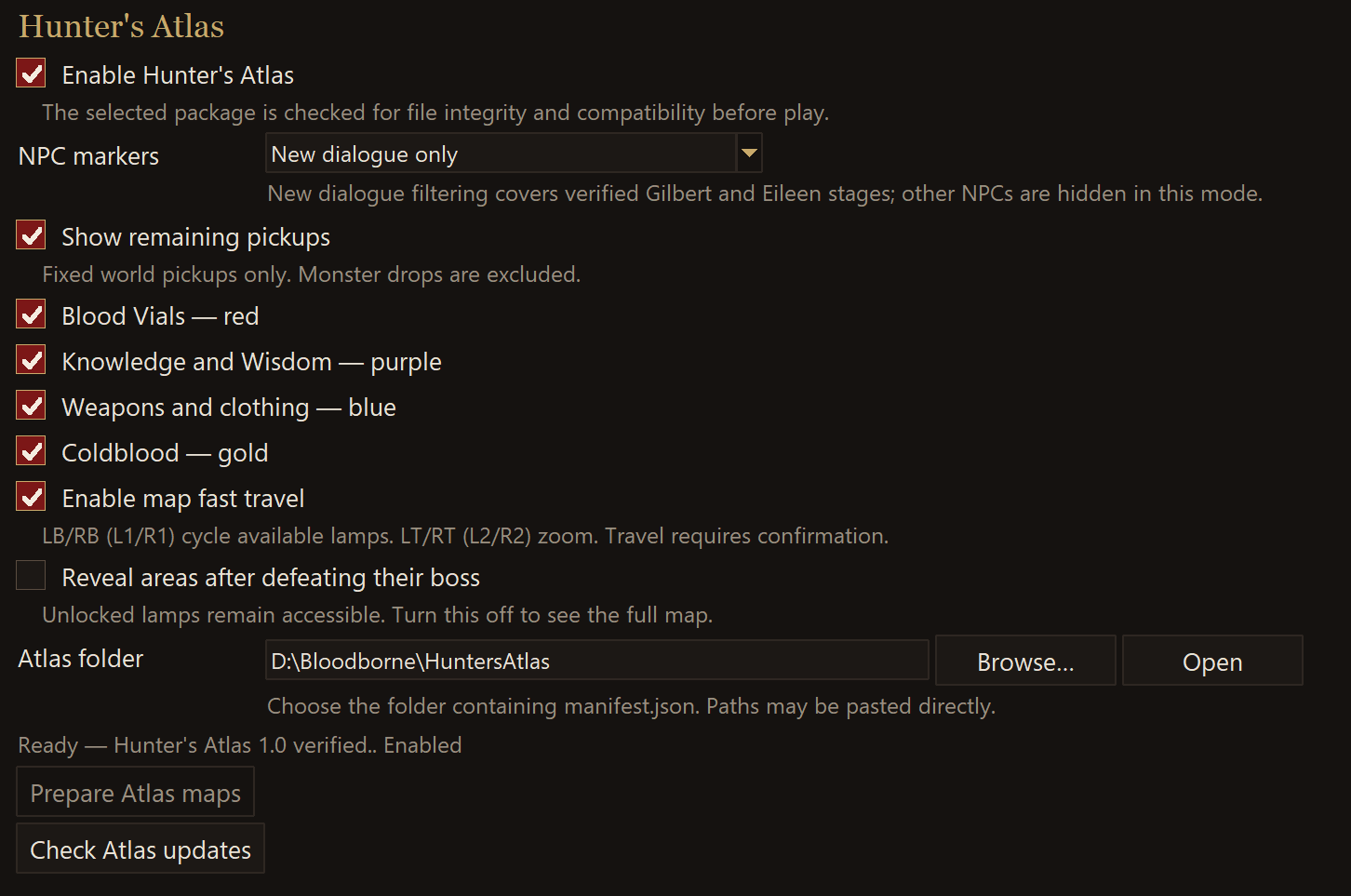
Already have Atlas? Close the game and launcher, extract 1.1 into a new folder,
then run Update.cmd from that extraction and select your existing launcher.
Windows 10/11, verified CUSA00207 1.09. Launcher 1.7.2 → 1.8.2 was tested.
The first automatic rebuild may take several minutes. Future incompatible
launcher changes may require an Atlas repair; verified launcher updates can
still complete while Atlas is pending.
Hunter's Atlas 1.0 - LEGACY (unsupported)
Legacy — no longer supported. All versions before Atlas 3.0 are legacy. Please upgrade to Atlas 3.0 before reporting an issue.
Hunter’s Atlas 1.0 adds fullscreen navigation maps to Bloodborne on Windows, with player position and facing, zoom, recentering and floor context for 16 supported areas.
Extract Hunters-Atlas-1.0.zip completely, run Install.cmd and select the supported Bloodborne launcher. Installation prepares maps from your own game files. Enable Hunter’s Atlas in Mods and click Play.
October 15 hotfix: simplifies the map footer to Zoom, Recenter and Back. Atlas sessions now use serial draw preparation as a stability workaround after a GPU FMask conversion assertion. The owner's repeat test completed without the crash; this does not establish that every renderer crash is resolved.
Supported: official Windows launcher v1.7.2 and verified Bloodborne CUSA00207 1.09. Run Uninstall.cmd from the extracted folder to restore the ordinary launcher.
Source and dependency sources for this ZIP: commit 17468d6.