Mineralogy 6
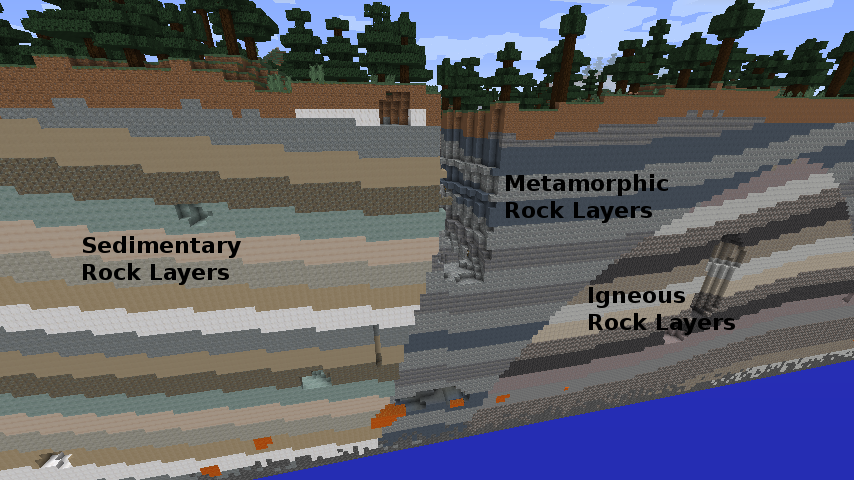
Minecraft Mineralogy is a geology and building mod. It replaces much of the Overworld's ordinary stone and deepslate with recognisable rocks arranged in broad underground formations.
The rocks are not just scenery. Mineralogy supplies matching bricks, polished blocks, slabs, stairs, walls, relief carvings, and furnaces. It also adds rock salt lighting, gypsum and drywall, three mineral ores, and crude oil.
Mineralogy is inspired by real rock families and geological relationships. It is designed to make Minecraft's underground more varied and believable, not to be a precise geological simulation.
Mineralogy 6 always uses MMD OreSpawn 4 for world generation.
| Mineralogy owns | OreSpawn owns |
|---|---|
| Rocks, blocks, items, fluids, and block entities | Terrain replacement and formations |
| Models, textures, recipes, loot, language, and tags | Geomes and biome influence |
| Stone and cobblestone compatibility | Ore and fluid-deposit placement |
| Historical registry IDs and saved-block compatibility | World profiles, templates, configuration screens, and retrogen |
| Mineralogy's packaged provider declaration | Provider loading and the public worldgen API |
For a player, the two mods make one experience. For a pack author, the split means Mineralogy can share one world-generation engine with Base Metals and other providers instead of several mods trying to replace the same terrain.
Read the Player and Server Guide for installation, world creation, Recommended Defaults, dedicated servers, and saved profiles.
Read Rocks, Geomes, and Formations for the complete 32-material catalogue, rock families, depth preferences, geomes, Sky formations, and Cyano legacy layers.
Start with Recommended Defaults and let caves, cliffs, mines, and tunnels reveal changing rock families. Rock selection is influenced by the region, surface biome, and depth rather than being shuffled randomly at every block.
Turn the rocks below a settlement into matching structural and decorative blocks. Different regions can naturally supply different building materials.
Use OreSpawn to adjust formation scale, rock weights, depth preferences, ore hosts, abundance, biomes, dimensions, and fluid deposits without modifying the Mineralogy jar.
Other OreSpawn providers can place their ores through Mineralogy's rock families while each mod continues to own its own blocks and items.
Mineralogy retains historical registrations and known aliases so saved blocks can still resolve. Always test an upgrade on a disposable copy and keep every mod that owns content in the world installed.
This wiki explains the Mineralogy 6 family. Exact dependencies and fields can differ between builds.
Every Mineralogy 6 jar exports the guide and the exact packaged provider for that build to:
config/mineralogy-guide/
OreSpawn exports its matching world-generation guide and JSON Schemas to:
config/orespawn-guide/
Use those exported guides when checking an installed build. The current canonical source also contains the Mineralogy 6 guide and the packaged provider.
For Mineralogy 5 and earlier, use the Legacy Mineralogy Overview.