Repository navigation
Releases: MoHadiShibli/Control4Free
Release list
Control4Free 1.3.1

- Arabic and Brazilian Portuguese for the web interface and PS4 app.
- Move, resize and hide face buttons individually, or keep them grouped.
- Reset individual controls in the layout editor.
- Updated Xbox-button troubleshooting for Chrome and Edge on Windows.
Control4Free 1.3.0

WebRTC connections, controller testing on the PS4, and new experimental controller features.
- Rebuilt controller connections around WebRTC. The old WebSocket connection delivered everything
in order, so recovering a lost packet could hold up newer input. Input now uses an unordered channel
without retransmissions, while controller selection and status use a separate reliable channel.
This reduces delayed and bunched-up inputs during packet loss. After a brief disconnection, the page
reconnects and restores its controller selection. - Controller tester in the PS4 app: see buttons, sticks, analog triggers, touchpad, motion and
connection latency; test rumble, choose light-bar colours with RGB sliders and reset orientation.
Supports controllers and HDMI-CEC remotes. See Testing controllers. - DualShock 4 and DualSense touchpads now work when linked: both finger positions and the click.
Experimental Sony controller support also adds direct rumble and PS4 light-bar colours. - Experimental motion controls use a phone's sensors or a linked DualShock 4 / DualSense.
- Experimental trigger rumble adds vibration to the trigger you're pulling on supported Xbox
controllers and a linked DualSense. It follows the game's rumble; when both triggers are held, the
last one pulled vibrates. See Experimental features for setup
and how it works. - Corrected the large and small rumble motors being swapped on connected gamepads.
Experimental features are off by default. Sony linking and motion need the
Chrome / Edge setup.
Controller tester
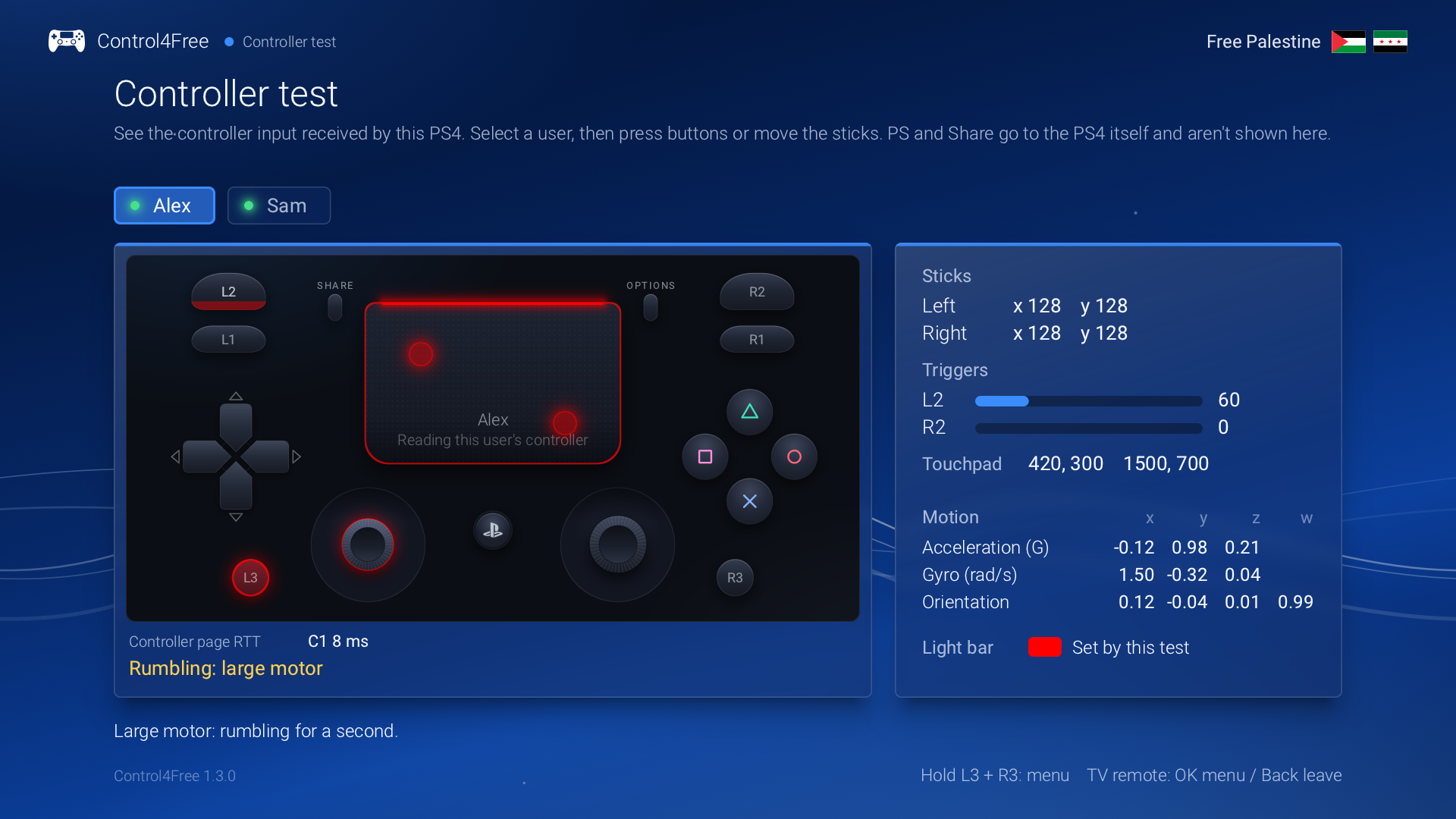
Test tools
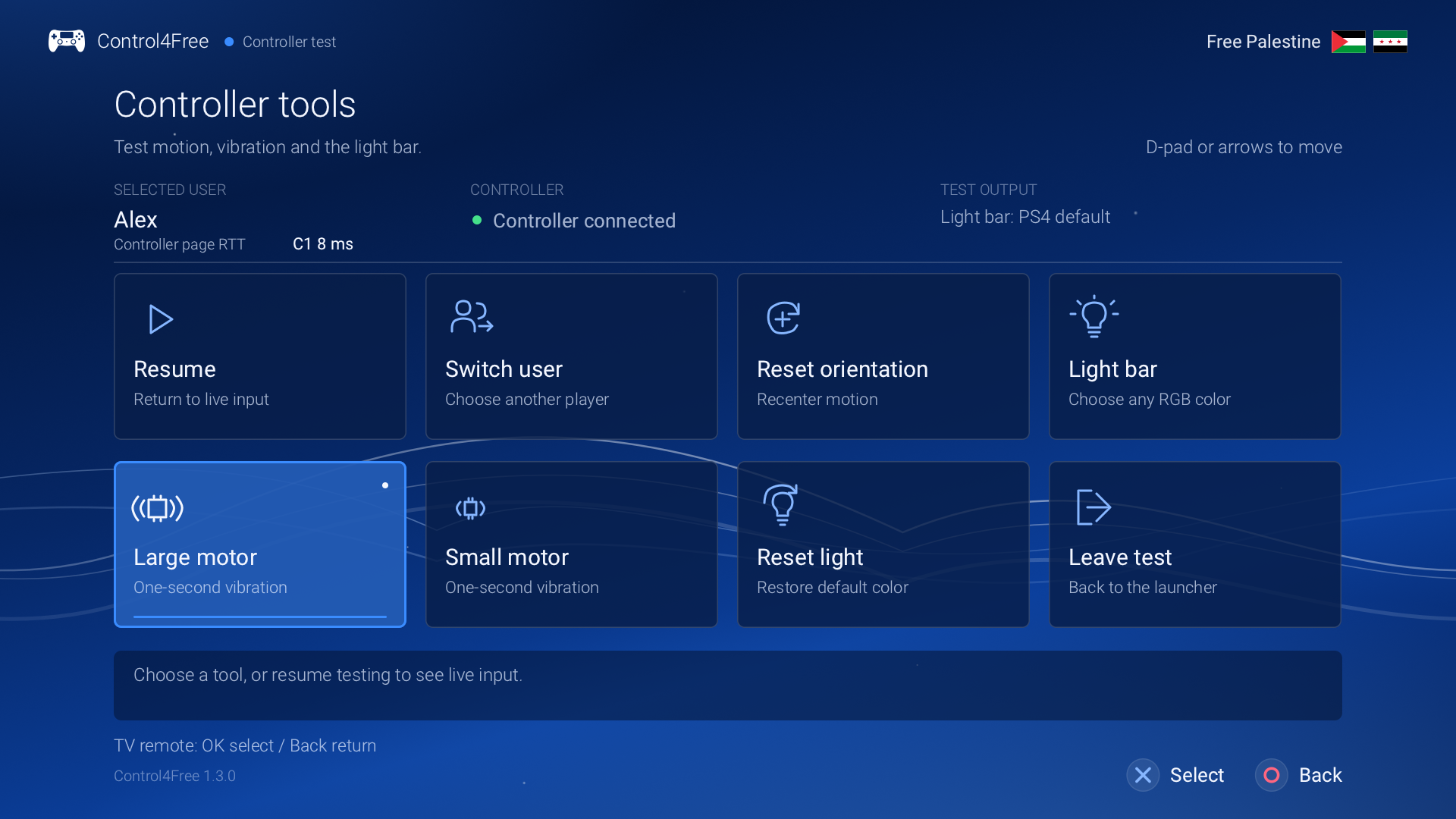
Updating: update the PS4 service, then reload the controller page. Replace any saved copy with a
fresh one from the updated service.
Control4Free 1.2.1
HDMI-CEC navigation for the PS4 app.
- Use your TV remote to control the PS4 app through HDMI-CEC. Press OK to open Actions,
use the arrows to choose, and press OK again. Back returns; Stop has a separate confirmation.
The diagnostic app also supports remote navigation and retains the last received remote key.
See HDMI-CEC navigation. - If the app cannot reach PayLoader, it tells you to enable GoldHEN → Server Settings → Enable
PayLoader Server and retry Start. The setup message now fits on screen, and the installation
guide explains when the server is needed.
Thanks to NotDev-Kike
for testing and confirming OK, arrows, Back and service startup with a Samsung TV remote on firmware 11.02.
Control4Free 1.2.0
Gamepad mapping.
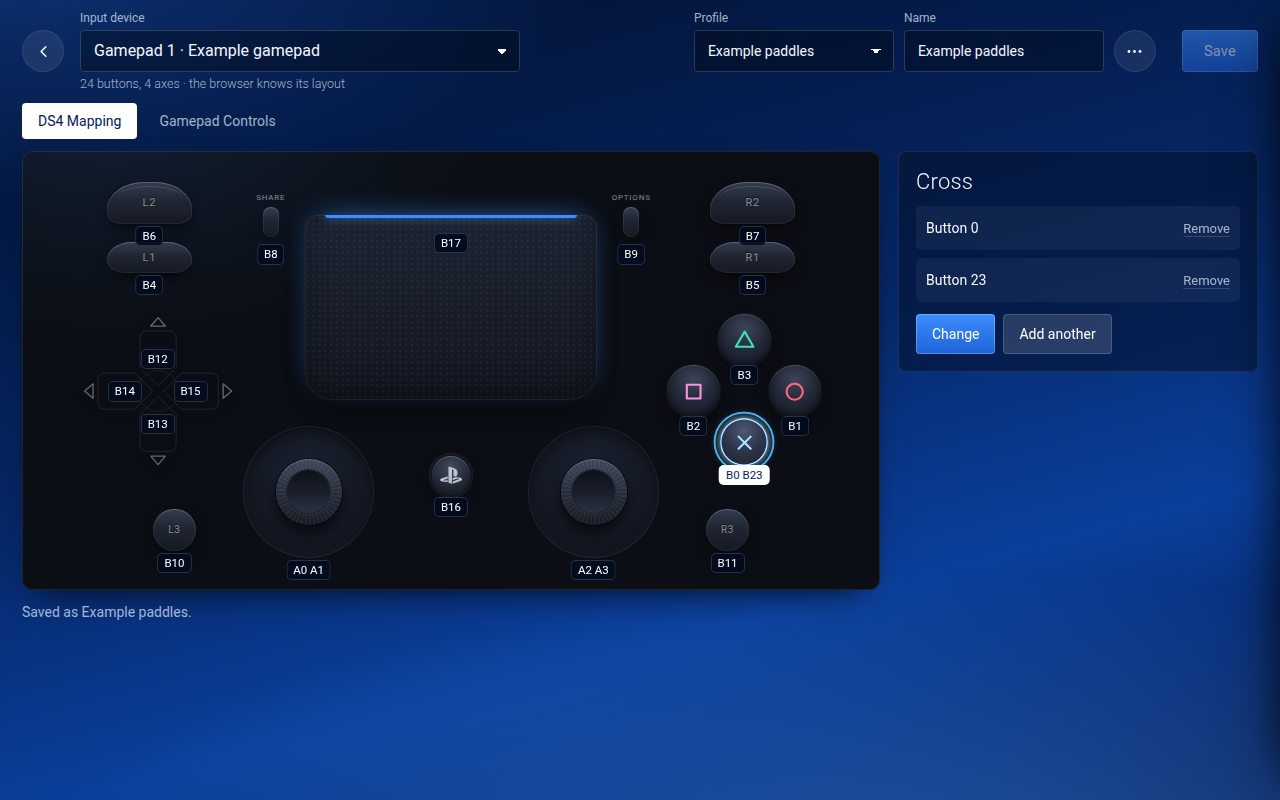
- Map a gamepad on a DualShock 4: each control shows what drives it and lights up when pressed.
Click a control, then press the gamepad button for it. Map browser-exposed inputs from gamepads, wheels,
guitars, pedals and arcade sticks to DualShock 4 buttons, sticks and triggers. Wheel and guitar model
compatibility remains unverified, and native accessory identity is not provided. Sticks and
triggers show their position with a dead zone and a curve. Gamepad Controls shows every button and
axis live, and sets an axis's range a step at a time. See Gamepad mapping. - Keyboard keys are chosen on the same screen.
- Mappings are saved as named profiles in the browser. Save updates every connected gamepad using that
profile; Save as new gives the selected gamepad a separate profile. Profiles can be exported to a file
and imported on another device for review before saving. - Several gamepads can play as the same controller, for example a wheel and its pedals.
- A phone that drops off the network no longer keeps a connection to the PS4 open for ever. Before, enough of
those could stop new phones and computers from opening the page. - When two people pick controllers at the same moment, one is asked to try again, instead of one taking the
other's controller. - A controller the console refused input for recovers once it accepts input again.
- Signing out of a PS4 user disconnects their virtual controllers and clears their names and browser
selections. Other signed-in players stay connected. - The mapping header aligns its controls, and gamepad rows group the device name, controller choice and
Mapping button. The PS button uses the PlayStation mark and shows press feedback. - Documented a Windows GameInput workaround for Xbox buttons crossing gamepads in affected Chrome/Edge
builds. A two-controller Chrome/Windows 11 test confirmed it; it is not a general requirement. See
Gamepad troubleshooting. - A touch on the touchpad that the browser cancels no longer clicks it.
- Keys with Ctrl, Alt or the Windows key can't be chosen any more: they never worked in play.
- The app on the PS4 says when the Control4Free running is a different version from the app, and how to switch.
It tells a missing auto-start copy apart from auto-start being off. - Active service logs are bounded to two 1 MiB files. The last segment of the previous run is kept separately.
- The diagnostic app says whether it managed to save its report.
Control4Free 1.1.1
Fixes.
- Control4Free starts on firmware 13.52. Before, it stopped before doing anything on that firmware:
GoldHEN said the payload launched, but the app said it never answered. The payload's start-up code now
comes from a newer ps4-payload-sdk that knows 13.52's kernel. - When a start fails, press Cross to try again. The app no longer asks you to restart the PS4: a second
copy of Control4Free quits on its own, so two can't end up running. - Each release now includes a diagnostic package,
Control4Free-<version>-diag.pkg. Its app shows what the
PS4 reports (firmware, GoldHEN, the logs, each connection from a phone or PC) on pages you can screenshot
for a bug report. See Reporting a problem.
Control4Free 1.1.0
Rumble, the light bar, player names, and an easy way to invite friends.
What's new
- Rumble. When a game rumbles a controller, the device driving it feels it: an Android phone buzzes, and a
gamepad playing as that controller rumbles too, though not every controller supports vibration in the
browser. A gamepad that can't be rumbled says so on its row. - Light bar. The page glows in the controller's real light-bar colour: the player colour the PS4 gives each
user, or whatever the game sets. - See who's playing. Each controller shows the name of the PS4 user signed in on it.
- Invite friends. A button next to the settings shows the page's address as a QR code: friends scan it and
they're in. - The page says "Choose user on PS4" rather than "on TV".
Update
- Download
Control4Free-1.1.0.pkgbelow and install it over the old one with GoldHEN's Package Installer
(delete the old app first if the installer refuses). - Open Control4Free and press Triangle to update the auto-start copy.
- Stop the old version (Square, then Cross) and start the new one with Cross, or restart the PS4.
New here? See the installation guide.
Files
| File | What it is |
|---|---|
Control4Free-1.1.0.pkg |
The app for the PS4, with the service inside. Most people want this. |
control4free.elf |
The service on its own, for GoldHEN's Payloader LaunchPad or a payload sender. |
SHA256SUMS |
Checksums for both. |
Tested on firmware 10.01 with GoldHEN v2.4b18.10. Full details in the
changelog.
Control4Free 1.0.0
Use your phone or PC as a PS4 controller everywhere: in the menus, and in every game.
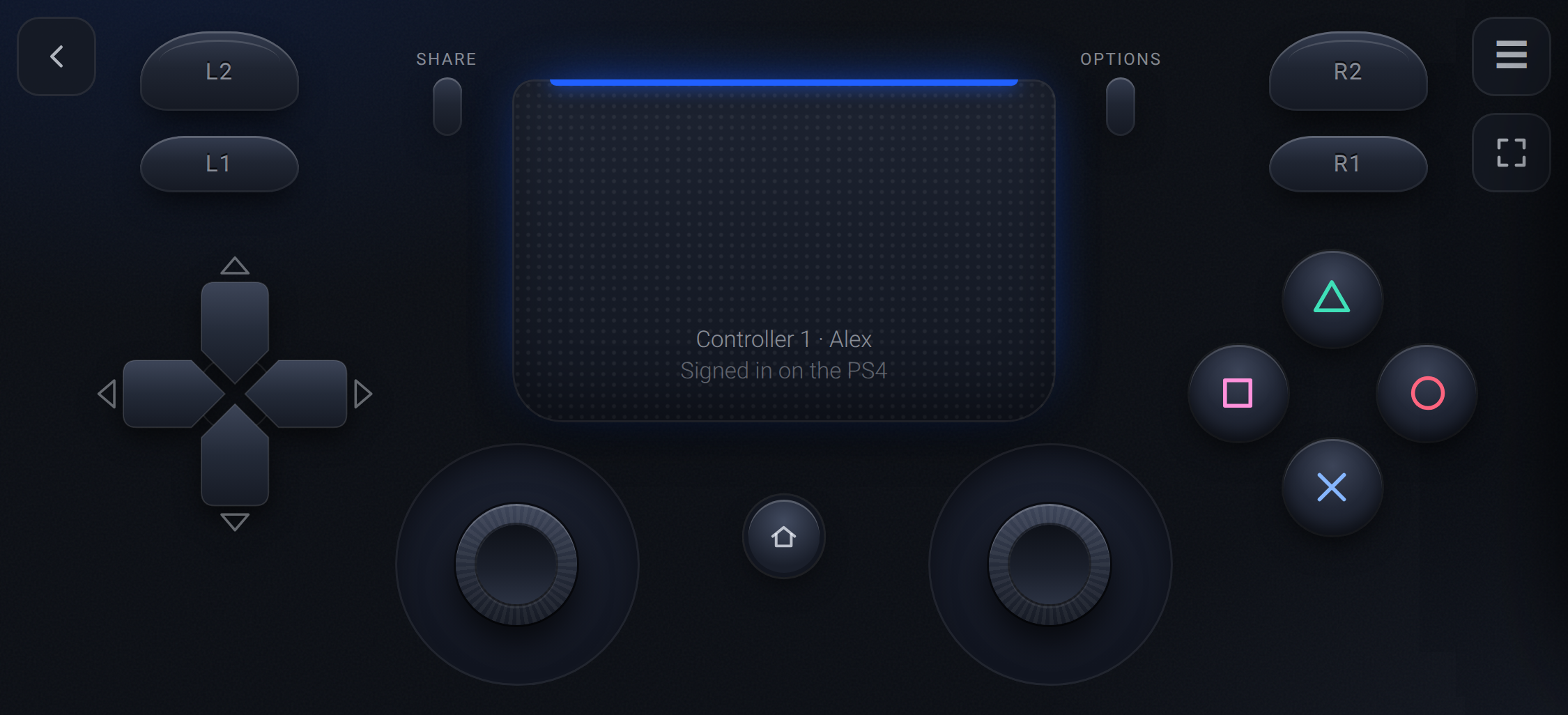
Control4Free is a GoldHEN payload that adds up to four virtual DualShock 4 controllers through the PS4's own
virtual controller service, the one Remote Play uses. The console sees a real controller, so it works in the
menus and at sign-in, and each one is assigned to a user through the PS4's own "Who's using this controller?"
screen.
Highlights
- Works on the home screen, at sign-in and in every game, with no per-game setup
- Up to 4 controllers, from any mix of phones, tablets and PCs
- Touch, a keyboard, or your Xbox, DualSense or Switch Pro pad through the phone or PC
- An app on the PS4 with the address, a QR code and the controller count, plus auto-start through GoldHEN's AutoRun
- Input sent the moment it arrives, at a DualShock 4's own 4 ms rate
Install
- Download
Control4Free-1.0.0.pkgbelow and install it with GoldHEN's Package Installer. - Open Control4Free from Library → Applications and press Cross.
- Scan the QR code, pick a controller, and choose your user on the TV.
Guides: Installation ·
Playing ·
Troubleshooting
Files
| File | What it is |
|---|---|
Control4Free-1.0.0.pkg |
The app for the PS4, with the service inside. Most people want this. |
control4free.elf |
The service on its own, for GoldHEN's Payloader LaunchPad or a payload sender. |
SHA256SUMS |
Checksums for both. |
Tested on firmware 10.01 with GoldHEN v2.4b18.10. Not included: rumble, light bar and motion.
Coming from RemotePad NG? The two aren't compatible: remove RemotePad NG from plugins.ini before you switch.