Repository navigation
Home
On this page
Make a model smaller, check what changed, and run it on a compatible runtime. GPT-QModel brings quantization, calibration, evaluation, conversion, and inference into one workflow.
This wiki is for builders compressing their first model, operators loading existing checkpoints, and contributors extending model or kernel support. Start with your task; the implementation details are here when you need them.
| I want to… | Start here | Then |
|---|---|---|
| Understand quantization without getting lost in jargon | What is Quantization? | Choose a method and dtype |
| Pick a recipe for my hardware and data | Choosing a Method and Dtype | Dtypes and Formats · Backends |
| Quantize my first model | Installation and Quickstart | Lifecycle · Evaluation |
| Run a checkpoint I already have | Loading and Inference | Packing compatibility · Serving |
| Fit a larger model or resume work | Memory, Offload, and Multi-GPU | Lifecycle and recovery |
| Fix unexpected output or a loading error | Troubleshooting and FAQ | Evaluation · Supported Models |
| Add a model, method, or backend | Developer Guide | Module plans · Processors |
- Choose and understand: plain-English value, audience, decision tables, prerequisites, and honest limits.
- Use it: practical load → quantize/convert → save → reload examples, with hardware and calibration requirements.
- Go deeper: intuition, defined math/number representations, advanced configuration, internals, and source/research citations.
Method pages follow this progression while retaining their detailed references. Short calibration strings are API demos, never accuracy recipes. For real decisions, use representative calibration and disjoint evaluation data.
Keep the layers separate: an algorithm chooses weights; a number representation defines their values; a checkpoint layout/container stores them; a backend executes them. GSQ refinement, EoRA adapters, and fusion are additional choices—not replacement dtypes.
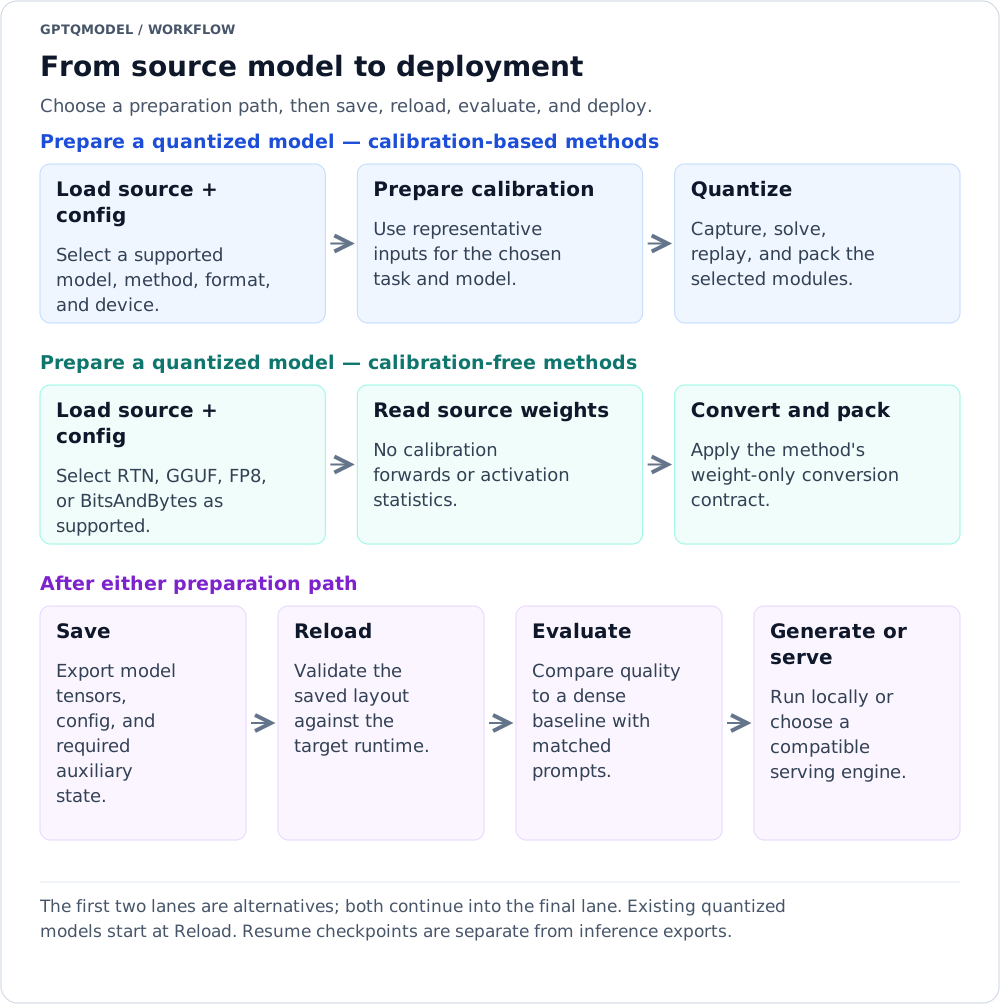
Reading the diagram: The first two lanes are alternatives; both continue into the final lane. Existing quantized models start at Reload. Resume checkpoints are separate from inference exports.
Text version of the workflow
- Prepare a quantized model — calibration-based methods: Load source + config → Prepare calibration → Quantize.
- Prepare a quantized model — calibration-free methods: Load source + config → Read source weights → Convert and pack.
- After either preparation path: Save → Reload → Evaluate → Generate or serve.
- What is Quantization? — storage/quality tradeoffs, W4A16 notation, groups, and scalar reconstruction.
- Choosing a Method and Dtype — hardware-aware and calibration-aware shortlists, without universal rankings.
- Dtypes and Formats — source versus stored versus activation dtype; nominal payload versus actual memory.
- Installation and Quickstart — prerequisites and first end-to-end workflow.
- QuantizeConfig Reference — exported configs, fields, defaults, and normalization.
- Packing Formats and Compatibility — saved tensor contracts and interoperability.
| Your direction | Full guides: practical examples → intuition/math → advanced controls |
|---|---|
| Scalar integer quantization | GPTQ / GPTAQ / RTN · AWQ |
| Existing FP8 weights | FP8 loading (load-only) |
| Low-precision activations | QQQ: INT4 + INT8 · MACaQ: MXFP4 · FP8 and NVFP4 streams |
| Alternative low-bit representations | EXL3 · VPTQ · Paro |
| Calibration-free weight packing | BitsAndBytes NF4 / FP4 / INT8 · GGUF block families · RTN |
| Exact BF16 weight compression | NF12 — variable escape overhead; not guaranteed fixed-size lossy 12-bit quantization |
| Shared-exponent block floats / card execution |
Tenstorrent — distinguish model checkpoints, native card routes, and standalone CPU bf8_b / bf4_b / bf2_b kernels |
GGUF is not one dtype. FP4, NF4, MXFP4 and NVFP4 are not interchangeable. See Dtypes and Formats before comparing bit-width labels.
- CalibrationConfig — data, packing, batching, ordering, attention-sink policy, and migration from removed calibration keywords.
- GSQ — eligible scalar refinement, staged training and format-aware reconstruction allocation.
- EoRA — low-rank error recovery on supported calibrated paths.
- Rotations, Smoothing, and Norm Tuning — optional preprocessing/recovery and lifecycle limits.
- Projection Fusion — opt-in packed-layout execution, not a new checkpoint format.
- MSEConfig and smoothing descriptors — detailed controls.
- Automatic NF12 source storage — independent of final output format.
- Loading and Inference — detection, placement, generation, and adapter loading.
- Inference Backends — AUTO selection and per-backend requirements.
- Kernel Backends Reference — packed operators, native constraints, and portable paths.
- Serving — built-in OpenAI-compatible server and external engines.
- Evaluation — dense baselines, held-out metrics, and reproducible comparisons.
- Troubleshooting and FAQ — compatibility, memory, calibration, and runtime controls.
NVIDIA CUDA and AMD ROCm are distinct support families. A Triton implementation or Torch cuda device name is not proof of every vendor/architecture's support. Check the selected backend's actual declarations and architecture/dtype/shape gates. A support claim is not benchmark or numerical qualification.
- Memory, Offload, and Multi-GPU — placement, calibration memory, offload, and resharding.
- MLX / Apple Silicon — native packed inference and MLX quantization.
- Tenstorrent — vendor runtime prerequisites and separate execution routes.
- Hugging Face Integration — Transformers, Hub, PEFT, and interoperability.
- Supported Models — registry and model-definition lookup; not every model × method × backend combination.
- Multimodal and MoE Models — modality inputs, expert coverage, and replay caveats.
For contributors and readers debugging the pipeline; you do not need these pages to run your first model.
- Quantization Lifecycle — capture, solve, replay, packing, and recovery.
- Looper Processors — processor ownership, inputs/outputs, and extension boundaries.
- Model Definitions and Module Tree — wrappers, explicit declarations, loading and writing.
- Module Plans: API, Tags, and New Models — inspect a plan, declare weight ownership, and validate a new model.
- DeepSeek V4.1 Flash Inventory — pinned checkpoint inventory and integration gaps, not a support announcement.
- Developer Guide — source map, tests, and contributor workflows.
The main branch declares GPT-QModel 7.11.4 at source revision c1807f889. Individual pages and historical measurements have their own source pins. Check the source matching your installed version for exact behavior.
For release history, see Releases, the 7.11.4 highlights in the pinned README, and release notes.
Workflow SVGs have text alternatives. Their lanes describe alternatives, independent concerns, or nested loops; they complement rather than replace API validation rules.