Releases: MrTactical/AvatarBridge
Release list
2.32.3 — real joysticks, and material swaps that survive

Two-axis puppets are a real joystick now
A VRChat two-axis puppet drives two parameters over −1..1. They were being converted into two ChilloutVR sliders, and a slider offers 0..1 — so half of every axis was unreachable and each controller worked in one quadrant. On one test avatar that was six half-usable sliders where there should have been three working controls.
ChilloutVR has the matching control and it simply wasn't being used. Joystick2D takes a Vector2 range, defaulting to (0,0)..(1,1) but settable, so −1..1 on both axes is a supported configuration rather than something to work around. A puppet now becomes one joystick with that range, centred where VRChat leaves it.
The catch is that Joystick2D takes no parameter names — it derives them, driving <machineName>-x and -y. The avatar's own axis parameters are therefore renamed to match, everywhere they're referenced, and both stay synced: the pair is one control to the wearer, and half a joystick arriving at other players would be worse than none.
Four-axis puppets are untouched — those are four independent 0..1 parameters, not two signed axes, so the sliders they already produce are the honest reading.
Toggles that swap materials no longer break
A toggle that swapped a material turned the mesh magenta, on an avatar that had converted cleanly many times with nothing about it changed.
VRCFury generates into a temp folder it deletes on its next build, and AvatarBridge has always copied what it finds there. But a reference is not the thing it points at, and that turned out to be true three levels deep:
- a clip that assigns a material carries it as an object-reference curve — copying the clip copies the reference
- the material VRCFury hands over is often embedded inside one of its controllers, so copying "the asset's file" duplicated a whole animator controller and rescued nothing
- and that material points its texture slots at sub-assets of a repacked texture container, also in temp
Each layer failed differently, which is what made it hard to see. A missing material renders magenta; missing textures render as an untextured wash — a white face with no eyes, which reads as an unrelated bug.
Re-homing now follows the whole graph: the clip, what it assigns, and the shader and textures that asset depends on, with standalone files and embedded sub-assets each handled correctly.
Also
- A stripped system's puppet is left alone. GoGo Loco ships its own two-axis puppet, and converting it renamed both parameters out of the
Go/family that marks them for removal — so GoGo's puppet survived a conversion that had been asked to strip GoGo, under a generated name. Anything that renames parameters ahead of stripping now asks first whether they're about to be removed. - Joystick and vector controls are no longer deleted as dead entries. A joystick's
machineNameis never itself a parameter — ChilloutVR derives one per axis — so the dead-entry cleanup judged every joystick by a name that by design never appears in an animator, and removed the only control for those axes. It now expands each entry to the parameters its type actually uses. - No compile warning in a CCK-only project. A field used only by convert mode was declared outside the guard covering its use, so every project without the VRChat SDK got a warning naming AvatarBridge on each recompile — which is the first thing anyone checks when they think a tool is misbehaving.
2.30.3 — shaders with includes, and constraints that drive another object
Shaders whose code lives in includes can now be patched
The SPI patcher previously refused any shader whose vertex function wasn't in the .shader file itself. That rules out most serious effect shaders — Cancerspace declares #pragma vertex vert and keeps vert, the structs, and nine includes' worth of everything else in Cancercore.cginc.
The refusal was reasonable on its own terms: editing somebody's shared .cginc would reach every other shader that includes it. But the objection was to editing the original, not to patching the shader. The includes are now cloned alongside the shader, and the copy's #include lines are repointed at the clones — so the originals are never written to and never read by the patched copy.
The patcher works on a unit now: the .shader plus every local include it reaches, depth-first. Each of the six stereo edits lands in whichever file actually contains its target. Unity's own includes (UnityCG.cginc, AutoLight.cginc) are recognised by failing to resolve next to their includer and left alone — they already handle stereo, and they aren't ours to copy.
Verified on Cancerspace: ten files cloned, every include repointed, compiles, and the CCK's non-SPI warning is gone.
The safety net is unchanged and now covers the whole unit — if the copy fails to compile, every file written for it is removed, not just the shader.
Constraints that drive another object
A VRC constraint can sit on one object and drive a different one via its Target Transform. Unity's constraints have no equivalent, and AvatarBridge had been dropping the redirection as unsupported.
That isn't a degradation — it's a silent total failure of anything built that way, and prefabs are built that way routinely. Avatar Limb Scaling puts its scale constraints on proxy objects inside its own prefab and points them at your real arm and leg bones; dropped, its sliders appeared, moved, synced, and scaled a hidden proxy.
Unity offers no way to redirect a constraint, but it doesn't need one: the constraint is now added to the target instead, carrying the same sources. Exact, not approximate. A target outside the avatar still can't be honoured, and the report now says plainly that whatever it was driving will not move.
Reports read the same in every locale
A report from a comma-decimal locale came back reading 'Height (M)' = 1,24 m and StepSize 0,05. Nothing generated was affected — there's no float.Parse anywhere in the tool and no number is written into any file it produces — but the report is the document bugs arrive with, read by someone other than whoever made it. Numbers are now formatted invariantly for the length of a conversion.
Documentation
The README picks up everything from 2.26.0 onward: a third-party prefab table (Avatar Limb Scaling, GoGo Loco, VRCFT rigs), a section on constraints that drive another object, one on VRCFury's systems and why the parameter compressor is removed, and a correction to face tracking — both set-up modes remove the existing rig's objects and parameters, not just its layers, and None leaves it entirely alone.
2.29.0 — constraints that drive another object now work
A VRC constraint can sit on one object and drive a different one, through its Target Transform field. Unity's constraints have no such field — they always affect the transform they're attached to — so AvatarBridge reported that as an unsupported feature and dropped the redirection.
Dropping it isn't a degradation. It's a silent, total failure of anything built that way.
Why it matters
Avatar Limb Scaling is exactly that shape, and it's far from the only prefab that is. Its scale constraints live on proxy objects inside its own prefab and point at the avatar's real arm and leg bones — that's the whole mechanism. With the redirection dropped, each constraint scaled a hidden proxy instead.
The result was an avatar where the Arms and Legs sliders appeared in the menu, moved, and synced correctly — and changed nothing anyone could see. The tester reasonably asked whether they were dead weight. They weren't; the conversion was.
The fix
Unity offers no way to redirect a constraint, but it doesn't need one: the constraint can simply be added to the target instead, carrying the same sources. That's exact rather than approximate, and it's what now happens.
Those report lines change accordingly — from Approximated: 'Target Transform' redirection is not supported to Converted: the Unity constraint was placed on that target instead.
The one case still dropped
A Target Transform pointing at something outside the avatar. That isn't ours to add components to and wouldn't survive an upload either way. It still drops, but the report now says plainly that whatever it was driving will not move, rather than describing it as an unsupported option.
Confirmed in game. If you converted an avatar using Avatar Limb Scaling — or any prefab whose constraints drive bones from proxy objects — it's worth re-running on this version.
2.28.1 — four fixes that showed up as a broken avatar
Four fixes, all found on one avatar, all of which produced a converted result that looked wrong rather than one that reported an error.
Blend trees were being flattened
The important one, and it affects most VRCFury avatars.
Unity clamps a blend tree's child thresholds into [minThreshold, maxThreshold] when those are assigned — but min/max only mean anything when a tree uses automatic thresholds, so an author working in manual mode leaves them wherever they happen to be. VRCFury emits its manual trees with min = max = 0. Copying that faithfully crushed every child threshold to 0.
That is not a subtle failure. A 1D tree whose thresholds are all equal plays all of its clips at once. On the avatar this was found with, the tail-scale tree held both extremes at full weight and the tail swallowed the model.
Min and max are now copied only in automatic mode, which is the only mode in which they mean anything. In manual mode the children's own thresholds are the whole truth.
(Found by diffing VRCFury's own baked controller against the converted one — thresholds 0, 1 in the source against 0, 0 in the output. Reasoning about it had already produced one wrong answer.)
VRCFury's parameter compressor is removed
It exists to beat VRChat's 256-parameter ceiling: it sets your real parameters to networkSynced = false, mirrors each into VF<id>_<name>, and rotates the mirrors through a couple of sync slots about twice a second. A good answer to a VRChat problem, and a pure loss in ChilloutVR, which has 3200 bits and syncs straight from the animator declaration.
Carried across, it cost three ways:
- the rotation ran every frame, as a Direct blend tree — most of what made the "Internal Parameter Math" layer expensive
- the mirrors and slot counters sat in the parameter list doing nothing
- the real parameters were left marked not-synced, so the conversion faithfully gave them the local-only
#prefix and the compressed values reached nobody
An avatar whose author installed the compressor to make more things sync ended up with those things syncing not at all. Its layers and mirrors are now removed and every real parameter goes back to syncing natively, instantly, rather than on a half-second carousel.
Face-tracking rigs are actually removed now
The setting always claimed both face-tracking modes strip whatever rig the avatar shipped with. They stripped its animator layers and stopped there — so a Native conversion carried the original VRCFT prefab in the hierarchy alongside the native component that had just replaced it, plus its entire parameter set.
The objects are now removed too, and the parameters can finally be released: they were pinned in place by VRCFury's Defaults layer, a single Direct blend tree that writes every parameter on the avatar and is rightly kept. On the test avatar that came to one object, two layers and 202 parameters.
None mode is untouched and now means what it says: the rig is left completely alone, objects and all.
Missing parameters take their default from the parameter they mirror
VRCFury copies parameters it needs into its own namespace, and those copies are often the ones left undeclared — so they were being declared Float 0 along with every other unknown name.
Zero is not neutral for a slider. Avatar Limb Scaling rests at 0.5, where 0 means fully shrunk; the same avatar's Wider Legs, Wider Thighs and Chubby Belly sliders behave identically. The repair now finds the parameter each copy shadows and takes its default. Genuinely unknown names still get 0, which is right for them.
The distinction is worth stating: the old behaviour left a feature inert, which is obvious and recoverable. This left the avatar deformed, which reads as the converter having mangled the model.
2.25.2 — the window, rebuilt
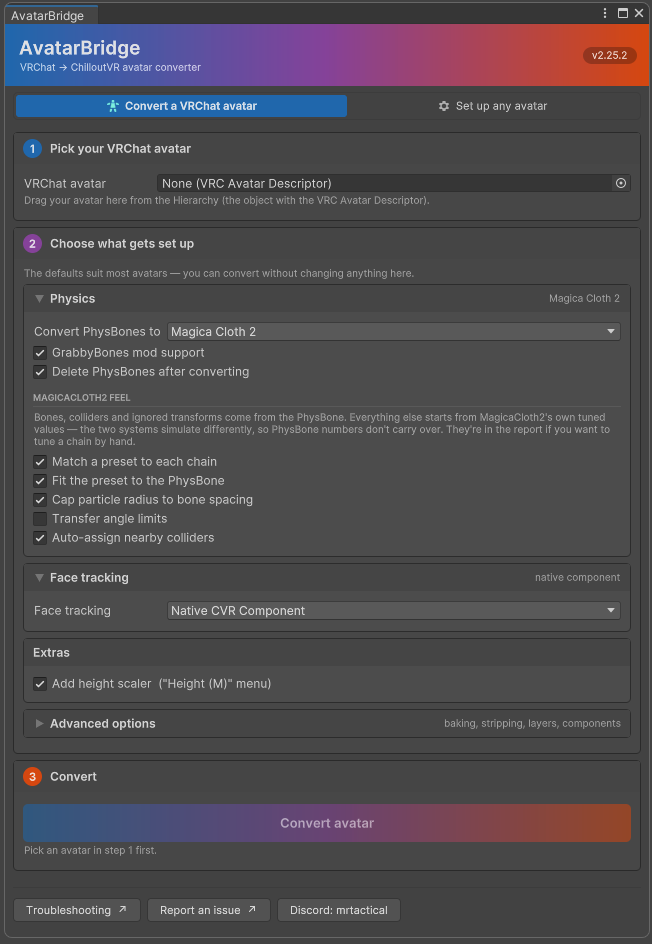
The window has been rebuilt. No conversion behaviour changed — every setting, tooltip and warning is the one that was there before, laid out properly for the first time.
Built the way its neighbours are
The ChilloutVR CCK panel and the VRChat SDK panel are both UI Toolkit. AvatarBridge was IMGUI, which is why it looked like a Unity default sitting between two designed tools — IMGUI can't do rounded corners, hover states or real layout. It's UI Toolkit now too.
Borrowed knowingly, with the source noted in the stylesheet: the CCK's card shape and its icon-and-label tab strip; the VRChat SDK's section header fills, its spacing scale, and its .dark/.light root class, which is a better way to support both editor skins than deciding every colour in C#.
Coloured as the bridge it is
VRChat's SDK panel is blue. The CCK's header is orange. Those are the two ends of what this tool does, so the banner runs a gradient from one into the other, and the step markers sample it: step 1 sits in VRChat's blue, step 3 in ChilloutVR's orange, step 2 between them. The active tab is tinted to its own end.
(Blue and orange are near-opposites, so a straight interpolation sags through grey-brown exactly where the two platforms meet. The ramp passes through a plum to hold saturation across the span.)
The report is usable now
Click a tally to filter. "9 skipped" shows those nine and nothing else; click it again to go back. Zero-count chips aren't clickable. The default view stays "everything that needs a look" — an unfiltered dump is hundreds of "converted fine" lines with the interesting ones lost among them, which is why "168 done" is worth a deliberate click rather than being the default.
Entries are laid out rather than concatenated. Each was one long sentence with status, category, subject and detail run together and clipped at the right edge, so the useful half was off screen. Now: a status stripe, a bold heading, and the detail wrapped underneath. Same information, skimmable.
Report an issue appears whenever a report does, not only when something went wrong — "it converted clean but the avatar is wrong in game" is a report worth having, and that was exactly the case where the button was missing.
Also
- Checkboxes sit left of their labels, so a column of them lines up.
- Dropdowns read "Magica Cloth 2", not "MagicaCloth2".
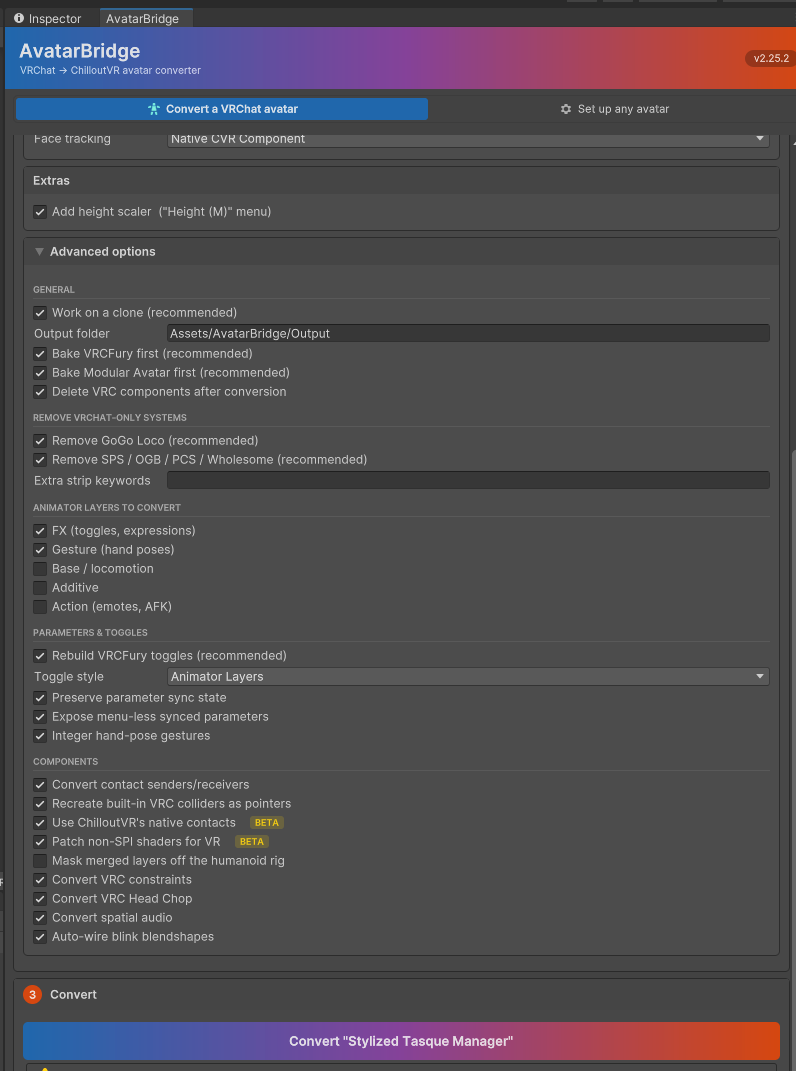
- Group headings in Advanced carry a rule; toggle rows highlight under the cursor.
- Both editor skins work — the light skin had invisible foldout arrows and unreadable status colours, neither visible from the dark one.
- The Discord button opens a profile card instead of copying a handle.
Under the hood
Two bugs worth naming because neither is the sort a compiler catches: rebuilding the panel from inside a control's own value-changed callback destroys that control while its event is still dispatching (deferred a frame now), and the tab strip was built once at window creation, so switching modes left the highlight on the tab you had just left.
Verified across all five build configurations — with and without each SDK, and with the DynamicBone path — and by checking that every field in the settings object is written back by some control rather than merely displayed. A toggle that shows but never saves is the failure a rewrite like this invites, and compilation says nothing about it.
Advanced options
The report, after a real conversion
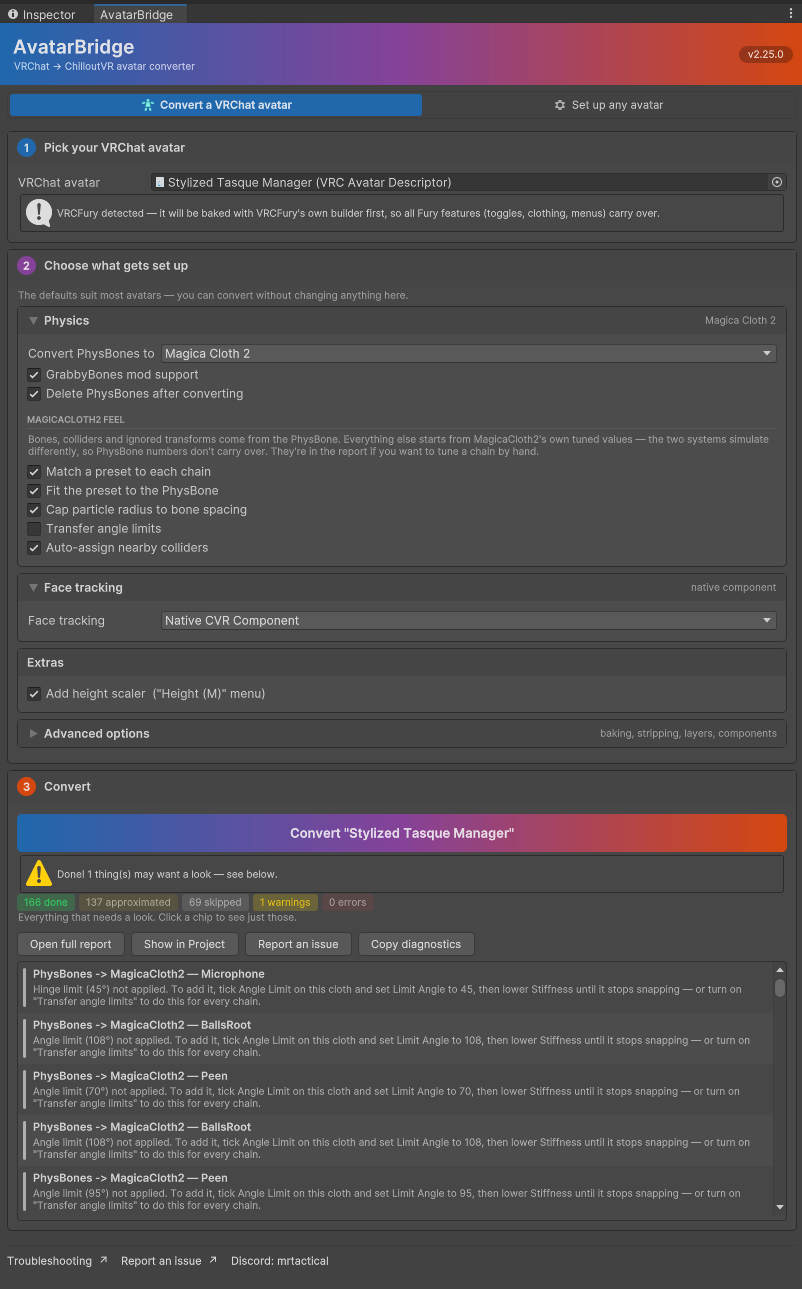
(Report shot taken on 2.25.0 — 2.25.2 adds a Troubleshooting button to that row and drops the duplicate link from the footer.)
2.22.0 — README audit
A documentation release. No conversion behaviour changes — the README went through a full audit against what the code actually does, and three claims turned out to be wrong rather than merely out of date.
Corrections
PhysBones → MagicaCloth2 was overstating its own restraint. It said the conversion "transfers structure and nothing else" and that "every physics value is left at MagicaCloth2's own defaults." Not true with the default settings: Fit the preset to the PhysBone is on, and applies three things — a chain with no gravity keeps none, negative gravity points up, and immobile becomes world influence. The setting wasn't in the options table at all. Both fixed, with the reason those three are safe to carry when pull and spring aren't: they ask the same question on both sides rather than needing conversion.
Action-layer emotes were listed under "converted with caveats", which implies they convert. They don't — only Gesture and FX are on by default, because CVR drives locomotion and emotes itself. The README now says which layers convert and why the rest are off.
Menu-less synced parameters. The setting's tooltip claimed the menu entry is what makes them sync. ChilloutVR takes syncing from the animator declaration; what the entry buys is profile persistence, so the value survives between avatar loads. Corrected in the tooltip and in the code.
Feature list
Rewritten — a lot has landed since it was last touched. It now covers SPI shader patching, VRCAnimatorTrackingControl → BodyControl, and the rescue of VRCFury's temp materials and shaders before Fury deletes them.
Native contacts and shader patching both now carry ✅ confirmed working in game callouts. Both stay off by default — one avatar's evidence each, and that's not enough to flip a default.
Shader patching moved out of Known limitations into its own section. It stopped being a limitation when it started being a fix.
Mask merged layers off the humanoid rig is documented for the first time, including the honest note that the bug which prompted it turned out to be something else entirely.
2.21.2 — SPI shader auto-patching
Shaders that only draw into one eye can now be fixed automatically.
ChilloutVR renders single-pass instanced. VRChat renders double-wide single-pass. Both SDKs force their own mode, unconditionally — StereoRenderingPath.Instancing in the CCK's CCK_EnvConfig.cs, StereoRenderingPath.SinglePass in the VRChat SDK's EnvConfig.cs.
That difference is the whole problem. Under double-wide a shader receives both eyes without having to ask. Under instancing it has to declare that it knows which eye it's drawing — so a shader that never opted in looks entirely correct in VRChat and draws into one eye only in ChilloutVR. Nobody did anything wrong, and there's nothing to fix in the original project: converting is what exposes it. Which makes it exactly the sort of thing worth handling here.
The CCK flags these as potentially non-SPI. AvatarBridge now reports them too, and can repair the ones that are fixable mechanically — turn on Patch non-SPI shaders for VR in Advanced.
What it does
For each affected shader it writes a patched copy into RehomedAssets beside your converted avatar, adds the stereo macros, and points this avatar's materials at the copy.
Your original shader is never modified, and neither is the original material — both are copied, so other avatars sharing them are unaffected. These shaders usually aren't yours to edit.
A copy that doesn't compile is thrown away, and the original left exactly as it was. The worst case is a line in the report rather than wrong pixels.
Not everything can be patched. Surface shaders have no vertex stage to edit, locked and generated shaders can't be parsed, and structs living in a shared include can't be edited from one file. Those are listed in the report for hand-fixing or replacing, not quietly mangled.
There's nothing to undo. The macros are the mode-agnostic ones — they expand to real instancing code under ChilloutVR's mode and to nothing under VRChat's or on desktop. The patched copy is a valid shader on both platforms, not a ChilloutVR-only fork.
Passing the CCK's check isn't the same as being correct
The CCK looks for four macros. A shader can have all four and still be broken.
The shader that prompted this feature — KriptoFX/ME/Particle, a soft-particle effect — is exactly that case. It declares sampler2D _CameraDepthTexture and reads it with tex2Dproj, and under single-pass instanced that texture is an array. Add the four macros and validation goes green while the effect stays wrong.
So the patch makes six edits, not four, rewriting that pair to UNITY_DECLARE_DEPTH_TEXTURE and SAMPLE_DEPTH_TEXTURE_PROJ as well.
Why it's off by default
Compilation is the only thing that can be checked automatically. Whether the result looks right is a judgement no editor script can make. A patched shader is repairing something already broken in ChilloutVR, so the downside is small — but look at the effect in both eyes before you trust it.
Also in 2.21.x
- One clone per material, not per slot. A material used by three renderers was being copied three times, producing byte-identical assets that no longer batched with each other.
- Line endings in the patched file now match the source, so Unity stops warning about mixed endings and blaming AvatarBridge for a shader that imported fine.
- Corrected in 2.21.2: 2.20.0's diagnostic and 2.21.0's notes claimed VRChat rendered the same way and that these shaders were "already broken there". That was backwards. It sent people looking for damage in their VRChat project that was never there.
Verified end to end on a 400k-triangle, 56-slot avatar: detected, patched, compiled, validated clean, built and uploaded.
2.21.1 — SPI shader auto-patching
Correction — see 2.21.2, which supersedes this release. The first paragraph below is wrong. VRChat does not render single-pass instanced — it forces double-wide single-pass (
StereoRenderingPath.SinglePass), while ChilloutVR forces instancing. Under double-wide a shader gets both eyes without opting in, so these shaders were not "already broken in VRChat" and there is nothing to fix in your original project. Converting is what exposes it. The patch itself was correct and is unchanged; only the explanation was wrong.
Shaders that only draw into one eye can now be fixed automatically.
Both ChilloutVR and VRChat render VR single-pass instanced: both eyes in one pass, with the shader itself responsible for knowing which eye it's drawing. A shader that never opted in draws into one eye only — a common and genuinely disorienting result, and one the CCK flags as potentially non-SPI without being able to do anything about it.
AvatarBridge now reports them too, and can repair the ones that are fixable mechanically. Turn on Patch non-SPI shaders for VR in Advanced.
What it does
For each affected shader it writes a patched copy into RehomedAssets beside your converted avatar, adds the stereo macros, and points this avatar's materials at the copy.
Your original shader is never modified, and neither is the original material — both are copied, so other avatars sharing them are unaffected. These shaders usually aren't yours to edit.
A copy that doesn't compile is thrown away, and the original left exactly as it was. The worst case is a line in the report rather than wrong pixels.
Not everything can be patched. Surface shaders have no vertex stage to edit, locked and generated shaders can't be parsed, and structs living in a shared include can't be edited from one file. Those are listed in the report for hand-fixing or replacing, not quietly mangled.
There's nothing to undo. The macros compile to nothing outside stereo rendering, so the patched copy behaves identically on desktop — and it's equally valid in VRChat, where the shader was half-blind too. Worth copying back into your VRChat project.
Passing the CCK's check isn't the same as being correct
The CCK looks for four macros. A shader can have all four and still be broken.
The shader that prompted this feature — KriptoFX/ME/Particle, a soft-particle effect — is exactly that case. It declares sampler2D _CameraDepthTexture and reads it with tex2Dproj, and under single-pass instanced that texture is an array. Add the four macros and validation goes green while the effect stays wrong.
So the patch makes six edits, not four, rewriting that pair to UNITY_DECLARE_DEPTH_TEXTURE and SAMPLE_DEPTH_TEXTURE_PROJ as well.
Why it's off by default
Compilation is the only thing that can be checked automatically. Whether the result looks right is a judgement no editor script can make. A patched shader is repairing something already broken in VR, so the downside is small — but look at the effect in both eyes before you trust it.
Also in this release
- One clone per material, not per slot. A material used by three renderers was being copied three times, producing byte-identical assets that no longer batched with each other.
- Line endings in the patched file now match the source, so Unity stops warning about mixed endings and blaming AvatarBridge for a shader that imported fine.
Verified end to end on a 400k-triangle, 56-slot avatar: detected, patched, compiled, validated clean, built and uploaded.
AvatarBridge 2.19.1 — native contacts
🎉 ChilloutVR's native contacts now convert — and they work in game
VRChat contacts have always had to be approximated on ChilloutVR, as pointers and triggers,
because the real contact system lives inside the game client and the CCK ships no way to author
it. AvatarBridge can now author it directly.
Confirmed in a live instance: CCK validation clean, avatar uploaded, contacts triggered by other
players, and ChilloutVR's own runtime gizmos drawing the components — which is the proof that
counts, because it means the game's real implementation is running against declarations generated
in your project.
Turn on Use ChilloutVR's native contacts under Advanced, and VRChat contacts convert one to
one:
- Real proximity, not a distance-driven stand-in
- Collision tags kept verbatim, so contacts still meet other avatars' on the same names
localOnlyhonoured — the legacy path has nowhere to put it- No sync cost at all, because every client simulates contacts for every avatar rather than
replicating values
Still off by default, and staying that way until more than one avatar has confirmed it. If
anything is wrong the conversion switches back to the legacy path by itself and says why.
New: Tools → Avatar Bridge → Diagnose native contacts prints exactly what Unity holds, in one
click, changing nothing.
Also fixed — these affect every avatar
- Humanoid muscle curves survive conversion. The parameter rename pass rewrote any binding of
typeAnimatorwith an empty path; muscle and root curves have that exact shape, so
Chest Front-Backbecame#Chest Front-Backand bound to nothing. Present since the first
release, and it erased its own evidence — the check meant to catch it scans after the rename. - Conversions no longer flood the editor log. The pipeline ran inside
OnGUI, which corrupts
IMGUI state; one conversion produced a 38 MB log. Now deferred, and only errors and warnings
reach the console. The report still has everything. - Stream-fed parameters reach other players.
MuteSelf,VRMode, gesture weights and
Uprightwere marked local, but the component feeding them exists only on the wearer's copy —
so for everyone else they sat frozen forever. - DynamicBone gravity works on scaled avatars. ChilloutVR multiplies gravity by avatar scale
but divides its rest-pose cancellation by it; below scale 1 the two invert and bones get pushed
upward. - Core parameter declarations match the CCK's own —
Groundedwas Float instead of Bool,
EmoteandToggleInt instead of Float, and five locomotion Bools were missing. - The override controller is wired into both slots it belongs in, including the CCK's own
Override Controller field.
New diagnostics
- Components ChilloutVR will delete on load. The client filters every component on an avatar
and destroys anything not on its list, silently. FinalIK is the usual casualty. - Sync budget tracking — the limit is 3200 bits; parameters past it stop replicating with no
warning in game.
Known limitation: quadruped avatars
Still on ice — see the README. Bipeds are unaffected.
AvatarBridge 2.17.4
A small follow-up to 2.17.3,
which carries everything of substance. Update to that one if you're coming from 2.6.0.
Fixed
- ChilloutVR's native contacts now draw in the scene view. With the experimental Use
ChilloutVR's native contacts option on, a converted contact had no gizmo —Draw Gizmosdid
nothing whether ticked or not — so there was no way to see or size the volume you'd just
authored. AvatarBridge declares those components itself (ChilloutVR keeps them internal to the
client), and the declarations were deliberately written with no behaviour, since anything they
did at runtime would be dead code. Gizmos are the exception: they're editor-only and the game
can't draw them for you here. Sphere, capsule and box now all draw, at the contact's own local
position and rotation, scaling with the bone they sit on, honouringDraw Gizmosand
Gizmo Color.
Nothing else changed. The declarations are regenerated automatically on the next domain reload
after updating.
Still experimental
Use native contacts remains off by default. It converts VRChat contacts one-to-one onto
ChilloutVR's own system — real proximity, collision tags kept as-is, localOnly honoured, no sync
cost — and the components have now been confirmed binding correctly on a real conversion, but it
hasn't been through a full in-game test yet.