Repository navigation
Session Timer and Clock
A countdown timer you set to the second: 9 minutes for the pasta, 30 minutes on the highline. With no time set it works as a stopwatch.
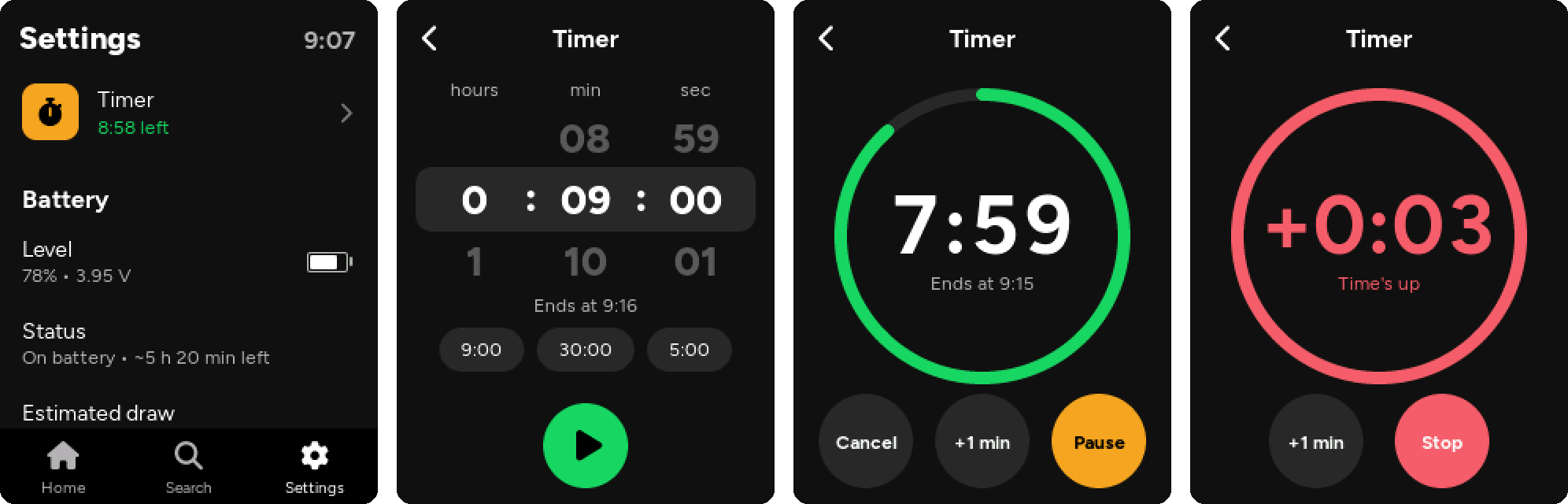
Open it from Settings → Timer (the first row; underneath it shows the time left while it runs).
- Turn the three wheels: hours, minutes, seconds. Underneath you see when it will end (Ends at 13:42, once the clock is set).
- Or tap one of the chips: the last times you used (until then 9:00, 30:00 and 5:00).
- All wheels at zero: it becomes a stopwatch and counts up.
- Tap the green play button.
- The ring empties as the time runs out, with the time left in the middle and the end time below.
- Cancel stops it, +1 min adds a minute, Pause / Resume.
- Go back and use the player as usual: the timer keeps running. While this screen is open and the timer is running, the screen stays on.
- Three beeps over the music (or on their own if the music is paused).
- The screen turns back on if it went off by itself, and the Timer screen opens on top of everything. If you locked the screen with the BOOT button (in your pocket) it stays off and you only hear the beeps.
- The time turns red and counts how long ago it ended (+0:23). The beeps repeat every 30 seconds until you tap Stop.
- Not ready yet? +1 min starts a new minute from now.
With the player in your pocket, 3 clicks on BOOT start the timer with the last time you set (1 beep) or stop it (2 beeps).
While the timer is running (also when paused) the player never powers off by itself.
The board has no backup battery for the clock, so the player gets the time from somewhere else:
- from your phone or computer, every time you open the file transfer page;
- from the internet (NTP), when the player is connected to your home Wi-Fi.
After that the chip keeps the time with the screen off, when powered off with the button, and across restarts. It is lost only when the battery is disconnected. While powered off it can drift by a few minutes a day (there is no clock crystal); the next transfer sets it right again.
The time is in the top-right corner of Settings, and the date is in the Date and time section together with where the time came from.
The default is Italy (CET/CEST, with automatic daylight saving time). To change it, set TIME_ZONE in src/config.h to a POSIX time zone string, for example:
| Place | TIME_ZONE |
|---|---|
| Italy, Central Europe | CET-1CEST,M3.5.0,M10.5.0/3 |
| United Kingdom | GMT0BST,M3.5.0/1,M10.5.0 |
| US Eastern | EST5EDT,M3.2.0,M11.1.0 |
| Japan | JST-9 |