Repository navigation
Voice Search
Say the name of an artist, album, playlist, genre or song and the player opens it. Recognition runs on the chip itself, with no internet, using the board's microphone.
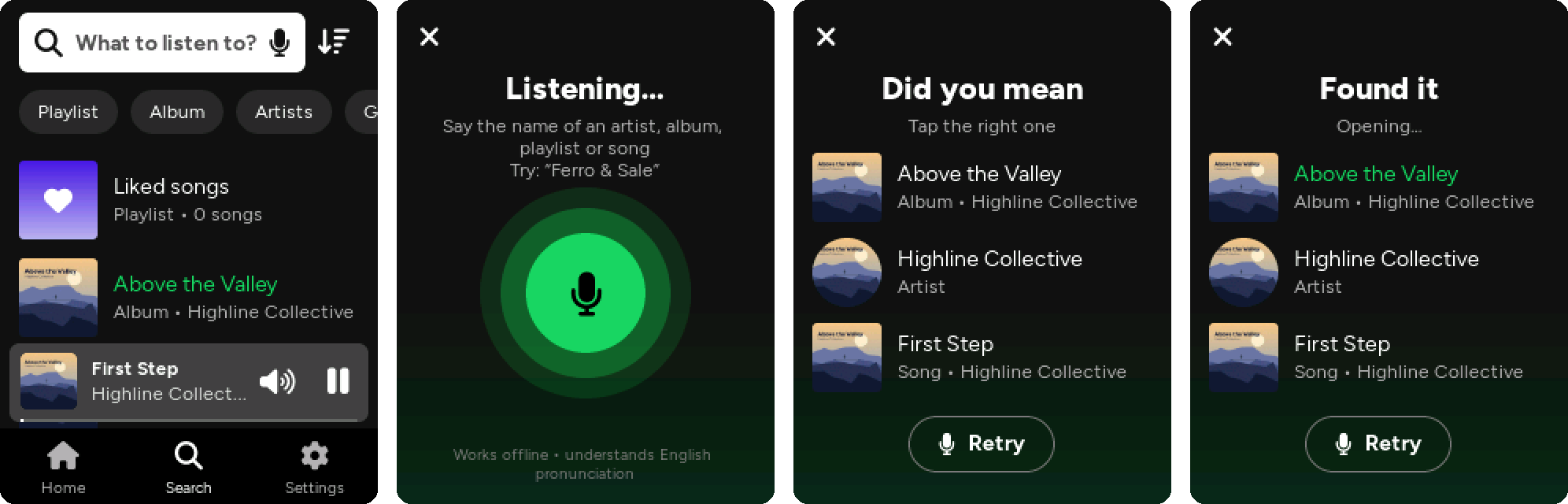
Voice search is experimental and switched off in the firmware for now. To try it, set
VOICE_SEARCHto1insrc/config.hand flash with the ESP SR 16M partition scheme (see below); otherwise the microphone doesn't appear.
- Go to Search and tap the microphone in the search box (it is also inside the text field while you are typing).
- The first time it takes a few seconds to prepare the names of your library. Then the button turns green and the rings follow your voice.
- Say the name, for example "Above the Valley" or "Highline Collective". It stops by itself when you finish; you can also tap the button to stop.
- If the match is clear the page opens by itself. Otherwise you get up to three candidates: tap the right one, or Retry.
What happens with the result:
- artist, album, playlist, genre: its page opens;
- song: it starts playing from its album, and Now playing opens.
The music pauses while the microphone is on (the microphone and the speaker share the same audio bus and codec) and starts again when you close the screen, unless you picked a song.
It is not free dictation. The recogniser (Espressif's ESP-SR MultiNet, English model) listens for phrases from a list, and the list is made of the names in your library:
- all playlists and genres;
- artists and albums, the ones you play most first;
- songs you have played or liked.
Up to 300 names. With a large library the least played ones are left out. The list is rebuilt after every library scan and every 15 minutes or so as your play counts change.
Names are turned into sounds with English pronunciation rules, so:
- say them as an English speaker would read them. Italian or French names work, but the "English" reading is what gets recognised best;
- numbers are read as English words: "1984" is "nineteen eighty four", "Wind at 80 Metres" is "wind at eighty metres";
- for songs and albums, anything in brackets or after a dash is dropped: "Anchors (Live) - 2019 Remaster" is just "anchors";
- names written only in other scripts (Japanese, Cyrillic…) can't be said.
First turn it on in the firmware: in src/config.h set #define VOICE_SEARCH 1.
The speech models (about 3.3 MB) live in their own flash partition, so the board has to be flashed with a partition scheme that has one. The FNK0104B has 16 MB of flash, so there is room.
In Arduino IDE, Tools:
- Flash Size: 16MB (128Mb)
- Partition Scheme: ESP SR 16M (3MB APP/6MB SPIFFS/3.9MB MODEL) (on core 3.2.0 it is called ESP SR 16M (3MB APP/7MB SPIFFS/2.9MB MODEL))
Everything else stays as in Building and Flashing. The IDE writes the models (srmodels.bin) by itself together with the firmware, so every upload takes a little longer. Settings are kept and the card is not touched.
With arduino-cli:
arduino-cli compile --upload -p /dev/cu.usbmodem1101 \
  --fqbn "esp32:esp32:esp32s3:PSRAM=opi,FlashSize=16M,PartitionScheme=esp_sr_16,CDCOnBoot=cdc" \
  FlacPlayer
Core 3.3.x is recommended: it has the newer MultiNet 7 model. Core 3.2.0 ships MultiNet 5, which is older and less accurate.
The model loads the first time you use the microphone and then stays in memory (mostly PSRAM; the model data is read straight from flash). Opening File transfer frees it, because Wi-Fi needs the internal RAM; it loads again next time.
Open the serial monitor at 115200 baud. Every step prints a line that starts with [voice] (the messages are in Italian). A normal run looks like this, with different numbers:
[voice] partizione "model" presente: ricerca vocale disponibile
[voice] 34 nomi dalla libreria in 12 ms
[voice] modello mn7_en pronto in ... ms (blocco 512). RAM interna ... -> ... KB, PSRAM ... -> ... KB
[voice] 34 nomi pronti in ... ms (senza fonemi 0, rifiutati 0)
[voice] riconosciuto dopo ... ms, picco microfono .../32767, 3 candidati
[voice]   1. "above the valley" (album) 0.82
-
partizione "model" assente: the firmware was flashed without the ESP SR 16M scheme. -
picco microfono(microphone peak) very low, say under 1000: the microphone hears almost nothing; speak closer to the board. -
rifiutati(rejected) above 0: some names couldn't be added; the next lines show which. -
RAM interna(internal RAM) very low after loading, or no sound after using the microphone: please open an issue with the log. -
il microfono non manda dati: the codec doesn't send audio; please open an issue with the log. - Names that are always confused with each other: the numbers after each candidate are the confidence. Include these lines if you open an issue.
A clear match opens by itself when the first candidate is above 0.50 and at least 0.15 ahead of the second (kAutoProb and kAutoGap in src/ui/voice_ui.cpp).