Repository navigation
Runs and deliverables
Generated from docs/runs.md: edit it there, changes made in the wiki are replaced. Em português: Execuções e entregas.
Most of what you ask is answered in the conversation: a question, an explanation, a definition, an investigation, a small change. No file is created for that.
The AI creates a run — a folder under Deliveries — only when:
- you ask for a file; or
- the activity's result is a document — a review matrix, test cases, a report, evidence, a bug; or
- the work stops at an approval and has to be continued later.
It never writes support documents nobody asked for (notes, summaries, plans) or logs of its own work. When one would help, it offers it in one line and waits for your yes.
Deliveries lists only the files you asked for — what each run delivered — straight under it, the newest first. There are no run folders to open: a run's internal files (the state that lets it resume, the inputs, helper files) stay out of sight, still on disk.
The Activities card of the project panel shows, first, the activities pinned to this project (📌 in Call…; one click calls the AI with it), then what is under way. What waits for you — an approval, an answer — comes first, with a ▶ to continue it in your AI. Finished and cancelled activities are not listed. The 📌 belongs to the project; the ⭐ in the lists of Settings is for the whole workspace.
Multi-agent operations have their own Operations card below it.
A skill stops at its approval points and asks in the terminal. If you close the app, the run keeps where it stopped: ask the AI to continue it — in the same tool or another — and it reads where it was and goes on.
The AI delivers only the files you asked for, in the format you asked; when the format is not set, it asks. No copies in other formats, no screenshots of a spreadsheet. Helper files go to the run's work/ folder and are deleted when the run is completed. Anything extra that still lands next to the deliverables is listed on the run's page under Leftovers, to send to the trash.
When files pile up, right-click Deliveries › Organize with Hudson.
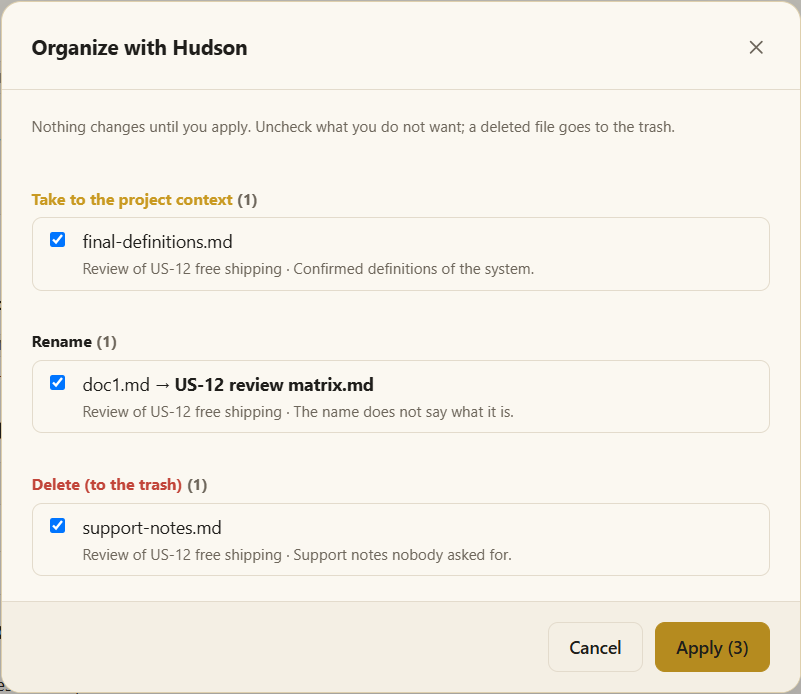
- Your AI (Claude Code or Codex) looks at the files the runs left — never their state, inputs or journals — and proposes, file by file with a reason:
- Take to the project context — confirmed knowledge worth keeping;
- Rename — a deliverable whose name does not say what it is;
- Delete — support notes, drafts, duplicates — to the trash;
- Keep — what you asked for, or anything it is not sure about.
- Uncheck what you do not want.
-
Apply. Moki does the moves; the AI touches nothing. A file taken to the context is listed in
context/index.md.
Hudson is also an agent: in a terminal, ask it to organize the project and it shows the same plan as a table and waits for your approval.
Scratch files are not kept: once used, they are deleted for good (not sent to the trash).
- A finished run's
work/folder is deleted as soon as the run is completed or cancelled (and, if Moki was closed then, when the project opens). -
temporary/(requests sent to the AI, pasted screenshots, inspection renders) is emptied when the project's last AI terminal ends, and when the project opens with none of its terminals running. - The workspace's own scratch files (launch requests, MCP configuration for a terminal) are deleted when Moki starts and when its terminals end.
- Optional, in the project's settings (Cleanup): a finished activity's
outputs/folder goes to the trash when the project opens, once every file it delivered is incontext/(moved there, or an identical copy). It is off by default.
- Calling activities, agents and skills
- Projects and workspaces — the context, where Hudson takes confirmed documents.