Repository navigation
Add Card and Variants
English · Español
The dialogs in src/features/variants/ that put a single card into the deck from Scryfall ("Add card"), swap the printing of a card already in the deck ("Change variant"), and link an own-image card to its real Scryfall card ("Link with a card", one at a time or in bulk). They all share one results grid and one fetch helper, and talk to Rust through card_search, card_prints, card_fetch and friends.
Screenshots: 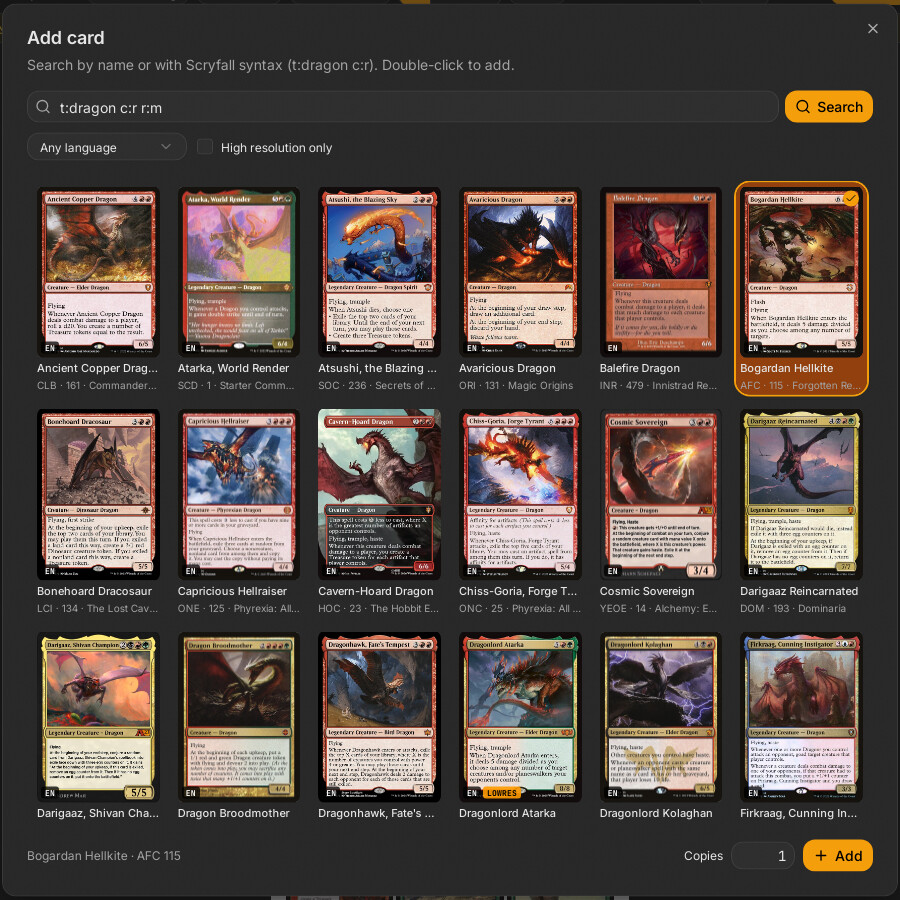
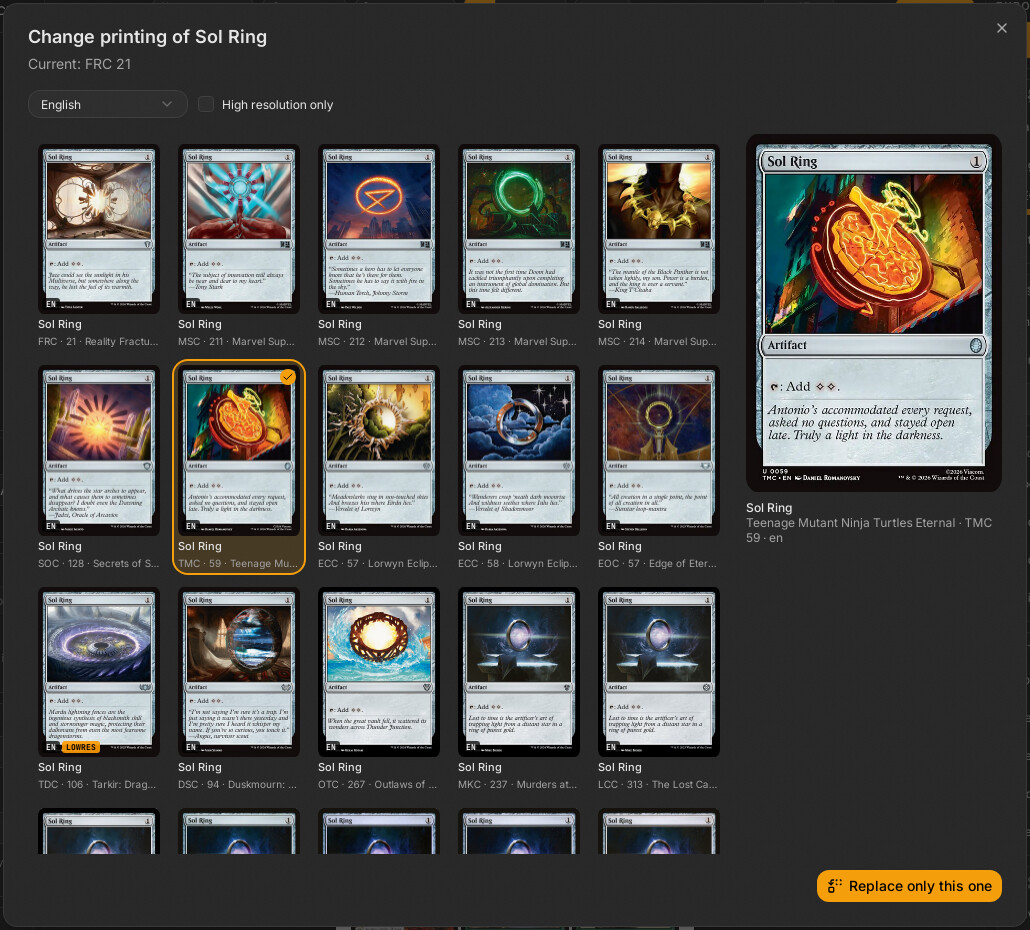
| File | Responsibility |
|---|---|
src/features/variants/add-card-dialog.tsx |
AddCardDialog: search (name or Scryfall syntax, autocomplete), pick a printing, copies, add |
src/features/variants/variant-dialog.tsx |
VariantDialog: all printings of a card, replace this copy or all copies |
src/features/variants/rejilla-cartas.tsx |
RejillaCartas: the shared thumbnail grid (also used by Set Browser and the token dialog of the Decklist Panel) |
src/features/variants/filtros.tsx |
FiltrosBusqueda (language + "high resolution only"; the language options are "any" plus IDIOMAS_SCRYFALL of src/lib/idiomas.ts, by their own names), idiomaParaRust
|
src/features/variants/traer.ts |
traerCarta: summary -> DeckCard, choosing the Scryfall or the external-source command |
src/features/variants/vincular.ts |
vincular, desvincular, propiasPorImagen, estaVinculada
|
src/features/variants/vincular-dialog.tsx |
VincularDialog: link one own card (search or OCR) |
src/features/variants/vincular-lote.tsx |
VincularLoteDialog: bulk link with review |
src/features/variants/ampliar-cartas.tsx |
AmpliarCartas: side-by-side comparison of the own image and the proposed Scryfall card |
src/features/variants/__tests__/vincular.test.ts |
Vitest for vincular.ts
|
All dialogs are mounted once in src/App.tsx and opened through the dialogo field of useUi (src/stores/ui-store.ts): { tipo: "anadir"; en?: number; hueco?: string; cambiar?: string }, { tipo: "variante"; id }, { tipo: "vincular"; id }, { tipo: "vincularLote"; ids?; soloSeleccion? }. Each dialog component renders its content only while open, so its local state (query, results, selection) resets every time.
All in src-tauri/src/commands/cards.rs unless noted. Arguments are camelCase on the JS side (highresOnly, scryfallId).
| Command | Args | Returns | What it does |
|---|---|---|---|
card_autocomplete |
q |
string[] |
Scryfall autocomplete. Returns [] without a call if q.trim().len() < 2. |
card_search |
q, lang?, highresOnly
|
CardSummary[] |
Free-text / Scryfall-syntax search, capped at 50. Appends Cockatrice tokens when lang is empty or en and not high-res-only (fuentes::buscar_cockatrice, merged by juntar_externas: after the Scryfall results, or before them when an external token matches the query name exactly and Scryfall has none with that name). |
card_prints |
name, lang?, highresOnly
|
CardSummary[] |
Every printing of an exact name (!"name", quotes stripped from the name), unique=prints with include_multilingual, up to 175. A Scryfall failure is swallowed (unwrap_or_default): a token Scryfall lacks is not an error. Adds Cockatrice entries under the same language rule. |
card_fetch |
scryfallId |
DeckCard |
Downloads one printing and returns it as a deck card (see below). |
card_fetch_externa |
fuente (FuenteCarta), id
|
DeckCard |
Same for a card from another source: an own card with its image and the link (fuentes::carta_cockatrice). |
card_link (commands/identify.rs) |
scryfallId |
CardMeta |
Card data for linking: from the local cache if present, otherwise Scryfall (and stored in the cache so statistics work offline). |
card_link_externa (commands/identify.rs) |
fuente, id
|
CardMeta |
The same for an external token (NotFound if the catalog lacks it). |
card_identify (commands/identify.rs) |
blob, hint?, ocr
|
CardIdentify |
Propose cards for an own image (see Card Identification and OCR). |
identify_batch (commands/identify.rs) |
items[{blob, hint}], ocr
|
u32 job id |
Bulk version with identify://progress / identify://done events. |
CardSummary (commands/cards.rs, exported to src/bindings/CardSummary.ts) is the light row used by every grid: id, name, printedName?, lang, set, setName, collectorNumber, thumb?, highres, imageStatus?, isDfc, typeLine?, fuente?. fuente is set only for cards from another source; id is then that source's id.
resumir(state, cartas) builds the summaries. For each card it takes the front face's normal (or small) image URL, hashes it with SHA-256 (huella_url) and registers huella -> url in AppState.miniaturas (a mutex-guarded map that is cleared when it exceeds 5,000 entries). The grid then loads urlBusqueda(c.thumb) = pbimg://…/t/<huella>. The protocol handler (src-tauri/src/protocol.rs, Ruta::Miniatura) serves it from app_cache_dir/renders/t/<huella>.jpg if present, otherwise looks the URL up in miniaturas, downloads it (Scryfall URLs via the Scryfall client; any other URL only through fuentes::Externo::bajar and limpiar_imagen), writes it to the cache and returns it. Why: the web view never touches the network (project rule: all network is Rust). A hash that is not registered (for example after the 5,000-entry reset) gives 404 and the card shows without image until searched again.
traer_carta (commands/cards.rs, generic over CardApi so tests use a fake Scryfall):
- Fetches the card (
NotFoundwithcarta= id if missing) and stores it in the Scryfall cache (cache::guardar). - Downloads the front face PNG (
c.print_url(0); if the card has no PNG it uses the large JPEG:ImageOrigin::ScryfallPngvsScryfallLarge) and puts it in the blob store (state.blobs.put_bytes). - For a double-faced card (
c.is_dfc()) downloads face 1 and setsback = BackSpec::Dfc { image }; otherwiseBackSpec::DeckDefault. - Builds the
DeckCard: new UUIDid;source=CardSource::Token { scryfall_id }if the layout istokenordouble_faced_token, elseCardSource::Scryfall { scryfall_id }; defaultedits,locked: false,metafromresolve::meta_de,design: None,marca: None. A card without image enters withfront: Noneand downloads nothing.
The command holds the busy marker (state.trabajo()), the same marker that blob_gc consults through state.ocupado(), so the garbage collector will not run mid-download.
Opened from any empty cell of the last sheet (CeldaVacia in src/features/preview/page-view.tsx), from the empty states in preview-pane.tsx, and from a blank slot: a plain left click or the "Add card from Scryfall…" item of its context menu (anadirEnHueco in acciones-carta.ts). The empty cells and the toolbar add at the end. A blank slot sets en (its position) and hueco (its id): on adding, the blank is removed (quitar) and the cards are inserted in its place, so the new card takes the slot instead of pushing it along.
Behavior (add-card-dialog.tsx):
- Search box: 200 ms after typing (when at least 2 characters) it requests
card_autocompleteand shows up to 8 suggestions. Enter runscard_searchwith the raw query (sot:dragon c:rworks); clicking a suggestion runscard_printswith the exact name, so the grid lists printings, not different cards. - Filters (
FiltrosBusqueda): language (default: the deck languageuseUi.lang, butanywhen the deck language is English, so the first search is not restricted) and "Only high resolution".idiomaParaRustconverts"any"tonull. - Results:
RejillaCartas; single click selects, double click selects and adds. If exactly one result comes back it is auto-selected. ANotFounderror is shown as "No results", every other error as a toast. - Footer: the selected printing, a "Copies" number (1-99) and "Add".
anadircallstraerCarta(c)once; copies after the first are clones with a freshnuevoId()(same images, no extra download). They are inserted withuseDeck.getState().setCartas((cs) => insertar(hueco ? quitar(cs, [hueco]) : cs, copias, en))(one undo step) and announce "N x card added". - The dialog refuses to close while adding (
ocupado={anadiendo}).
The same dialog opened with cambiar (the id of a deck card) is "Change card": the context-menu item "Change card…" (slot-menu.tsx, only for a single selected card with source.kind scryfall or token, like "Change variant"). It replaces a card with a different one, where "Change variant" only swaps the printing of the same card. The title and description change, the "Copies" field disappears, and the footer has "Change" (this copy; also what a double click does) and, when the deck has more copies of the same card (scryfallDe equal), "Change all copies". sustituir calls traerCarta(c) and keeps for each replaced copy its id, locked, marca and a custom back (back.kind === "custom"); everything else (edits, design) belonged to the old card and comes from the new one. One setCartas call, so a single undo reverts it. It announces "Changed to {card}".
Opened from the card context menu (src/features/preview/slot-menu.tsx), enabled only for a single selected card whose source.kind is scryfall or token. Custom images and designed cards cannot change variant.
- On open (and whenever name, language or high-res changes) it calls
card_prints { name: carta.meta.name, lang, highresOnly }. The language filter starts at the card's ownmeta.lang(orany). Avigenteflag discards stale responses. - A large preview of the chosen printing appears on the right (
urlBusqueda(elegida.thumb)), with set name, collector number and language. - Two actions, each calling
traerCarta(elegida)once:-
"Replace only this" replaces the card with the same
idas the one the dialog was opened for. -
"Replace the N copies" (only shown when
copias > 1): replaces every card whosemeta.nameequals the name. Matching is by name, not by Scryfall id, so copies of different printings of the same card are all replaced.
-
"Replace only this" replaces the card with the same
-
reemplazar(vieja, nueva)keeps what belongs to the slot, not to the printing:id,locked,edits(rotation, filters, etc.) and a custom back (back.kind === "custom"); everything else (images,meta,source, DFC back) comes from the new card. - Applied through one
setCartascall, so one Ctrl+Z reverts it. Announces "Variant changed" or "Variant changed in all copies of X".
A CSS grid (repeat(auto-fill, minmax(120px, 1fr)), p-1.5 so rings are not clipped) of Tarjeta buttons. Rules it implements:
- Decision: thumbnails only exist while the card is near the viewport. Why: a search can return 175 cards and the project mounts images only for visible items.
TarjetausesuseVisible(el)fromsrc/features/preview/visibilidad; the enclosing scroll area must publish its viewport throughRaizScroll.Provider(dialogs passonViewportChange={setViewport}). Without the provider, visibility cannot be computed. - Badges: language code,
COCKATRICE(whenfuenteis set: a token Scryfall does not have) andLOWRES(when nothighresand not external). - Selection is a
Set<string>of ids owned by the parent; the grid only reportsonElegir(c, event)andonDoble(c).
Linking says which real card an own image is, without changing the image: the card gets name, set, type and prices for statistics and info. It is stored as CardSource::Custom { scryfallId?, externa? } (externa is RefExterna { fuente, id } for a token Scryfall lacks). CardMeta.imageLang stays the language of the image itself. See Deck Model.
vincular(id, destino, idiomaImagen?) (vincular.ts):
- Calls
card_link(orcard_link_externa) to get theCardMeta. - Sets the new
sourceandmetaon the card and on every own copy that has the same front blob (c.front?.blob === blob), so one link applies to all copies of that image. The meta overridesimageStatus: null,langFallback: false, keeps the card'shighres, and setsimageLangto the OCR-read language or keeps the previous one. - If Rust fails nothing changes (the store is only touched after the await).
-
desvincularresetssourceto{ kind: "custom" }for the card and its same-image copies.propiasPorImagen(ids?)returns one own card per image (optionally within a set of ids);estaVinculada(c)is true for a custom card withscryfallIdorexterna.
VincularDialog (opened from the card menu "Link with a card…" / "Change the link…"): the search box starts with the card's current name and runs card_identify with hint and ocr: false; the "Detect with OCR" button runs it with ocr: true, which may download the OCR models first, and shows the lines read plus the language read from the footer. The best candidate is preselected; "Remove the link" calls desvincular.
VincularLoteDialog: phases elegir -> leyendo -> revisar -> aplicando. It launches identify_batch through lanzarTrabajo("identify://progress", "identify://done", …) with one { blob, hint: c.meta.name } per own image, receives one result per image (p.result: CardIdentify, confidence: exact | probable | none), and shows rows with the proposal pre-checked for exact and probable matches. The user reviews, can change the candidate, compare in AmpliarCartas, then "apply" runs vincular sequentially for every checked row (cancellable). With a selection it can work on the selection or the whole deck (soloSeleccion, ids from useUi). Cancelling the read uses job_cancel.
| Situation | Behavior |
|---|---|
| Scryfall unreachable |
Network error -> toast; the grid shows "No results" with empty resultados
|
| Scryfall rate limit |
RateLimited after the client's retries |
card_fetch for an id Scryfall does not know |
NotFound with param carta
|
| Card without image on Scryfall | Enters with front: null (the MISSING / PLACEHOLDER badge comes from meta.imageStatus) |
| Unregistered thumbnail hash | 404 from pbimg://…/t/…, empty tile |
| No results for a variant search | "There are no printings with those filters." |
-
src/features/variants/__tests__/vincular.test.ts: linking applies to same-image copies, takes info but not image state, keeps image and edits, own card without image only links itself, unlinking, relinking, Rust failure leaves the deck unchanged,propiasPorImagen,estaVinculada. -
src-tauri/src/commands/cards.rs(mod tests): language filter, search and print query builders (quotes stripped), thumbnail registration and its 5,000 cap,traer_cartafor a normal card (PNG + deck back), no-PNG fallback to large, DFC (two faces), tokens enter asCardSource::Token, card without image, unknown card isNotFound.
- A new search filter: extend
FiltrosBusquedaand the query buildersconsulta_busqueda/consulta_impresionesincommands/cards.rs, then pass the new argument inadd-card-dialog.tsxandvariant-dialog.tsx. - A new external source of cards: add a
FuenteCartavariant and handle it incard_fetch_externa,card_link_externaandtraerCarta(see External Sources). - Anything that must look at images in a dialog grid: reuse
RejillaCartasand provideRaizScroll.