Repository navigation
Deck Library
English · Español
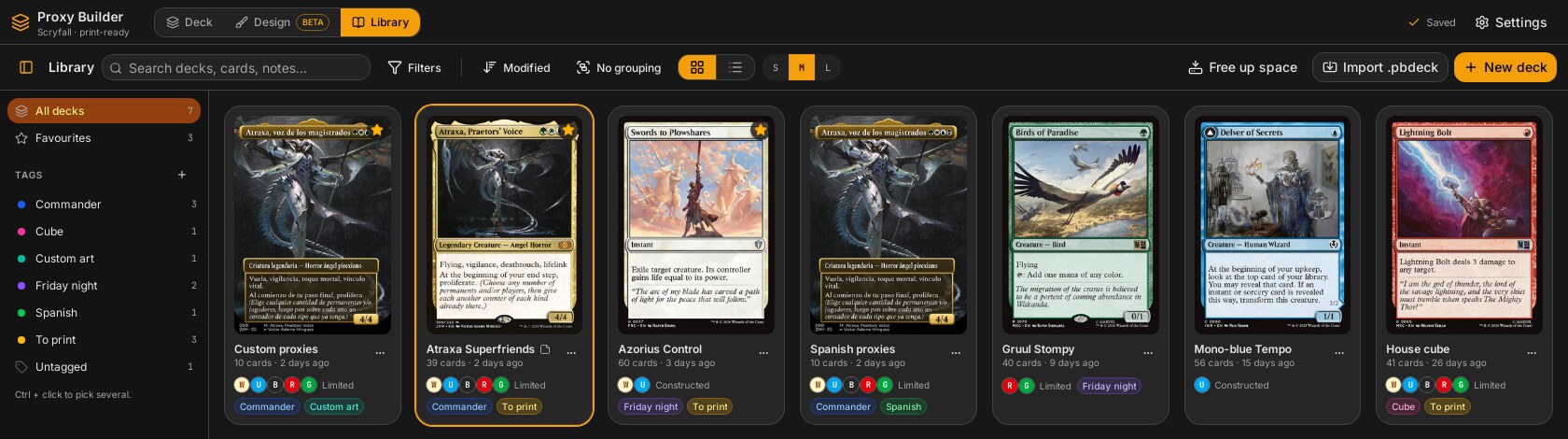
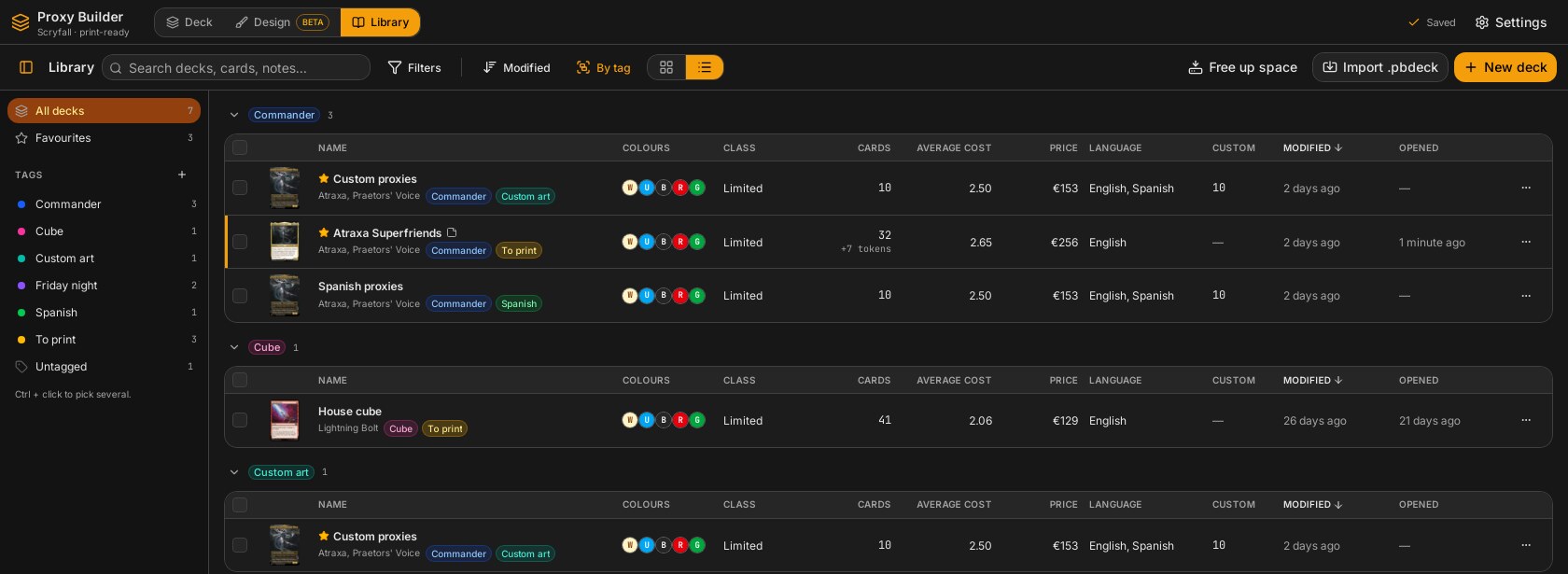
The Library is the screen that lists every deck stored on this machine and lets the user organise them: tags, favourites, notes, a chosen cover card, a manual deck language, search, filters, sorting, grouping, a grid and a list view, and bulk actions. The cheap data (names, counts, tags) is read straight from SQLite; the expensive per-deck "details" (colours, deck class, price, languages, legal formats) are computed offline in Rust from the cached Scryfall data and cached in memory.
flowchart LR
    subgraph UI["src/features/library"]
        LS["library-screen.tsx LibraryScreen"]
        ST["store.ts useBiblioteca"]
        PF["preferencias.ts usePrefsBiblioteca / useFiltrosBiblioteca"]
        OZ["organizar.ts filtrar / ordenar / agrupar"]
    end
    subgraph Cmds["commands/library.rs"]
        DL["deck_list"]
        DD["deck_details"]
        TG["tag_* / deck_tags_set / deck_pin / deck_notes_set / deck_lang_set / deck_cover_set"]
    end
    subgraph Core["Rust"]
        DK["store/decks.rs list, save, duplicate"]
        ET["store/etiquetas.rs"]
        BI["biblioteca.rs detalles, CacheDetalles"]
        SC["commands/stats.rs calcular_sin_red"]
    end
    LS --> ST --> DL --> DK
    ST --> DD --> BI --> SC
    BI --> DK
    ST --> TG --> ET
    LS --> OZ
    LS --> PF
Decision: filtering, sorting and grouping happen in the web view (pure functions in organizar.ts), not in Rust. Why: they only reshuffle data the screen already holds (DeckSummary + DeckDetails), need instant feedback while typing, and perform no heavy computation; the heavy part (details) is in Rust. This is the one place where the "all heavy work in Rust" rule is satisfied by the details computation, not by the list logic.
| File | Responsibility |
|---|---|
src-tauri/src/biblioteca.rs |
DeckDetails, detalles_de, detalles, CacheDetalles
|
src-tauri/src/store/etiquetas.rs |
Tags, favourites, notes, cover, manual language (Tag, COLORES, IDIOMAS, create, update, delete, etiquetar, de_deck, favorito, notas, idioma, portada) |
src-tauri/src/store/decks.rs |
DeckSummary, list, open, save, duplicate, delete, marcar_abierto, notas_de, idioma_de
|
src-tauri/src/store/migrations/0003_biblioteca.sql, 0004_idioma_deck.sql
|
Schema for the library features |
src-tauri/src/commands/library.rs |
The Tauri commands (below) |
src-tauri/src/package.rs |
.pbdeck export/import carrying tags, notes and language |
src/features/library/library-screen.tsx |
LibraryScreen: composition, selection, keyboard, dialogs, selection bar |
src/features/library/zona-decks.tsx |
useOrganizados (filter → sort → group, folded groups) and ZonaDecks (active-filter chips, grouped views, empty states, footer totals), shared by the Library and the Play tab |
src/features/library/etiquetas-ui.tsx |
useEtiquetasUi: state and dialogs for creating, editing and deleting tags, shared by both screens |
src/features/library/store.ts |
useBiblioteca (zustand): decks, details, tags and the actions |
src/features/library/preferencias.ts |
usePrefsBiblioteca / usePrefsJugar (persisted view prefs) and useFiltrosBiblioteca / useFiltrosJugar (not persisted); OrganizadorContexto says which pair the shared pieces use |
src/features/library/organizar.ts |
Pure filter/sort/group/selection logic |
src/features/library/barra-herramientas.tsx |
Search, sort, group, filters popover (PanelFiltros), view toggle (takes the screen titulo), active-filter chips (FiltrosActivos) |
src/features/library/barra-lateral.tsx |
Tag sidebar (BarraLateral) |
src/features/library/vista-cuadricula.tsx, vista-lista.tsx
|
Grid (VistaCuadricula, TarjetaDeck) and table (VistaLista) views |
src/features/library/menu-deck.tsx |
Shared deck menu: MenuDeck (dropdown) and MenuContextualDeck (right click) over one Items component; the right-click one is rendered with ContenidoContextual, which ignores the pointer for 250 ms after opening (Live Preview) |
src/features/library/propiedades-dialog.tsx |
Properties dialog (name, tags, notes, cover, summary) |
src/features/library/etiqueta-dialog.tsx |
Create / edit tag dialog |
src/features/library/piezas.tsx |
Small pieces: tag chips, colour pips, IDIOMAS (the native names of IDIOMAS_SCRYFALL from src/lib/idiomas.ts, plus a translated "Phyrexian" for ph, which is not an app language), CLASES, FORMATOS, useFecha, useHace, useDinero (dates, relative times and prices formatted with localeDe(lang), the interface language's locale) |
src/features/library/__tests__/organizar.test.ts |
Tests for organizar.ts
|
Migration 0003_biblioteca.sql adds to decks: pinned INTEGER NOT NULL DEFAULT 0, notes TEXT NOT NULL DEFAULT '', opened_at INTEGER, cover_card_id TEXT, and two tables. Migration 0004_idioma_deck.sql adds decks.lang_override TEXT (NULL = computed from the cards). Migrations are registered in src-tauri/src/store/db.rs ((3, include_str!(...)), (4, ...)); the connection enables PRAGMA foreign_keys = ON, which makes the cascades below work.
erDiagram
    decks ||--o{ deck_tags : has
    tags ||--o{ deck_tags : labels
    decks {
        text id PK
        text name
        int updated_at
        int pinned
        text notes
        int opened_at
        text cover_card_id
        text lang_override
    }
    tags {
        text id PK
        text name "unique, NOCASE"
        text color
        int created_at
    }
    deck_tags {
        text deck_id FK "ON DELETE CASCADE"
        text tag_id FK "ON DELETE CASCADE"
    }
tags_name is a unique index on name COLLATE NOCASE; deck_tags_tag indexes tag_id.
Decision: favourite, notes, cover, tags and manual language are metadata of the library, not of the deck. etiquetas::favorito/notas/portada/idioma update only their own column, and decks::save upserts only name, list text, settings, default back, schema version and updated_at (its ON CONFLICT DO UPDATE list does not name these columns). Why: updated_at drives the "Modified" sort, the autosave logic, and the key of the details cache; starring a deck should not make it look edited nor invalidate its computed details. Pinned by the Rust tests favorito_notas_y_portada_no_cambian_la_fecha and el_idioma_elegido_no_cambia_la_fecha_y_se_quita in store/etiquetas.rs. (Renaming does update updated_at: decks::rename.)
Returned by deck_list (decks::list, ordered by updated_at DESC). Fields: id, name, cardCount, createdAt, updatedAt, openedAt?, thumbnail? (blob hash of the cover image), coverName?, coverCardId?, pinned, notes, langOverride?, tags (tag ids). The cover is the chosen card if it is still in the deck and has an image, otherwise the first card with an image (one SQL query with COALESCE, json_extract(card_json, '$.meta.name') for the name).
Returned by deck_details. Fields and meaning:
| Field | Meaning |
|---|---|
kind (DeckKind) |
commander, constructed or limited, deduced by proxy_core::stats::deducir: fewer than 50 non-token cards is limited; 90-110 with at most two repeated non-basic cards is Commander; otherwise constructed |
colorIdentity |
W U B R G subset, sorted in WUBRG order; empty = colourless |
deckSize, lands, tokens
|
Copies counted by statistics (tokens excluded from deckSize) |
unknown |
Copies without Scryfall data (unlinked own images, nothing in cache) |
averageCmc |
Mean mana value without lands |
priceEur, priceUsd
|
Total from cached prices; null when no card has that price |
designed, designedReady
|
Cards with an editor design, and those with status Ready
|
custom, customLinked
|
Own-image cards, and those linked to Scryfall |
dfc |
Double-faced copies |
langs |
Languages by use, most used first (ties alphabetical) |
legalFormats |
Formats in which all cards are legal |
bracket |
Minimum Commander bracket the cards allow (2-4), if any |
cardNames |
Unique card names, for "decks containing…" search |
How it is computed (detalles_de(db, deck)):
-
commands::stats::calcular_sin_red(db, &deck.cards)runs the normal statistics engine with aSinRedAPI, so it reads only the local Scryfall cache and never touches the network. Cards marked as variant/optional/sideboard are left out (proxy_core::model::cuentan), exactly as in the statistics dialog; see Statistics. - One pass over the cards: blank slots are skipped; a designed card counts toward
designedand its language is the deck'ssettings.design_lang; otherwise the language isidioma_de_la_carta(c). - Decision: for an own-image card (
CardSource::Custom) the language ismeta.imageLang, notmeta.lang. Why: a card linked to the English printing but whose image is in Spanish would otherwise make a Spanish deck look English. Own cards with unknown image language do not count (tested incuenta_idiomas_propias_y_guarda_en_memoria).
CacheDetalles (AppState.detalles, src-tauri/src/state.rs) maps deck id -> (updated_at, DeckDetails) behind a mutex. detalles(db, cache, ids) lists the decks (decks::list), filters by ids (all if empty) and for each deck reuses the entry if its updated_at equals the deck's current one; otherwise opens the deck, computes the details and stores them.
Gotchas:
- The key is only
updated_at. Changes in the Scryfall cache that happen without editing the deck (for example prices refreshed by the statistics dialog) do not invalidate an entry; the new numbers appear after the deck is next saved or the app restarts. - The cache lives only in memory. The first library load after launch computes every deck; later loads are cheap.
- Entries of deleted decks are never removed (no removal code in
biblioteca.rs); harmless because lookups are by id from the live list.
| Command | Args | Returns | Notes |
|---|---|---|---|
deck_list |
none | DeckSummary[] |
|
deck_details |
ids (empty = all) |
DeckDetails[] |
async, offline, memoised |
deck_peek |
id |
Deck |
Opens a deck for reading (cover picker) without setting opened_at
|
deck_open |
id |
Deck |
Also calls decks::marcar_abierto (opened_at = now) |
deck_create |
name |
Deck |
Empty deck with the generic back |
deck_save, deck_rename, deck_delete
|
|||
deck_duplicate |
id, name
|
Deck |
New card ids; copies tags, notes, cover (remapped to the new card id) and manual language, and the game lists of the game table (with the card ids remapped); not the favourite |
tag_list |
none | Tag[] |
Ordered by name, case-insensitive |
tag_create |
name, color
|
Tag |
If a tag with that name (any case) exists, returns it unchanged |
tag_update |
id, name, color
|
Tag |
InvalidInput (motivo = "tag_repetido") if another tag has the name; NotFound if the id is unknown |
tag_delete |
id |
Cascade removes it from decks; decks are untouched | |
deck_tags_set |
decks, add, remove
|
One transaction; INSERT OR IGNORE only if both deck and tag exist |
|
deck_pin |
decks, pinned
|
Favourites (column pinned) |
|
deck_notes_set |
id, notes
|
Trimmed at the end, capped at 4000 characters; NotFound for an unknown deck |
|
deck_lang_set |
decks, lang?
|
None clears; only codes in etiquetas::IDIOMAS (es en fr de it pt ja ko ru zhs zht ph), else InvalidInput with motivo = "idioma"
|
|
deck_cover_set |
id, card?
|
None = first card |
|
deck_export_package, deck_import_package
|
.pbdeck, see below |
||
blob_gc |
GcReport |
"Free up space" button: deletes images no deck uses and older than 24 h; fails with Busy while a job runs (state.ocupado()) |
Tag rules (etiquetas::limpiar): the name has whitespace collapsed and is cut to 40 characters; an empty name is InvalidInput (motivo = "tag_vacio"); a colour outside COLORES (gray red orange amber green teal sky blue violet pink) silently becomes gray.
Holds decks (null until loaded), detalles (record by id), etiquetas, contando. Actions:
-
cargar():guardarAhora()(flush the open deck's pending autosave so the list is current), thenrefrescar()(deck_list+tag_listin parallel), thendeck_details { ids: [] }for all decks.contandois true while the details are computed, so the list appears immediately and colours/prices fill in later. -
refrescar(): only the list and tags. -
etiquetar,crearEtiqueta,editarEtiqueta,borrarEtiqueta,favorito,idioma,notas,portada: call Rust, thenrefrescar()(details are not recomputed, since none of these change them).
LibraryScreen calls cargar() on mount. Creating, duplicating, importing and deleting decks call recargar() (full cargar). Because the details call is made once for everything, a deck whose details have not arrived yet is handled everywhere: it never passes a filter that needs details, sorts last by detail columns, and groups under "No data" / "Calculating…".
usePrefsBiblioteca persists in localStorage key proxybuilder.biblioteca (reads and writes wrapped in try/catch): vista (cuadricula | lista), orden, ascendente, agrupar, tamano (s | m | l), lateral (sidebar shown), favoritosArriba (default true). useFiltrosBiblioteca holds the filters and is not persisted: each visit starts unfiltered. ascendentePorDefecto(orden) picks the natural direction (ascending for name, colours, cost; descending for the rest).
One toolbar, two screens. The Play tab's deck picker reuses the Library's toolbar, tag sidebar, filters, sort, grouping and grid/list views. The pieces do not name a store: they read the pair of stores from OrganizadorContexto through usePrefs, usePrefsSel and useFiltros (default: the Library's). EntradaMesa wraps itself in ORGANIZADOR_JUGAR, whose stores (usePrefsJugar, key proxybuilder.jugar, and useFiltrosJugar) are separate, so each screen remembers its own view, sort and grouping and a filter set in one does not hide decks in the other. The data (useBiblioteca: decks, details, tags) is shared. Tutorial anchors (biblioteca-barra…) come from useAncla, which returns nothing when the context has no ancla, so the Play tab does not repeat them. Deleting a tag removes it from the filters of both screens.
What changes in the Play tab is the SeleccionDecks context it provides: casillas: false hides the checkboxes (the grid and the list drop the column), pulsar picks the deck, alDobleClic starts a solo game (only if the click lands on the deck already picked, no job is running and no list is missing), and abierto is the picked deck (drawn with the ring). AccionesDeck there only offers Open (in the Deck tab), Properties and the tag/language/favourite submenus: Acciones makes renombrar, duplicar, exportar and borrar optional and menu-deck.tsx hides the items whose action is missing.
All pure functions; the screen only calls them inside useMemo.
filtrar(decks, detalles, etiquetas, filtros):
- Text: words are normalised (
normalizar: NFD, strip diacritics, lower case) and all must occur in a haystack made of name, cover card name, notes, tag names andcardNames. - Tags:
todasLasEtiquetaschooses "has all" vs "has any" for the selected tags;sinEtiqueta;favoritos. - Panel filters (colours, class, format, language, "with designs", "with own images") require the deck's details; without them the deck is excluded.
- Colours have three modes (
ModoColor):incluye(has all the chosen colours; withCalso requires colourless),exacto(exactly those),dentro(uses no colour outside them: "can play with these"). - Language uses
idiomasDe(deck, details): the manuallangOverridewins; else the computedlangs.
ordenar(decks, detalles, orden, ascendente, favoritosArriba): orders by modificado, creado, abierto, nombre, cartas, precio (EUR, else USD), coste (null if the deck has no known non-land cards), colores (claveColores: fewer colours first, then WUBRG position). Decks lacking the value go last regardless of direction; ties fall back to the normalised name. With favoritosArriba, favourites are first regardless of the sort.
agrupar(decks, detalles, etiquetas, por) returns Grupo[] (id, clave: ClaveGrupo, decks). Groupings: none, tag (a deck with several tags appears in each group, then "No tag"), colours, class (commander, constructed, limited) and language (manual language needs no details). Groups with no data or no language go last. The screen turns ClaveGrupo into a title (TituloGrupo) and lets the user fold groups.
Selection: seleccionar(actual, visibles, id, ancla, modo) implements Ctrl-toggle and Shift-range over the on-screen order (enPantalla, which excludes folded groups); contar(decks) gives the counts shown in the sidebar.
-
Opening a deck: clicking a card/row opens it (
abrirDeck(id)fromsrc/stores/deck-store.tssaves the current deck first, callsdeck_open, storeslast_deck_id, thenuseUi.setVista("deck")). With any selection active, a click toggles selection instead (open via the menu, or double click in the list view). -
Selection and keyboard (a
windowkeydown handler, ignored inside dialogs, menus and text fields): Ctrl+F focuses search, Ctrl+A selects everything visible, Esc clears search text or selection, Delete asks to delete the selection. -
Shared menu (
menu-deck.tsx): a singleItemscomponent renders against two primitive sets (DESPLEGABLEfor the...dropdown,CONTEXTUALfor right click), so both menus are identical. If the clicked deck is part of a multi-selection, the actions (favourite, tags, language, delete) apply to all selected decks (ids); single-deck actions (open, properties, rename, duplicate, export.pbdeck) are hidden when several are selected. Tags are checkbox items that show an indeterminate state when only some of the selected decks have the tag, and keep the menu open (preventDefault) so several can be toggled. -
Tag sidebar (
barra-lateral.tsx): "All decks", "Favourites", "No tag" and each tag with its count; click filters, Ctrl+click picks several; each tag has a menu to edit colour/name or delete. Creating a new deck while exactly one tag filter is active gives the deck that tag. -
Tag dialog (
etiqueta-dialog.tsx): creating a tag with a name that exists just applies the existing one to the selected decks; renaming onto another tag's name is blocked (bloqueada). -
Properties dialog (
propiedades-dialog.tsx): name, tags, notes and cover. It loads cards viadeck_peekand offers one card per distinct front image as a cover choice; saving only calls the commands whose value changed (deck_rename,deck_notes_set,deck_cover_set; choosing the first card storesnull). It also shows the summary built fromDeckDetails(class, colours, lands, average cost, estimated price, languages, own/linked images, designed/ready, double-faced, dates). -
Games tab (
partidas-deck.tsx, inside the properties dialog): the history of that deck frompartidas_de_deck(phase H) — games, wins and win rate, and one row per game with the result («Victoria» or the place), the other seats' names as rivals («En solitario» when there are none), rounds, duration and date; «Ver repetición» opens the replay of that game (only if it has a record) and a button deletes the game after confirming. Details in Game Table. -
Grid (
vista-cuadricula.tsx): cover thumbnails throughurlMiniatura(d.thumbnail, PORTADA, …)(neutral edit parameters, 244 or 488 px by card size) mounted only when visible (useVisible, with theRaizScrollof the mainScrollArea). -
List (
vista-lista.tsx):COLUMNAS(name, colours, class, cards, average cost, price, language, own, modified, opened). The "own" cell also shows the number of designed cards after a lucidePencilicon.queCaben(ancho)measures the available width with aResizeObserverand drops lower-priority columns (quitarorder) until the rest fit. Clicking a sortable header changes the sort. -
Footer (
Pie): visible deck count ("Showing a of b"), total cards, and an estimated total price (EUR if any deck has it, otherwise USD). -
Import/export: "Import .pbdeck" (
deck_import_package) and per-deck "Export .pbdeck" (deck_export_package; file dialogs throughsrc/lib/dialogos.ts). - Delete: if the open deck is deleted, a new empty deck is created and opened.
src-tauri/src/package.rs stores a Biblioteca { etiquetas: [{nombre, color}], notas, idioma? } struct in the manifest (#[serde(default)] everywhere, so older files and older app versions that ignore the field still work). On import: tags are matched by name (case-insensitive, via etiquetas::create, so an existing local tag keeps its own colour) or created, then attached with etiquetar; notes are restored if non-empty; a manual language unknown to this build is ignored. Not carried: favourite, cover, open date. Tested by las_etiquetas_y_las_notas_viajan in package.rs. Full format in Deck Package Format.
| Code / situation | Where |
|---|---|
InvalidInput + motivo tag_vacio / tag_repetido / idioma
|
store/etiquetas.rs; the screen translates via mensaje(e)
|
NotFound with tag or deck param |
tag_update, deck_notes_set, deck_cover_set
|
Db |
any SQLite failure |
| Details not ready | Handled in the UI (see Frontend state); no error |
| Duplicate deck names on import | The importer appends " (importado)" to the name |
-
src/features/library/__tests__/organizar.test.ts:filtrar(text accent-insensitive across name/cover/notes/tags/cards, tag any/all, colours in the three modes, class, format, language incl. manual override, designs/own),ordenar(dates, name, price, missing values last, favourites first, colours),agrupar(tag, colour, language, class),contar,normalizar,seleccionar. - Rust:
biblioteca.rs(cuenta_idiomas_propias_y_guarda_en_memoria),store/etiquetas.rs(create returns existing, rename conflicts, bulk tagging and cascade delete, date invariants, language),store/decks.rs(la_portada_elegida_y_lo_que_se_lleva_la_copia,duplicar_renombrar_y_borrar),package.rs(las_etiquetas_y_las_notas_viajan).
- New detail (for example a new badge): add the field to
DeckDetailsinbiblioteca.rs, fill it indetalles_de, runpnpm bindings, then use it inorganizar.ts/vista-lista.tsxand add a test. - New per-deck metadata (like notes): add a column in a new migration (next number in
store/db.rs), a function instore/etiquetas.rsthat does not touchupdated_at, a command incommands/library.rsregistered insrc-tauri/src/lib.rs, an action instore.ts, and decide whetherduplicateand.pbdeckshould carry it. - New filter: add it to
FiltrosandFILTROS_VACIOS,filtrar,filtrosDelPanel, and the popover inbarra-herramientas.tsx.