Repository navigation
Card Editor Dialog
English · Español
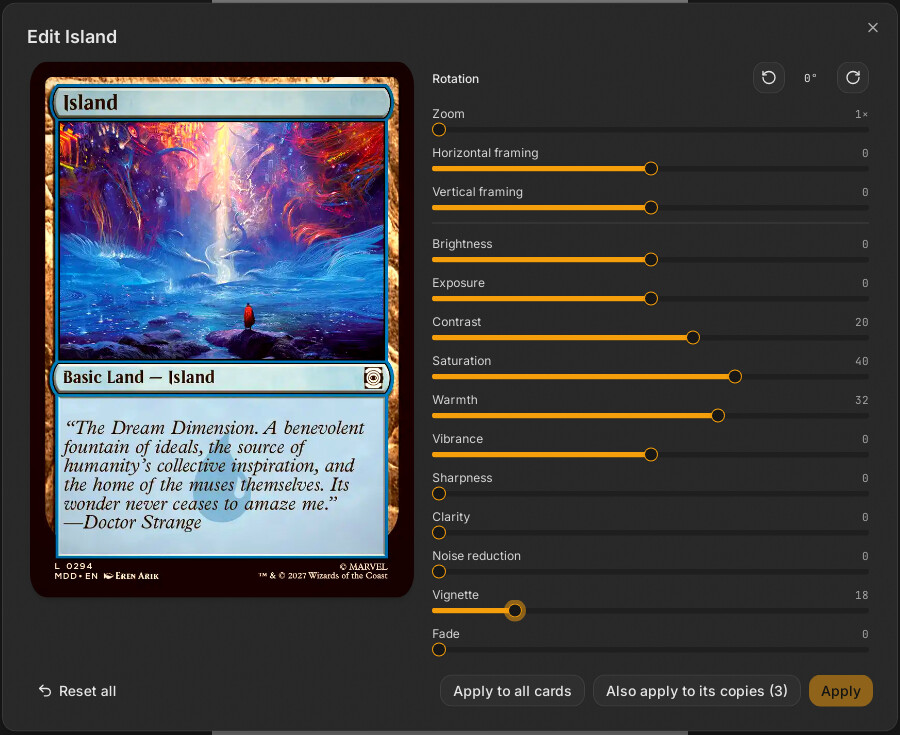
"Edit card" ("Editar carta") is the modal for touching up one card's existing image: rotation, zoom/pan framing and eleven colour/detail adjustments. It applies the result to that card, to its copies, or to all cards, and shows a live preview rendered by the same Rust code as the PDF. It is not the card designer; see Relation to the designer below.
| File | Role |
|---|---|
src/features/card-editor/card-editor-dialog.tsx |
CardEditorDialog (mounted once in src/App.tsx) and its inner Contenido
|
src/features/card-editor/propagar.ts |
Alcance, copiasDe, aplicarEdicion: pure functions deciding which cards get the edit |
src/features/card-editor/__tests__/propagar.test.ts |
Tests for the scope rules |
src/lib/imagen-viva.ts |
useAlRitmo, useRafaga, useImagenViva (real-time image updates, shared with the Designer UI) |
src/lib/image-url.ts |
parametros, urlMiniatura, EDICION_NEUTRA
|
- Double-click a card slot in the preview (
src/features/preview/slot-view.tsx, only if the card has an image:carta?.front). - Context menu "Editar carta" (
src/features/preview/slot-menu.tsx; disabled with several cards selected or when the card has no image).
Both call useUi.getState().abrir({ tipo: "editar", id }); CardEditorDialog reads useUi.dialogo, looks the card up with cartaPorId(id) (src/features/preview/acciones-carta.ts) and opens only if carta.front exists.
CardEdits (src-tauri/crates/proxy-core/src/model.rs, binding in src/bindings/CardEdits) is stored on each DeckCard.edits:
| Field | Meaning | UI |
|---|---|---|
rotation |
r0, r90, r180, r270 (lossless) |
Two buttons: rotate left/right, shows 0/90/180/270 |
crop |
zoom (>= 1), offsetX, offsetY in [-1, 1] inside the slack the zoom leaves (0 = centred) |
Zoom slider 1x-2x, horizontal/vertical framing sliders, drag on the image when zoom > 1 |
adjust |
Adjustments: the eleven retouches |
Sliders |
The eleven retouches, in the order of the RETOQUES list (the order of the original web tool this app clones): brightness, exposure, contrast, saturation, warmth, vibrance (all -100..100); sharpness, clarity, noise reduction, vignette, fade (all 0..100). 0 = no effect, EDICION_NEUTRA is the all-zero value. Rust applies them in a fixed order (noise reduction, exposure, brightness, contrast, warmth, saturation, vibrance, clarity, sharpness, fade, vignette) with radii in millimetres so a 488 px thumbnail and a 600 dpi PDF look the same (src-tauri/crates/proxy-core/src/imaging/adjust.rs).
Framing in Rust (imaging/frame.rs): rotate, then crop box from zoom/offset, then Lanczos3 resample to the exact slot size. The image is stretched to the card shape; only if its aspect ratio is more than 15 % off (MAX_ESTIRADO) is it cropped to cover. See Imaging and PDF.
flowchart LR
  S["sliders / buttons / drag"] --> B["borrador: CardEdits (useState)"]
  B -->|"useAlRitmo 60 ms"| P["pintado"]
  P -->|"useRafaga"| W{"burst?"}
  W -->|yes| U1["urlMiniatura 488 px"]
  W -->|no| U2["urlMiniatura 745 px"]
  U1 --> V["useImagenViva"]
  U2 --> V
  V --> I["img (last loaded)"]
  B -->|"filtroAproximado"| F["CSS filter bridges the gap"]
  F --> I
-
borradorholds the edits being edited.pintado = useAlRitmo(borrador, 60)lets the value through at most every 60 ms (the last one always arrives), so Rust is asked for a new image at slider speed but never flooded. - The image URL is
urlMiniatura(front.blob, parametros(ajustes, pintado, false, 0), ancho)→pbimg://…/r/<blob>/<base64url params>/<width>(src-tauri/src/protocol.rs).parametrospacks the deck'sedgeDarkening, bleed mode, corner fill, card size and the edits intoPreviewParams. Rust renders it withAppState::miniatura(src-tauri/src/render.rs), the sameimaging::pipeline::renderthe PDF uses, and caches the JPEG atapp_cache_dir/renders/<RenderSpec key>.jpg. -
useRafaga(pintado)is true while edits change faster than every 250 ms; the request is then 488 px wide, otherwise 745 px. -
useImagenViva(url)keeps the previous image on screen until the new one has loaded (no flicker or blank). - Between a slider move and the new image arriving,
filtroAproximado(borrador.adjust, enPantalla.adjust)applies a CSSbrightness/contrast/saturatefilter computed from the difference between the current draft and the adjustments the displayed image was rendered with. AporUrlmap (cleared past 64 entries) remembers which edits each requested URL used, soenPantallais exact even if an older image is still shown. Only brightness, exposure, contrast, saturation and vibrance are approximated; rotation, framing, sharpness and the rest simply wait for Rust. - A spinner appears while an image loads (
cargando).
alBajar only starts a drag when borrador.crop.zoom > 1. alMover converts the pointer delta (as a fraction of the frame) to offset deltas scaled by the slack 1 - 1/zoom, clamps both offsets to [-1, 1] and writes them to the draft. The cursor shows grab only when zoom > 1.
For Scryfall cards and tokens (source.kind === "scryfall" | "token"), a zoom above 1.05 shows an amber warning: "With this zoom the card footer (artist and copyright) is cropped". It is a notice only.
| Button | Alcance |
Effect (aplicarEdicion) |
|---|---|---|
| "Aplicar" | carta |
Only this card gets the whole edit. Disabled when nothing changed (JSON.stringify(borrador) === JSON.stringify(carta.edits)). |
"Aplicar también a sus copias (n)" (shown only if n > 0) |
copias |
This card plus every card with the same front image hash (front.blob) gets the whole edit: rotation, framing and retouches, because the image is identical. |
| "Aplicar a todas las cartas" | todas |
This card gets the whole edit; every other card with an image gets only the colour adjustments (adjust) merged into its own edits (their rotation and framing are kept: those depend on each image). |
-
copiasDe(cartas, carta)= other cards whosefront.blobequals this card's; a card without an image has no copies even if other blank slots exist. - Cards that are not touched keep the same object identity (tests assert it), which keeps React and the history cheap.
- All three go through one
useDeck.getState().setCartas(...)call, so one undo step reverts the whole operation (see State Stores). Then an announcement is shown ("Carta retocada", "Carta y sus N copias retocadas" or "Retoques aplicados a todas las cartas") and the dialog closes. - "Restablecer todo" resets the draft to
EDICION_NEUTRA(disabled when already neutral); it does not close or apply. - Closing the dialog with the X discards the draft. The dialog does not pass
cambiosSinGuardar, so the default behaviour ofsrc/components/ui/dialog.tsxapplies (it tracks touched controls). Inferred: the exact confirm-on-close behaviour comes from that component; read it before relying on it.
Two different mechanisms edit how a card looks:
| Edit card (this page) | Designer ("Diseñar") | |
|---|---|---|
| What it changes | Pixels of an existing image: DeckCard.edits
|
A structured CardDesign rendered by the engine |
| Data |
CardEdits (rotation, crop, adjustments) |
DeckCard.design (Designer UI, Designer Engine) |
Applied by imaging::pipeline::render from the original blob |
Re-painted from the design at print size (render_desde_imagen after diseno::pintar) |
|
| Copies | Same-image copies via propagar.ts
|
Same-Scryfall-card group via grupos.ts
|
Interaction points, verified in code:
- A designed card is a deck card whose
frontis a JPEG thumbnail withImageOrigin::Designed. "Edit card" can open for it (it has afront). - Saving a design resets
editsto the default (diseno::vista::aplicarsetsnueva.edits = CardEdits::default()), and the designed-card path of the exporter ignoreseditsand edge darkening (encargoinsrc-tauri/src/commands/export.rssetsspec.edits = CardEdits::default(),spec.edge = None;render_desde_imagenskips corners, framing and retouches;edge_forreturnsNoneforDesigned). - The on-screen preview of a designed card still goes through
/r/…with the card'sedits, so a retouch made with "Edit card" (or "Apply to all cards", which touches every card with an image, designed ones included) changes the thumbnail on screen but not the printed PDF. Inferred from those code paths; the UI does not warn about it. To change a designed card's look for print, use the designer. - Designer "Crop from a card…" (
src/features/disenar/recortar-dialog.tsx) lists only non-designed cards with an image and uses their original blob, not their edits. - Original-image edits vs. the "before" snapshot: when a design is created,
design.before.editskeeps the card's edits so "Remove design" restores them.
- The card has no image: the menu entry is disabled and the dialog will not open (
open={!!carta?.front}). - The card disappears while open (deleted, undo):
cartaPorIdreturnsundefinedand the dialog unmounts. - A preview image that fails to load is not shown and the last good image stays visible (
CargaUltimaskips failed loads); the dialog shows no error toast. - Zoom range here is 1x-2x, narrower than the designer's artwork zoom (1x-3x); the model itself allows any zoom >= 1.
src/features/card-editor/__tests__/propagar.test.ts: copies are same-image cards; a card without image has no copies; "only this card" leaves other objects identical; "copies" copies everything to same-image cards only; "all" gives the whole edit to this card and only colour to the rest; order and count are preserved. There are no component tests for the dialog (the live behaviour is covered by src/lib/__tests__/imagen-viva.test.ts for the loading utilities and by running the app). Rust: the pipeline's render and adjustment tests live in src-tauri/crates/proxy-core/src/imaging/ (Testing and CI).
- New retouch: add a field to
Adjustmentsinmodel.rs, implement it inimaging/adjust.rs(mind the fixed order and mm radii), regenerate bindings withpnpm bindings, add it toRETOQUESincard-editor-dialog.tsxwith Spanish source text and its English entry insrc/i18n/en/(pnpm idiomaschecks it), and decide whetherfiltroAproximadoshould approximate it. - Changing which cards an edit reaches: edit only
propagar.tsand its test.