ROS 2 on your Mac in one command — native rclpy/colcon on macOS, Tier-1 Ubuntu for the heavy stuff, one TCP port between them.
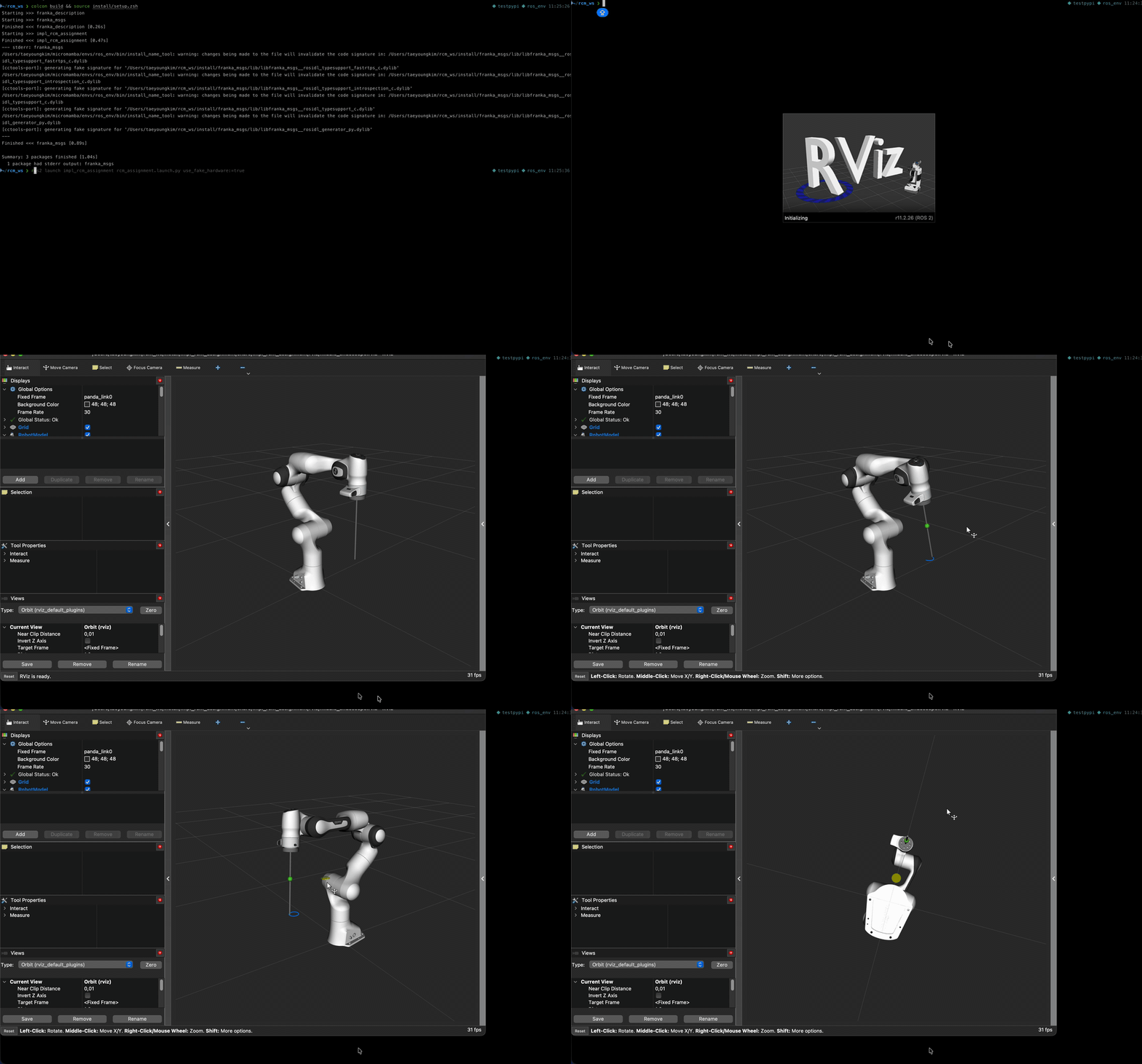
A user's own Franka workspace: colcon build on macOS (RoboStack, no Docker), then
ros2 launch with RViz on the Mac. ▶ full clip ·
▶ Mac↔VM bridge (teleop over one TCP port)
ROS 2 does not really support macOS (Tier 3; Apple Silicon isn't even listed). Existing
workarounds each hit a wall: Docker on macOS has no --network=host, so host↔container DDS
discovery is broken by design; plain VMs give up on Mac-side tooling entirely; and while
RoboStack ships surprisingly many osx-arm64 packages, the heavy stack (MoveIt, Gazebo) is
present but not dependable there — dylib breakage and runtime crashes are field-measured, not
hypothetical.
rosmac splits the problem instead of fighting it:
develop natively on the Mac (RoboStack: rclpy, colcon, ros2 CLI)
        ↕  zenoh bridge — a single TCP port (7447), no DDS multicast at the boundary
run the heavy stack where it's Tier 1 (Lima VM, Ubuntu 22.04 arm64: MoveIt, Gazebo)
        →  visualize on the Mac (Foxglove, ws:8765)
        ⇢  optional: a real robot on your LAN — one more TCP endpoint, same model
           (beta, [docs/robot-setup.md](docs/robot-setup.md))
What makes it more than an install script:
rosmac doctor— 16 checks for known failure modes,--fixauto-repairs the safe ones (hung ros2 daemon, orphan bridges, broken lima port rules). Built from a database of 29 field-measured macOS/ROS pitfalls, not a wiki of hope.rosmac deps— maps your workspace'spackage.xmldependencies to RoboStack conda packages (arosdepsubstitute that actually knows about conda).rosmac push --build— anything Linux-only gets copied to the VM and built there.rosmac report— one tar.gz diagnostic bundle for issue reports (collects only from~/.rosmac).
| Item | Supported | Notes |
|---|---|---|
| Hardware | Apple Silicon (M1+) | Intel Macs unsupported (no way to verify) |
| OS | macOS 14 (Sonoma)+ | measured on macOS 26.x / M3 Pro / 18 GB |
| Python | 3.11+ | measured on 3.12 |
| ROS 2 | Humble (rmw_cyclonedds_cpp pinned on both sides) | VM: Ubuntu 22.04 arm64 |
Versioning: SemVer. While 0.y.z, minor versions may break. See CHANGELOG.md.
- Homebrew, ≥ 40 GB free disk
- Foxglove app (optional, for visualization)
brew install lima micromamba
git clone https://github.com/PythonToGo/rosmac && cd rosmac
python3.12 -m venv .venv && .venv/bin/pip install -e .
export PATH="$PWD/.venv/bin:$PATH"

rosmac init      # conda env + bridge binary + VM provisioning (idempotent)
rosmac up        # start VM + both zenoh bridges
rosmac doctor    # 16 checks — C8 self-verifies a full topic round-trip
Smoke test:
rosmac shell --vm -c 'nohup ros2 run demo_nodes_cpp talker >/dev/null 2>&1 & echo ok'
rosmac shell -c 'ros2 topic echo /chatter --once' # VM topic received on the Macrosmac sim panda-moveit # MoveIt (Panda arm) — /move_action usable from the Mac
rosmac sim gazebo-diffbot # Gazebo Fortress headless + front camera
rosmac sim nav2-diffbot # Nav2 mobile navigation — /navigate_to_pose from the Mac
rosmac sim list / status / stop / --attach
rosmac viz --layout nav2 # Foxglove connection (+ layout import guide)nav2-diffbot runs SLAM + Nav2 on a lidar diffbot in a walled arena; drive it
with /cmd_vel to build the map, then send /navigate_to_pose goals from the Mac.
The full Nav2 stack works over the default bridge — rosmac sim resets the bridge
session on start so a new stack gets fresh routes (KI-17).
The native dev loop and a worked example (pick_demo) live in docs/workflow.md.
rosmac deps ~/my_ws --install   # package.xml deps → RoboStack packages (rosdep substitute)
rosmac shell                    # colcon build inside — legacy-CMake pitfalls auto-bypassed
rosmac ps                       # stuck? Mac+VM processes & publishers on one screen
rosmac push ~/my_ws --build # Linux-only packages (libfranka, …) build in the VM| Command | What it does |
|---|---|
rosmac init |
deps / conda env / bridge / VM provisioning (idempotent, skips existing) |
rosmac up / down / status |
start/stop/inspect the stack (--keep-vm, --viz) |
rosmac doctor |
16 checks + remedies (--json, --fix auto-repairs safe items) |
rosmac shell |
subshell with the ROS env injected (--vm, -c) — colcon defaults included |
rosmac deps <ws> |
check/install package.xml dependencies (--install, --json) |
rosmac ps |
Mac+VM ROS processes & core-topic publishers (--json) |
rosmac push <ws> |
copy a workspace into the VM (+--build) — for Linux-only packages |
rosmac sim <preset> |
start a sim preset in the VM (tmux) + health gate |
rosmac viz |
start foxglove_bridge + app deep link |
rosmac report |
diagnostic bundle for issues (never collects outside ~/.rosmac) |
rosmac uninstall |
remove everything rosmac created (conda env, VM, ~/.rosmac) |
Exit codes:
| code | meaning | examples |
|---|---|---|
| 0 | success | |
| 1 | execution failure (environment/state) | VM not running, conda env missing, bridge/build failure |
| 2 | usage/config error (fix your input) | unknown preset/layout, workspace without src/, broken config.yaml |
Errors are shown as a cause + fix panel; only unexpected errors show a traceback
(attach a rosmac report bundle when filing those).
- Bridge throughput: 10.3 MB/s (1 MB @ 10 Hz, no drops)
- MoveGroup action round-trip: plan+execute, 3 consecutive goals SUCCEEDED
- Nav2
/navigate_to_posefrom the Mac: 3 consecutive goals SUCCEEDED (default bridge) - Gazebo Fortress headless RTF: physics-only 1.00 / with camera (320×240 @ 15 Hz) 0.99
- Camera stream: VM 14.4 fps → Mac 14.4 fps (lossless)
What works across the Mac ↔ VM zenoh bridge:
| ROS 2 feature | Status | Measured evidence / notes |
|---|---|---|
| Topics | ✅ | pub/sub both directions; 10.3 MB/s @ 10 Hz no drops. First subscription to a new topic takes a few seconds (bridge route creation) |
| Services | ✅ | requires the pinned CycloneDDS RMW — with Fast DDS, discovery looks fine but every call times out (KI-16; why rosmac pins the RMW) |
| Actions | ✅ | MoveGroup plan+execute, 3/3 goals SUCCEEDED; Nav2 /navigate_to_pose 3/3 SUCCEEDED from the Mac (full stack, default bridge) |
| Parameters | raw parameter services (get/set_parameters, …) work via ros2 service call; the ros2 param CLI does not — the bridge doesn't mirror remote nodes into the node graph, so ros2 node list won't show VM nodes |
|
| rosbag2 | ✅ | record on Mac of VM topics (no loss), record in VM, play from either side reaches the other. Retrieve VM bags with limactl cp -r rosmac:/path ~/dest (D16) — see docs/workflow.md |
| Robot link (LAN) | 🧪 beta | robot: config → Mac bridge adds a TCP endpoint to a robot-side bridge (D15). Topics/services measured against a surrogate robot (2nd VM): 10 MB/s @ 10 Hz no drops, service RTT < 1 ms, auto-reconnect on robot restart. Surrogate-verified — real-hardware/WiFi numbers pending (E.15 R5). Setup: docs/robot-setup.md. Trusted LAN only — plaintext TCP, no auth/TLS |
Structural limits (by design, not bugs):
- A stale bridge silently breaks a fresh stack (KI-17). Restarting the VM
sim stack while the bridge keeps running leaves stale routes behind, so the new
stack's action sub-services fail to discover from the Mac (measured: 0/6, then
4/4 after a bridge restart).
rosmac simresets the bridge session on start to avoid this — the full Nav2 stack then works over the default bridge, no scoping. - Every Mac↔VM message crosses one bridge hop. Fine for dev, teleop and visualization; high-rate closed control loops belong inside the VM (or on the robot).
- macOS-local DDS discovery can be silently degraded by other lima VMs that lack UDP ignore rules (KI-28). rosmac's own VM ships the rules; see known-issues KI-28 for the remedy.
- The VM is headless (D2) — no RViz2/GUI inside; Foxglove on the Mac is
the visualization path (
rosmac viz).
- Why not just use Docker / a full VM / RoboStack alone: docs/why-rosmac.md
- Decision log and risk register: PLAN.md
- When stuck: docs/troubleshooting.md (common failure modes + fix commands), backed by the field-measured known-issues database (30 pitfalls)
Bug reports (with a rosmac report bundle), pitfall contributions, and PRs
within scope are welcome — see CONTRIBUTING.md and the
Code of Conduct. Security issues: SECURITY.md.
MIT. Bundled simulation presets are adapted from Apache-2.0 / BSD-3-Clause upstream ROS and Gazebo examples — see THIRD-PARTY-NOTICES.md.