Repository navigation
Releases
Yonder 1.0.7

Guided eye exercises for long breaks.
New
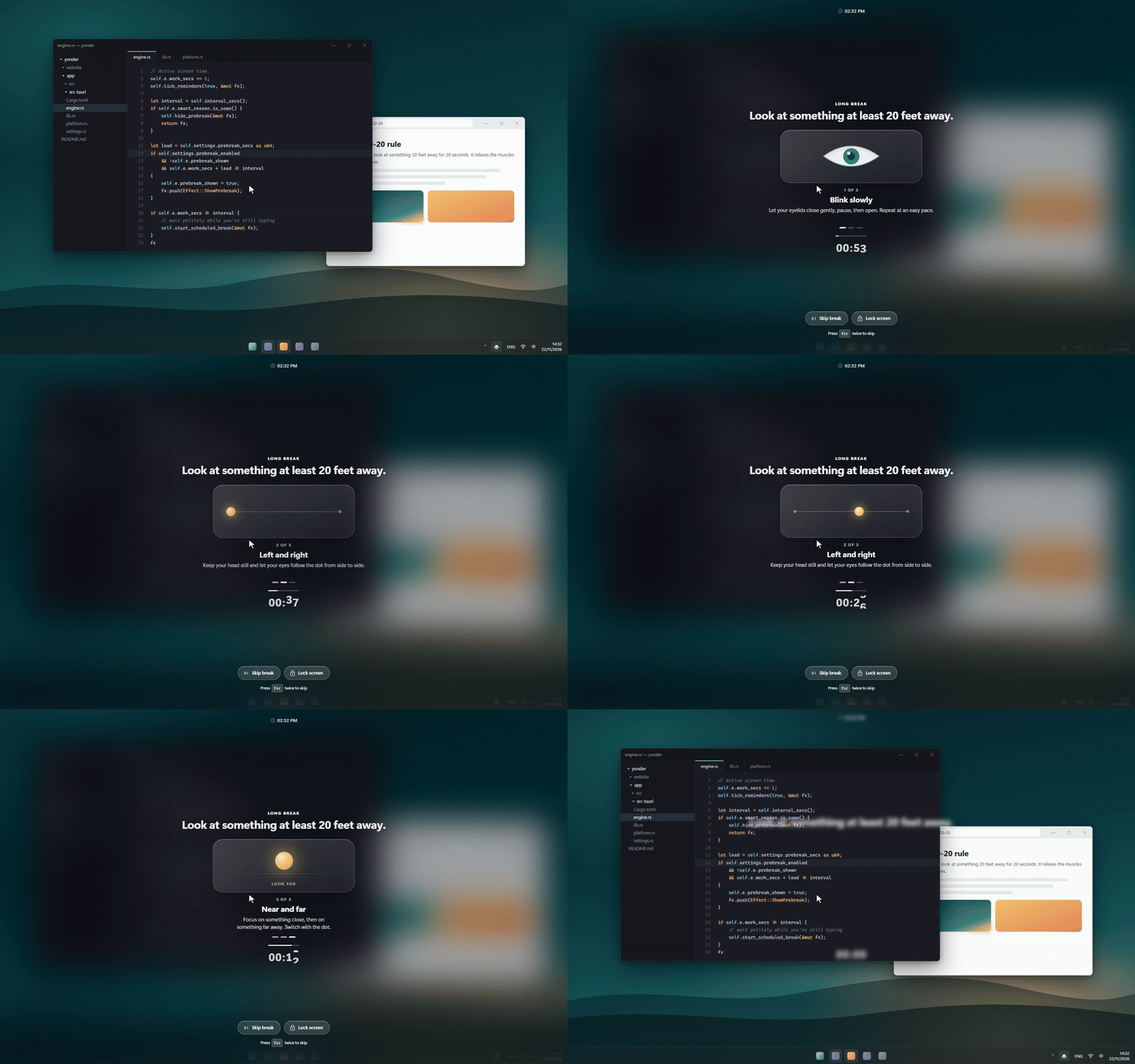
- Guided exercises (optional). Long, planned and focus breaks can show a calm routine to follow while you rest (#13):
- Blink slowly, with an animated eye
- Left and right, up and down and a figure eight: follow the dot with your eyes, head still
- Near and far: switch focus as the dot grows and shrinks
- Neck stretch and shoulder rolls
- Palming: warm palms over closed eyes, with a soft chime when it's time to open them
- The routine is fitted to the break length, works on all monitors in sync, and switches to still illustrations if your system prefers reduced motion. You can also turn on a short eye-only routine for regular 20-second breaks.
- Off by default. Turn it on in Settings → Break Screen → Exercises. It appears on the full-screen and split-screen styles; Gentle and Notification breaks stay exercise-free.
Exercise ideas come from Workrave, Safe Eyes and Stretchly; the wording and illustrations are Yonder's own. These are gentle suggestions, not medical advice.
Install
| Platform | How |
|---|---|
| macOS | brew install --cask rmoura98/tap/yonder (or brew upgrade --cask yonder), or the .dmg below |
| Windows | scoop install yonder/yonder after scoop bucket add yonder https://github.com/RMoura98/scoop-bucket, Yonder_1.0.7_x64-setup.exe, or the portable zip below |
| Debian / Ubuntu | the signed apt repository, then sudo apt install yonder |
| Other Linux | .AppImage, .deb or .rpm below |
Verify downloads with SHA256SUMS.txt. On 1.0.1 or later, Yonder will tell you about this update itself.
Translations of the new exercise texts are fresh; corrections from native speakers are very welcome. Ideas in Discussions.
Yonder 1.0.6
A fixes release: reminders that leave your game alone.
Fixes
- Wellness reminders now respect smart pause. Blink, posture and custom reminders used to pop up during calls, fullscreen games and Do Not Disturb, because only screen breaks were held. They now wait while smart pause is on, and show once afterwards, not once per missed interval.
- Borderless fullscreen games are detected on Windows. "Fullscreen windowed" games don't report themselves as fullscreen. Yonder now counts a window that covers the whole monitor as a fullscreen game when Windows itself recognises it as a game (the list Game Bar keeps), so maximised terminals and editors still don't trigger it.
New in 1.0.5 and worth a look if you skipped it: focus sessions, the tray popover, Do Not Disturb support and notification-only breaks. See the 1.0.5 notes.
Install
| Platform | How |
|---|---|
| macOS | brew install --cask rmoura98/tap/yonder (or brew upgrade --cask yonder), or the .dmg below |
| Windows | scoop install yonder/yonder after scoop bucket add yonder https://github.com/RMoura98/scoop-bucket, Yonder_1.0.6_x64-setup.exe, or the portable zip below |
| Debian / Ubuntu | the signed apt repository, then sudo apt install yonder |
| Other Linux | .AppImage, .deb or .rpm below |
Verify downloads with SHA256SUMS.txt. On 1.0.1 or later, Yonder will tell you about this update itself.
Yonder 1.0.5
Focus sessions, a tray popover, and breaks that know when you're busy.
New
- Focus sessions (Pomodoro). 25 min focus, 5 min break, a long break after the fourth period, all adjustable. Start one from the tray or the Today page. Eye breaks that would land within a few minutes of a focus break are folded into it, so you're never interrupted twice in a row. (#27)
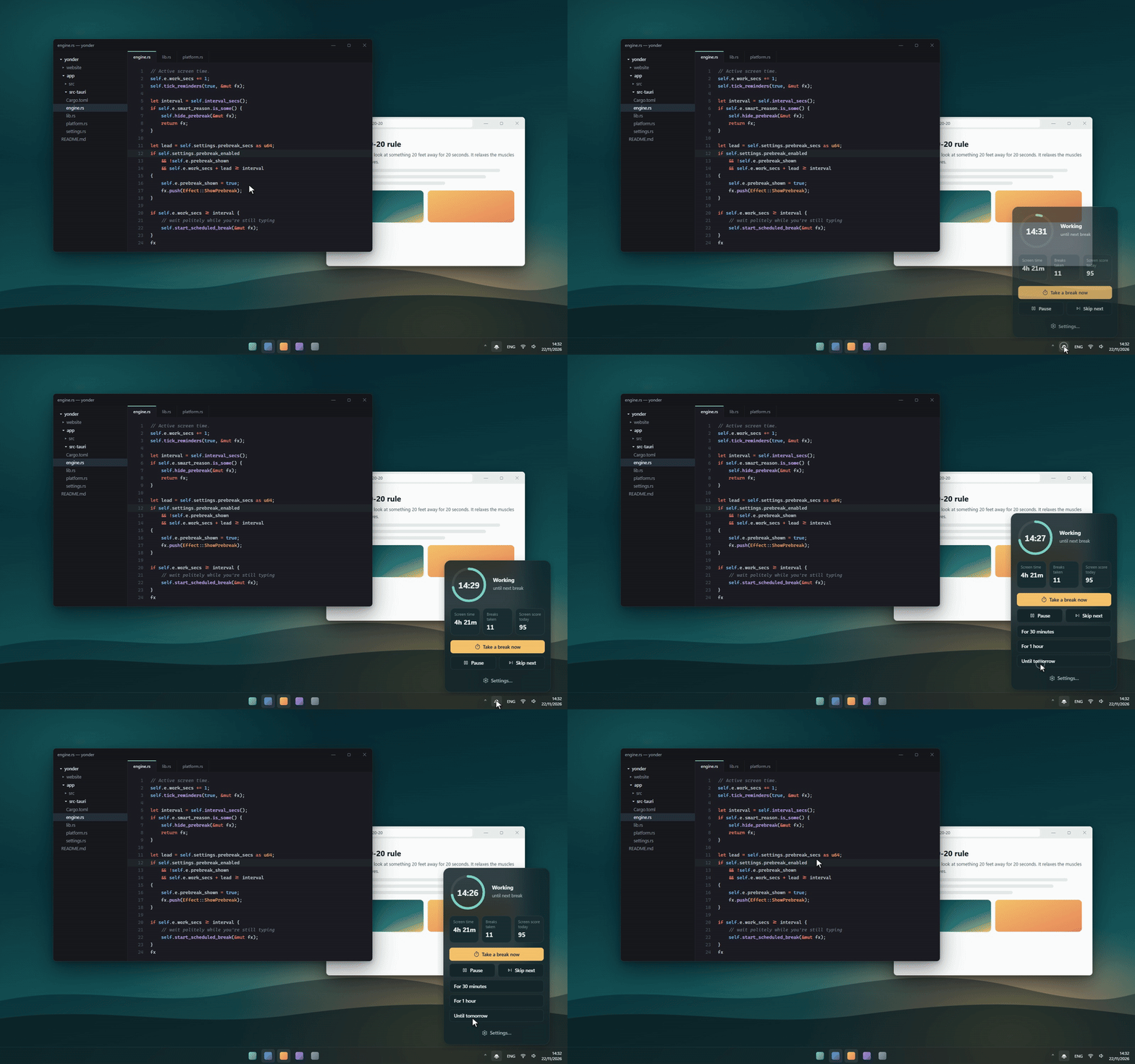
- Tray popover. Click the tray icon for a live countdown ring, today's screen time, breaks and score, and quick actions: take a break, pause, skip, settings. Right-click keeps the menu; on Linux there's a Show status menu entry instead. (#23)
- Notification only break style. No window at all: a desktop notification and a chime. (#34)
- Firm skip difficulty. Hold Skip (or Esc) for two seconds to skip, so a reflex click doesn't end the break. (#26)
- Back up and restore settings. Export everything, including custom sounds and your break background, to one file and import it on another computer (Settings → About). (#18)
- Hide the tray countdown next to the icon, where your system shows one (macOS menu bar, some Linux panels). (#24)
Smarter pauses
- Do Not Disturb / Focus. Breaks wait while Windows Do not disturb, GNOME Do Not Disturb or KDE's notification inhibit is on; macOS Focus where Yonder can read it. Windows' automatic full-screen/game rule is left to the separate Fullscreen apps setting. (#15)
- Screen sharing and recording. Breaks wait while a screen recorder such as OBS is open, while displays are mirrored, or during PipeWire screen sharing on Linux. (#21)
- Calls on macOS. Any app using the microphone or camera now counts as a call, not just Zoom. (#10)
- The countdown survives a restart. Restart Yonder (an update, a crash) within ten minutes and it picks up where it left off. (#31)
- Wayland idle detection on GNOME and KDE Plasma, so time away counts as a break there too. Sway and Hyprland aren't supported yet. (#12)
Install
| Platform | How |
|---|---|
| macOS | brew install --cask rmoura98/tap/yonder (or brew upgrade --cask yonder), or the .dmg below |
| Windows | scoop install yonder/yonder after scoop bucket add yonder https://github.com/RMoura98/scoop-bucket, Yonder_1.0.5_x64-setup.exe, or the portable zip below |
| Debian / Ubuntu | the signed apt repository, then sudo apt install yonder |
| Other Linux | .AppImage, .deb or .rpm below |
Verify downloads with SHA256SUMS.txt. On 1.0.1 or later, Yonder will tell you about this update itself.
The new macOS and Linux detection was written without a Mac or a Wayland desktop at hand. If something misfires, please open an issue. Ideas welcome in Discussions.
Yonder 1.0.4
Softer breaks, set up in a minute, and now in Chinese and Japanese.
New
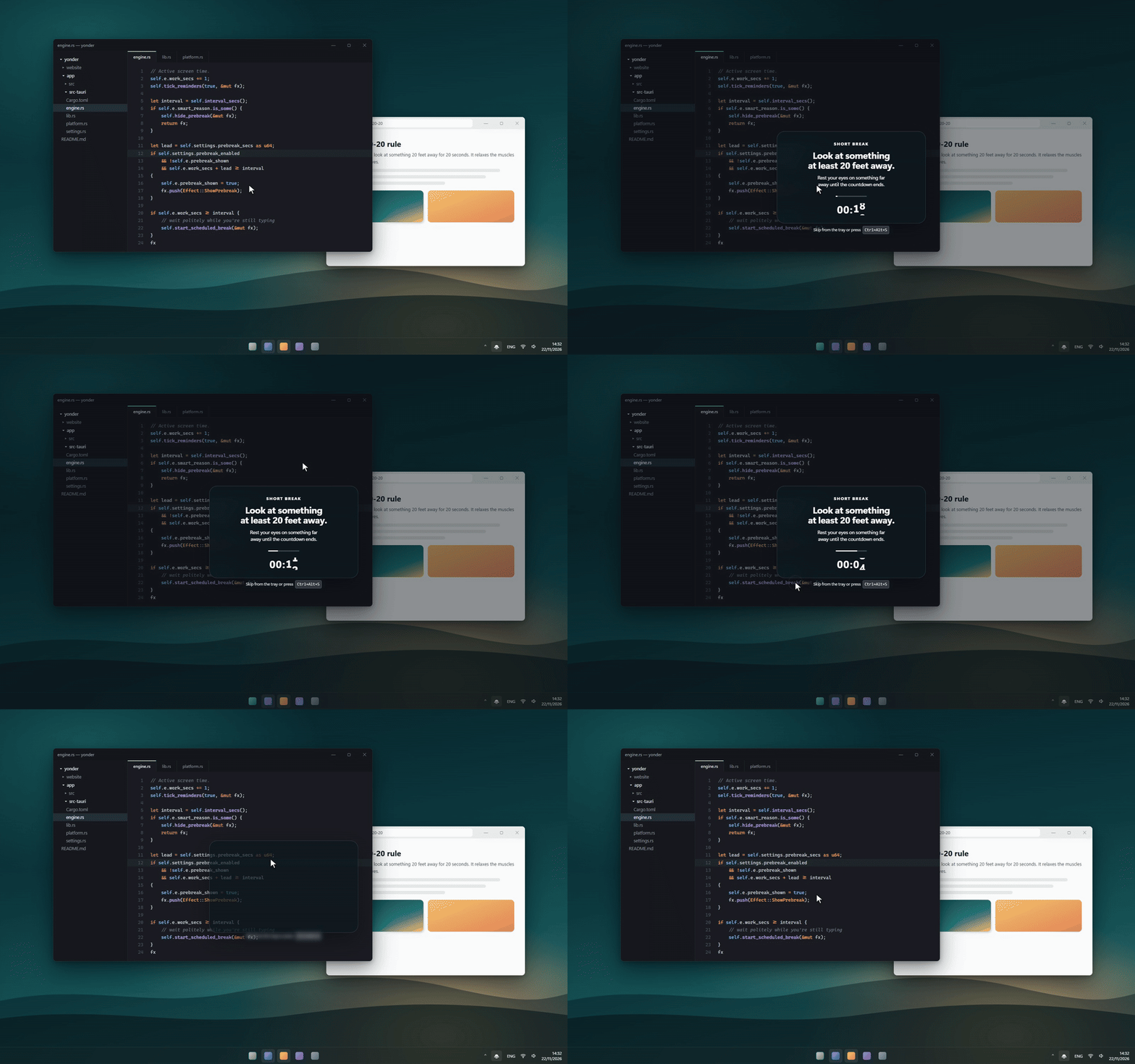
- Gentle break style. No takeover: every display dims around a small countdown and clicks pass through, so a call, a video or a game keeps going underneath. The break never takes keyboard focus; skip it from the tray or with the skip shortcut (Ctrl+Alt+S by default). Pick it in Settings → Break Screen. (#34)
- Pause music and video during breaks. Optional (Settings → Screen Breaks → More). When a break starts Yonder pauses what's playing and resumes it afterwards, and only resumes what it paused. Uses the system media controls on Windows, Music and Spotify on macOS, and
playerctlon Linux. (#20) - First-run setup in three steps. Language, rhythm (Balanced, Deep Focus, Eye Care, Wellness) and skip difficulty, then break style and smart pause. Skip it anytime. (#36)
- 简体中文 and 日本語. Yonder now speaks seven languages. Native speakers, corrections are very welcome. (#29)
- Checksums and a portable Windows zip. Every release now has
SHA256SUMS.txtandYonder_<version>_x64-portable.zip(justyonder.exe, no installer). See Verify a download. (#30)
Fixes
- Smart pause can't hold a break forever. If a call, a fullscreen window or a focus app keeps smart pause on, the heads-up now comes anyway after an hour ("You've been busy for a while. A short break?"). Choose 30 minutes, 1 hour, 2 hours or never in Settings → Smart Pause. (#33)
Install
| Platform | How |
|---|---|
| macOS | brew install --cask rmoura98/tap/yonder (or brew upgrade --cask yonder), or the .dmg below |
| Windows | scoop install yonder/yonder after scoop bucket add yonder https://github.com/RMoura98/scoop-bucket, Yonder_1.0.4_x64-setup.exe, or the portable zip below |
| Debian / Ubuntu | the signed apt repository, then sudo apt install yonder |
| Other Linux | .AppImage, .deb or .rpm below |
On 1.0.1 or later, Yonder will tell you about this update itself.
Ideas welcome in Discussions, and there are good first issues if you'd like to contribute.
Yonder 1.0.3
A fixes release: breaks that never get in the way of your typing.
Fixes
- Reminders and the heads-up no longer steal keyboard focus. A blink or posture reminder (or the heads-up card) could take focus away from the app you were typing in. They now appear without ever becoming the active window, and their buttons still work.
- A manual break you actually took resets the countdown. Ending a "Take a break now" break early used to resume the old countdown, so the scheduled break could come back a minute later. Once a manual break has lasted at least your normal break length, it now counts as taken and restarts the timer.
- Clearer heads-up while you're typing. When a break is due but waiting for a pause in your typing, the heads-up says "Waiting for a pause in your typing…" and the cursor pill says "Break when you pause typing", instead of sitting at 00:00.
Install
| Platform | How |
|---|---|
| macOS | brew install --cask rmoura98/tap/yonder (or brew upgrade --cask yonder), or the .dmg below |
| Windows | scoop install yonder/yonder after scoop bucket add yonder https://github.com/RMoura98/scoop-bucket, or Yonder_1.0.3_x64-setup.exe below |
| Debian / Ubuntu | the signed apt repository, then sudo apt install yonder |
| Other Linux | .AppImage, .deb or .rpm below |
On 1.0.1 or 1.0.2, Yonder will tell you about this update itself.
Ideas welcome in Discussions — and there are good first issues if you'd like to contribute.
Yonder 1.0.2
Make Yonder sound like you, and let it get out of your way on the Mac too.
What's new
- Your own sounds. Add any MP3, WAV, OGG or M4A file in Settings → Sounds (up to 8 MB each). Your files appear in every sound picker, for breaks and for each reminder, and stay on your computer. (#1)
- Five new built-in sounds: Soft gong, Rain, Kalimba, Wind chimes and Harp, for 15 in total.
- Five new split-screen textures: Wood grain, Slate, Terrazzo, Paper and Denim. (#2)
- Fullscreen detection on macOS. Games, presentations and fullscreen video now hold your breaks on the Mac, like on Windows. (#4)
- Matching reminder icons. Settings shows Posture and Blink with the same sun orb, arrow and blinking face as the reminders themselves.
Fixes and polish
- The heads-up card no longer jumps sideways when it collapses, and there's no dark rectangle behind it anymore.
- Long settings pages (like Screen Breaks) scroll again, and the sidebar's status and Support button always stay in view.
- Changing the language updates the window in place and keeps you on the same page, with no reload flash.
- macOS builds are now ad-hoc signed: instead of "Yonder is damaged", macOS shows the usual "unidentified developer" prompt that right-click → Open gets past.
- 30 new tests for the break scheduler. (#3)
Install
| Platform | How |
|---|---|
| macOS (Apple silicon and Intel) | brew install --cask rmoura98/tap/yonder (new one-command install), or the .dmg below |
| Windows 10 / 11 | scoop bucket add yonder https://github.com/RMoura98/scoop-bucket then scoop install yonder/yonder, or Yonder_1.0.2_x64-setup.exe below |
| Linux | .AppImage, .deb or .rpm below |
Builds aren't notarized or Authenticode-signed yet: on Windows choose More info → Run anyway if SmartScreen asks; the Homebrew cask handles macOS Gatekeeper.
Already on 1.0.1? Yonder will tell you about this update on its own (Settings → About shows the banner, and the tray gets an entry).
Thanks for trying Yonder! Ideas and questions are welcome in Discussions, and if it helps you, you can sponsor its development.
Yonder 1.0.1
Yonder now speaks five languages, tells you when an update is out, and has a cleaner heads-up card.
What's new
- Five languages. English, Português, Español, Français and Deutsch, including the tray menu and status line. Yonder follows your system language, or pick one in Settings → General. Built-in break messages and reminders are translated too; anything you wrote yourself stays as you wrote it. (#7)
- Update notifications. Yonder checks GitHub Releases a few times a day and shows a tray entry and a banner in Settings → About when a new version is out, with the Homebrew command on macOS. Check manually, skip a version, or turn it off with the toggle. The check is the only network request Yonder makes.
- Redesigned heads-up card. A watch-face badge whose hand sweeps as the break approaches, lighter glass, and simpler buttons. The cursor countdown matches it, and both windows now appear only once they're fully drawn.
- One-color tray icon. The horizon glyph follows your taskbar theme (black or white on Windows, a template icon on macOS) and dims while paused.
Fixes
- Break screen: Skip, End break and Lock screen no longer show at the same time.
- Split-screen breaks keep the countdown readable on light textures.
- Fullscreen detection on Windows no longer mistakes a maximized borderless window (like a terminal) for a game or video.
- External links in Settings always open in your browser.
Install
| Platform | Download |
|---|---|
| macOS (Apple silicon and Intel) | brew upgrade --cask yonder, or for a new install brew tap rmoura98/yonder https://github.com/RMoura98/yonder && brew install --cask yonder; or the .dmg below |
| Windows 10 / 11 | Yonder_1.0.1_x64-setup.exe (or the .msi) |
| Linux | .AppImage, .deb or .rpm |
Builds still aren't code-signed: on Windows choose More info → Run anyway; on macOS the Homebrew cask handles Gatekeeper (or right-click the app → Open the first time).
Coming from 1.0.0? 1.0.0 had no update checker, so install this version manually once. From here on, Yonder will tell you about new releases itself.
Thanks to everyone trying Yonder! Questions and ideas are welcome in Discussions, and if it helps you, you can sponsor its development.
Yonder 1.0.0
Look up. Look far. Get back to it. The first release of Yonder, a tiny, free and open-source break reminder for Windows, macOS and Linux.
Highlights
- Breaks that respect your flow. Balanced (20 min / 20 s), Deep Focus, Eye Care and Wellness presets or your own timing, with optional long breaks.
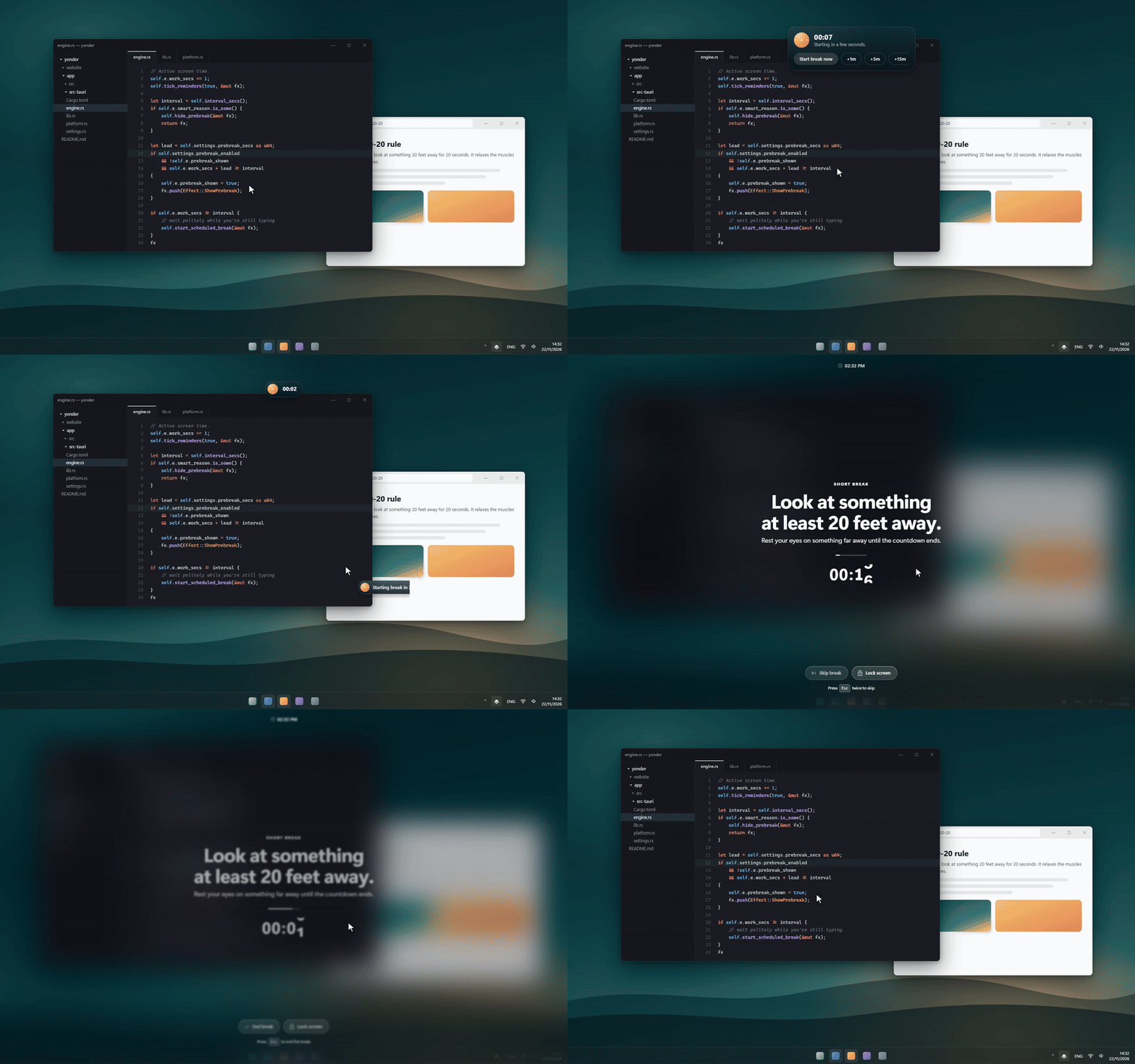
- A heads-up before every break. Start now, +1m, +5m or +15m, then a small countdown that follows your cursor for the last five seconds.
- Calm break screens. Blurred desktop, split screen with textures, animated Aurora / Nebula / Ripple, gradients or your own image, with a rolling countdown and your own messages.
- Smart pause. Holds breaks while you type, during calls, in fullscreen apps (Windows) and in the focus apps you choose; time away from the computer counts as a break.
- Posture and blink reminders, plus up to five custom reminders with their own icon, interval and sound.
- Skip difficulty, office hours, planned breaks, global shortcuts and shell hooks.
- Private by design: no account, no telemetry, everything stays on your machine.
Install
| Platform | Download |
|---|---|
| macOS (Apple silicon and Intel) | brew tap rmoura98/yonder https://github.com/RMoura98/yonder && brew install --cask yonder, or Yonder_1.0.0_universal.dmg below |
| Windows 10 / 11 | Yonder_1.0.0_x64-setup.exe (or the .msi) |
| Linux | .AppImage, .deb or .rpm |
Heads-up: this release isn't code-signed yet.
- macOS: the Homebrew cask handles it for you. If you open the
.dmgdirectly, right-click Yonder.app → Open the first time. The blurred and split break styles need Screen Recording permission. - Windows: SmartScreen may say it doesn't recognize the app. Choose More info → Run anyway.
Known limitations
- Fullscreen detection is Windows-only for now; on macOS and Linux, add apps under Smart Pause → Focus apps.
- Blurred-desktop and split-screen breaks aren't available on Linux yet.
Yonder is free forever. If it helps you, you can sponsor its development. Found a bug? Open an issue.