SystemOverview
An overview of the Human Navigation task is provided below.
The Windows computer runs the Human Navigation app. The Human Navigation app has been created in Unity. The Ubuntu computer runs the rosbridge server, the SIGVerse rosbridge server, and the robot controller created by the competition participants.
The Human Navigation app and robot controller communicate via the rosbridge server, but high-bandwidth data (e.g., sensor data) is transmitted via the SIGVerse rosbridge server.
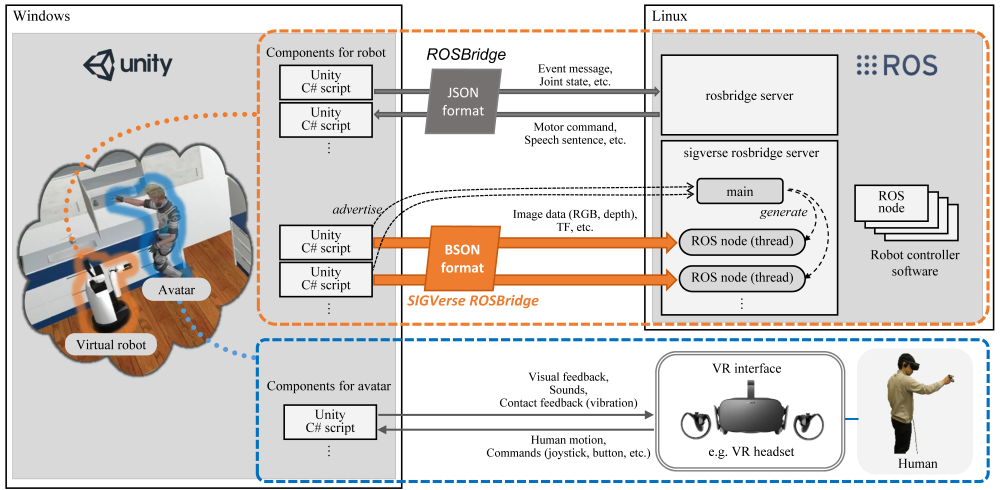
The flow of the competitive challenge is outlined below.
- A team member launches the ROSBridge server, SIGVerse ROSBridge server, and robot controller.
- The operator (Competition committee) launches human_navi.exe
- The test subject puts on the Meta Quest 2.
- The operator presses the session start button.
- The app loads the environment for the competitive challenge to initialize the position and direction of the avatar.
- Moderator sends the "Are_you_ready?" message to the robot controller.
- The robot controller sends the "I_am_ready" message to the moderator.
- The moderator sends the TaskInfo to the robot. The TaskInfo includes the target object and destination.
- The robot controller generates a guidance_message (a spoken instruction) and sends it to the test subject. The robot controller can send a guidance_message at any time.
- The test subject follows the spoken instructions to pick up the target object and place it at the designated location (destination). The test subject can request a guidance message by pressing the X button. After the test subject requested a new guidance message, the "Guidance_request" message is sent to the robot controller.
- If the target object is grasped, points will be awarded.
- If the wrong object is grasped, a penalty will be given.
- If the target object is placed in/on the destination, points will be awarded.
- If the number of instructions exceeds 15, a penalty will be given.
- Each session ends when one of the following events occurs.
- The target object is placed in/on the destination: The Moderator sends the "Task_succeeded" message to the robot controller.
- "Give_up" is sent from the robot controller: The robot can send "Give_up" message if it is impossible to achieve the task. In that case, the session is aborted and the Moderator sends the "Task_failed" message to the robot controller.
- Time is up: The Moderator sends the "Task_failed" message to the robot controller.
- Session ends.
- If no sessions are left, the moderator sends "Mission_complete" message to the robot controller.
- If any sessions are left:
- The test subject moves to the next team area and puts on the Meta Quest 2.
- The operator presses the Go_to_next_session button. The Moderator sends "Go_to_next_session" message to the robot controller.
- Return to step 4.