Repository navigation
Colorizing
Colours decide only the look of the GLB and OBJ files (and the colour tag of each STEP solid).
They never change geometry or the physical properties in materials.json. Stage 5, materials
(kese/s5_materials/materials.py), gives every part one material from parameters/color.py.
Color.MATERIALS: one entry per key, a colour as an sRGB hex string and the glTF PBR values.
Alpha below 1 writes a glTF BLEND material.
| Key | Colour | Alpha | Metallic | Roughness | Used for |
|---|---|---|---|---|---|
Board |
 #968A58
|
1.0 | 0.0 | 0.80 | the laminate with Run.DIELECTRIC_GROUPING = "merged"
|
Board_core |
#968A58
|
1.0 | 0.0 | 0.80 | cores, with "layer" grouping |
Board_prepreg |
 #A89C66
|
1.0 | 0.0 | 0.80 | prepregs, with "layer" grouping |
Copper |
 #CD803E
|
1.0 | 0.9 | 0.35 | copper, simulation mode |
Plating |
#CD803E
|
1.0 | 0.9 | 0.35 | the Plating part (Run.COPPER_GROUPING = "layer") |
Copper_exposed |
 #DEBA60
|
1.0 | 1.0 | 0.25 | all copper and plating, visual mode |
Top Solder Mask, Bottom Solder Mask
|
 #EBEBE6 white |
0.80 | 0.0 | 0.30 | the mask parts |
Top Mask over Copper, Bottom Mask over Copper
|
 #F2EFD8
|
1.0 | 0.0 | 0.30 | the mask on copper, visual mode only |
Top Silkscreen, Bottom Silkscreen
|
 #141414 black |
1.0 | 0.0 | 0.75 | silkscreen |
Nickel |
 #B8B8B0
|
1.0 | 1.0 | 0.40 | finish |
Gold |
 #E6C15A
|
1.0 | 1.0 | 0.20 | finish |
Tin |
 #C9C9C9
|
1.0 | 1.0 | 0.45 | finish |
Silver |
 #E4E4E0
|
1.0 | 1.0 | 0.25 | finish |
Palladium |
 #DFDAD4
|
1.0 | 1.0 | 0.30 | finish |
OSP |
 #D9955A
|
1.0 | 0.8 | 0.35 | finish |
How a part finds its key (_key() in kese/s5_materials/materials.py):
| Part role | Key |
|---|---|
board |
Board_<kind> (Board_core, Board_prepreg) with "layer" grouping, else Board
|
copper, plating
|
Copper_exposed in visual mode, else Copper / Plating
|
mask, mask_over_copper, silk
|
the part's own name, e.g. Top Solder Mask
|
finish |
its metal, e.g. Gold
|
A key with no entry in MATERIALS takes the Board entry.
KiCad's Board Setup gives the mask and silkscreen layers a colour: one of its names (Green, Red,
Blue, Purple, Black, White, Yellow), written as the name ((layer "F.Mask" ... (color "Green"))),
or one picked under "User defined", written as #RRGGBBAA with its opacity last
((color "#1B5E20D4")). With Color.USE_STACKUP_COLORS = True (the default) a name, in lower
case, is looked up in three tables. A name the mask or silkscreen table does not have keeps the
MATERIALS colour, and report.txt warns about it.
| Name | STACKUP_MASK_COLORS |
STACKUP_MASK_OVER_COPPER_COLORS (visual mode) |
STACKUP_SILK_COLORS |
|---|---|---|---|
green |
 #126830
|
 #3F8F3A
|
#126830
|
red |
 #A01414
|
 #C8503C
|
#A01414
|
blue |
 #14328C
|
 #3C5AB4
|
#14328C
|
purple |
 #501E6E
|
 #7A4696
|
#501E6E
|
black |
 #121214
|
 #2E2E30
|
#141414
|
white |
#EBEBE6
|
#F2EFD8
|
 #F0F0EC
|
yellow |
 #D2B414
|
 #E6CC50
|
 #E6C828
|
matte green |
 #1E5A2D
|
 #4A7D4A
|
|
matte black |
 #191919
|
 #343434
|
|
matte blue |
 #19326E
|
 #3C5A96
|
|
matte red |
 #8C1919
|
 #AA4646
|
The six_layer test board, for example, has a black mask in its stack-up, so its mask parts come
out
#121214.
Set USE_STACKUP_COLORS = False to always use MATERIALS.
A user-defined colour is used as it is, for the mask and the silkscreen alike. Its opacity is not:
the mask keeps the alpha of MATERIALS, 0.8 in simulation mode and opaque in visual mode, as with
a named colour. In visual mode the mask over copper takes the colour mixed part of the way toward
white, each channel
| Symbol | Meaning |
|---|---|
| one channel of the user-defined colour, 0 to 255 | |
| the same channel over copper, rounded | |
USER_MASK_OVER_COPPER_LIGHTEN, 0.15 by default |
With #1B5E20D4 gives 
#1B5E20 for the mask and 
#3D7641 over copper.
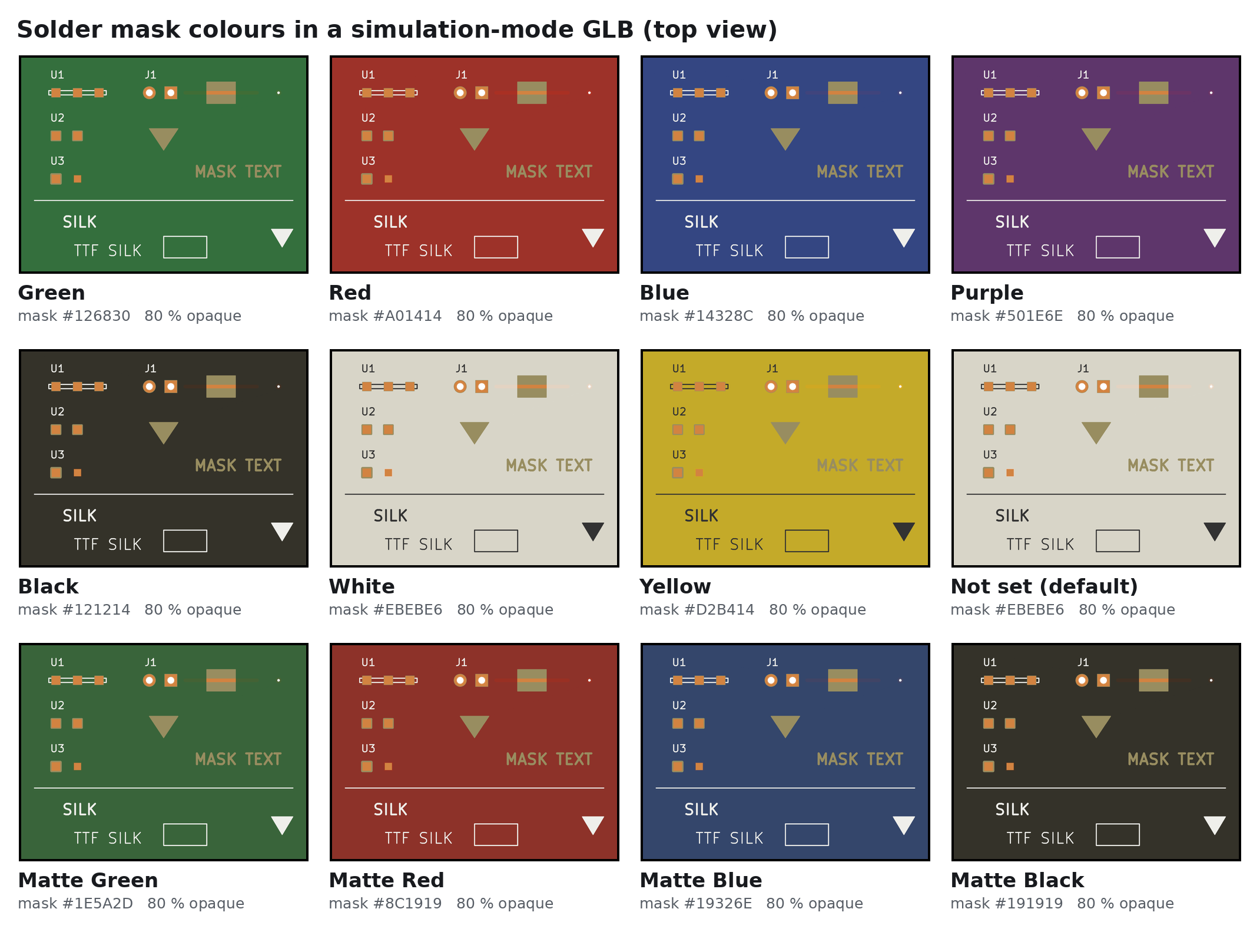
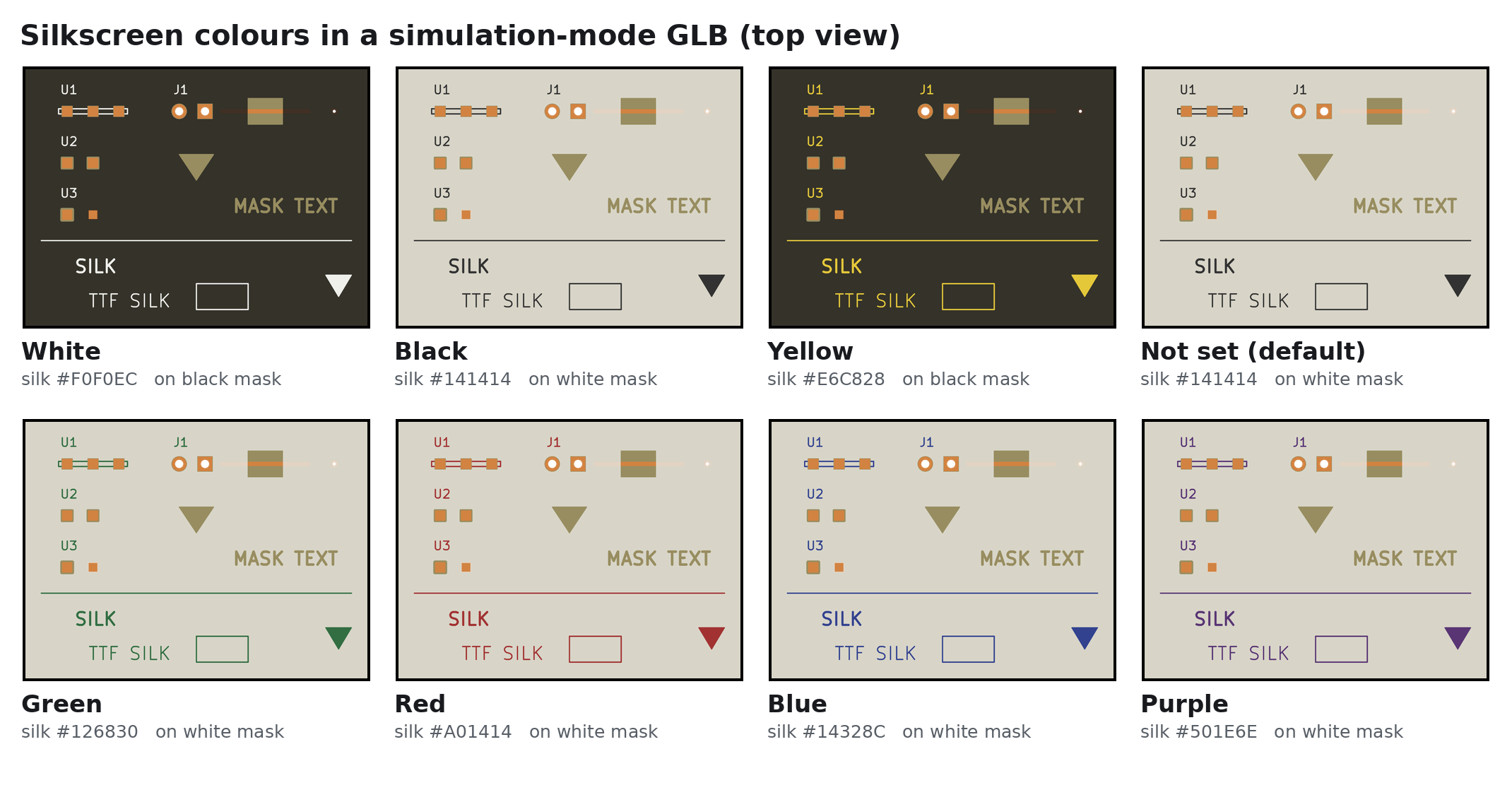
- Simulation mode: the mask is translucent (alpha 0.80) so the copper under it can be seen in a viewer. The mask on top of copper is part of the same mask solid and has the same colour.
-
Visual mode: the mask is drawn opaque whatever its alpha (
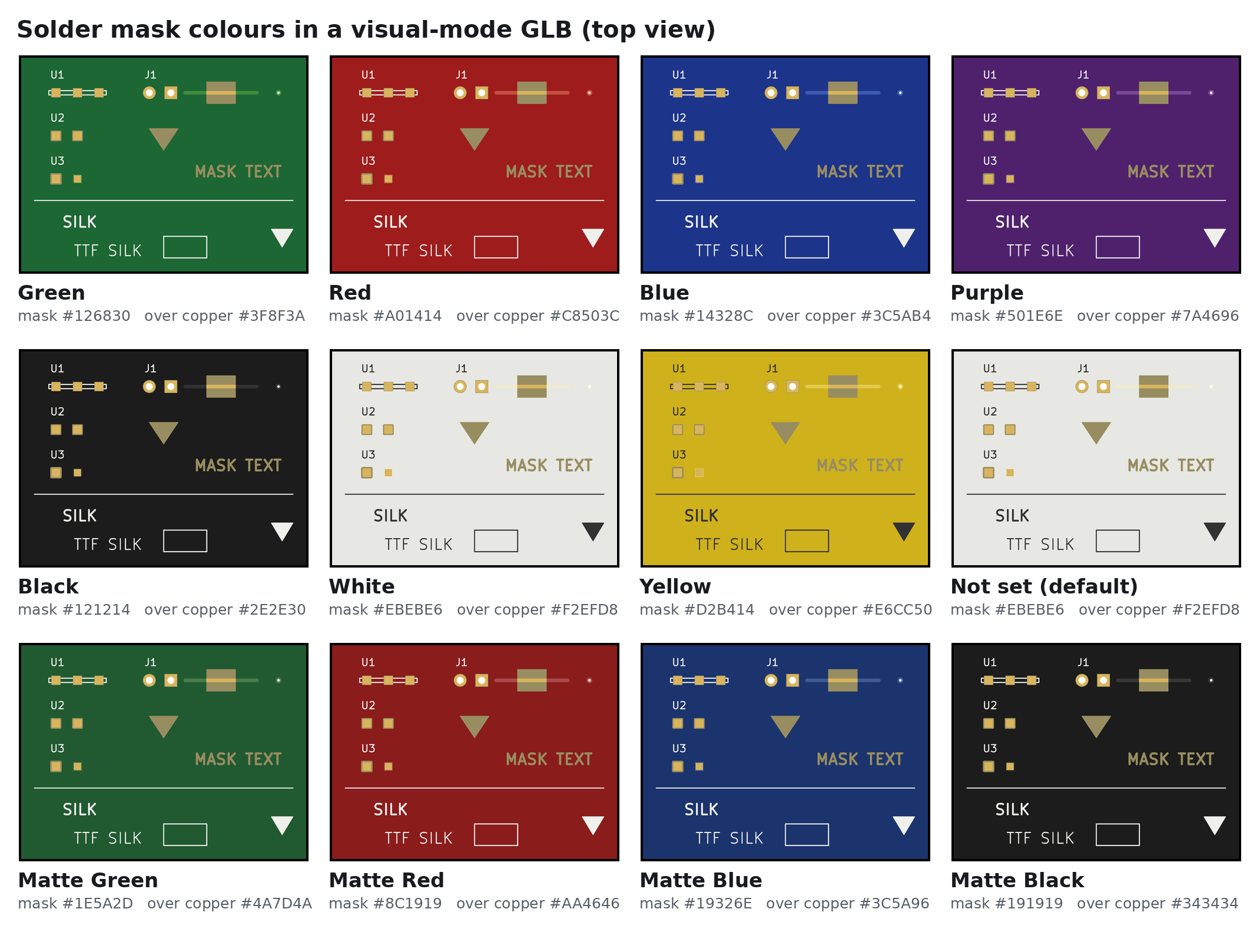
Color.VISUAL_MASK_OPAQUE = True), because the skin has nothing behind it; the mask over copper is its own part with the lighter "over copper" colour, so traces read through the mask as on a real board; all copper takesCopper_exposed.
| File | How the colour is written |
|---|---|
| GLB | a PBR material named after the part's MATERIALS key, shared by parts with the same key and look (every Copper_<net> uses one Copper material; the top and bottom mask and silkscreen each keep their own): baseColorFactor (sRGB converted to linear, below), metallicFactor, roughnessFactor, alphaMode: BLEND when alpha < 1 |
| OBJ | an .mtl next to the .obj with newmtl <part> (the part name with spaces and other characters replaced by _, e.g. Top_Solder_Mask), Kd r g b, d alpha
|
| STEP | the assembly colour of each solid (RGB and alpha) |
| STL | none (STL has no colour) |
materials.json |
look: {color, alpha} per part |
report.txt |
the material key, hex and alpha on every parts line |
glTF stores base colours in linear light, so kese/s7_write/glb.py converts each 8-bit sRGB
channel before it writes the GLB:
def _srgb_to_linear(rgb):                    # rgb: the hex colour as three 0-255 values
    s = np.asarray(rgb, dtype=float) / 255
    return np.where(s <= 0.04045, s / 12.92, ((s + 0.055) / 1.055) ** 2.4)

factor = [*np.round(_srgb_to_linear(mat["rgb"]), 5), round(float(mat["alpha"]), 4)]
The GLB writer then stores the factor in 8 bits, so the GLB holds the nearest step of 1/255:
#968A58
is written as 0.30588, 0.25490, 0.09804 rather than 0.30499, 0.25415, 0.09759. The alpha is
stored in the same 1/255 steps (0.80 stays 0.80; 0.85 would become 0.85098). The OBJ Kd line
carries the sRGB values as they are, s above.
| Name | Default | Range | Meaning |
|---|---|---|---|
MATERIALS |
the table above | dict of {color, alpha, metallic, roughness}
|
Look of every part kind |
VISUAL_MASK_OPAQUE |
True |
bool | Draw the mask opaque in visual mode |
USE_STACKUP_COLORS |
True |
bool | Honour the mask and silkscreen colours in the board's stack-up, named or user-defined |
STACKUP_MASK_COLORS, STACKUP_SILK_COLORS
|
tables above | name to hex | Stack-up colour names |
STACKUP_MASK_OVER_COPPER_COLORS |
table above | name to hex or None per entry |
Visual-mode colour of the mask over copper per stack-up colour; an entry set to None keeps the MATERIALS entry (the table itself must stay a dict) |
USER_MASK_OVER_COPPER_LIGHTEN |
0.15 |
0 to 1 | With a user-defined mask colour, how far the visual-mode mask over copper is mixed toward white (0 the same colour, 1 white) |
| Previous | Next |
|---|---|
| Copper And Traces | Top And Bottom Copper Finishings |