Inventory dashboard for Claude Code resources — commands, skills, agents, hooks, MCP servers, and plugins — across user, project, and local scopes.
Zero LLM calls. Zero servers. Zero runtime dependencies. npx ccinv and you get a colored terminal table; pass --html to open a single-file dashboard in your browser instead.
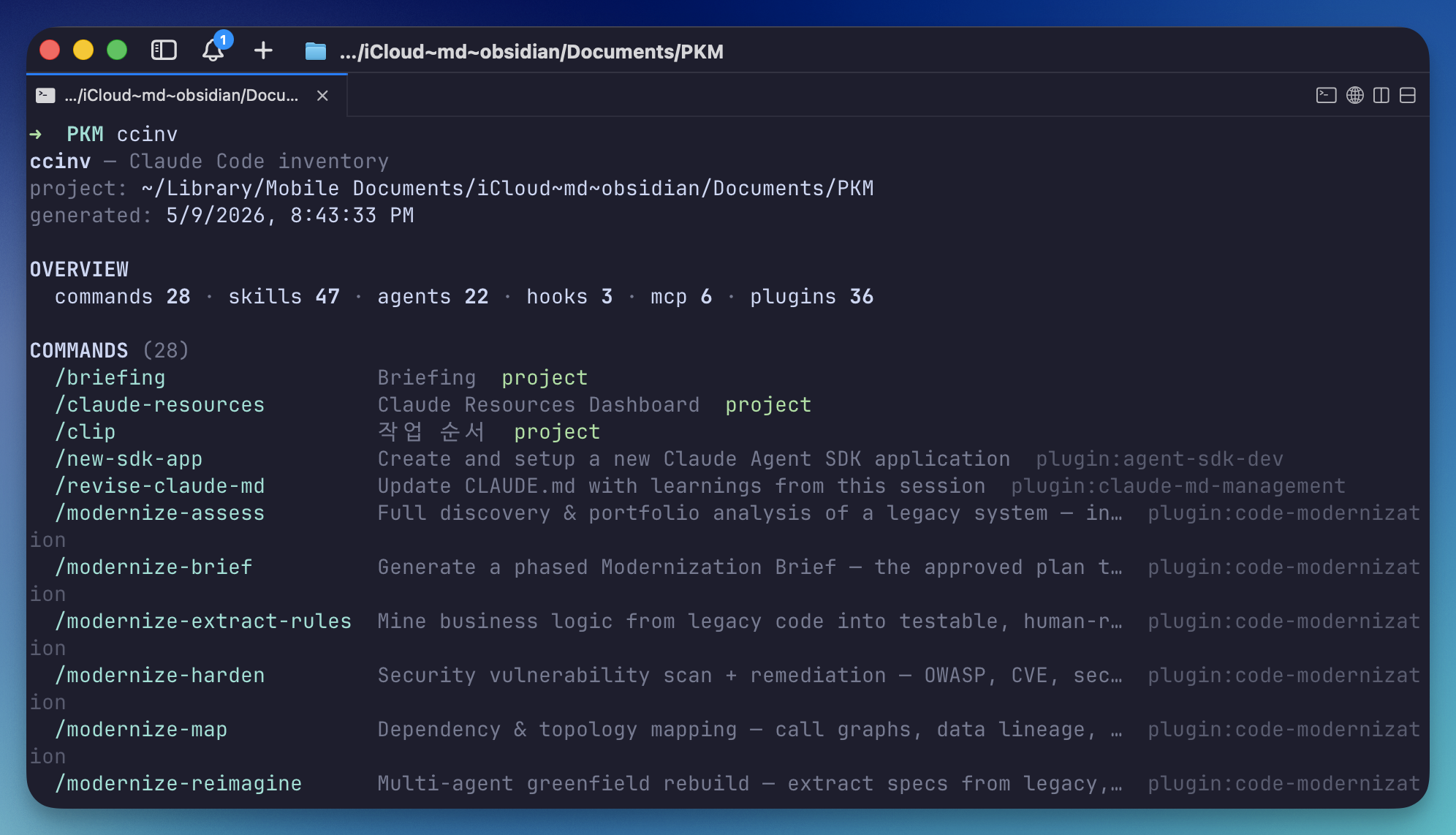
Claude Code spreads configuration across ~/.claude/, <project>/.claude/, plugin marketplaces, and per-user settings.local.json. Existing dashboards (SkillDeck, ClaudHub) only scan the user scope. ccinv scans all three scopes plus plugins and renders the result instantly.
It's deterministic file-system work — there's no reason to burn LLM tokens for it.
Inspired by ccusage. Same
cc*ergonomics — quicknpx, table-first output, optional richer formats — applied to "what's installed?" instead of "what did I spend?".
npx ccinvThat's it — no install, no config. ccinv prints a colored inventory table for the current scope (the screenshot above is from a real Obsidian vault project).
For a richer view, render an HTML dashboard:
ccinv --html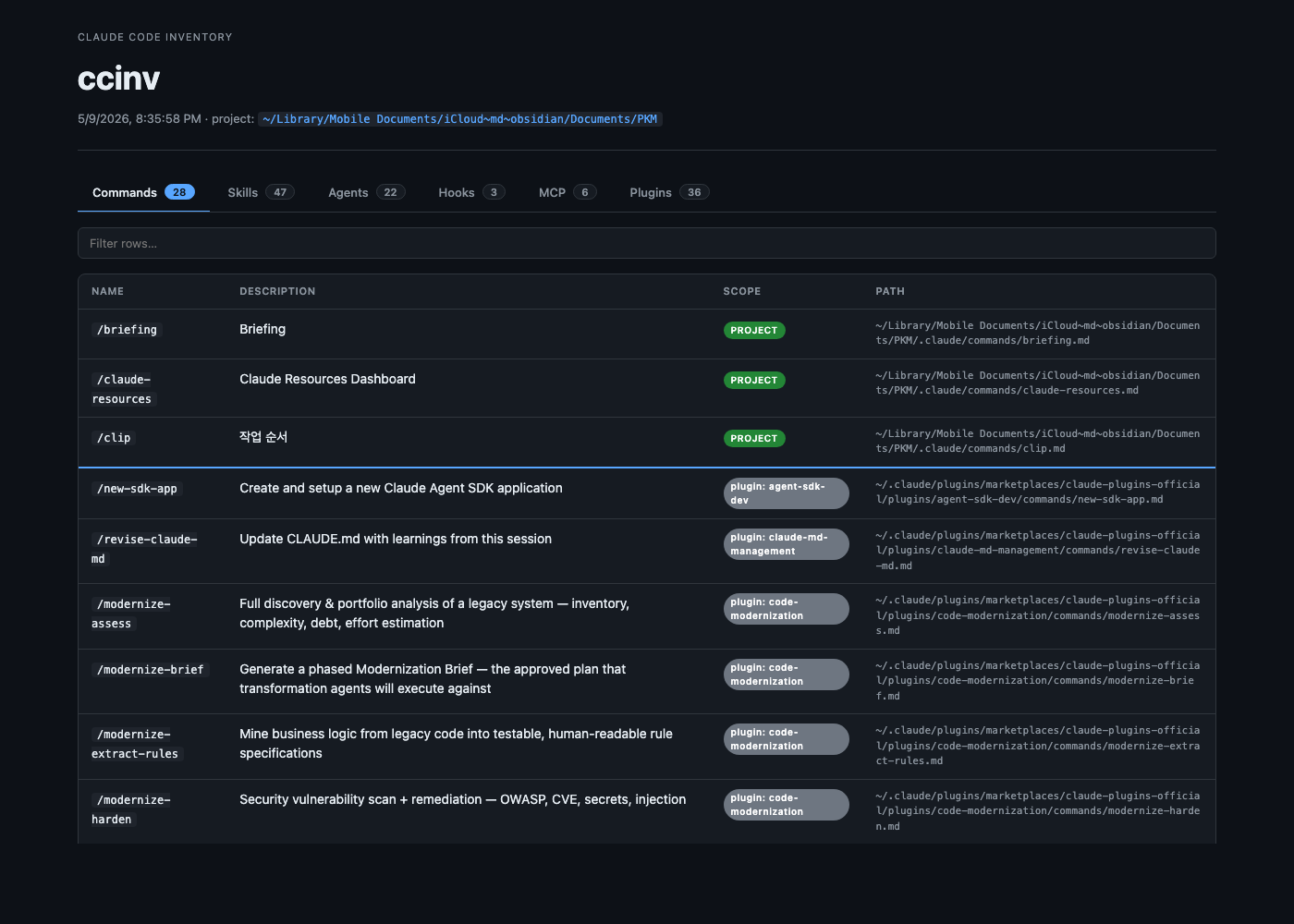
ccinv [options]

Output formats:
      --html             Render as HTML and open in browser
      --json             Print inventory JSON to stdout

Filtering:
      --no-plugins       Hide plugin-scope resources in table output
      --scope <list>     Comma-separated: user,project,local,plugin
                         (applied to JSON / HTML)

HTML options:
  -o, --output <path>    Write HTML to a specific file path (with --html)
      --no-open          Do not auto-open the HTML in browser
      --stdout           Print HTML to stdout (with --html)

Misc:
      --cwd <path>       Use a different working directory for project detection
  -V, --version          Print version
  -h, --help             Print help
| Resource | User | Project | Local | Plugin |
|---|---|---|---|---|
| Commands | ~/.claude/commands/*.md |
<root>/.claude/commands/*.md |
— | ~/.claude/plugins/marketplaces/*/plugins/*/commands/*.md |
| Skills | ~/.claude/skills/*/SKILL.md |
<root>/.claude/skills/*/SKILL.md |
— | ~/.claude/plugins/marketplaces/*/plugins/*/skills/*/SKILL.md |
| Agents | ~/.claude/agents/*.md |
<root>/.claude/agents/*.md |
— | ~/.claude/plugins/marketplaces/*/plugins/*/agents/*.md |
| Hooks | ~/.claude/settings.json |
<root>/.claude/settings.json |
<root>/.claude/settings.local.json |
— |
| MCP | ~/.claude.json, ~/.claude/settings.json |
<root>/.claude/settings.json |
<root>/.claude/settings.local.json |
— |
<root> is detected by walking up from the current directory until a .claude/ is found.
# count plugin-provided agents
ccinv --json | jq '[.agents[] | select(.scope == "plugin")] | length'

# list project-scope skills as a flat name list
ccinv --json | jq -r '.skills[] | select(.scope == "project") | .name'v0.1.0 — initial release.
- Tested on macOS.
- Linux and Windows are untested. The code only uses Node's cross-platform APIs (
os,path,fs/promises) and branches onprocess.platformfor browser open (open/xdg-open/cmd start), so it should work — but no guarantees yet. - ANSI color is auto-disabled when stdout is not a TTY or
NO_COLORis set.
Bug reports welcome on GitHub Issues.
MIT © Sianmin