Repository navigation
Hello World
In this chapter I will introduce you to Tic in the most traditional way possible: a script that prints "Hello World!" to the screen.
This chapter also shows you how to install the Tic compiler (linux) and how to use it. At the end of this chapter you will have your first Tic script compiled and executable!
I won't let you wait any longer. This is Hello-World.tic, Tic's Hello World:
PrintLine "Hello World!"
Pretty simple eh? As you can see, Tic does not use semicolons at the end of each line. Another thing to note is the file extension: .tic. This extension is important as it's the only filetype supported by Tic's compiler, which we'll get to next.
PS: You could also use Print instead of PrintLine, but that leaves out the trailing newline which just looks uglier.
Before actually compiling and executing anything, we need the Tic compiler. The installment of ticcomp is pretty straight forward:
- Head on over to the releases page of Tic's github repository. Here you can find all its releases. Make sure to download the latest one (1.4 as of writing this chapter). The file you have to download is the
.debfile.
- Once downloaded open up your favourite linux terminal and enter the directory you saved the
.debfile in (probably~/Downloads).
- Enter the following command to install ticcomp:
sudo apt-get install ./<filename>.deb
Make sure to replace<filename>.debwith the name of the file you downloaded in step 1! After executing this command, the compiler should be installed. (If not, contact me.)
Now we're all good to go! First, validate your installation by running ticcomp --version. The correct version should be displayed.
The ticcomp command comes with a few positional and optional arguments. Run ticcomp --help to display them.
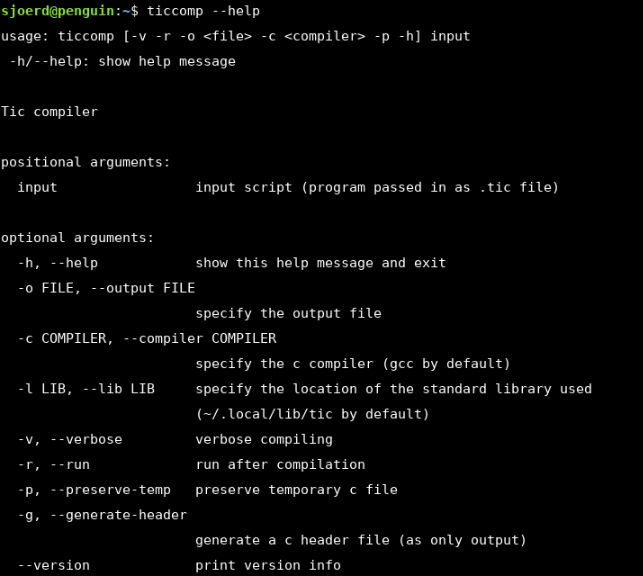
That might be quite a lot at once, so let's break down the options and arguments that'll matter in this series.
-
input
This is the only positional argument, meaning that it must be given. You probably already guessed what you'll need to give here: the Tic script you want to compile. -
-o / --output
This is the optional argument you'll probably be using the most. When used, an output file must be supplied. Using this option simply spits the compiled executable out as the specified file instead of e.g../bin/hello-world. -
-r / --run
When used, this option simply runs the script directly after a successfull compilation. Handy for quick debugging. -
-v / --verbose
When used, the compiler will spit out an abundance of information such as the intermediate c code. This option is, however, mostly usefull for me, the developer.
Let's try it out. Firstly, savePrintLine "Hello World!"tohello-world.ticin your filesystem (I reccomend creating a seperate directory for this course). Then, enter the directory you saved your file to and enter the following command:
ticcomp hello-world.tic
If all goes well, a bin directory should appear and within that directory a file called hello-world. This is the tic executable! Let's try it out:
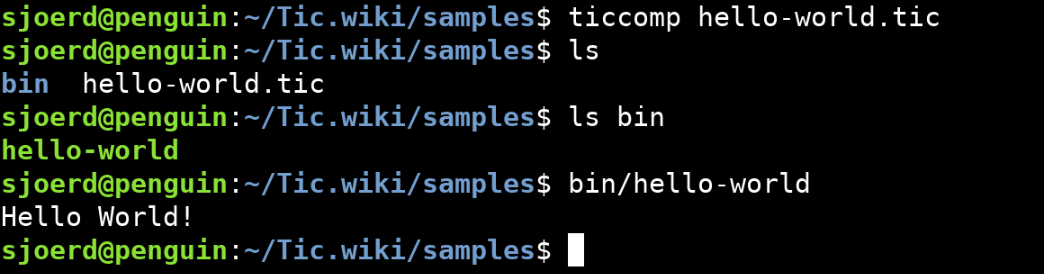
It works! Now we can get to the real stuff...
2. Variables