
Box3D, Erin Catto's 3D rigid-body
physics engine, embedded in Godot 4 as a
GDExtension: drop in a Box3DWorld, add Box3DBody nodes, and simulate.


This is a fork of erincatto/box3d. The
upstream engine sources are unchanged; everything Godot-specific lives in
godot/. The original Box3D README is preserved below.
Early and experimental. Box3D itself is v0.1.0 and this binding is young: expect rough edges and API churn. It is a starting point to build on, not a production dependency.
Contents: Features · New in 0.4.2 · Browser demo · Getting started · Your own project · Troubleshooting
- Near-complete API parity with upstream Box3D across 21 documented
classes: worlds; static/kinematic/dynamic bodies;
box/sphere/capsule/cylinder/cone/convex-hull/triangle-mesh/height-field
colliders; nine joints (hinge, slider, distance, ball, fixed, motor, wheel,
parallel, filter); contact and sensor events; ray/shape/overlap queries; a
character controller with spring suspension; continuous collision; recording
and replay; and live solver tuning. The gaps are deliberate and documented:
upstream's external task-system hooks stay unbound for thread-safety, and
the raw solver callbacks ship as the
Box3DContactRulesdata table instead of script callbacks. - Feels native in the editor. Every class carries in-editor documentation (F1 answers for the binding the way it does for a built-in node), and colliders and joints draw editor gizmos: a hinge shows its axis and limit arc before you ever press play.
- One-command build.
sconscompiles Box3D from source into the extension; no prebuilt engine binary required. Prebuilt libraries for Windows, Linux, Android and web ship with every release. - A 69-sample browser demo: stacks, a ragdoll, a drivable car, joints, queries, determinism showcases and toys, organised by category, with a physics-engine selector that reruns any sample on Godot Physics or Jolt for side-by-side comparison.
- Runs on Android (arm64 + x86_64), verified on real hardware under
Vulkan, with touch controls and a mobile-scaled UI. Toolchain walkthrough:
godot/ANDROID_BUILD.md.
- Record and replay any sample, with a timeline. Two buttons in the demo sidebar capture a whole session, including everything you do to it (fired balls, bombs, grab-drags). A draggable timeline scrubs the result in both directions, plays it backwards, and single-steps either way. The timeline is very early and still needs iteration: expect rough edges in its UI and behaviour, and expect it to change between releases. Reverse playback reads cached transforms instead of re-simulating, so scrubbing a 16,000-body pyramid collapse costs milliseconds a frame; recordings larger than the memory budget spill to a temp file and stay scrubbable end to end.
- Replays look like the scene you recorded. A small sidecar file captures
each body's colour and material response at record time (the
.b3recrecording itself stays byte-identical to upstream's format); replaying a recording made at one worker count on another is a live cross-thread determinism check, verified on desktop at 1, 2, 4 and 8 workers. - In-editor gizmos for every collider type and all nine joints, drawn in upstream's own debug palette so the editor and the runtime overlay agree.
- Debug shells for every collider in the demo's debug view: convex hulls, height fields and fitted meshes included, not just primitives.
- Bombs work everywhere: the demo's blast now auto-calibrates to scenes authored at upstream's density, and a crash on exploding near dynamic triangle-mesh bodies is guarded (the underlying upstream bug is written up, with the fix located, ready to file).
- Smaller: the sample picker groups by category and highlights where you are; saving a recording is instant and threaded with a visible progress state; spacebar drives the replay transport.

export-1783566955300-compressed.mp4
export-1783568120005-compressed.mp4
Play it on itch.io: the demo in a browser, no download, multi-threaded solver, full-size scenes. Desktop, Android and iOS all run that threaded build there. Both browser builds are also downloadable from Releases if you want to host your own; the single-threaded one is the one to pick for a plain static host, which cannot send the headers the threaded build needs.
It is a preview, not the real thing. Running the demo in Godot is the intended way and the only one that shows the binding at full speed. The browser build is slower on purpose and by circumstance: WebAssembly costs something over native, and it renders through the Compatibility (WebGL2) renderer because Godot 4.7 has no WebGPU. Judge performance from a desktop run, not from the page. Determinism on wasm is unverified, so the browser build is not a reference for behaviour.
Never used a GDExtension before? This walks the whole way, from nothing installed to a crate falling onto a floor. You do not need a compiler. The extension is a small prebuilt library that you download and drop into a folder. Building it yourself is optional and covered in Building.
The short version: install Godot 4.7, get
this repository, download your platform's libraries from
Releases into
godot/demo/bin/, open godot/demo/project.godot, press play. The long
version:
Step 1: install Godot 4.7
Download it from godotengine.org/download. Godot is a single executable with no installer: unzip it and run it. The normal (non-.NET) download is the simplest choice.
The version matters. This extension declares a minimum of Godot 4.7, so
4.6 and earlier will refuse to load it. If in doubt, check Help > About in
the editor.
Step 2: get this repository
Either clone it:
git clone https://github.com/Stink-O/box3d-godotor, if you do not use git, open the repository page, click the green Code button and choose Download ZIP, then unzip it somewhere.
Step 3: download the library for your platform
Go to Releases, open the newest one and look under Assets. Download the files for your system:
| Your system | Files to download |
|---|---|
| Windows | libbox3d_godot.windows.template_debug.x86_64.dll and libbox3d_godot.windows.template_release.x86_64.dll |
| Linux | libbox3d_godot.linux.template_debug.x86_64.so and libbox3d_godot.linux.template_release.x86_64.so |
| macOS | Not prebuilt. Play the browser demo, or build from source. |
Why two files? The template_debug one is what the Godot editor itself
loads, so it is the one you need to press play. The template_release one is
used when you export a finished game. Grab both now and you will not have to
come back for the second one later.
The android and web files in the same list are only needed if you later
export your game to a phone or to a web page. You can ignore them for now.
Windows note: the DLLs are cross-compiled from Linux and have never been run on Windows by the author. They may work fine, but they are untested. If Windows SmartScreen or your antivirus flags a downloaded DLL, that is the usual unsigned-binary warning rather than a sign of a problem.
Step 4: put the files where Godot looks for them
Copy the files you downloaded into this folder inside the repository:
box3d-godot/godot/demo/bin/
That folder already exists and already contains a file called
box3d.gdextension. That file is the manifest: it tells Godot which library to
load for which platform, so do not rename or delete it, and do not rename
the libraries either. The names have to match what the manifest expects,
character for character.
When you are done the folder looks roughly like this (Linux shown):
godot/demo/bin/
  box3d.gdextension
  libbox3d_godot.linux.template_debug.x86_64.so
  libbox3d_godot.linux.template_release.x86_64.so
Steps 5 and 6: open the project and press play
Start Godot. On the Project Manager screen click Import, browse to
box3d-godot/godot/demo/project.godot, and open it. Godot will import the
assets once, which takes a moment the first time.
Hit F5 (or the play button, top right). The demo opens on its first sample. The Samples button in the top bar drops down the full list, grouped by category and marking the sample you are on.
The controls worth knowing straight away:
- Left-click and drag grabs a body at the exact point you clicked and lets you throw it. While holding one, the scroll wheel reels it closer or pushes it further away.
- Hold right mouse to fly the camera with W A S D, plus Q and E for down and up, and Shift to move faster.
- Hold F to charge a shot and release to fire a ball from the camera. The longer you hold, the harder it goes. The Shot selector in the top bar swaps the ball for a fused bomb or a ragdoll.
- The Settings button opens a panel on the right: solver tuning, debug draw, the recorder, and an engine selector that reruns the same sample on Godot Physics or Jolt, which is the quickest way to see what the binding is actually doing.
Once the demo runs, using the extension in a project of your own is four steps.
1. Make a bin folder at the root of your project, next to your
project.godot.
2. Copy two things into it: the library files you downloaded, and the
box3d.gdextension file from godot/demo/bin/. The manifest looks for the
libraries at res://bin/, so keeping the folder named exactly bin means you
do not have to edit anything. (If you prefer a different layout, edit the paths
inside box3d.gdextension to match.)
3. Restart Godot. Extensions are loaded at startup, so a project that was already open will not see a newly added one until you close and reopen it.
4. Check that it worked. Add a new node and type Box3DWorld into the
search box. If it appears, the extension is loaded. If it does not, see the
troubleshooting table below.
Now make something fall. Create a Node3D, attach this script, and press play:
extends Node3D

func _ready() -> void:
    # Everything physical has to live under a Box3DWorld.
    var world := Box3DWorld.new()
    add_child(world)

    var ground := Box3DBody.new()
    ground.body_type = Box3DBody.STATIC   # static bodies never move
    ground.box_size = Vector3(20, 1, 20)
    ground.position = Vector3(0, -0.5, 0)
    ground.auto_visual = true             # give it a mesh so you can see it
    world.add_child(ground)

    var crate := Box3DBody.new()          # dynamic is the default
    crate.position = Vector3(0, 5, 0)
    crate.auto_visual = true
    world.add_child(crate)
You will need a Camera3D pointed at the origin to see it, and a light such as
a DirectionalLight3D so the shapes are not flat black. auto_visual is a
convenience that generates a mesh matching the collider, which is handy while
learning; for real work you add your own MeshInstance3D children.
From here, godot/README.md documents every node, property
and joint.
| What you see | What it usually means |
|---|---|
Box3DWorld is not in the node list |
The library is missing, in the wrong folder, or renamed. Check that the files sit next to box3d.gdextension and that their names are unchanged. Restart Godot after adding them. |
| An error about the extension needing a newer version | You are on Godot 4.6 or earlier. Install 4.7. |
| It works in the editor but the exported game crashes on start | The template_release library is missing. Export uses that one, the editor uses template_debug. |
| Godot loads but every sample is empty | The project was opened before the library was added. Close the project and reopen it. |
| Nothing at all happens on macOS | There is no prebuilt macOS library. Build from source or use the browser demo. |
A downloaded .dll is flagged by antivirus |
Expected for unsigned binaries. These particular DLLs are also untested on Windows. |
Full docs: see godot/README.md.
Inspired by the box3d-unity binding,
which does the same for Unity.
The rest of this file is the upstream Box3D README.


Box3D is a 3D physics engine for games.
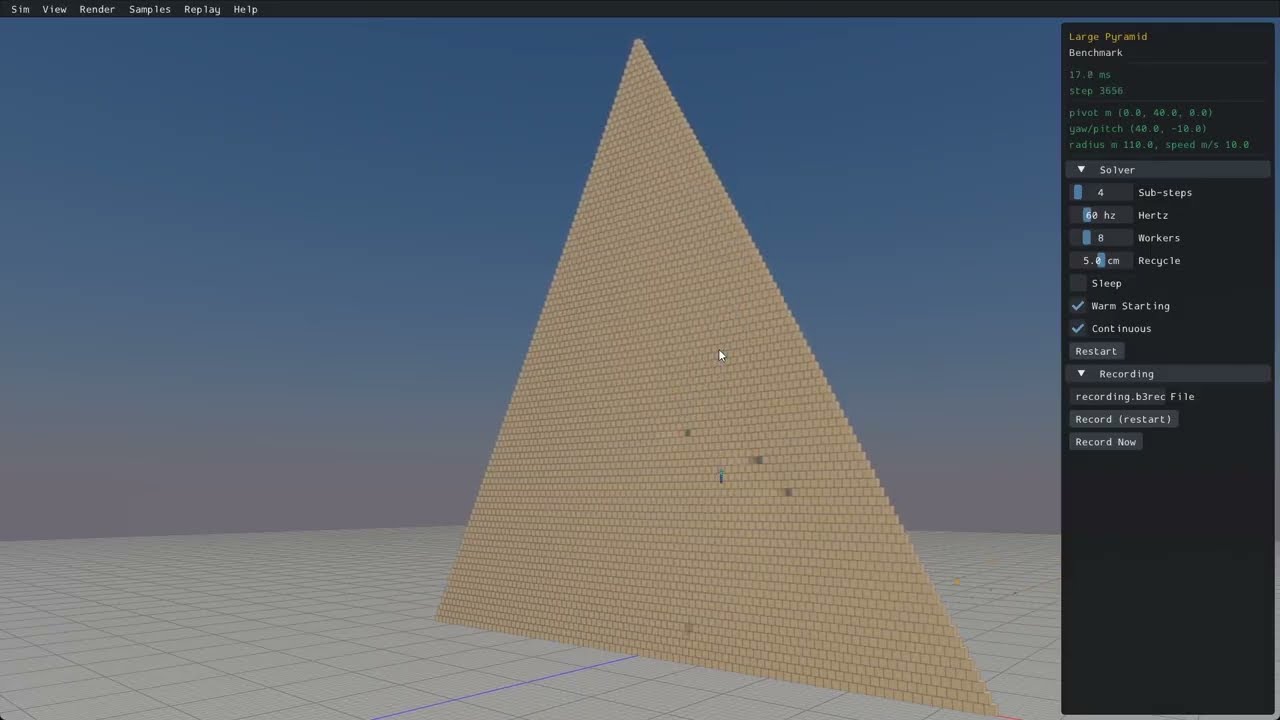
- Continuous collision detection
- Contact events
- Convex hulls, capsules, spheres, triangle meshes, and height fields
- Multiple shapes per body
- Collision filtering
- Ray casts, shape casts, and overlap queries
- Sensor system
- Character mover
- Robust Soft Step rigid body solver
- Continuous physics for fast translations and rotations
- Island based sleep
- Revolute, prismatic, distance, motor, weld, and wheel joints
- Joint limits, motors, springs, and friction
- Joint and contact forces
- Body movement events and sleep notification
- Data-oriented design
- Written in portable C17
- Extensive multithreading and SIMD
- Optimized for large piles of bodies
- Cross platform determinism
- Recording and replay
- Uses sokol to run with D3D11 on Windows, Metal on macOS, and OpenGL 4.5 on Linux.
- Graphical user interface with imgui.
- Many samples to demonstrate features and performance.
This uses the presets in CMakePresets.json.
- Windows:
cmake --preset windowsthencmake --build --preset windows-release - Linux:
cmake --preset linux-releasethencmake --build --preset linux-release - macOS:
cmake --preset macosthencmake --build --preset macos-release - Windows MinGW:
cmake --preset mingw-releasethencmake --build --preset mingw-release
Run the samples app (must be in the Box3D directory).
- Windows:
.\build\bin\Release\samples.exe - Linux:
./build/bin/samples - macOS:
./build/bin/Release/samples
- Install Visual Studio
- Run
build_vs2026.bat - Open and build
build/box3d.slnx
- Run
build.shfrom a bash shell - Results are in the build sub-folder
- mkdir build
- cd build
- cmake -G Xcode ..
- Open
box3d.xcodeproj - Select the samples scheme
- Build and run the samples
- Emscripten SDK
emcmake cmake -B build -DBOX3D_SAMPLES=OFFcmake --build build
Box3D uses SSE2 with WebAssembly. Define BOX3D_DISABLE_SIMD to disable SSE2.
- mkdir build
- cd build
- cmake ..
- cmake --build . --config Release
- cmake --install . (might need sudo)
The core library has no dependencies beyond the C runtime (and libm on Unix). Linking it
gives you the box3d::box3d target.
I recommend to use FetchContent:
include(FetchContent)
FetchContent_Declare(box3d
  GIT_REPOSITORY https://github.com/erincatto/box3d.git
  GIT_TAG v0.1.0)
FetchContent_MakeAvailable(box3d)

target_link_libraries(my_app PRIVATE box3d::box3d)
For a vendored copy or git submodule, point add_subdirectory at it:
add_subdirectory(extern/box3d)

target_link_libraries(my_app PRIVATE box3d::box3d)
To use a copy installed with cmake --install, find the package:
find_package(box3d 0.1 REQUIRED)

target_link_libraries(my_app PRIVATE box3d::box3d)
See docs/hello.md for a minimal first program.
The Box3D library and samples build and run on Windows, Linux, and Mac.
You will need a compiler that supports C17 to build the Box3D library.
You will need a compiler that supports C++20 to build the samples.
Box3D uses SSE2 and Neon SIMD math to improve performance. SIMD can be disabled by defining BOX3D_DISABLE_SIMD.
The user manual lives in docs/ and is built with Doxygen. Enable the BOX3D_DOCS CMake option and build the doc target.
Pull requests are currently disabled. Instead, please file an issue for bugs or feature requests. For support, please visit the Discord server.
Please file an issue or start a chat on discord. You can also use GitHub Discussions.
Box3D is developed by Erin Catto and uses the MIT license.
Support development of Box3D through Github Sponsors.
Please consider starring this repository and subscribing to my YouTube channel.
LLMs are used in the following areas:
- unit tests
- samples app
- migrating code between Box2D and Box3D
- build configuration
- code reviews
- benchmarking
Elsewhere all code is developed and written by me. I take responsibility for every line of code in Box2D/3D.