Repository navigation
Releases: SynoPiia/PSXS5
Release list
PSXS5 2.2.0

PSXS5 2.2.0: SwanStation as a third emulator, games from USB drives, a smooth boot intro, and a long list of fixes from testers.
SwanStation
- A third emulator (Settings → System → Emulator): SwanStation, libretro's fork of DuckStation, drawing with Vulkan and running its fast CPU recompiler. Your settings (internal resolution, PGXP, true colour, anti-aliasing, texture filtering, fast CD loading, widescreen, overclock...) apply to it too, and it uses the same memory card as the other emulators, so your saves follow you. Thanks to darkxex's SwanStationPS5 port, which PSXS5 builds on.
- Save states say which emulator made them. Each emulator has its own state format; loading a state made by another one now tells you which, instead of calling the slot empty.
Games on USB drives
- Games are found in
PSXS5/,PSXS5/games/ordata/PSXS5/games/on any USB drive or extended storage, in every format PSXS5 reads (CHD, CUE/BIN, PBP, ISO, IMG, MDF, CCD, M3U). - The BIOS is taken from
PSXS5/biosordata/PSXS5/bioson the drive when the console'sbiosfolder has none.
New options
- Run-ahead (1 or 2 frames): less input lag.
- NeGcon analog gas and brake on R2 / L2 for NeGcon racing games, and the touchpad as a PlayStation Mouse for mouse games.
- PS1 startup intro: the white Sony screen and the PlayStation logo, as on the real console.
- Disc launch animation: the disc slides out of its case and spins up when a game starts (it can be switched off).
- Sharpening, true colour (32-bit, no dot pattern), smooth video colours for FMV, and faster screen effects (Beetle).
- RetroAchievements sign-in from the phone page. Your password goes to retroachievements.org only; PSXS5 keeps the sign-in token.
- Settings tabs across the top, switched with L1 / R1.
Fixes
- The boot intro and screen effects show properly with Beetle. The white Sony screen froze and jumped between old pictures, and effects drawn straight to the screen (Final Fantasy VII's battle swirl) didn't show.
- No more stall when a game switches video modes (the white Sony screen to the PlayStation logo, menus to gameplay): Beetle's renderer was rebuilt each time, for seconds at high internal resolutions.
- Effects compile once. Beetle's shader cache is saved, so a new effect only stutters the first time it's seen.
- Save states work in Final Fantasy VII and other big games: rewind now keeps Beetle's real state size (about 4 MB, not 16 MB), which left too little memory to save.
- No black screen while a game loads: the disc keeps spinning with "Loading...".
- Fast CD loading no longer breaks video sound: the disc is read at normal speed while a video plays.
- Disc changes register: the lid stays open for a moment, so games like Final Fantasy IX notice the new disc.
- Supersampling is done by PSXS5 at the screen's resolution (it flickered before).
- Resume no longer presses Cross in the game.
- Gran Turismo and other stick games start in analog mode with Beetle, and stay analog when an older save state is loaded.
- CHD, MDF and CCD games get their serial, so region and covers work. Covers can also be found by name when a disc's serial is unknown, and every downloaded cover is listed in the cover picker.
- Multi-disc games lying loose in the games folder are one game on the shelf. A playlist made on a PC is ignored when its discs aren't beside it.
PC tool (tools/psxs5_sync.py)
- Every disc of a multi-disc game is copied, whether the discs lie loose or sit in one folder (or archive) per disc.
- Progress within each file, and the copy speed.
- The working folder is
PSXS5_readybeside your games (same drive, so games are linked rather than copied), and disc images are removed from it once uploaded. - It no longer assumes a drive letter.
Updating
From 2.1.1 or later: Settings → About → Check for updates. From 2.0: install by FTP once (copy the PPSA97510 folder to /data/homebrew/), as its updater can't start new versions.
PSXS5 2.1.1
PSXS5 2.1.1: everything in 2.1.0, with a fixed updater.
⚠️ Coming from 2.0? Install this one by FTP
The in-app update in PSXS5 2.0.0 writes the new files without the permission the PS5 needs to start them, so after updating the console says "Can't start the game or app". Your games, saves and settings are safe in /data/PSXS5.
- Install 2.1.1 by FTP: unzip it and copy the
PPSA97510folder to/data/homebrew/(orpython tools/psxs5_sync.py app --app-dir PPSA97510 --host <PS5 IP>). - Already stuck after updating from 2.0? Copy the folder again by FTP. Or, in FileZilla, set the permissions of
eboot.bin,lapy.elfandsce_module/libc.prx(in/data/homebrew/PPSA97510) to 777.
From 2.1.1 on, Settings → About → Check for updates installs new versions safely. PSXS5 2.0.0 won't offer updates anymore, so it can't break itself.
Fixed
- The updater makes the new files executable, as an FTP copy does.
- It reads the whole list of releases.
New in 2.1
Themes, the DualSense as a light gun, adaptive triggers, profiles, anti-aliasing and texture filtering, PAL at 60 Hz, game info and known fixes from DuckStation's database, DuckStation's cheats and patches, text guides, bezels, auto-save and more: see the 2.1.0 notes.
PSXS5 2.1.0
⚠️ Coming from 2.0? Install 2.1.1 by FTP instead. PSXS5 2.0.0's in-app update leaves the app unable to start ("Can't start the game or app"); 2.1.1 explains the fix. Your saves are safe.
PSXS5 2.1.0: themes, light guns, adaptive triggers, profiles, text guides, game art and a lot more.
Looks
- Five themes (Settings → Library → Theme): Classic, Neon Arcade, Memory Card, Memory Card Dark and Record Shelf, each with its own colours, fonts and shelf. Memory Card lays the games out in a grid with a detail card; Record Shelf shows them as spines on a shelf. The in-game screens follow the theme.
- Shaders for Beetle on the GPU (Settings → Display → Shader): sharp bilinear and a CRT look (scanlines, RGB grille, glow).
- Picture colours (Settings → Display → Colour): brightness, and Vivid, Soft, Warm, Cool or Black and white.
- Game artwork borders (Settings → Display): the game's own artwork around a 4:3 picture, from The Bezel Project, downloaded the first time.
- Beetle widescreen when a game has no widescreen code, and HD texture packs for Beetle.
Controller
- The DualSense as a light gun for GunCon and Justifier games (Time Crisis, Point Blank, Die Hard Trilogy...): point the controller at the screen to aim, R2 fires, L2 reloads, R3 re-centres. On automatically for known gun games (Settings → Controls → Light gun).
- Adaptive triggers: R2 firms up like a gas pedal in racing games and clicks like a trigger with a light gun.
- Gas and brake on R2 / L2 in racing games where Cross is the gas and Square the brake (Gran Turismo, Ridge Racer, Colin McRae...).
- Rumble feel: Classic, Soft, Punchy, or Punchy in the triggers too.
- Stick dead zone and response, for drifting sticks or careful aiming.
- Player order: choose which controller is player 1, 2, 3 and 4.
- Light bars: player colours or the game's cover colour.
Playing
- Auto-save (Settings → System, off unless you turn it on): every 5, 10 or 15 minutes into three slots; load them from the PSXS5 menu → Auto-saves.
- Text guides: put a walkthrough
.txtnext to a game (or in itsguidesfolder) and read it from the PSXS5 menu → Guide. Monospace, so ASCII tables line up; your place is kept. - Manuals: page images in
<game folder>/manual/, read from the PSXS5 menu. - The PSXS5 menu shows the time and how long you've been playing.
- Overclock (Settings → System): fewer slowdowns in games that slow down on a real console.
- Screenshots (touchpad + Square), a speedrun timer (touchpad + Triangle / Circle), next disc (touchpad + R1).
- Find a code: search the game's memory for a value (lives, money...) and turn it into your own cheat.
- Achievement pop-up styles (banner, compact, big trophy) and a progress tracker you can switch off.
Graphics (Beetle PSX HW)
- Anti-aliasing (MSAA 2x to 16x), texture filtering (bilinear, xBR, SABR, JINC2, 3-point; 2D sprites can stay sharp), supersampling and deinterlacing (weave, bob, motion-adaptive): Settings → Graphics.
- PAL at 60 Hz (Settings → System): European games at the American speed.
- Known game fixes: PSXS5 reads DuckStation's game database (downloaded once on the console) and, for that game only, turns off the settings it's known to break with (PGXP, widescreen, upscaling, filtering).
Shelf
-
Game info in Details from that database: genre, year and developer, number of players. A 2+ players category on the shelf. Light-gun and racing games are recognised from it too.
-
Profiles (Settings → System → Who's playing): each person keeps their own memory cards, save states, settings, play time, favourites and RetroAchievements sign-in. Your existing data is the main profile. Sign a profile in with
python tools/psxs5_sync.py ra-login --profile "<name>". -
Title screen and gameplay pictures in Details, downloaded with the covers.
-
RetroAchievements profile (Settings → Achievements → Your profile, or Square in Your library): points, games mastered, recent unlocks, games closest to mastery. Covers show a trophy badge with your progress.
-
Idle slideshow: after a minute without a button on the shelf, your games go by full screen.
-
Surprise me (touchpad), hide a game (L3 in Details), Your library stats, per-game tips in Details.
-
The phone page has a Saves tab (memory cards and save states: download, upload, slot pictures) and notes on save-state slots.
Cheats and patches
- Patches from the same database, listed first in Cheats with a Patch tag: widescreen, 60 fps, NTSC mode for European games, and fixes. Widescreen picks the 16:9 code when a game offers several ratios.
- A second source of cheats: DuckStation's cheat database, by the disc's serial, for games libretro-database has nothing for (Persona, Persona 2, Diablo and many more). Downloaded automatically, like the others.
Fixes
-
The cheat, achievement and memory-card lists scroll to the very last row (it stayed hidden under the edge).
-
Games whose
.cuehas no quotes around the file name, or whose.binwas renamed, now get their serial: region and cover download work again for them. Games still without one are named in the log. -
The shelf runs faster (about 10 ms a frame instead of 30).
-
The shelf clock follows the console's time zone and 12/24-hour setting.
PSXS5 2.0.0
PSXS5 2.0.0: a second emulator drawn on the GPU, up to 16x, plus automatic cheats and a better achievements screen.
Beetle PSX HW, on the GPU
- A second emulator: Beetle PSX HW (Mednafen), the accurate one, rendering on the PS5's GPU through Vulkan.
- Internal resolution up to 16x (native, 2x, 4x, 8x, 16x), at full speed: Parasite Eve holds 60 fps at 16x.
- PGXP: no more wobbling polygons or warping textures (Settings → Graphics → Precise geometry, on by default).
- Emulator: Automatic (Settings → System) picks Beetle when the BIOS for the game's region is there, and PCSX-ReARMed otherwise. You can also choose either one, per game.
- One memory card per game, whichever emulator runs it. Your existing saves work in Beetle; the memory card manager shows them as before.
- Save-state pictures, the quick-resume picture, scanlines, the TV frame and the menus all work over Beetle's picture.
- The whole screen now reaches the TV through Vulkan; the old path stays as a fallback.
Beetle needs your own BIOS for the game's region: scph5500.bin (Japan), scph5501.bin (USA), scph5502.bin (Europe) in /data/PSXS5/bios/. The PC tool recognises your dumps and gives them the right names:
python tools/psxs5_sync.py bios <your BIOS files> --host <PS5 IP>Cheats for every game, automatically
- PSXS5 knows all 1,961 PlayStation cheat files of libretro-database. When a game starts, it finds that game's file and downloads it. No PC tool and no setup.
- Smarter matching: "Disney-Pixar's" or "Disney-Pixar", "VII" or "7", "The Legend of..." or "Legend of..., The" all match; sequels never mix; full GameShark sets win over one-code files.
- Cheats work with both emulators.
Achievements
- Two tabs: Achievable (closest first) and Achieved.
- Progress bars for counted achievements (18/80 dragons, 23%), and a tracker in game that pops up when one moves.
- Settings → Achievements: switch the unlock pop-ups and the tracker off if you'd rather not see them while playing.
- Fixed: discs weren't recognised (no achievements loaded) in 1.2.0.
- Every image format is recognised with both emulators, PBP and CHD included.
- When your version of a game isn't in any set (some PlayStation Store or patched images), PSXS5 now says so.
Picture
- Crop black edges (Settings → Display): hides the black lines many games leave at the top and bottom, which an old TV hid. With Stretch, the picture fills the screen.
- With Stretch, the border and TV frame no longer shrink the picture.
Your own covers
Suggested in #1.
- By name: an image in
/data/PSXS5/covers/named like the game's title, disc file or serial (Crash Bandicoot.png,SCUS-94900.jpg) is used automatically. - By hand: on the shelf, △ (Details), then □. Choose any image from
covers/or the game's folder, with a preview.
Seeing your games
- Unlocking
/data: PSXS5 asks LegacyJB, etaHEN (port 9028, with its Legacy CMD server on) and PS5SX2 Helper. Settings → System → Allow PSXS5 in PS5SX2 Helper adds PSXS5 to that helper's whitelist. The README's new Unlocking /data section explains which one to use. - Games copied another way (FileZilla, a file manager, a USB drive):
python tools/psxs5_sync.py index --host <PS5 IP> --fix-cueslists them for PSXS5 and repairs.cuefiles that point at renamed.binfiles. - The empty shelf now shows where games and the BIOS go, and why it's empty when
/datais locked. - Cheats are found even when
/datais locked.
Install or update
- From 1.1 or newer: Settings → About → Check for updates. This needs
/dataunlocked. - By hand:
- Extract
PSXS5-v2.0.0.zip. - Copy
PPSA97510to/data/homebrew/on the PS5, with permissions777. Or run:python tools/psxs5_sync.py app --app-dir PPSA97510 --host <PS5 IP>
- Close PSXS5 completely (PS button → Close Game) and start it again.
- Extract
Your games, saves, states and settings stay as they are.
Needs
- A jailbroken PS5 with etaHEN and kstuff (developed on firmware 13.60), and LegacyJB loaded so PSXS5 can see your games folder.
- ShadowMountPlus.
- Your own games, and for Beetle PSX HW your own BIOS dump.
No BIOS files, games or keys are included, and none will be provided.
Known limitations
- Beetle PSX HW needs the BIOS of the game's region; without it, PCSX-ReARMed runs the game (up to 2x).
- The first time a new effect appears, Beetle prepares its shader: a short hitch, once.
- Shaders (CRT filters beyond scanlines) aren't there yet.
Licences
PSXS5 is GPL-3.0-or-later. Beetle PSX HW (GPL-2.0-or-later), PCSX-ReARMed (GPL-2.0-or-later), Mesa RADV (MIT), rcheevos (MIT) and the rest: see PPSA97510/licenses/ and the source at this release's tag.
PSXS5 1.2.0
PSXS5 1.2.0: a redesigned interface and eleven new features.
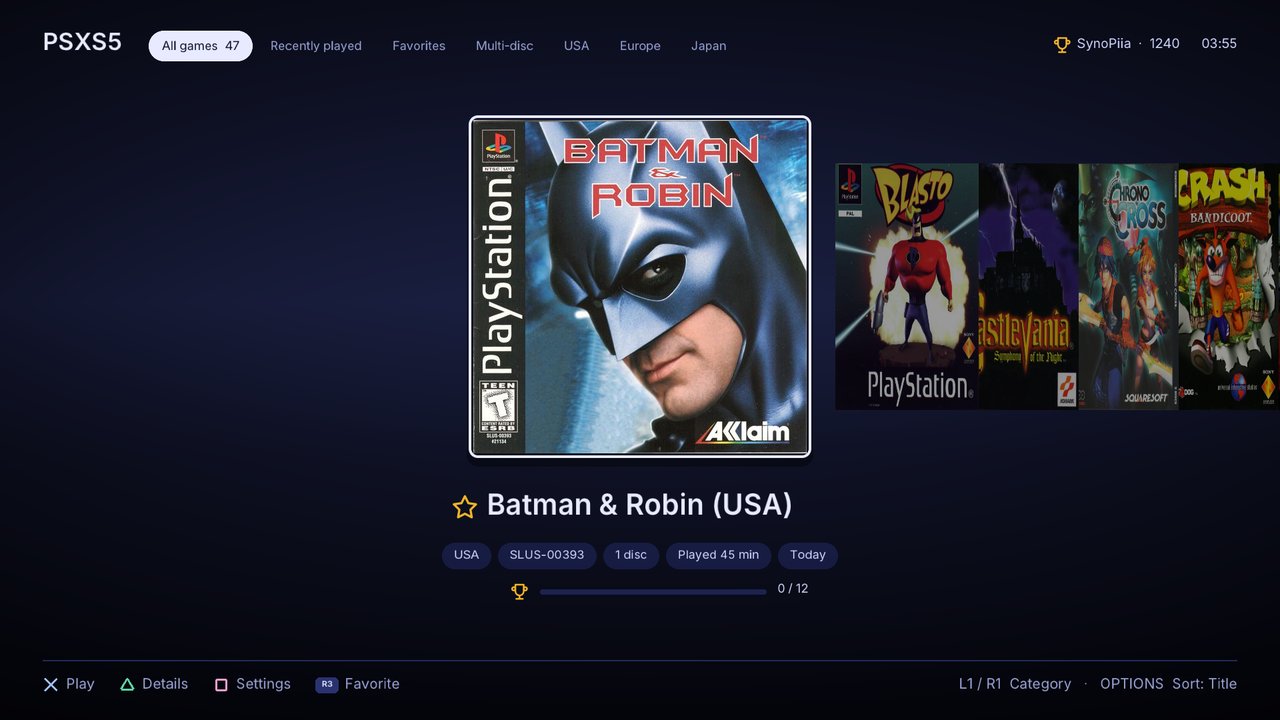
New interface (1.1)
- Shelf:
- Categories (L1/R1): All, Recently played, Favorites, Multi-disc, and each region.
- Sorting with OPTIONS, and favorites with R3.
- Tags for play time and last played, plus achievement progress.
- A dark background, or one tinted by the selected cover (Settings → Library → Background).
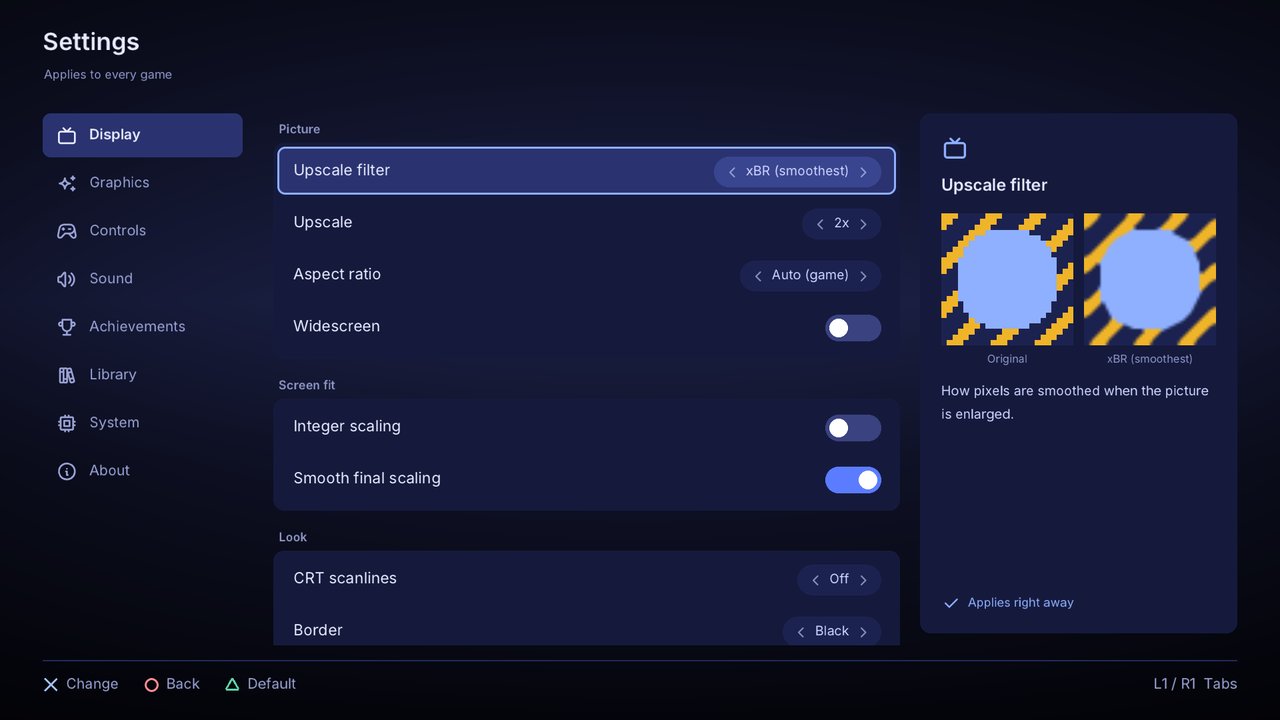
- Settings:
- Eight tabs, grouped cards and switches.
- A help panel that explains each setting.
- Per-game settings: L2/R2 switch between this game and all games.
- Button mapping: a DualSense drawing, any button to any PS1 button, and presets.
- In-game menu: a side panel with the cover, icons and save slots.
- Snappier: text and panels use the renderer's fast paths, and menu repeat is quicker.
- Languages: English, Français, Português (Portugal), Español (Latinoamérica) and 日本語.
New in 1.2
- Quick resume: leave a game and press ✕ on it later to choose Continue, shown with a picture of where you were, or Start over.
- Save-state thumbnails on every slot.
- Rewind and fast forward: hold the touchpad and press L2 to rewind, or R2 to fast forward. Turn Rewind on in Settings → System first.
- One-switch widescreen: turns on the game's widescreen code and shows 16:9.
- CRT look: light or strong scanlines, and a soft glow or a 90s TV around the picture.
- Up to 4 players through a multitap.
- Fan translations: a
.ppfpatch next to a game is applied automatically. - Memory card manager: see each card's saves, export them, and import
.mcr,.mcd,.srmor.gmecards. - Achievements list with badges and progress, in the in-game menu.
- Settings from your phone: turn it on and scan the QR code shown on the console.
- Updates from GitHub: PSXS5 tells you when a new release is out and installs it from Settings → About.
Install or update
- From 1.1 or newer: Settings → About → Check for updates installs 1.2 directly. This needs
/dataunlocked through etaHEN, and the repository to be public. - From 1.0, or by hand:
- Extract
PSXS5-v1.2.0.zip. - Copy
PPSA97510to/data/homebrew/on the PS5, with permissions777. Or run:python tools/psxs5_sync.py app --app-dir PPSA97510 --host <PS5 IP>
- Close PSXS5 completely (PS button → Close Game) and start it again.
- Extract
Your games, saves, states and settings stay as they are.
Needs
- A jailbroken PS5 with etaHEN and kstuff (developed on firmware 13.60).
- ShadowMountPlus.
- Your own games, and optionally your own BIOS dump.
No BIOS files, games or keys are included, and none will be provided.
Known limitations
- Rendering is on the CPU: internal resolution goes up to 2x. A Vulkan renderer is in progress for 2.0.
- Rewind keeps about 8 seconds and uses around 200 MB of memory while it's on.
- Players 3 and 4 depend on the PS5 reporting the extra controllers to PSXS5.
PSXS5 1.0.0
The first release of PSXS5 (PlayStation X Super 5), a PlayStation 1 emulator that runs as a native app on a jailbroken PS5.
What's included
- The PSXS5 app (
PPSA97510), built on PCSX-ReARMed with its built-in HLE BIOS. - Cover-flow shelf. Covers matched by disc serial and downloaded on the console. Flat or 3D-box style, with interface sounds (five styles, or off).
- Formats:
.cue/.bin,.chd,.pbp,.iso,.img,.mdf,.ccd, and.m3uplaylists for multi-disc games. - Video:
- internal resolution native or 2x
- upscale 1x to 4x with Sharp, Scale2x/3x or xBR
- aspect ratios: auto, 4:3, 16:9, 16:10, 1:1 or stretch
- integer scaling, smoothing, dithering, FPS counter
- RetroAchievements: sign in from your PC with the token only, unlock banners, leaderboards, hardcore mode.
- Cheats: RetroArch
.chtsupport, automatic per-game matching, and toggles from the in-game menu. - Play features: save states (10 slots), per-game memory cards, disc changing, reset.
- DualSense: analog with rumble, and the left stick as a D-pad on digital-only games.
- PC tools (
tools/psxs5_sync.py): prepare and upload your library, then covers, cheats, BIOS, RetroAchievements sign-in and app updates. PSXS5-symbols.txt: turns crash addresses in the log into function names, for bug reports.
What you need
- A jailbroken PS5 with etaHEN and kstuff (developed on firmware 13.60)
- ShadowMountPlus
- An FTP client, or the included PC tool
- Your own games, and optionally your own BIOS dump
No BIOS, games or keys are included, and none will be provided.
Install
- Extract
PSXS5-v1.0.0.zip. - Copy the
PPSA97510folder to/data/homebrew/on the PS5, and set its permissions to777(recursively). Or run:python tools/psxs5_sync.py app --app-dir PPSA97510 --host <PS5 IP>
- Put your games in
/data/PSXS5/games/<Game name>/. - Optionally, put your BIOS in
/data/PSXS5/bios/. - Restart ShadowMountPlus and start PSXS5 from the home screen.
The README has the controls, settings and every PC-tool command.
Known issues
- Rendering is on the CPU: internal resolution goes up to 2x, and HD texture packs aren't supported.
- Closing the app with the PS button crashed the console once during testing, with
/dataunlocked through etaHEN. If it happens, set Settings → System → Unlock /data with etaHEN to Off.
RADV build deps-radv-7b59ef27 (dependency for v2)
RADV from mihawk-99/PS5_Mesa 7b59ef27c1b09b9671bc4153c41940c3155c3af2, built by PS5_Vulkan fde9e3798c2ec1d8fccc90d5067cd6060490607f. Not an app release.