Repository navigation
Supporter Totals
Supporter totals add up the events TDSBLive has recorded for a selected period. They help you display support on stream. They are not a bank statement and do not tell you what a platform will pay out after fees or other adjustments.
Open the supporter totals area and select the period you want. A stream period uses the stream start time you set. Calendar periods use the configured financial time zone; weeks start on Monday.
Use Use browser time zone if that matches your reporting needs. If you change the time zone or stream start, events near the boundary can move into or out of the selected period. That is a change in the view, rather than proof that an event disappeared.
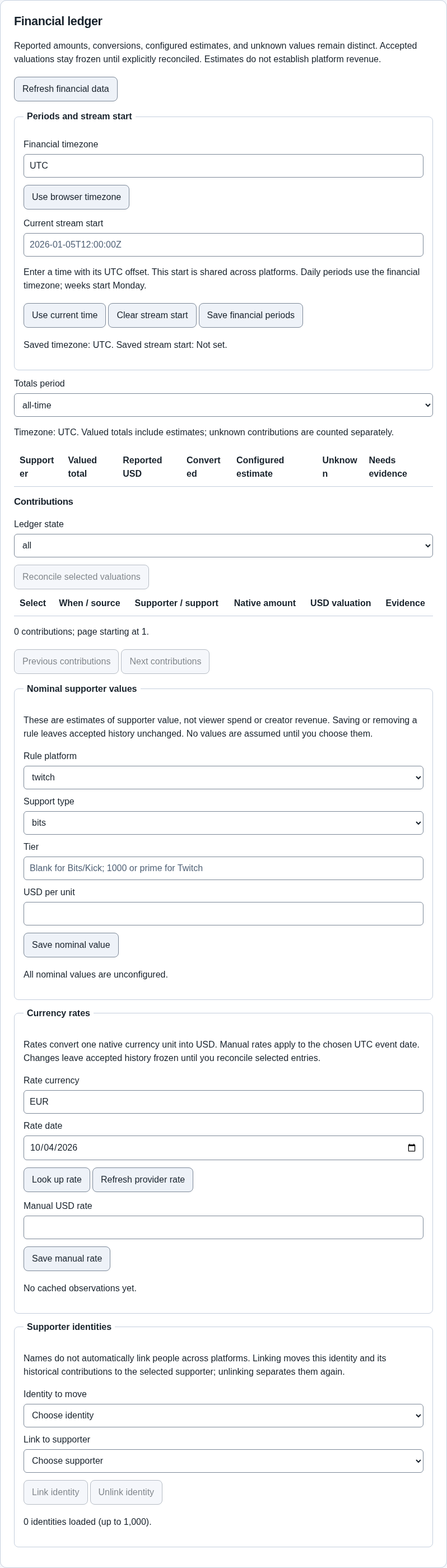
The picture uses example entries. Check both the period and the currency labels when reading your own totals.
An exact amount comes from an event with a known monetary value. A nominal estimate uses an assumed value where the actual amount is unavailable. An unknown amount cannot safely be turned into a money total.
For example, ten events with no known cash value should not silently become ten dollars. An estimate should remain visibly different from a confirmed amount.
Amounts in different currencies are not automatically interchangeable. A USD total and a EUR total represent different currencies. Check the chosen currency when using a ledger-based goal widget.
Before a new stream, choose Use current time for the stream start if you want the stream period to begin now. Do not press it halfway through a show unless you intend to change the period's boundary.
A connection's baseline may suppress old events when it first connects. Connecting today is not a guarantee that all historical platform activity will be imported.
A person may appear under different identities on different services. Use identity-linking controls only when you know the accounts belong to the same person. Similar names are not enough by themselves.
Review the combined result after linking. Keep a backup before large changes so you can recover an earlier known state if necessary.
Local qualification uses made-up, owned events to check calculations and presentation without spending money. Actual paid Rumble Rant, Ko-fi donation and Twitch Bits delivery remains unverified. Do not ask someone to pay just to complete the basic setup instructions.
A Goal widget in newer builds can display a manual amount or a selected currency's ledger total. Read Advanced editor and widgets for that feature and its version requirement.
Next: Automation, or Everyday use.