Repository navigation
The SmarthouseApplication API

The SmarthouseApplication API is your interface to communicate with the Smarthouse system - It makes your app loadable from the system, and defines what will happen as it's loaded on.
When creating your application, you must have one class that extends SmarthouseApplication:
public abstract class SmarthouseApplication {
    protected static void launch(final SensorsSimulator simluator, final Boolean showSimulatorGui) throws Exception;

    public abstract void onLoad() throws Exception;
    public abstract String getApplicationName();

    protected AppBuilder getAppBuilder();
    protected <T extends Service> T getService(final ServiceType $);

    protected final void saveApplicationData(final Object data, final String... path);
    protected final <T> T readApplicationData(final String... path);
}This function will run once, when the application loads.
In here you should determine the design of the application's GUI with the AppBuilder.
Here you can ask the system for various services, and use them to connect to sensors, send alerts and etc.
This function should return the name of your application as a String.
For example:
@Override public String getApplicationName() {
    return "SOS Application";
}The launch method loads the system in developer mode, and can possibly load a given simulator and communicate with its simulated sensors. This method is intended mainly to help you do live tests.
The launch parameters determine if a simulator will be run, and if that simulator will present it's GUI.
- If you want to run a simulator, call
launch(simulator, i_want_gui)(i_want_guiis a flag determining if to present a GUI or not). - If you're not interested in running a simulator, call
launch(null,false)
Example main:
public static void main(String[] args) throws Exception {
    launch(simulator, true);
}
To learn more about how to use to test your application, go to here.
With this object you can design the application's GUI.
Essentially this is a fun wrapper to JavaFX that gives a unified look to all of the applications in the system.
But if you really want, you can still use JavaFX.
For more information go to here.
With the getService function you can ask the system for various services that will allow you to connect to sensors, send alerts, and more.
For more information go to here.
store data on the house's storage - saves data on the Smathouse's File System for persistent keeping. The data will be stored on the given File System path.
read data from the house's storage - read your saved data from the File System. The data from the given path will be returned. If no data was present on that path, null will be returned.
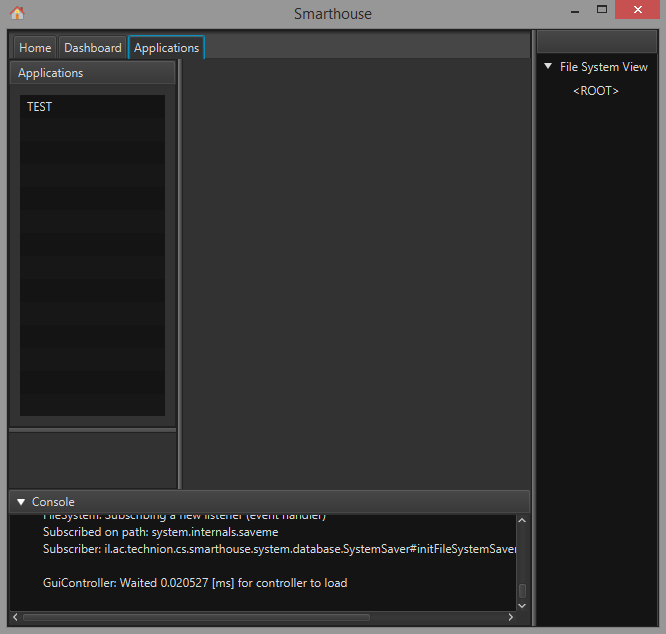
You can create the following class and run its main method:
import il.ac.technion.cs.smarthouse.developers_api.SmarthouseApplication;

public class TestApp extends SmarthouseApplication {
    public static void main(String[] args) throws Exception {
        launch(null, false);
    }

    @Override
    public String getApplicationName() { return "TEST"; }

    @Override
    public void onLoad() throws Exception {}
}
The Smarthouse should now start in developer mode:

Overview
Quick Start
Smarthouse Usage for Owners
Development Manuals
Continuous Development
Misc.