Repository navigation
Epic 2 Multi Server and Themes
Status: Released in 0.4.0. Everything marked Done below is in that release; see the changelog for the full list. Watch party and screen sharing are still Beta. A small follow-up, 0.4.1, is upcoming (see the end of this page).
Like everything in Mumcord, this stays client-only and works with unmodified Mumble servers.
| Feature | Status |
|---|---|
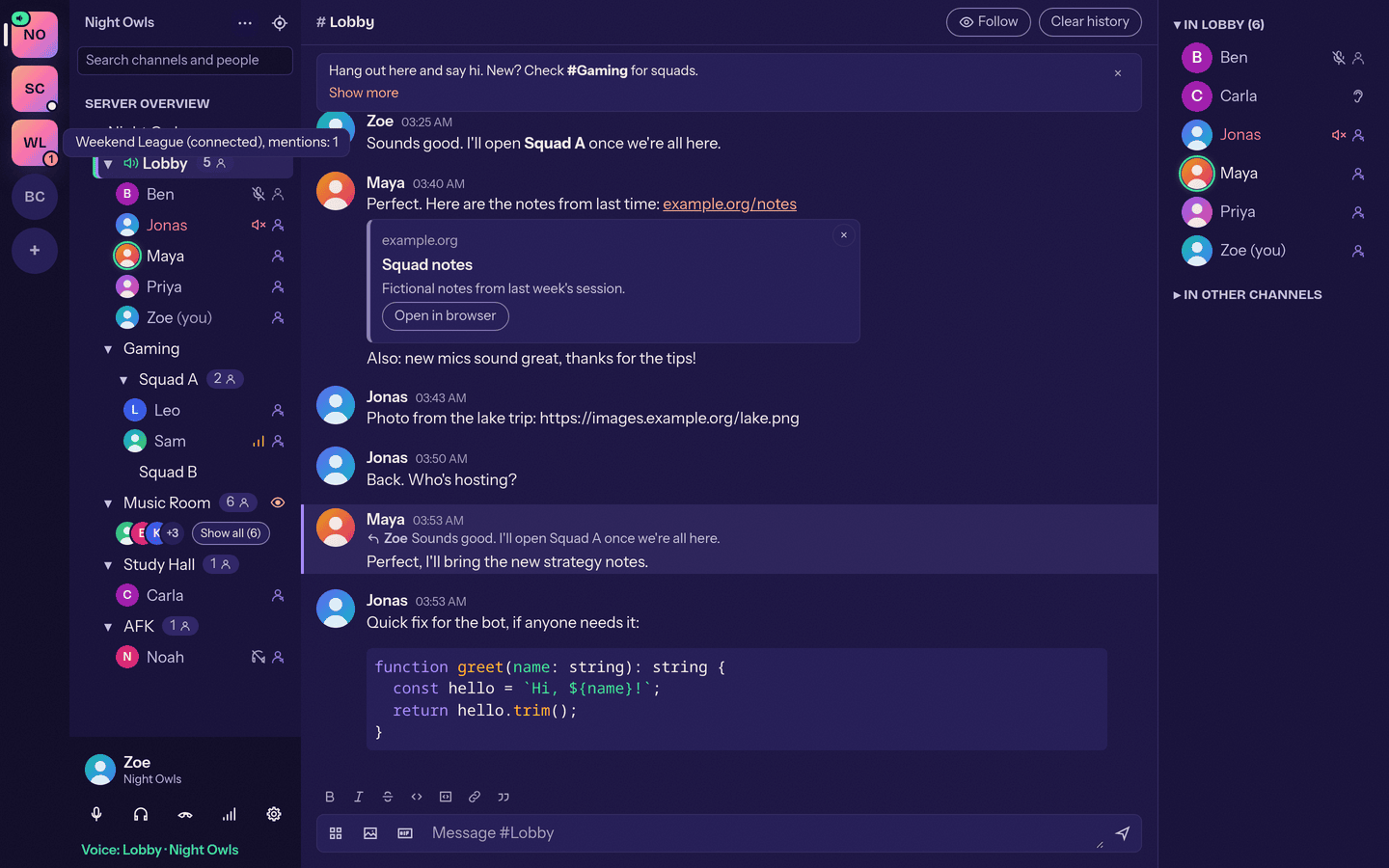
| Several servers at once: up to five (configurable from 1 to 15); talk on one, read, write and get notifications on all. Friends on another server can be joined with one click. | Done |
| Password retry: when a server or account password is wrong, a dialog opens on that server where you can type a new one, optionally save it, and connect again. | Done |
| Connection quality: ping, packet loss and bandwidth for yourself and others, with an optional signal icon for weak connections. The details are collapsed by default and open from a "Connection" row in the person menu and profile card. | Done |
| Per-person settings: volume, local mute and note for a person sit in a collapsible "Settings for (name)" section of the profile card. | Done |
| Big servers: calmer talking indicators, a "Syncing big server" state, switches to hide empty channels and show talking people first. | Done |
| Listeners inline: people who only listen to a channel are shown in the normal member list with a small ear icon instead of a separate group. | Done |
| Feature | Status |
|---|---|
| Dark and light version for every theme. The Dark / Light / System switch picks which version is shown. | Done |
| Theme picker: every theme is a round gradient swatch. Presets come first, your own themes follow under "Your themes", and a "+" circle starts a new one. | Done |
| Saved themes: own and imported themes can be saved, renamed and deleted. | Done |
| Theme editor: opens as a dialog with a Light and a Dark colour column and a Preview button to try the theme across the whole app before saving. | Done |
| Shareable themes: a theme can be shared as a text string that appears as a preview card in chat with one-click import (both versions are included). | Done |
| New look: styling in line with the website, styled dropdowns and a consistent settings layout. | Done |
| Translations of all new texts in the other 23 languages. | Done |
| Feature | Status |
|---|---|
| Replies: a Reply action on every message. The sent message starts with a short quote, so official Mumble clients show it readably too. | Done |
| Reply = mention: a reply to your own message counts as a mention (sound, notification, badge). | Done |
Quote shortcut: a line starting with "> " becomes a quote block; there is also a Quote button in the formatting toolbar. Emoticons like >_> stay plain text. |
Done |
| Avatar at the top of tall messages, plus a sticky banner that keeps the sender's avatar and name visible while you scroll through a long message. | Done |
| Link menu: right-click a link for "Copy link" and "Open link". | Done |
| Instant send feedback: the input clears at once and the message shows greyed out until confirmed; on failure it offers Retry / Delete and keeps your text. | Done |
| Dismissible welcome message and channel description, remembered per server and channel; they return when the text changes. | Done |
| Apps menu next to the image button in the composer: "Share screen" and "Watch together". | Done |
| Feature | Status |
|---|---|
| Bitrate slider in Settings, Audio: from 16 kbit/s up to the highest value the server and protocol allow (shown next to the slider). | Done |
| Auto-ducking: video and screen-share sound is lowered while people talk, with a switch and a level slider in Settings, Audio. | Done |
| Feature | Status |
|---|---|
| Windows in-game overlay as a separate click-through window over the game (no injection, works with anti-cheat games; exclusive fullscreen hides it). The old window overlay is removed. | Done |
| OpenGL games on Linux: a ready-to-copy Steam launch option with a stable library path, for games that do not use Vulkan. | Done |
| HDR colours, borderless-fullscreen games, Flatpak Steam, fix for games crashing when Mumcord closes. | Done |
| Feature | Status |
|---|---|
| Watch party: watch a YouTube video in sync in a channel. It starts paused at 0:00, has a shared playlist everyone can add to, and newcomers are told about a running party within about two seconds. | Done |
| Loopback player: YouTube blocks the app's internal address, so Mumcord plays videos from a tiny page served only on your own computer (127.0.0.1, random port and token). Twitch is untested. | Done |
| Floating widgets: a watched screen share or a watch party opens in its own widget inside the app window. Drag it, resize it, collapse it or close it; position and size are remembered. | Done |
| Activity banners: a slim banner at the top of the channel chat shows a running share or party with a "Watch" / "Join" button. | Done |
| Activity sounds: short sounds when a party or share starts, someone joins or leaves, or someone watches your share, each with its own switch. | Done |
| Sharing warning: a red bar "You are sharing your screen" with an End button above your user panel, and a red "Live" ring on your avatar. | Done |
| Screen sharing between Mumcord users (VP9 video, optional sound). Linux X11 and Wayland capture work and were tested with several viewers. Windows and macOS capture are included, with sound of the shared window or app (Windows 10 version 2004 or newer, macOS 13 or newer). | Done |
| Direct connections between Mumcord users: encrypted peer-to-peer, asked once before first use, also used for full-size images. | Done |
Known limit of screen sharing: it needs a direct connection between the two people. Mumcord uses IPv6, router port mapping (UPnP, NAT-PMP, PCP) and the local network, and deliberately has no relay server, because Mumcord stays client-only. People behind carrier-grade NAT (common on mobile and some home connections) may not get a direct connection; "Watch" is then disabled and the reason is shown.
| Feature | Status |
|---|---|
| Linux packages: .deb, .rpm, AUR and AppImage for x86_64 and ARM64, a one-line installer and an opt-in "new version available" hint. | Done |
| GStreamer packaging: watch party video needs the GStreamer media plugins on Linux. The .deb, .rpm and AUR packages declare them as dependencies; the AppImage bundles them (about 190 MB). Package names on openSUSE are not verified yet. | Done |
Desktop integration: app-menu entry and mumble:// handler; the AppImage asks before adding itself to the menu. |
Done |
Rich-text comment editor, Linux tray tooltips, "Now gaming" join target, cancelling a running full-size image transfer: done in 0.4.0. Checking the game plugins with real games so the Beta features can leave Beta: planned.
A fix release, mainly for macOS:
- Local Network permission: macOS asks for it, and Mumcord explains it, so direct connections and local servers work.
- Clearer failure reasons when a connection cannot be made.
- Keychain and microphone prompts happen at sensible moments instead of repeatedly; each keychain item is read once per session and the microphone is opened only when used.
- Audio device list shows up even while no audio is running.
- Signed and notarized macOS builds, so Gatekeeper no longer warns.
- Multi-server prompt fix: a server's certificate-trust question is kept when another server fails to connect.
The plan may change. See Roadmap for later epics and Epic 1 for the base.