Writing Scripts
Scripts are basically the Game Logic of your game. Scripts can be attached to entities and modified using the Editor. They are made using C++ code that is executed during the "play" state.
Green Tea comes with it's on reflection system name gtreflect. It use llvm/libclang to parse your header files inside the src directory into two steps (prebuild and postbuild) and generate all the necessary files that the Engine needs for it's reflection.
Note: Because llvm is over 30GiB and takes a lot of time to build, I decided to not ship the code together with the Engine and force users to go through the pain of building it. Besides that the source code for gtreflect is available on github in other repository if you want to check it out or build it yourself.
You can create Scripts for your game logic using one of the two following alternatives:
- Using the editor: By right clicking on the
Content Browserand selecting Native Script -> Scriptable Entity. - You can also use Visual Studio to create your
Scriptsjust make sure you are creating under thesrcfolder as mention above.
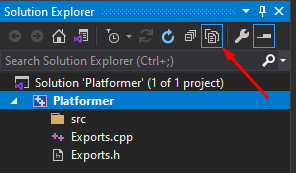
In order to make sure you see the src directory make sure you have selected Show All Files on your solution as shown in the picture bellow:
Unlike normal C++ classes, GreenTea Scripts have it's own signature that helps with reflection and they must inherit from ScriptableEntity:
using namespace gte;

CLASS()
Player : public ScriptableEntity {
//Your method(s) & field(s) definition goes here.
};
The CLASS() macro can optionally accept a name parameter, that will define the name that will be shown on the Editor. If this parameter is not defined the class' name will be used instead.
ScriptableEntity comes with a collection of virtual functions that can be overriden by your Scripts:
class ScriptableEntity {
public:
    //Called when the entity is spawned
    virtual void Start(void) {}
    //Called right before the entity is destroyed
    virtual void Destroy(void) {}

    //Called right after a Physics tick
    virtual void FixedUpdate(void) {}
    //Called every frame
    virtual void Update(float dt) {}

    //Called when the Entity starts a collision with an other rigidbody
    virtual void onCollisionStart(Entity other) {}
    //Called when the Entity stops colliding with an other rigidbody
    virtual void onCollisionStop(Entity other) {}
};At some point on your journey on making a game you will need to interact on Events such as a key on the keyboard was pressed, the a mouse button was pressed etc. The engine has two ways to interact with such events:
- Calling the
REGISTER()function to inform the Engine which method of an object should be called when an event like that occuries. For example:
REGISTER(EventType::KeyPressed, this, &Player::myMethod);
//where myMethod a user define function with the correct signature:
bool Player::myMethod(KeyCode keycode)
{
    //Your logic here
    return true;//Returning true means the Events is handled and thus will not be propagated any further.
}
- By Quering the
Inputclass for different types of events. For example:
void Player::Update(float dt)
{
    if(Input::IsKeyPressed(KeyCode::W))
    {
        //Your logic here
    }
}
NOTE: When you call REGISTER() it is very important to also call UNREGISTER before the object is destroyed. Forgeting to do that may cause the engine to crash.
Another critical feature that Scripts provides you, is the ability to export fields and editing them using the Editor. This can be done using the PROPERTY() macro. Right now the Engine and it's reflection system only supports exporting primitive types as well as some building types. Bellow you can find the full list of types:
bool-
char,byte(akaunsigned char) - Integers:
int16,int32,int64,uint16,uint32,uint64 - Floats:
float32,float64 - String:
std::string - User defined enumarations that have been defined using the
ENUM()macro - Asset:
Ref<Asset> - Entities
Entity
The PROPERTY() macro just like the CLASS() and ENUM() macro also accepts a name as parameter. But it can also accepts some extra parameters depending on the type. An example for each type bellow:
ENUM()
PlayerState : public byte{
    Idle = 0,
    Running,
    Jumping
};

CLASS()
Player : public ScriptableEntity{
public:
    //Define your methods
private:
    PROPERTY(name = "Active")
    bool mActive = false;
    PROPERTY(name = "Character", min = 1, max = 156)
    byte mAge = 26;
    PROPERTY(name = "Number", min = 0, max = 1024)
    uint64 mNumber = 256;
    PROPERTY(name = "Speed", min = -1000.0f, max = 1000.0f)
    float32 mSpeed = 0.0f;
    PROPERTY(name = "Name", length = 64)
    std::string mName = "Vasilis";
    PROPERTY(name = "State")
    PlayerState mState = PlayerState::Idle;
    PROPERTY(name = "Sound Clip")
    Ref<Asset> mSoundClip;
    PROPERTY(name = "Other Entity")
    Entity mEntity;
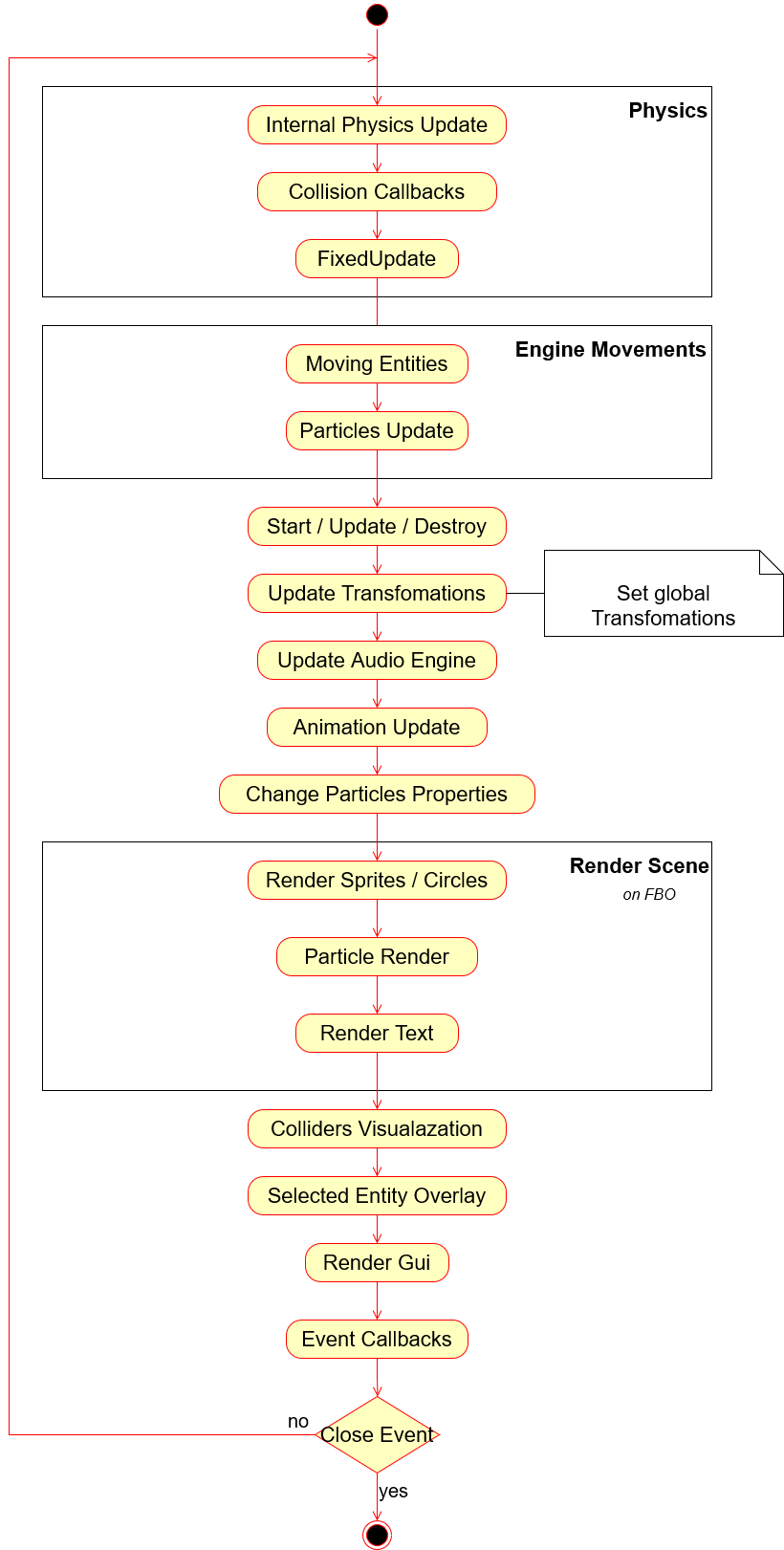
};Bellow you can find a UML diagram that describes the execution loop of Engine: