Repository navigation
Guided Folder
The Guided Folder is an eight-minute animated walkthrough of keeping a project's goal, plan, tasks, evidence, and next step connected. A fictional community-garden website gives the explanation a concrete task. An auditorium presentation then opens the four original system infographics, with a gardener, audience questions, a laser pointer, arrows, and readable callouts.
Watch the public 4K film on YouTube · Captioned native X video · Current four system maps · Archived original posters · First-time setup · Copy a setup prompt
The film is native 3840 × 2160, approximately 8:00 long, and includes synthetic English narration, English SDH captions, and 13 YouTube chapters. Select captions and playback quality in YouTube as needed. The wiki no longer embeds YouTube's older thumbnail. The controls illustrated inside the animation are part of the explanation; the actual player provides playback and chapter navigation.
| Part | Working responsibility | Read next |
|---|---|---|
| Global context and Master Plan | Keep the accepted objective, constraints, milestones, and next useful action available | Planning and memory |
| Canonical tasks and Agent 0 | Assign bounded work, integrate evidence, and record acceptance against the actual criteria | Task workflow, Agent 0 |
| Agent X | Preserve original occurrence time, actors, events, attempts, and evidence | Agent X |
| Native workers and Agent Y | Use host-provided workers or one selected installed external CLI lane with separate scopes and authority | Subagent processing, Agent Y |
| Agent Z | Apply the same advisory 100-question policy to supplied answers and evidence | Agent Z, 100 questions |
| ROOT | Compare retained SYSTEMX, harness, and optional bot TODO observations; use real authorized tools and readback to reconcile them | ROOT and task delta |
| Agent Alpha and AUTOBOT | Select relevant reference detail from ten fixed functions and reuse unchanged results | AUTOBOT and Agent Alpha |
DATA and .SYSTEMXP
|
Keep owner-managed payloads and independent named project records in the selected scope | DATA, SYSTEMX PROJECTS |
The folder holds records. Your app, IDE, CLI, or assistant supplies the model, running workers, tools, credentials, and permissions. Reading a role description does not start a process. Plain documents need no runtime; the optional included command tools require Python 3.9 or later.
Each numbered entry links to its original film scene and an archived JPEG in immutable alpha.3 source. These are historical 3840 × 2160 export canvases, with no claim of native generated detail. The current four maps and their text descriptions describe the newer beta source. YouTube controls its own chapter-card previews.
Watch this part at 00:43 · Open the archived alpha.3 4K JPEG
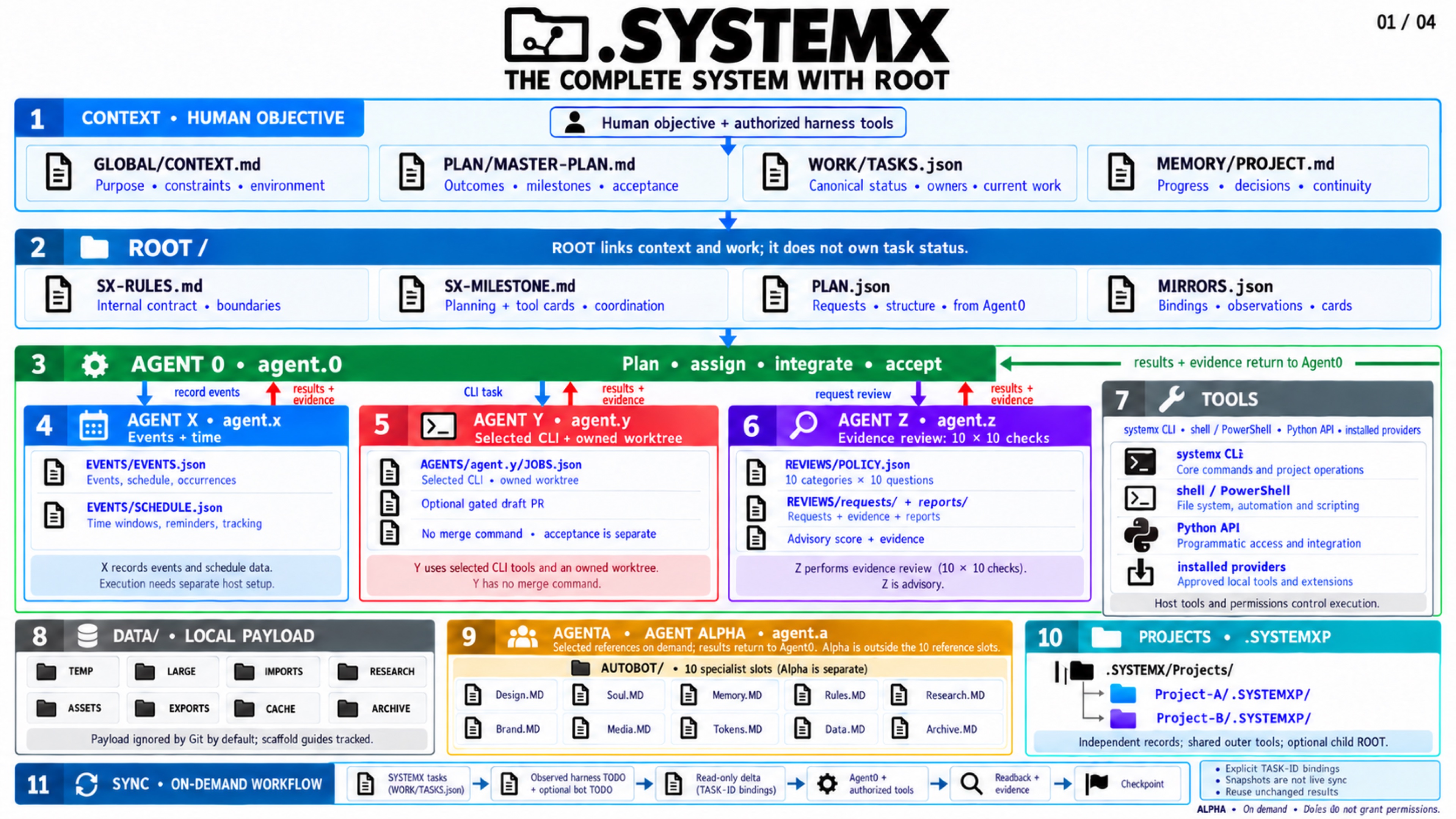
Global context, the Master Plan, canonical tasks, agent responsibilities, ROOT, references, DATA, and project scopes connect around one accepted goal.
Watch this part at 01:08 · Open the archived alpha.3 4K JPEG
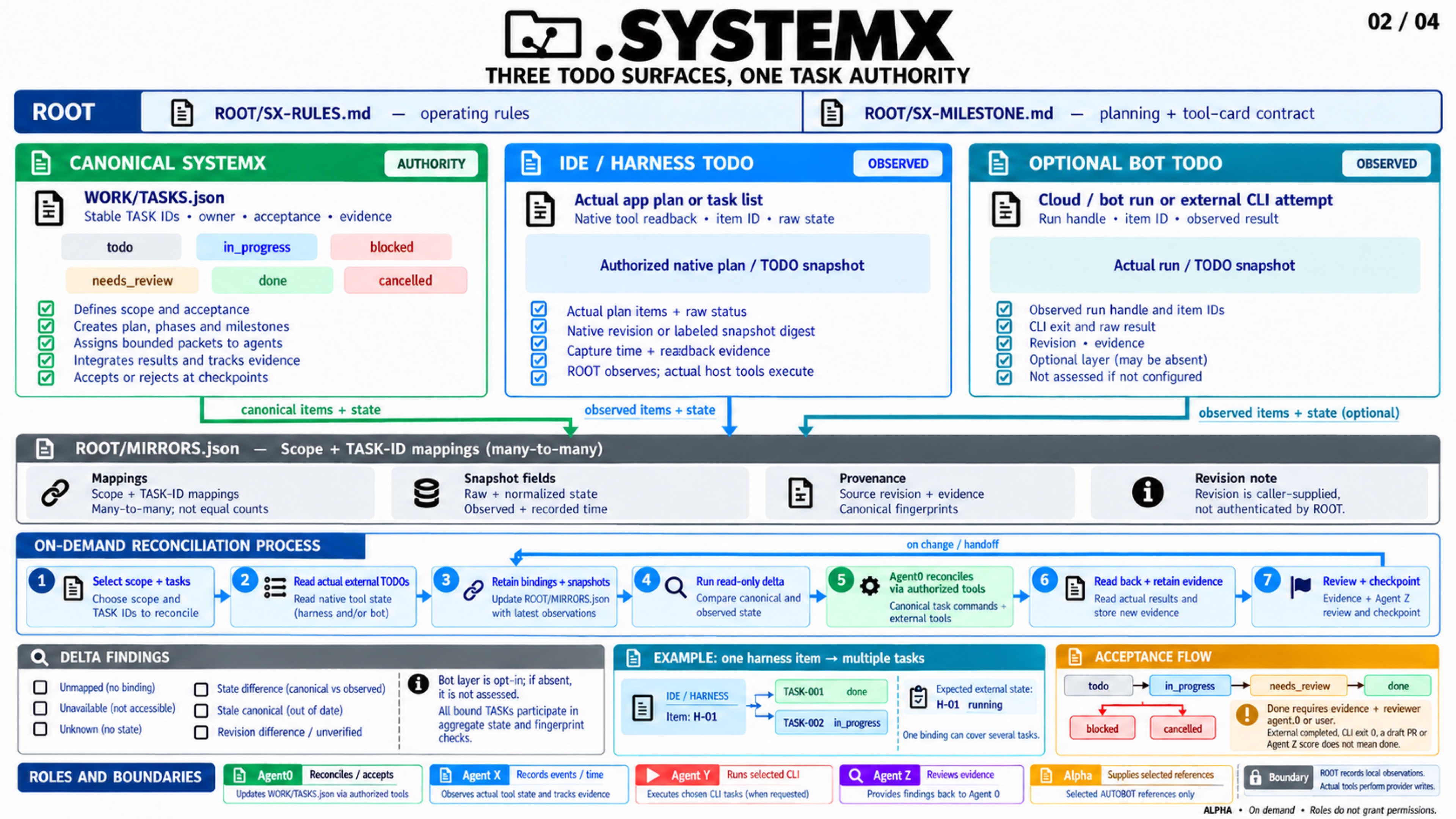
Agent 0 coordinates bounded work; the host executes tools, Agent X records evidence, Agent Z gives advisory review, and acceptance stays explicit.
Watch this part at 01:36 · Open the archived alpha.3 4K JPEG
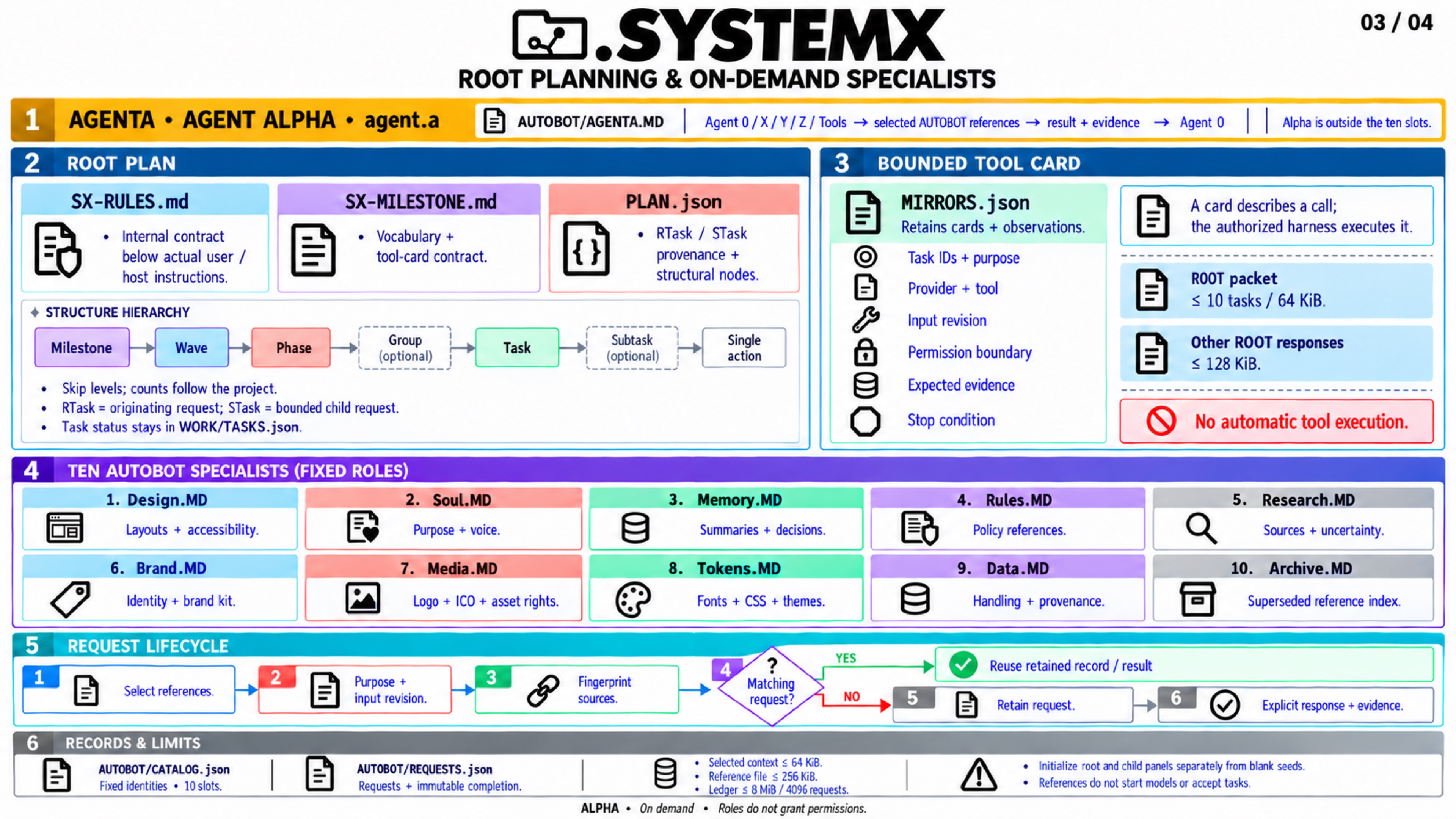
Agent Alpha selects useful Design, Soul, Memory, Rules, Research, Brand, Media, Tokens, Data, or Archive references for the current task.
Watch this part at 02:04 · Open the archived alpha.3 4K JPEG
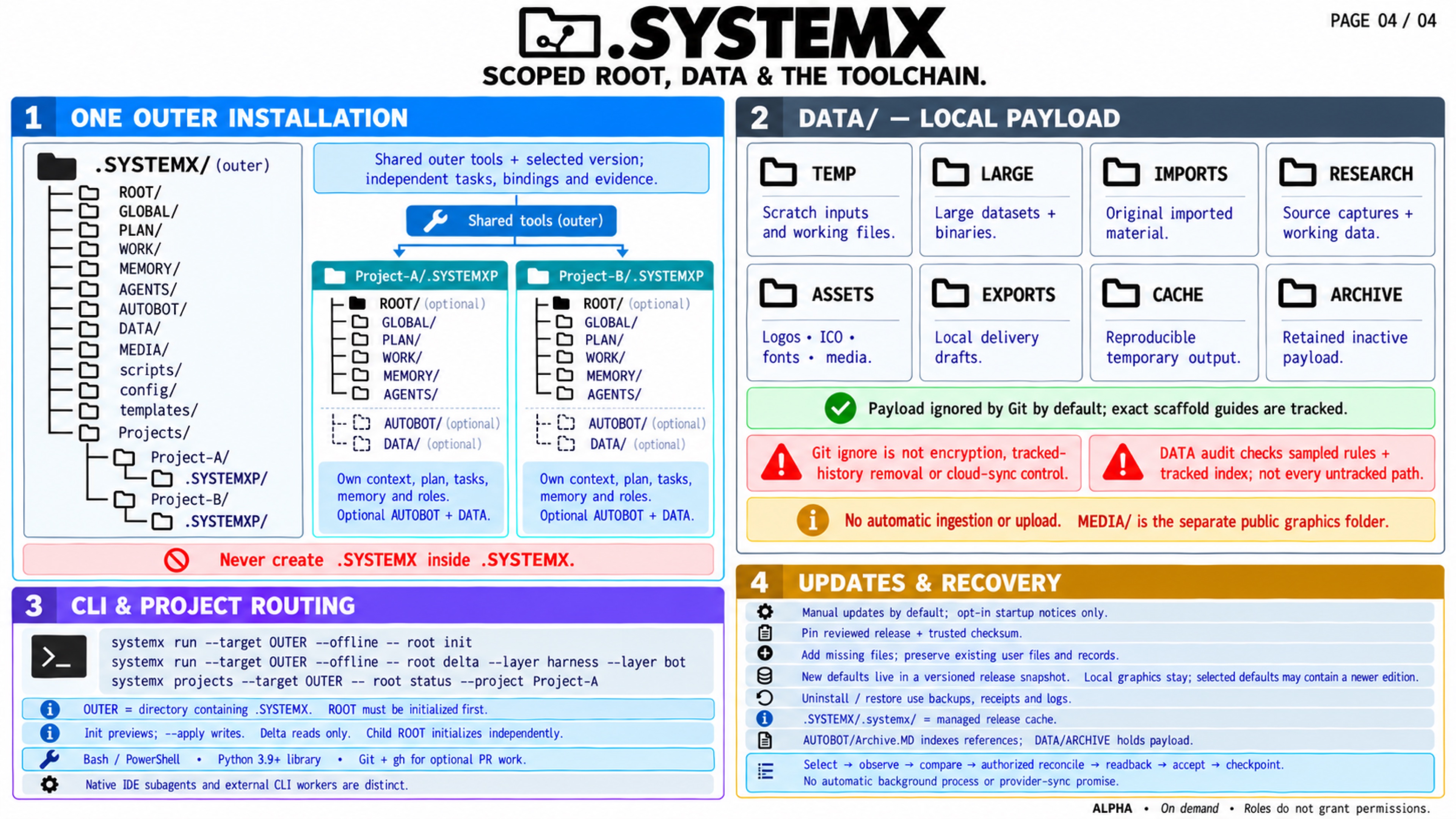
Owner-managed payloads, deliberate access, and named .SYSTEMXP records keep facts, tasks, memory, and evidence in their selected scope.
The whole-second links below land inside their intended scenes. They use the corrected starts in the public YouTube description.
| Start | Chapter |
|---|---|
| 00:00 | Meet the garden project |
| 00:27 | Welcome to the coordination folder |
| 00:43 | Four infographics: the first task |
| 01:08 | Completion, review and acceptance |
| 01:36 | AUTOBOT references selected on demand |
| 02:04 | Separate projects and deliberate access |
| 02:32 | Files first; tools when selected |
| 03:08 | Goals, plans, tasks and evidence |
| 04:01 | Agent coordination and CLI lanes |
| 05:00 | ROOT and the TODO delta |
| 05:40 | Agent Alpha and ten references |
| 06:02 | DATA, access and .SYSTEMXP |
| 06:59 | Prompts, measured inputs and the next turn |
After first-time setup, adapt this prompt to the tools and permissions available in your project:
Use this project's existing .SYSTEMX and its selected record scope.
Read the relevant context, Master Plan, canonical tasks, and saved next step.
Help me finish [ONE CLEAR OUTCOME].
Agree on evidence that would show this task is complete.
Use Agent 0 to coordinate bounded work with the authorized tools available here.
Use X for meaningful time/event evidence, Y only for a selected installed CLI
task, Z for requested advisory review, and Alpha for relevant reference detail.
Reconcile affected harness or bot task items through actual tools and readback.
Save verified results, open questions, and the exact next action.
A larger project benefits from a researched brief and useful phases, milestones, and independent tasks. Expand only the levels needed for the work. See the one-shot project guide for the researched 20-page app example and acceptance gates; use shared workspaces for multiple authorized chats, bots, or storage clients.
The garden is a fictional educational example. The animation is not a live model session, deployed application, external CLI/PR receipt, or autonomous swarm demonstration. Saved ROOT observations do not continuously synchronize external task lists. Agent X records schedules; external tools execute them. Agent Z scores supplied answers and does not perform its hundred checks or accept work. Agent Alpha selects references, rather than starting ten models.
DATA is owner-managed and is not automatically ingested. Git-ignore defaults do not provide encryption, cloud exclusion, or permission to upload. A Drive URL requires actual authorized access and transport. Record changes need their own ownership, conflict handling, and readback.
The film's token illustration uses constructed input counts. It does not establish a measured bill, execution speed, answer quality, or a universal savings percentage. Maintaining context also costs tokens and time. Compare the complete workflow against an ordinary compact handoff, retaining setup overhead and small tasks. See tokens, cost, and time and evidence and acceptance.
This is media edition 5.0. It demonstrates implemented
1.11.0-alpha.6 behavior. The separate 1.11.0-alpha.7
source-cleanup patch changes current publication files and documentation; it does not
add a model, agent runtime, synchronization service, or new execution authority.
Use Versions and changelog for the exact released
installer version, pins, evidence, and publication status.
The current template keeps video viewing on YouTube, with published PDFs, images, and reusable operating records in the source tree. Film authoring data, Blender projects, audio, captions, and render/preview outputs belong to the separate production archive. Current source cleanup does not erase historical GitHub releases or remove previously adopted local files. GitHub Actions remains disabled. The software is MIT-licensed alpha; use it at your own risk.
| Reference | Preserved identity |
|---|---|
| Original introduction | Media edition 1.0; 1:50 / 1080p; alpha.5 feature reference |
| Advanced walkthrough | Media edition 2.0; 5:54 / 1080p; alpha.6 coordination and separate local input-count fixture |
| Start with a Folder | Media edition 3.0; 9:55 / native 4K; beginner-paced garden story |
| White paper edition 2.0 | Technical paper examining alpha.4, published with alpha.5 |
| Four-part system infographic | Original static alpha.3 media exports and accessible text |
Created by Lucas (SatoshiUNO). A product of Wayne Tech Lab LLC.
Networks.Chat — portfolio · WayneTechLab.com — business · Source repository
.SYSTEMX · DOT SYSTEMX · Maintained by Wayne Tech Lab LLC · Repository · User manual · Prompt cookbook · MIT license
Beta 1.11.0-beta.4 prerelease — validate the selected release in your project. Release policy. Project records, configured commands, and verified evidence determine the state of each adopted project.
DOT SYSTEMX · User manual
1. Start here
- Current beta product film: chapters and scenes
- The Guided Folder: historical 4K walkthrough
- Start with a Folder: 4K animated guide
- Introduction video and archived poster
- Advanced walkthrough: inside the coordination layer
- Choose a workspace
- Agent 0 roster: roles, bots, and CLI paths
- Agent 0 and toolchain direct I/O
- First-time setup
- Provider and harness onboarding
- Daily workflow
- One-shot project guide
- Shared workspaces, clouds, and bots
- Historical use-case workflows
- Four current system maps
- Current maps, seven agent guides, and atlas
- 8K engineering master companion
- Agent guide text and CLI flows
- Visual guide and historical diagrams
- New chat setup prompt
- Prompt cookbook
2. Work and continuity
- SYSTEMX PROJECTS
- AUTOBOT and Agent Alpha: Tier 2
- Local DATA storage
- Planning and memory
- ROOT planning, rules, and task delta
- System MAP
- Access Matrix: 20 standard entries
- Agent Beta, Agent1, and Agenda
- Task workflow
- Agent X: events and time
- Agent Y: CLI and PR channels
- Agent Z: fixed review
- 100 review questions
- Agent 0 and subagents
- Subagent processing
- Advanced use cases
- Evidence and acceptance
- Anti-drift and long-running work
- Tokens, cost, and time
3. Setup and maintenance
- Project / VS Code
- OS directory
- Google Drive
- LLM chat
- Exact casing and alias
- Installation and updates
- Upgrading
- Uninstall and cleanup
4. Advanced reference
- Standard format
- Technical Guide
- Stack Guide
- Library integration
- CLI and Tools
- Command reference
- Configuration and quality
- Operations and troubleshooting
- Security and support
- Code review and readiness
5. Project information