Repository navigation
Use Case Infographics
These four alpha.7 environment cards and examples cover ChatGPT + Google Drive, Codex + GitHub, Dots / Codex Cloud, and a local coding CLI. Their archived 4K exports remain linked below, not embedded as current product graphics. They explain the context → work → evidence → review → checkpoint pattern at their stated baseline. Use the current four maps and provider onboarding for beta behavior, scope selection and host boundaries.
An image or workflow example does not prove a live provider run, PR, cloud synchronization or deployment. The CLI and Tools guide identifies the command and credential consumer actually in use.
This workflow retains its alpha.7 art baseline; the current onboarding map shows the newer host/toolchain boundary.
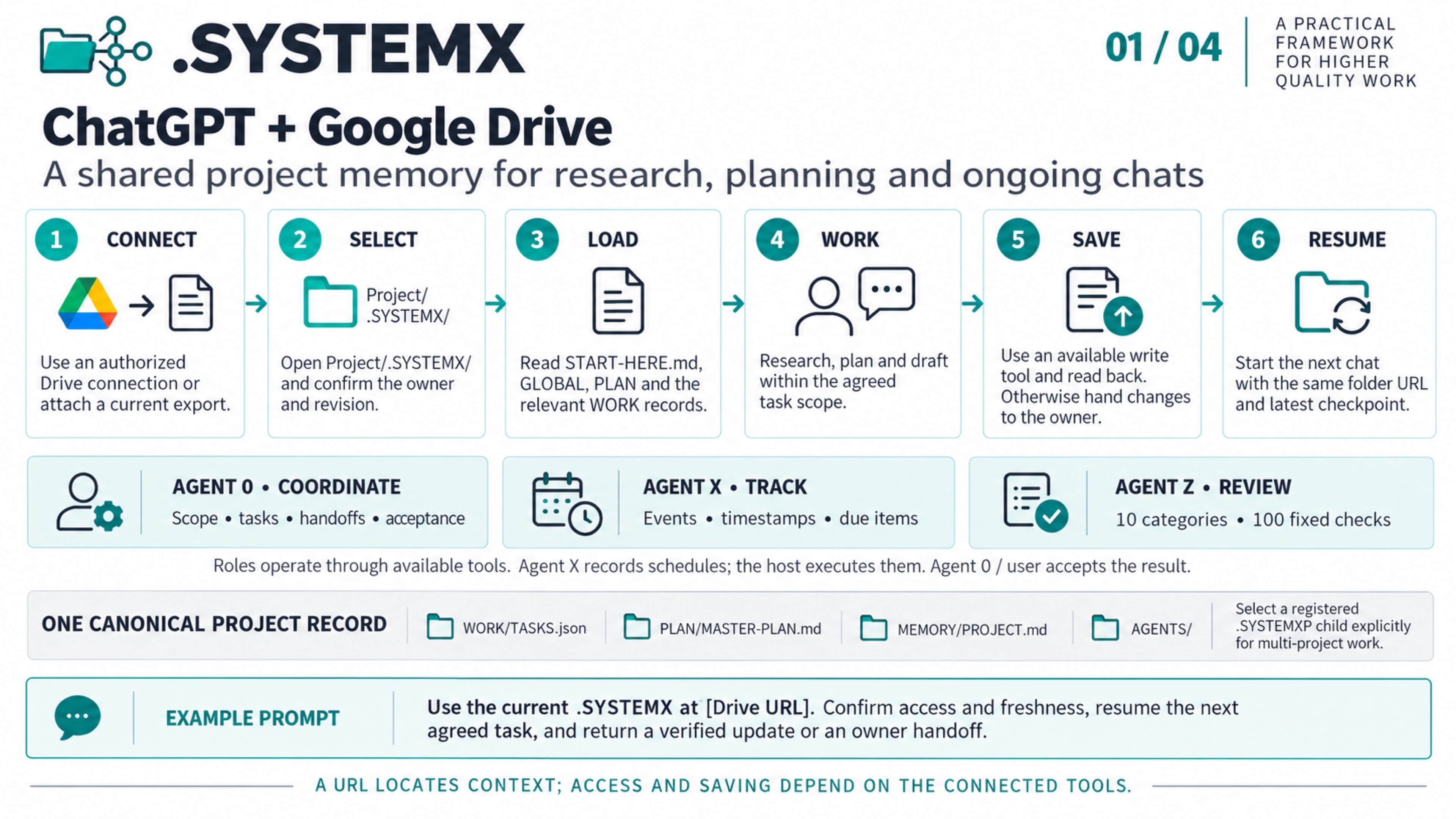
- Connect. Use an authorized Drive connection or attach a current export.
- Select. Open Project/.SYSTEMX/ and confirm the owner and revision.
- Load. Read START-HERE.md, GLOBAL, PLAN and the relevant WORK records.
- Work. Research, plan and draft within the agreed task scope.
- Save. Use an available write tool and read back. Otherwise hand changes to the owner.
- Resume. Start the next chat with the same folder URL and latest checkpoint.
- Agent 0: scope, tasks, handoffs and acceptance within user authority.
- Agent X: events, timestamps and due items; the host executes schedules.
- Agent Y: optional task-selected installed CLI and Git/PR channel where local tools and authority exist.
- Agent Z: the fixed review policy with 10 categories and 100 questions.
These are roles implemented through the available toolchain. The public template starts with Agent 0 only; activate Agent X/Y/Z explicitly in the selected scope. A review score is advisory and does not approve external actions.
Use Project/.SYSTEMX/ as the selected source. Read START-HERE.md,
GLOBAL/CONTEXT.md, PLAN/MASTER-PLAN.md, WORK/TASKS.json, current focus and
relevant MEMORY/PROJECT.md and agent notes. Assign one canonical writer and
check freshness before saving. When write tools are unavailable, return proposed
file changes for the owner to save; then read back the resulting files. A folder
URL does not grant access, recursively load every file, or synchronize chats.
For child projects, explicitly select Projects/NAME/.SYSTEMXP.
Use the current .SYSTEMX at [Drive URL]. Confirm access and freshness, resume the next agreed task, and return a verified update or an owner handoff.
ChatGPT can use connected plugins such as Google Drive; the available file operations depend on the connection. See Use ChatGPT.
Platform references checked 2026-10-04. Availability and permissions depend on the account, host and configuration. The workflow is a .SYSTEMX usage pattern, not a built-in integration or third-party endorsement.
This workflow retains its alpha.7 art baseline; the current onboarding map shows the newer host/toolchain boundary.
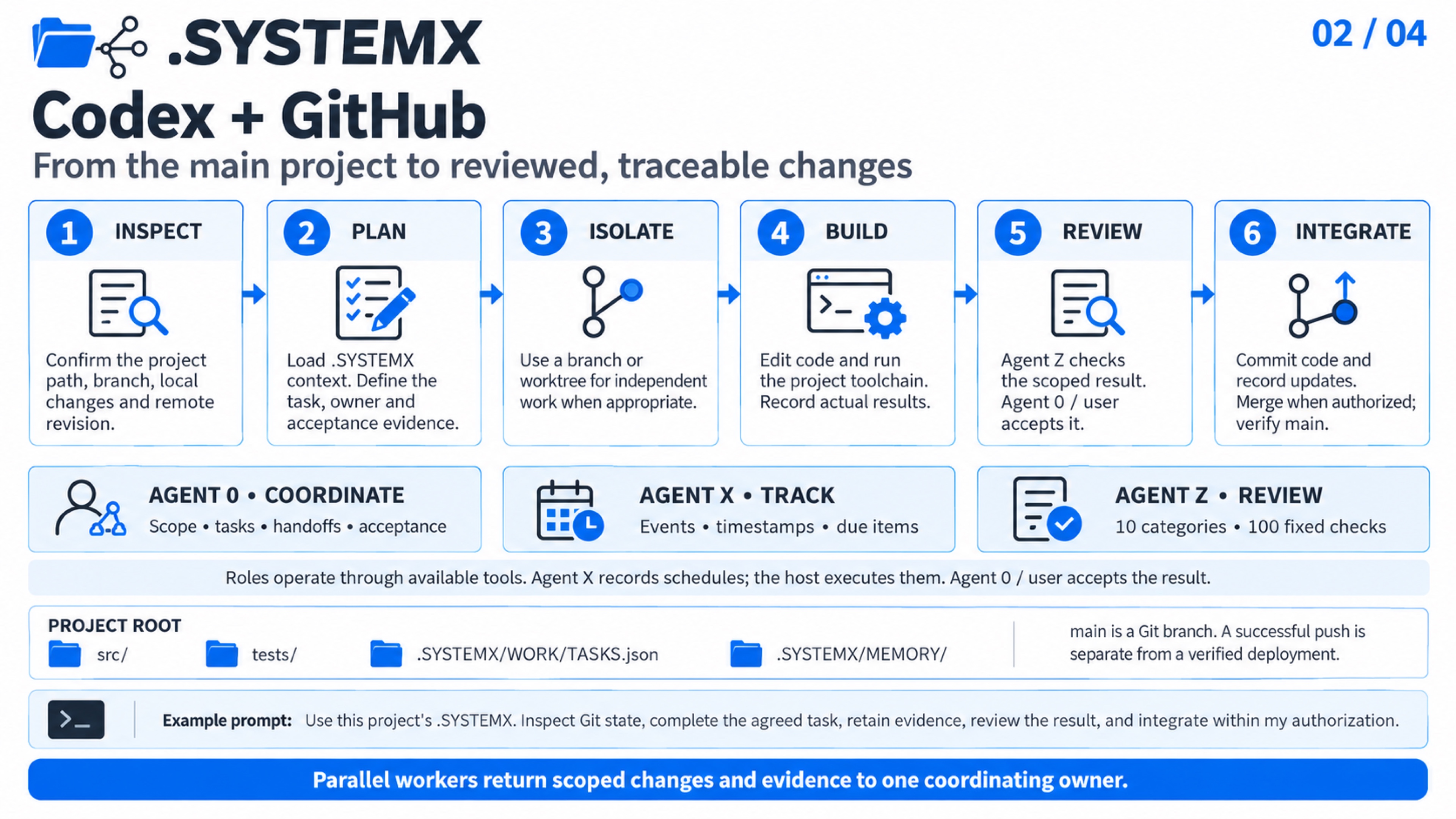
- Inspect. Confirm the project path, branch, local changes and remote revision.
- Plan. Load .SYSTEMX context. Define the task, owner and acceptance evidence.
- Isolate. Use a branch or worktree for independent work when appropriate.
- Build. Edit code and run the project toolchain. Record actual results.
- Review. Agent Z checks the scoped result. Agent 0 / user accepts it.
- Integrate. Commit code and record updates. Merge when authorized; verify main.
- Agent 0: scope, tasks, handoffs and acceptance within user authority.
- Agent X: events, timestamps and due items; the host executes schedules.
- Agent Y: optional task-selected installed CLI and Git/PR channel where local tools and authority exist.
- Agent Z: the fixed review policy with 10 categories and 100 questions.
These are roles implemented through the available toolchain. The public template starts with Agent 0 only; activate Agent X/Y/Z explicitly in the selected scope. A review score is advisory and does not approve external actions.
Keep .SYSTEMX/ beside the host project code and tests. main is a Git branch,
not a required directory name. Preserve existing local changes. Coordinate
independent workers with bounded scopes and a common source revision; workers
return changes and evidence to the coordinator. Commit accepted code and record
updates together when appropriate, then check the actual remote revision after
an authorized push or merge. Deployment and runtime verification need their own
evidence when they are part of the task.
Use this project's .SYSTEMX. Inspect Git state, complete the agreed task, retain evidence, review the result, and integrate within my authorization.
Codex worktrees provide separate Git checkouts for independent work. See Git worktrees.
Platform references checked 2026-10-04. Availability and permissions depend on the account, host and configuration. The workflow is a .SYSTEMX usage pattern, not a built-in integration or third-party endorsement.
This workflow retains its alpha.7 art baseline; the current onboarding map shows the newer host/toolchain boundary.
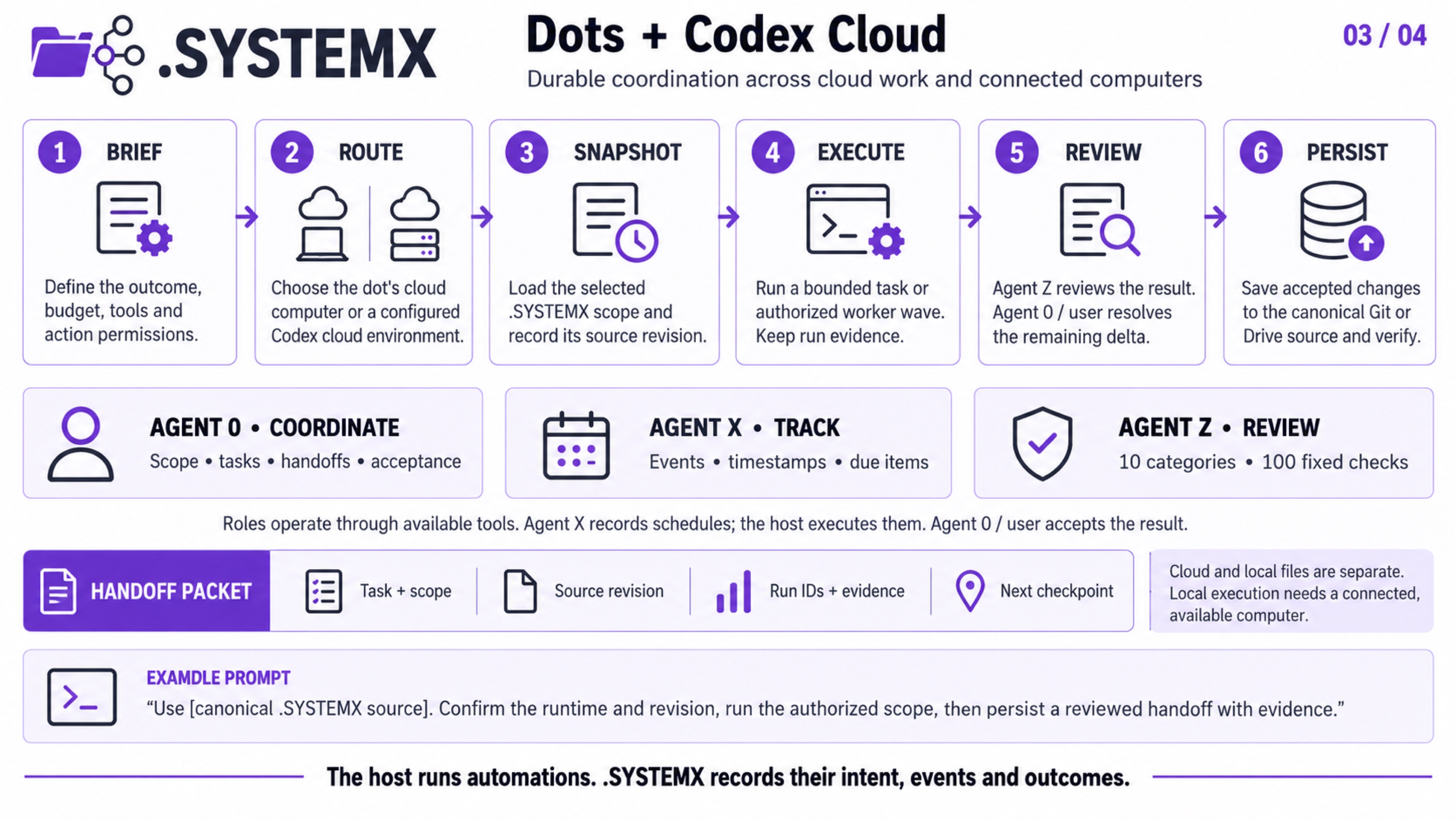
- Brief. Define the outcome, budget, tools and action permissions.
- Route. Choose the dot's cloud computer or a configured Codex cloud environment.
- Snapshot. Load the selected .SYSTEMX scope and record its source revision.
- Execute. Run a bounded task or authorized worker wave. Keep run evidence.
- Review. Agent Z reviews the result. Agent 0 / user resolves the remaining delta.
- Persist. Save accepted changes to the canonical Git or Drive source and verify.
- Agent 0: scope, tasks, handoffs and acceptance within user authority.
- Agent X: events, timestamps and due items; the host executes schedules.
- Agent Y: optional task-selected installed CLI and Git/PR channel where local tools and authority exist.
- Agent Z: the fixed review policy with 10 categories and 100 questions.
These are roles implemented through the available toolchain. The public template starts with Agent 0 only; activate Agent X/Y/Z explicitly in the selected scope. A review score is advisory and does not approve external actions.
Treat the dot and its selected coding environment as distinct runtimes. Carry the task ID, root or named child scope, source revision, actual run IDs, evidence, and next checkpoint across handoffs. Persist accepted record changes to the canonical Git/Drive source and verify them before ending or replacing a runtime. A cloud task does not automatically see unsaved local files. Local execution depends on the connected computer being available. Configure scheduling in the host separately; Agent X records intended occurrences and observed outcomes.
Use [canonical .SYSTEMX source]. Confirm the runtime and revision, run the authorized scope, then persist a reviewed handoff with evidence.
A dot can work on its cloud computer and route coding work to a configured Codex cloud environment. Its cloud and connected-computer access are separate. See Computers and apps.
Platform references checked 2026-10-04. Availability and permissions depend on the account, host and configuration. The workflow is a .SYSTEMX usage pattern, not a built-in integration or third-party endorsement.
This workflow retains its alpha.7 art baseline; the current onboarding map shows the newer host/toolchain boundary.
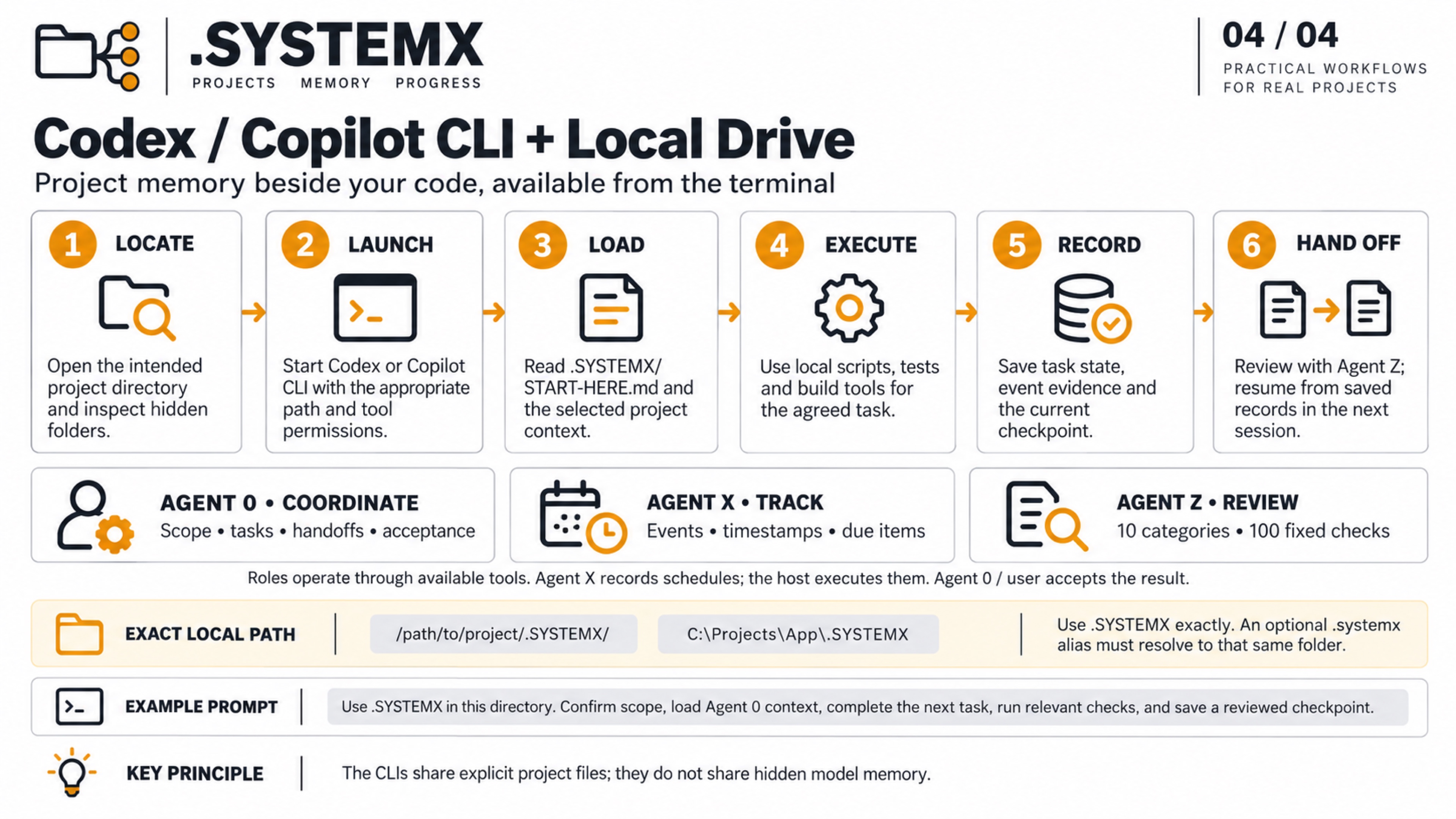
- Locate. Open the intended project directory and inspect hidden folders.
- Launch. Start Codex or Copilot CLI with the appropriate path and tool permissions.
- Load. Read .SYSTEMX/START-HERE.md and the selected project context.
- Execute. Use local scripts, tests and build tools for the agreed task.
- Record. Save task state, event evidence and the current checkpoint.
- Hand Off. Review with Agent Z; resume from saved records in the next session.
- Agent 0: scope, tasks, handoffs and acceptance within user authority.
- Agent X: events, timestamps and due items; the host executes schedules.
- Agent Y: optional task-selected installed CLI and Git/PR channel where local tools and authority exist.
- Agent Z: the fixed review policy with 10 categories and 100 questions.
These are roles implemented through the available toolchain. The public template starts with Agent 0 only; activate Agent X/Y/Z explicitly in the selected scope. A review score is advisory and does not approve external actions.
Example locations are /path/to/project/.SYSTEMX/ and
C:\Projects\App\.SYSTEMX. Start either CLI in the intended project; keep
its existing instruction discovery and permissions in force. Use .SYSTEMX
exactly. An optional .systemx alias must resolve to that same directory.
The two CLIs reuse explicit saved files rather than hidden model memory.
Record what checks actually ran and keep Git/backup synchronization explicit.
Use .SYSTEMX in this directory. Confirm scope, load Agent 0 context, complete the next task, run relevant checks, and save a reviewed checkpoint.
Copilot CLI exposes directory trust and tool/path permissions; configure them for the intended project. See Copilot CLI configuration. Codex also supports selecting a working directory; check your installed CLI help and Codex CLI documentation.
Platform references checked 2026-10-04. Availability and permissions depend on the account, host and configuration. The workflow is a .SYSTEMX usage pattern, not a built-in integration or third-party endorsement.
The edition 2.0 illustrated research paper explains current record authority, Agent 0/X/Y/Z/Alpha, ROOT coordination, scoped adoption, and a hypothetical efficiency model. Its four publication figures are distinct from these earlier environment cards; no measured savings are claimed.
First-time setup · Shared workspaces, clouds and bots · One-shot project guide · Visual Guide · Agent 0 · Agent X · Agent Y · Agent Z
The four environment cards retain their examined baseline. The current AUTOBOT and Agent Alpha guide and four-part field guide add on-demand Design/Soul/Memory/Rules/Research/Brand/Media/Tokens/Data/Archive detail for 1.10.0-alpha.2. Select only relevant specialists in the explicit root/child, reuse unchanged result/evidence, and keep private/large payloads in DATA. The refreshed system artwork also includes ROOT internal rules/planning and observed TODO mappings. Its delta compares retained scoped observations; actual synchronization needs authorized tools and readback. Git-ignore does not prevent a Drive, cloud snapshot, chat attachment, or whole-folder copy from including local payloads; review transport content and destination permissions. No environment gets an automatic bot, hidden memory transfer, sync service, or extra worker budget from this tier.
.SYSTEMX · DOT SYSTEMX · Maintained by Wayne Tech Lab LLC · Repository · User manual · Prompt cookbook · MIT license
Beta 1.11.0-beta.4 prerelease — validate the selected release in your project. Release policy. Project records, configured commands, and verified evidence determine the state of each adopted project.
DOT SYSTEMX · User manual
1. Start here
- The Guided Folder: 4K walkthrough and visual chapter index
- Start with a Folder: 4K animated guide
- Introduction video and archived poster
- Advanced walkthrough: inside the coordination layer
- Choose a workspace
- Agent 0 roster: roles, bots, and CLI paths
- Agent 0 and toolchain direct I/O
- First-time setup
- Provider and harness onboarding
- Daily workflow
- One-shot project guide
- Shared workspaces, clouds, and bots
- Historical use-case workflows
- Four current system maps
- Current maps, seven agent guides, and atlas
- Agent guide text and CLI flows
- Visual guide and historical diagrams
- New chat setup prompt
- Prompt cookbook
2. Work and continuity
- SYSTEMX PROJECTS
- AUTOBOT and Agent Alpha: Tier 2
- Local DATA storage
- Planning and memory
- ROOT planning, rules, and task delta
- System MAP
- Access Matrix: 20 standard entries
- Agent Beta, Agent1, and Agenda
- Task workflow
- Agent X: events and time
- Agent Y: CLI and PR channels
- Agent Z: fixed review
- 100 review questions
- Agent 0 and subagents
- Subagent processing
- Advanced use cases
- Evidence and acceptance
- Anti-drift and long-running work
- Tokens, cost, and time
3. Setup and maintenance
- Project / VS Code
- OS directory
- Google Drive
- LLM chat
- Exact casing and alias
- Installation and updates
- Upgrading
- Uninstall and cleanup
4. Advanced reference
- Standard format
- Technical Guide
- Stack Guide
- Library integration
- CLI and Tools
- Command reference
- Configuration and quality
- Operations and troubleshooting
- Security and support
- Code review and readiness
5. Project information