Repository navigation
Visual Guide
For the current public graphic set, see four system maps, seven detailed agent guides, and one atlas. This page retains the record-flow explanations and links to historical films without embedding their old artwork.
The current four-map field guide shows
ROOT internal rules/planning, canonical task and harness/optional-bot TODO
observations, Agent 0/X/Y/Z, AGENTA and all ten AUTOBOTS, DATA, CLI/tooling, and
named .SYSTEMXP projects together. The current maps separate architecture, task flow, governance, and onboarding. The diagrams below add text and record-flow explanations. Arrows describe
responsibilities and evidence flow; opening an image does not start a worker or
install transport. Use the exact command manuals for syntax and permissions.
Watch The Guided Folder on YouTube.
The Guided Folder is an eight-minute native 4K educational film with English SDH captions and 13 YouTube chapters. It presents the four original infographics alongside concrete explanations of task authority, agent routing, ROOT observations, selected references, deliberate access, and project scopes. The garden is fictional; the diagrams do not claim a recorded external worker run or deployed application. Media edition 5.0 describes alpha.6 behavior.
Watch the public film · Read the historical four-poster chapter index · All 13 chapter starts
The historical chapter index links four distinct alpha.3 poster exports to their corresponding scenes. The current map set is separate. YouTube supplies its own chapter-card previews; use its player for native 4K playback.
| Film | Original format and reference |
|---|---|
| Introduction | 1:50 / 1080p; media 1.0, alpha.5 feature baseline |
| Advanced walkthrough | 5:54 / 1080p; media 2.0, alpha.6 technical workflow |
| Start with a Folder | 9:55 / native 4K; media 3.0, beginner-paced garden story |
Their published media identities remain unchanged. Use the individual pages for original chapter tables, historical evidence, and exact scope boundaries.
Use-case infographics preserves four alpha.7 workflow explanations for ChatGPT + Drive, Codex + GitHub, Dots / Codex Cloud, and Codex / Copilot CLI on a local drive. Their images remain in immutable history. The current onboarding map covers present provider boundaries.
flowchart TD
    Scope["Select one root .SYSTEMX or named child .SYSTEMXP"] --> A0["Agent 0: plan, task routing, integrate, accept"]
    A0 --> Native["Authorized harness workers / configured project tools"]
    A0 --> Y["Agent Y: optional selected external CLI / draft PR"]
    A0 --> Alpha["Agent Alpha / AGENTA.MD / optional agent.a"]
    X["Agent X: observed events and time"] -->|"explicit detail request"| Alpha
    Y -->|"explicit detail request"| Alpha
    Z["Agent Z: fixed evidence review"] -->|"explicit detail request"| Alpha
    Tools["Explicit Tools step / caller tools"] --> Alpha
    Alpha --> Match{"Same selected inputs and request?"}
    Match -->|"yes"| Reuse["Reuse existing request/result and original evidence time"]
    Match -->|"changed / new"| Select["Select only relevant fixed specialist slots"]
    Select --> Panel["Design.MD · Soul.MD · Memory.MD · Rules.MD · Research.MD<br/>Brand.MD · Media.MD · Tokens.MD · Data.MD · Archive.MD"]
    Panel --> Detail["Bounded detail packet / explicit request and completion"]
    Reuse --> Detail
    Detail --> A0
    Native --> Evidence["Original project evidence; canonical task ledger stays with Agent 0"]
    Y --> Evidence
    Evidence --> X
    Evidence --> Z
    Panel -. "safe references only; no automatic scan" .-> Data["Selected DATA: TEMP / LARGE / IMPORTS / RESEARCH<br/>ASSETS / EXPORTS / CACHE / ARCHIVE"]
    Data --> Audit["Exact tracked scaffolds; payloads Git-ignored by default; data audit"]
Text equivalent: choose one scope and its records first. Agent 0 owns the objective/plan/task ledger and acceptance; X records actual time, Y is the optional external CLI channel, and Z reviews fixed questions. An explicit selected request from these roles or Tools reaches Agent Alpha, which returns only relevant detail from the ten fixed Markdown slots. An unchanged completed request reuses its original result/evidence time. Changed inputs identify stale historical detail and justify a new bounded request. No arrow starts a worker, a recursive check, a model call, or background synchronization. Specialist rules are lower-authority project data. Raw/private/large payloads stay in selected DATA; safe references connect them to the panel. Root/child panels and DATA never inherit each other. See AUTOBOT and Agent Alpha and Local DATA storage.
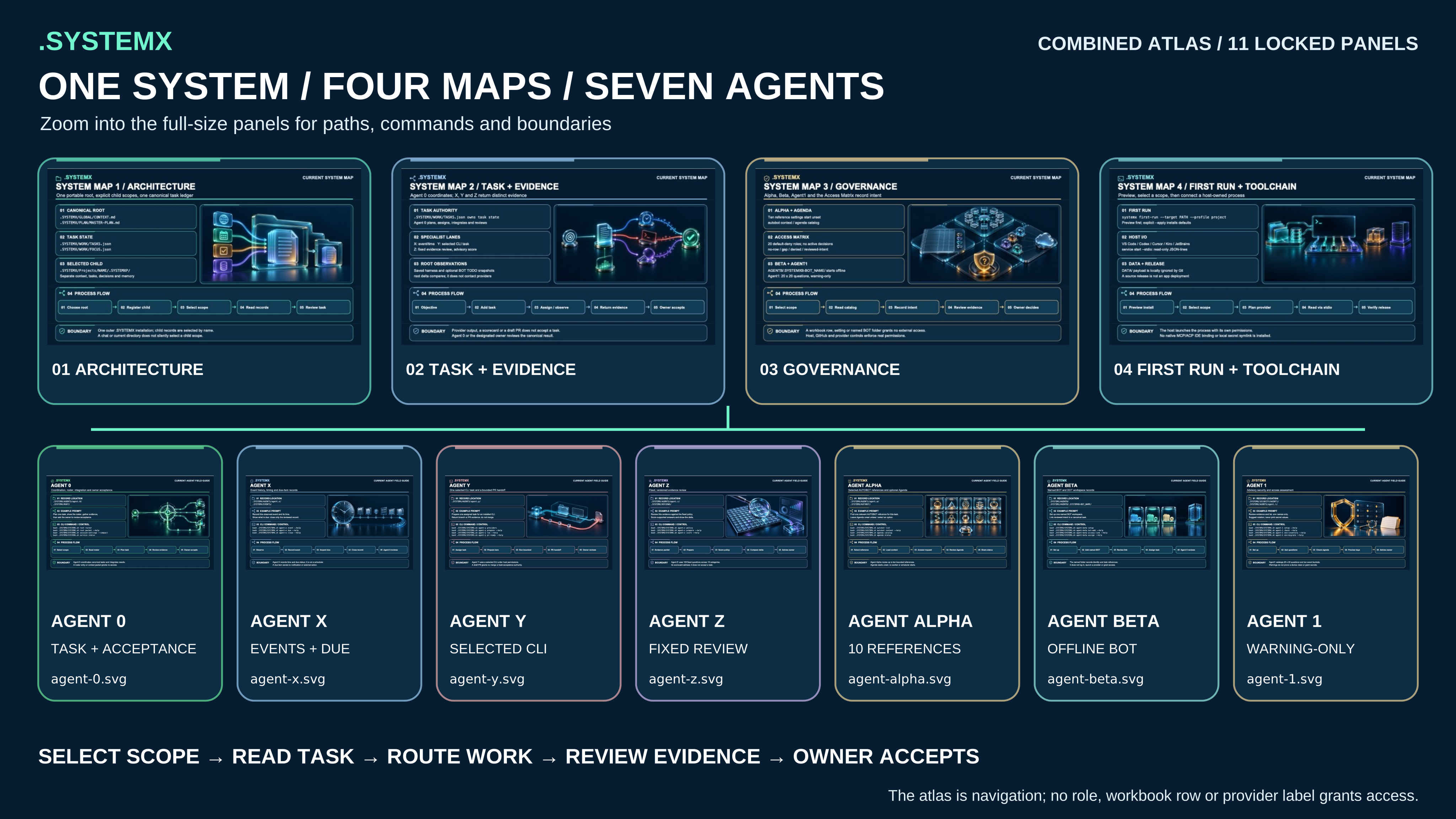
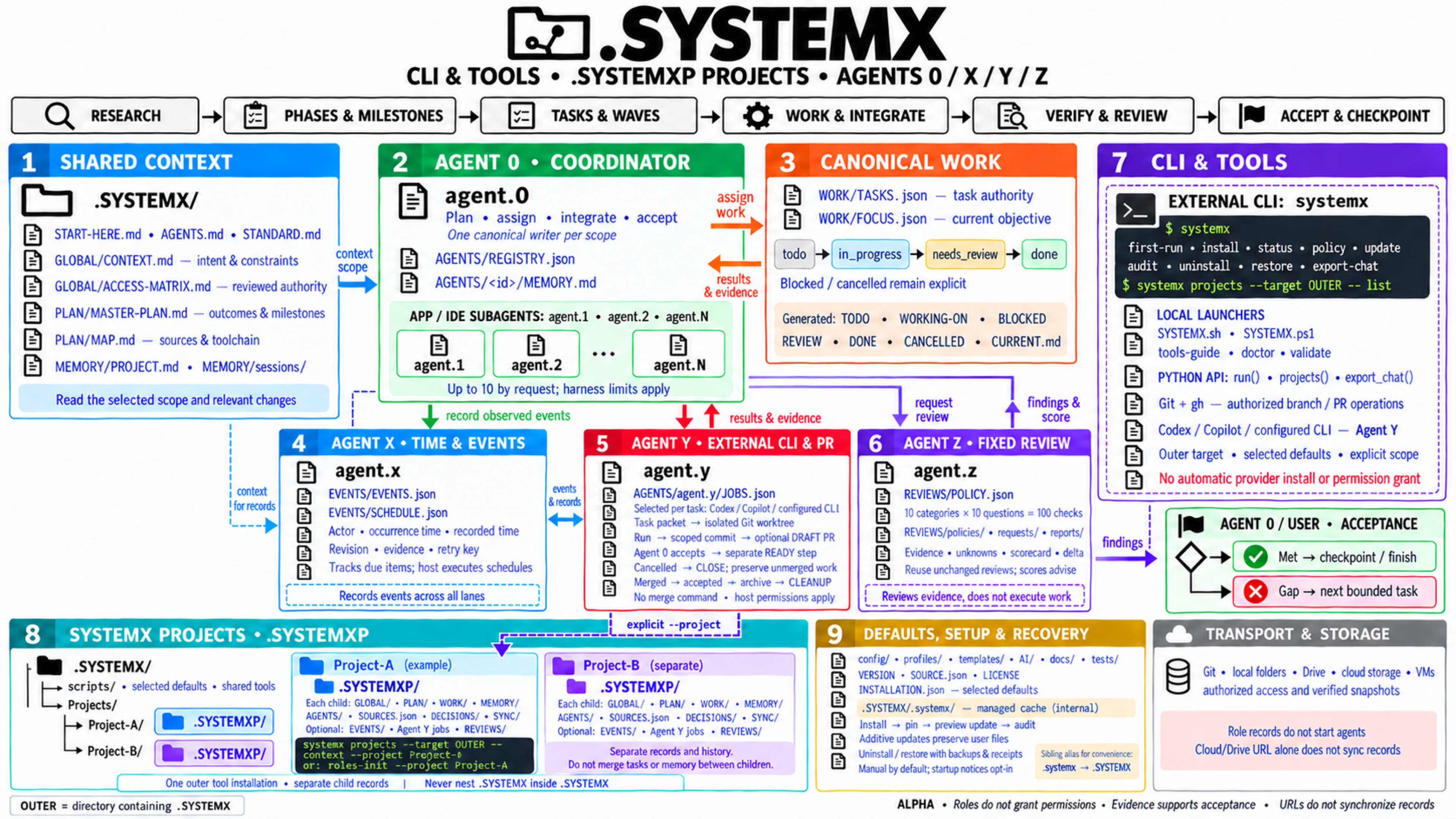
Open the full-size atlas · Read its full description
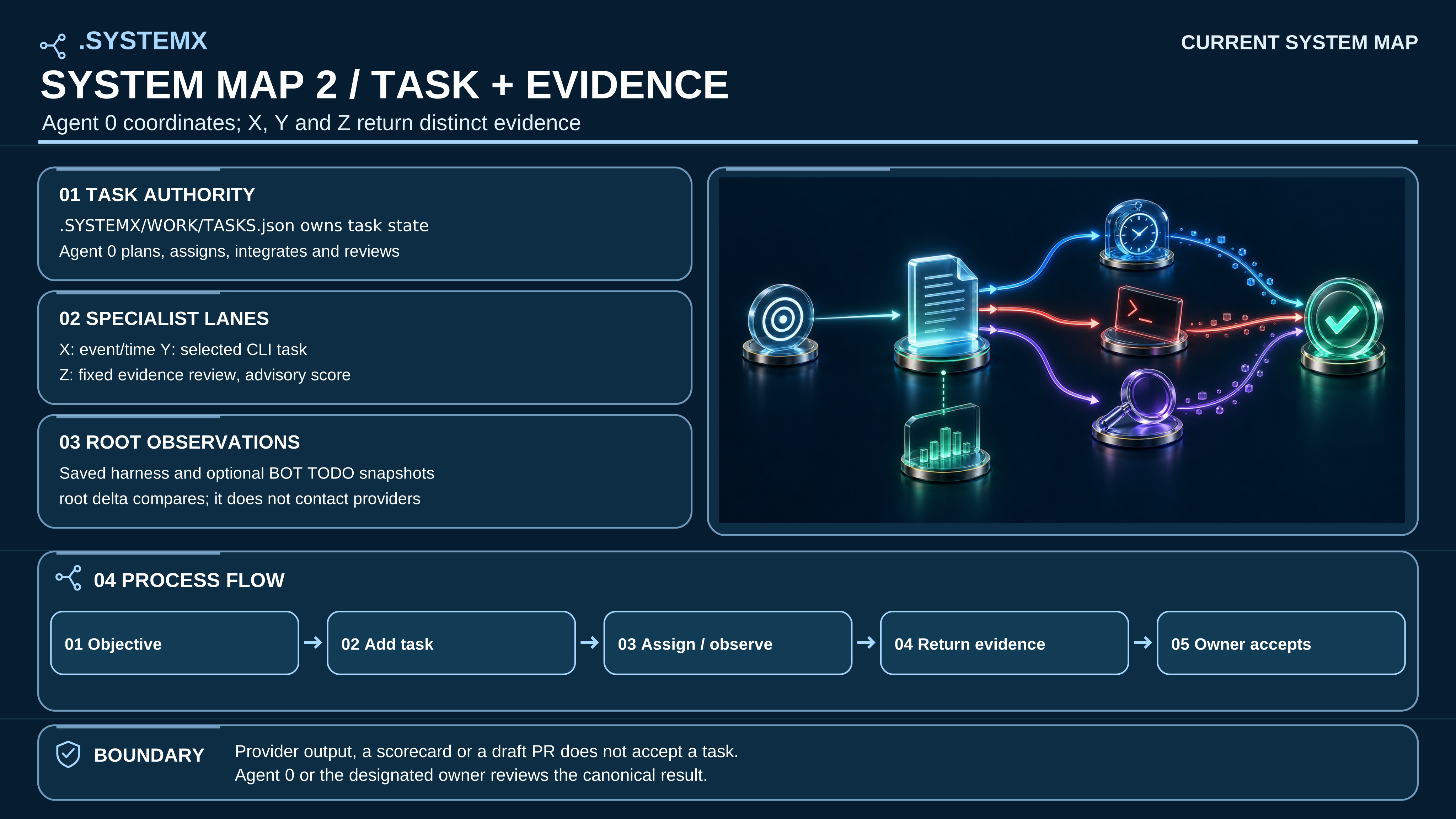
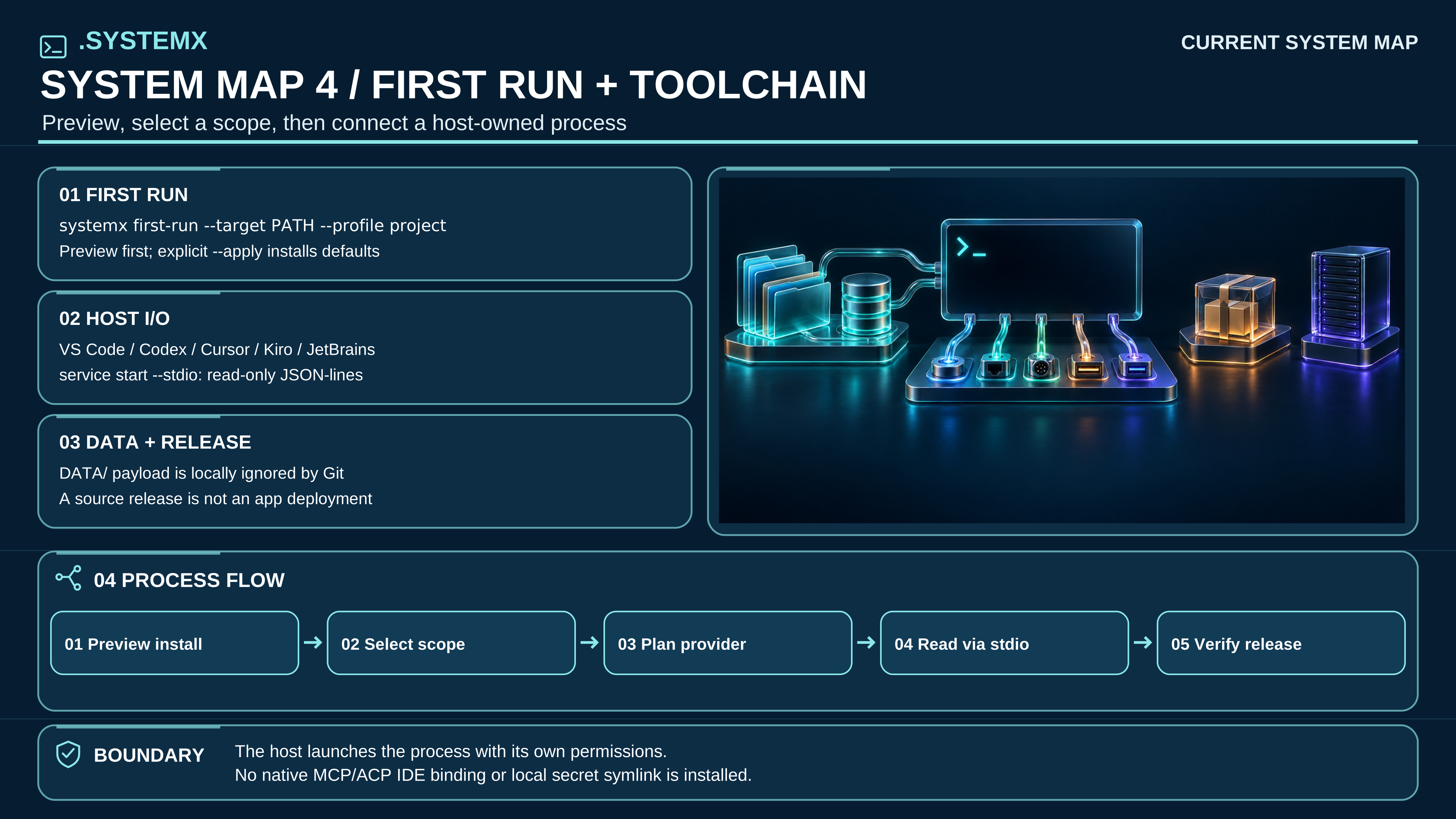
Read all four pages and their text equivalents. The overview connects one explicit scope, Global context, Master Plan, canonical work, Agent 0/X/Y/Z, Agent Alpha, all ten specialist files, execution tools, DATA, and named children. The detail pages separate the responsibilities so the overview need not carry every implementation limit in small type.
| Detail page | What it explains |
|---|---|
| 2. Task and evidence cycle | Bounded task assignment, app workers versus external CLI, actual checks, X evidence, Z review, acceptance and checkpoint |
| 3. Governance and access | Agenda and Access Matrix defaults, Agent Beta named records, Agent1 advisory review, and authority limits |
| 4. First run and toolchain | Setup preview, explicit root/child routing, host-owned CLI or stdio I/O, local DATA, and release boundaries |
Text equivalent: Agent 0 owns the plan, integration, canonical task ledger,
and acceptance within user authority. The harness supplies running agents and
tools. Agent X records actual event/time/evidence; Agent Y is an optional selected
external CLI lane with separately gated draft-PR lifecycle; Agent Z reviews the
fixed 100 questions. Agent Alpha selects requested reference detail from the ten
AUTOBOT documents and reuses unchanged results. Root/child DATA remains local
payload storage with default Git exclusions. Named .SYSTEMXP children share
outer defaults/tools but keep separate facts, tasks, memory, panel and payloads.
No arrow grants permission, merges a PR, synchronizes a cloud folder, or starts
an automatic review/rebuild loop.
The current provenance record lists exact bytes and art-source dimensions. The 7680 × 4320 SVG canvas keeps vector labels crisp; it does not add native raster detail.
The alpha.5 4K poster
and its text equivalent
remain available as a frozen Agent 0/X/Y/Z CLI/.SYSTEMXP baseline. The current four-map guide updates that conceptual view for the beta record model. Historical art remains in immutable tags and a private archive, while the portable template carries one current graphic per topic. The optional sibling
.systemx → .SYSTEMX alias remains distinct from the internal .SYSTEMX/.systemx/
managed cache. Exact case and alias.
flowchart LR
    Human["Human / authorized AI app or IDE"] --> SX["systemx: installed management CLI"]
    Human --> Local["Reviewed SYSTEMX.sh / SYSTEMX.ps1"]
    SX --> Outer[".SYSTEMX: shared selected defaults and tools"]
    Local --> Outer
    Outer --> Root["Explicit --root: workspace records"]
    Outer --> Registry["Projects/REGISTRY.json"]
    Registry --> A["Projects/Project-A/.SYSTEMXP"]
    Registry --> B["Projects/Project-B/.SYSTEMXP"]
    A --> A0["Scoped Agent 0: assign / integrate / accept"]
    A0 --> Native["App / IDE bounded workers"]
    A0 --> Y["Agent Y: selected Codex / Copilot / configured CLI"]
    Y --> Git["Task worktree / Git / opted-in draft PR via gh"]
    A0 --> Tools["Configured check / dev / build / deploy"]
    Native --> Evidence["Scoped evidence / Agent X time / Agent Z review"]
    Git --> Evidence
    Tools --> Evidence
Text equivalent: choose the outer installation before choosing a child.
The installed systemx projects --target OUTER_DIR -- ... --project Project-A
command selects shared defaults and that child's records. A reviewed local
launcher offers the same scoped runtime. Native app workers and Agent Y's
external CLI are distinct execution choices; Git/gh and configured project
commands remain explicit tools with their existing authority. A child .SYSTEMXP
is a record scope, never a nested installation. Tool map.
Open full-size SVG · Read full text
Text equivalent: keep the researched objective and constraints in shared context; Agent 0 selects and integrates bounded work; the harness supplies actual tools and workers. Agent X records meaningful times, attempts, revisions, and evidence. When selected, Agent Y runs one bounded external CLI task and returns its worktree/commit and optional draft PR for independent project checks. Agent Z reviews the fixed policy at a completion boundary or on request, reusing unchanged proof. Agent 0/user accepts against the original criteria or identifies a concrete gap. Save canonical tasks, generated views, reviewed facts, and a checkpoint. A later authorized turn reads the relevant current state.
This is the practical shared-brain metaphor: useful project knowledge can accumulate across turns. It is not model training, AGI, guaranteed improvement, or an automatic endless work loop. Turn protocol.
Open full-size SVG · Read full text
Text equivalent: preview a reviewed template install and explicitly select the root project or one registered child. Inspect first-time setup status, provider choices, Agent1 questions, and the Agent 0 roster. A host may use the selected CLI or start the bounded read-only JSON-lines session; this template does not install a native IDE extension, MCP/ACP bridge, or background daemon. Keep local DATA outside portable code by default. A source tag, package, or release counter needs separate downstream deployment and owner-acceptance evidence.
Optional ROOT root node records planning structure without duplicating
canonical task state. See ROOT planning and task delta.
See the 20-page app walkthrough for the route matrix,
research and execution prompts, acceptance gates, and alternative project types.
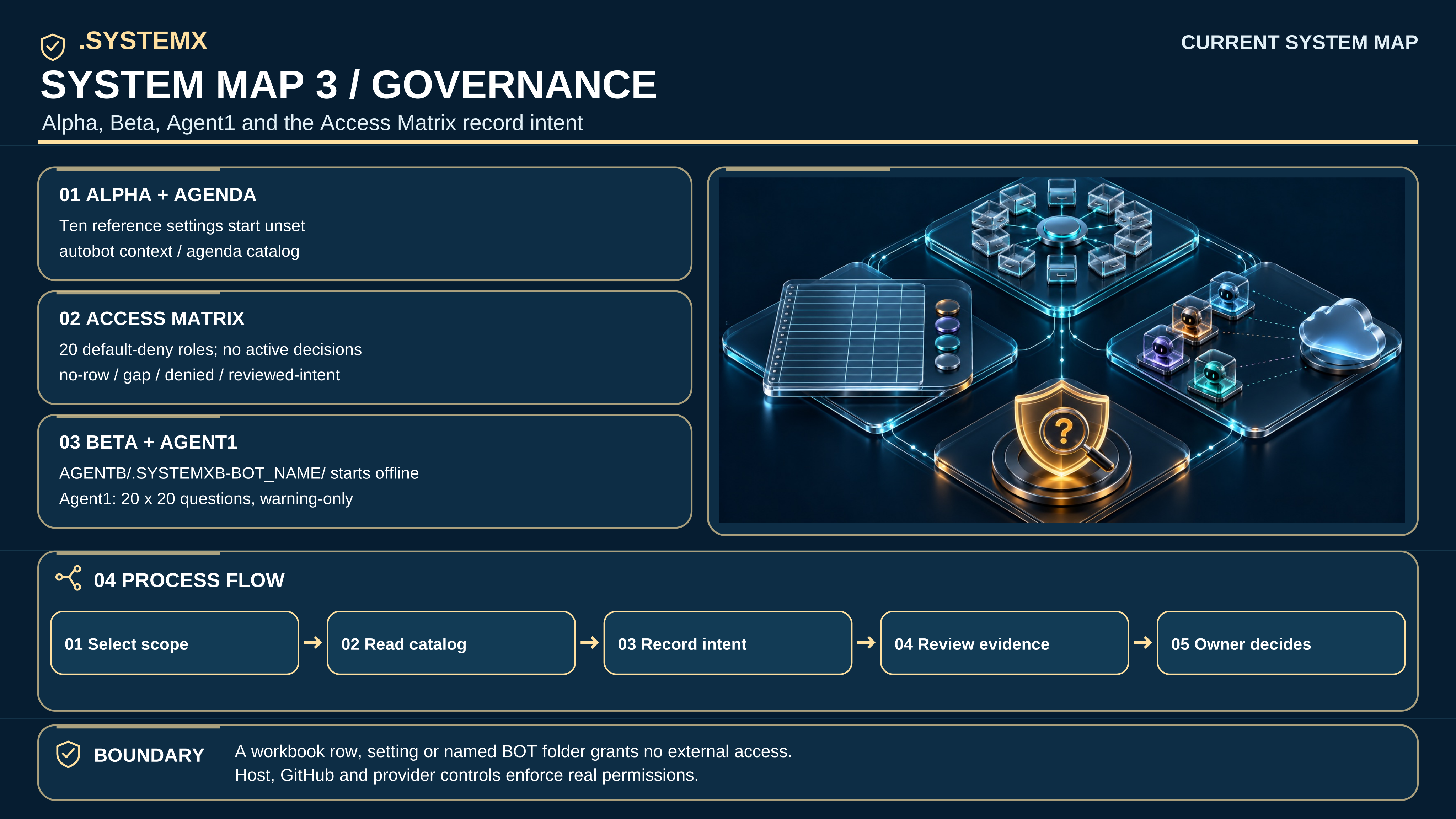
Open full-size SVG · Read full text
Text equivalent: several readers/workers can use a selected snapshot. One owner reconciles accepted changes to each canonical record scope. Git, Drive, a connector, or a cloud snapshot adapter supplies transport. Verify saved revision, conflicts, and readback before the next session writes. A URL does not itself grant access, persist changes, or synchronize concurrent edits. See shared workspaces, clouds, chats, and bots.
flowchart LR
    Root[".SYSTEMX"] --> Global["GLOBAL / shared context"]
    Root --> Plan["PLAN / Master Plan"]
    Root --> Work["WORK / canonical tasks and focus"]
    Work --> Views["Generated CURRENT and six status views"]
    Root --> Memory["MEMORY / accepted facts and checkpoints"]
    Root --> Agents["AGENTS / 0, optional X/Y/Z/A, registered workers"]
    Root --> Auto["AUTOBOT / ten fixed detail slots + AGENTA.MD"]
    Root --> Data["DATA / exact tracked scaffolds; ignored payloads"]
    Root -. role activation .-> Events["EVENTS / occurrence time and due items"]
    Root -. role activation .-> Jobs["AGENTS/agent.y/JOBS.json / external CLI channels"]
    Root -. role activation .-> Reviews["REVIEWS / policy, requests, scorecards"]
    Root --> Config["project.json / explicit command arrays"]
    Root -. managed install .-> Selected["INSTALLATION.json / selected defaults"]
    Root -. managed install .-> Cache[".systemx / retained releases and operation logs"]
Text equivalent: Global and Plan preserve purpose; Work owns task state and
focus; Memory holds reviewed knowledge; Agents holds scoped role notes. Activated
X/Y/Z records add event/due ledgers, CLI job channels, and fixed-policy review
records. Configuration selects explicit commands. Managed metadata selects versioned defaults. The
internal .SYSTEMX/.systemx/ cache differs from the optional sibling alias.
The public distribution stays blank with only Agent 0 registered. New role activation preserves existing records and starts no runtime process. Generated views come from canonical records, not independently edited status lists. Standard format · Exact casing.
flowchart TD
    Root[".SYSTEMX / shared tools and selected defaults"] --> Outer["Portfolio Global, Master Plan, Agent 0"]
    Root --> Registry["Projects/REGISTRY.json / explicit selection"]
    Registry --> App["WebApp/.SYSTEMXP"]
    Registry --> Research["Research/.SYSTEMXP"]
    Registry --> Bot["BotOps/.SYSTEMXP"]
    App --> AppRecords["App context, tasks, memory; optional X/Y/Z and AUTOBOT/DATA"]
    Research --> ResearchRecords["Research context, tasks, memory; optional X/Y/Z and AUTOBOT/DATA"]
    Bot --> BotRecords["Operations context, tasks, memory; optional X/Y/Z and AUTOBOT/DATA"]
Text equivalent: one outer installation provides defaults, while each named
child owns separate context, plans, tasks, and memory. X/Y/Z activation is scoped.
The supported path is .SYSTEMX/Projects/NAME/.SYSTEMXP; a nameless
Projects/.SYSTEMXP and nested .SYSTEMX installations are unsupported. No scope
or role is a process tree or an authentication boundary. SYSTEMX PROJECTS.
flowchart TD
    Boundary["Completion boundary or requested review"] --> Match{"Matching report exists<br/>and inputs unchanged?"}
    Match -->|Yes| Reuse["Reuse saved scorecard and evidence"]
    Match -->|No| Assess["Agent Z / same versioned 100 questions"]
    Assess --> Report["Scorecard / unknowns / evidence / delta"]
    Reuse --> Decision["Agent 0 or user / original acceptance criteria"]
    Report --> Decision
    Decision -->|Met| Done["Accept and checkpoint"]
    Decision -->|Concrete gap| Next["Next bounded action or real blocker"]
Text equivalent: review when needed, reuse identical inputs, and compare only matching subjects/policies. Changed policy requires a new baseline. The acceptance owner chooses completion or a bounded next step. Neither a score nor a due item automatically reopens tasks, executes jobs, or repeats the pipeline. Agent X · Agent Z · 100 questions.
The current visual guide links the four maps, seven agent sheets, atlas, and full text companion. SVGs declare <title> and <desc> and contain selectable operational labels. Every complex image on this page has adjacent text and a full-size link. Color alone does not convey a role or decision.
Earlier Mermaid, PNG and JPEG media remain available in immutable alpha.7 source, alpha.3 posters, and the beta.1 visual edition. They are not embedded as current graphics. This page's live Mermaid blocks remain text-readable diagrams of the concepts; current source manuals govern commands and permissions.
flowchart TD
    Context["Selected scope, Global context, Master Plan, TASKS.json"] --> A0["Agent 0: assign, integrate, verify, accept"]
    A0 --> App["Harness-native bounded workers"]
    A0 --> Y["Agent Y: task-selected installed CLI"]
    Y --> Local["Pinned executable; isolated worktree; scoped commit"]
    Local --> Draft["Optional authorized draft PR"]
    App --> Checks["Agent 0: original project check evidence"]
    Local --> Checks
    Draft --> Checks
    Checks --> Z["Agent Z: matching 100-question review"]
    Z --> Accept["Agent 0/user: criteria met or concrete gap"]
    Accept --> Ready["Accepted done + unchanged base: separate PR-ready"]
    Accept --> Cancel["Recorded cancelled: separate PR-close; retain work"]
    Ready --> External["Separately authorized merge outside Agent Y"]
    External --> Cleanup["Merged + accepted + exact owned head: verified bundle then cleanup"]
    A0 -. observations .-> X["Agent X: occurrence/recording time, revision, original evidence"]
    Checks -. observations .-> X
    Cleanup -. observations .-> X
Text equivalent: the canonical ledger remains under Agent 0. App workers and Agent Y are alternative bounded execution paths; they share one project budget. Y chooses a provider per task, pins the local executable, and returns a worktree and scoped commit. An opted-in draft PR may exist before independent project checks. X records observations without accepting tasks or running a scheduler; Z reviews evidence without granting authority. Agent 0/user records acceptance or cancellation. Ready, close, merge, and archived cleanup remain separate gates. A cancelled unmerged branch/worktree stays available for manual review. Agent Y has no merge command. Readback and recovery details are in Agent Y.
The optional ROOT guide includes editable Mermaid
views of originating/delegated requests, the flexible milestone/wave/phase/task
structure, and many-to-many observed harness/cloud mappings. These complement
the refreshed ROOT-aware four-page artwork. Canonical task status remains in
WORK/TASKS.json; local observations are not live connections. The delta is
read-only; Agent 0 reconciles through actual authorized tools and retains
external readback. One item may cover several scoped task IDs, and optional bot
assessment requires a real bot mapping. Completed execution never means
automatic task acceptance.