Repository navigation
Visual Guide
These diagrams explain the current .SYSTEMX format, including Agent 0, Agent X,
Agent Z, named .SYSTEMXP projects, execution waves, and shared-source handoffs.
The arrows show responsibilities and evidence flow. The folder does not launch
workers or install a transport when you open a diagram.
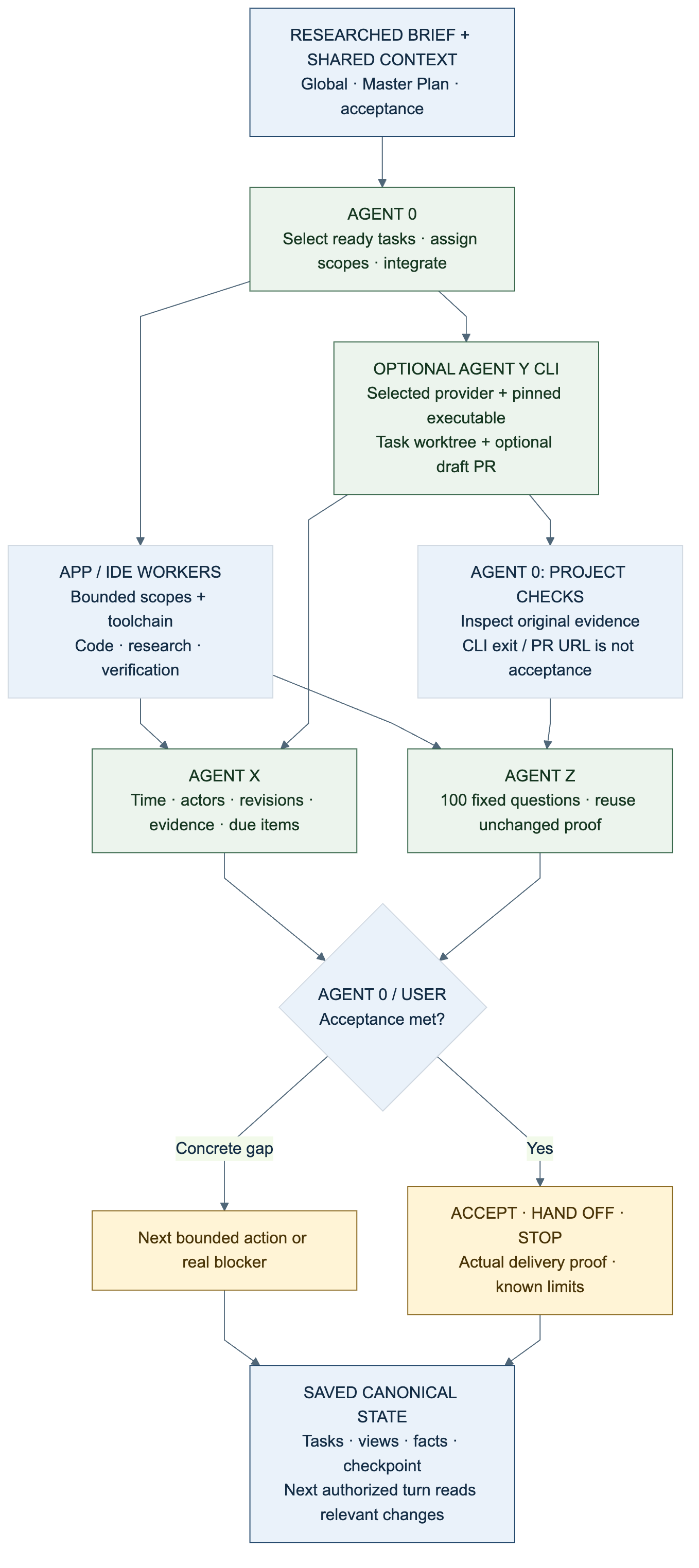
Text equivalent: keep the researched objective and constraints in shared context; Agent 0 selects and integrates bounded work; the harness supplies actual tools and workers. Agent X records meaningful times, attempts, revisions, and evidence. Agent Z reviews the fixed policy at a completion boundary or on request, reusing unchanged proof. Agent 0/user accepts against the original criteria or identifies a concrete gap. Save canonical tasks, generated views, reviewed facts, and a checkpoint. A later authorized turn reads the relevant current state.
This is the practical shared-brain metaphor: useful project knowledge can accumulate across turns. It is not model training, AGI, guaranteed improvement, or an automatic endless work loop. Turn protocol.
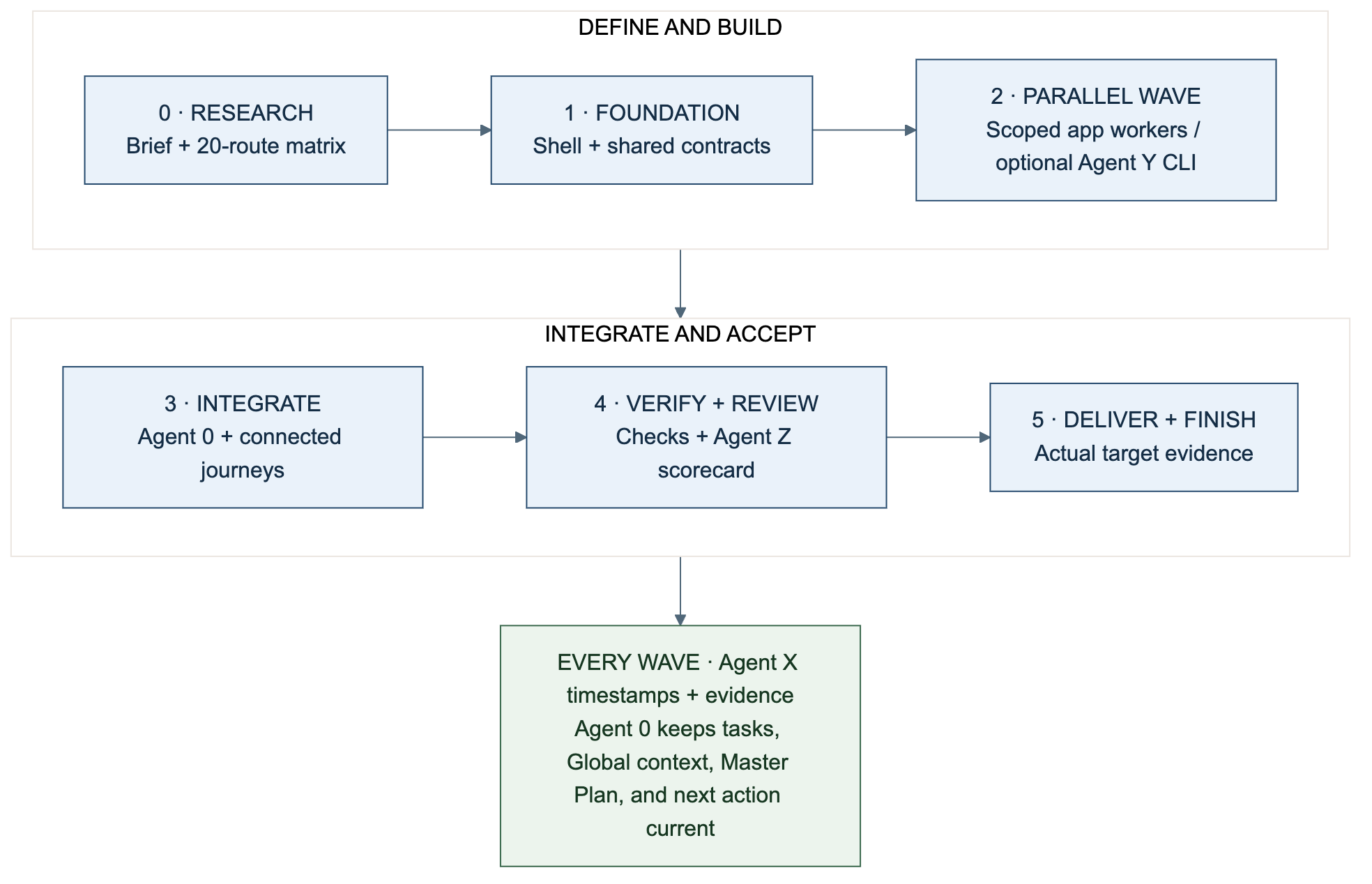
Text equivalent: wave 0 researches the brief; wave 1 verifies shared foundations/contracts; wave 2 performs independent scoped tasks; wave 3 integrates user journeys; wave 4 verifies and reviews; wave 5 delivers within authority and checks the actual target. Each transition requires the milestone's evidence. Agent X records events throughout; Agent 0 owns plan/task consistency.
Phases and waves are planning conventions, not extra commands or schema fields. See the 20-page app walkthrough for the route matrix, research and execution prompts, acceptance gates, and alternative project types.
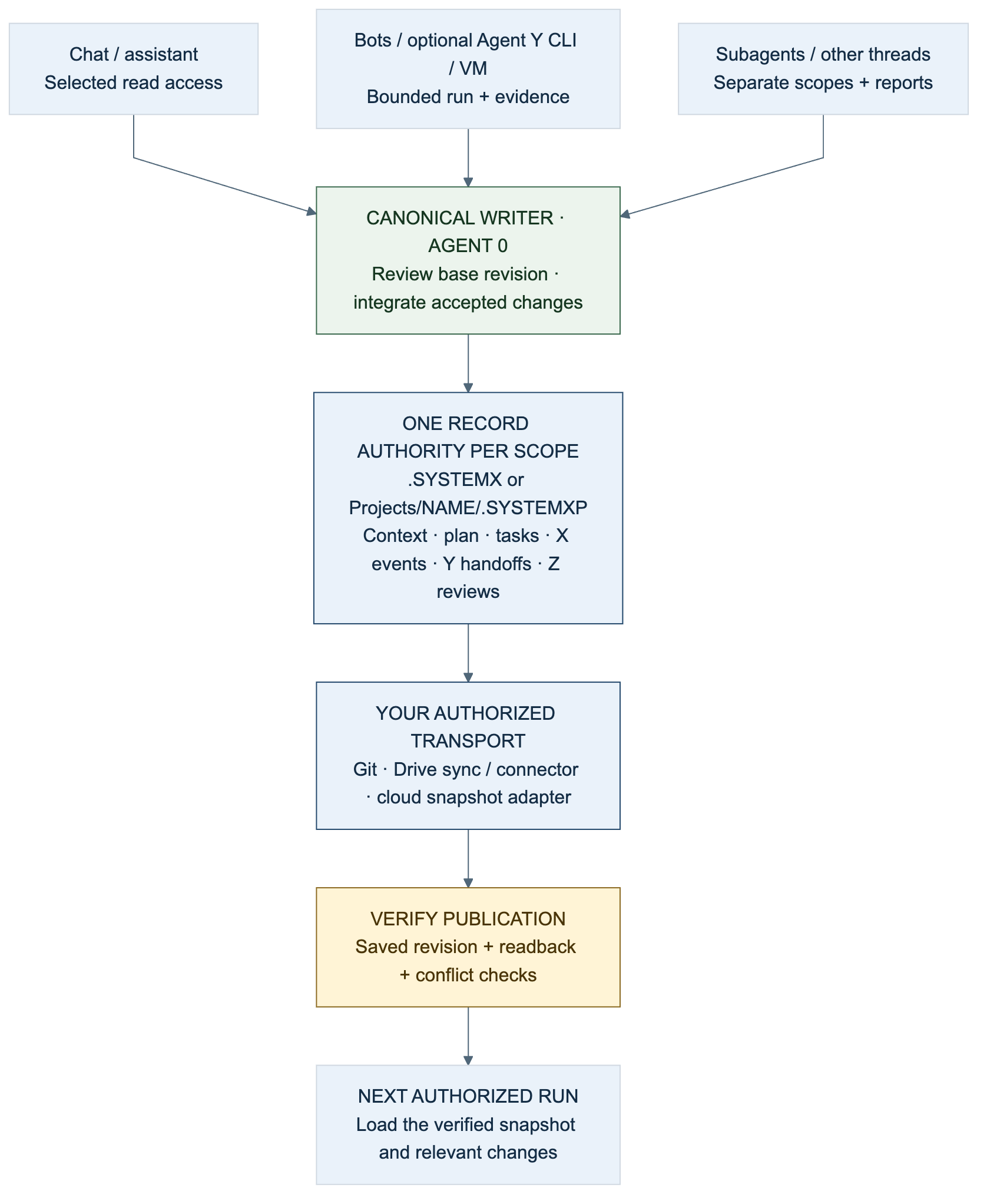
Text equivalent: several readers/workers can use a selected snapshot. One owner reconciles accepted changes to each canonical record scope. Git, Drive, a connector, or a cloud snapshot adapter supplies transport. Verify saved revision, conflicts, and readback before the next session writes. A URL does not itself grant access, persist changes, or synchronize concurrent edits. See shared workspaces, clouds, chats, and bots.
flowchart LR
    Root[".SYSTEMX"] --> Global["GLOBAL / shared context"]
    Root --> Plan["PLAN / Master Plan"]
    Root --> Work["WORK / canonical tasks and focus"]
    Work --> Views["Generated CURRENT and six status views"]
    Root --> Memory["MEMORY / accepted facts and checkpoints"]
    Root --> Agents["AGENTS / 0, optional X/Z, registered workers"]
    Root -. role activation .-> Events["EVENTS / occurrence time and due items"]
    Root -. role activation .-> Reviews["REVIEWS / policy, requests, scorecards"]
    Root --> Config["project.json / explicit command arrays"]
    Root -. managed install .-> Selected["INSTALLATION.json / selected defaults"]
    Root -. managed install .-> Cache[".systemx / retained releases and operation logs"]
Text equivalent: Global and Plan preserve purpose; Work owns task state and
focus; Memory holds reviewed knowledge; Agents holds scoped role notes. Activated
X/Z records add event/due ledgers and fixed-policy review records. Configuration
selects explicit commands. Managed metadata selects versioned defaults. The
internal .SYSTEMX/.systemx/ cache differs from the optional sibling alias.
The public distribution stays blank with only Agent 0 registered. New role activation preserves existing records and starts no runtime process. Generated views come from canonical records, not independently edited status lists. Standard format · Exact casing.
flowchart TD
    Root[".SYSTEMX / shared tools and selected defaults"] --> Outer["Portfolio Global, Master Plan, Agent 0"]
    Root --> Registry["Projects/REGISTRY.json / explicit selection"]
    Registry --> App["WebApp/.SYSTEMXP"]
    Registry --> Research["Research/.SYSTEMXP"]
    Registry --> Bot["BotOps/.SYSTEMXP"]
    App --> AppRecords["App context, tasks, memory; optional X/Z"]
    Research --> ResearchRecords["Research context, tasks, memory; optional X/Z"]
    Bot --> BotRecords["Operations context, tasks, memory; optional X/Z"]
Text equivalent: one outer installation provides defaults, while each named
child owns separate context, plans, tasks, and memory. X/Z activation is scoped.
The supported path is .SYSTEMX/Projects/NAME/.SYSTEMXP; a nameless
Projects/.SYSTEMXP and nested .SYSTEMX installations are unsupported. No scope
or role is a process tree or an authentication boundary. SYSTEMX PROJECTS.
flowchart TD
    Boundary["Completion boundary or requested review"] --> Match{"Matching report exists<br/>and inputs unchanged?"}
    Match -->|Yes| Reuse["Reuse saved scorecard and evidence"]
    Match -->|No| Assess["Agent Z / same versioned 100 questions"]
    Assess --> Report["Scorecard / unknowns / evidence / delta"]
    Reuse --> Decision["Agent 0 or user / original acceptance criteria"]
    Report --> Decision
    Decision -->|Met| Done["Accept and checkpoint"]
    Decision -->|Concrete gap| Next["Next bounded action or real blocker"]
Text equivalent: review when needed, reuse identical inputs, and compare only matching subjects/policies. Changed policy requires a new baseline. The acceptance owner chooses completion or a bounded next step. Neither a score nor a due item automatically reopens tasks, executes jobs, or repeats the pipeline. Agent X · Agent Z · 100 questions.
The brand is the standalone .SYSTEMX wordmark. Maintainer attribution stays
separate in project information. The original imagegen logo remains current.
The three current workflow infographics are rendered from editable Mermaid
sources, with PNG previews and SVG exports in the repository's
asset directory.
The earlier six-step raster illustration is retained only as a legacy asset;
current instructions use the Agent 0/X/Z graphics above.
| Diagram | Editable source | Vector | Raster |
|---|---|---|---|
| Shared-context coordination | Mermaid | SVG | PNG |
| Project waves | Mermaid | SVG | PNG |
| Shared workspace | Mermaid | SVG | PNG |


Text equivalents and alt text accompany the diagrams. Color is not the sole indicator of meaning. Mermaid source also remains readable when a viewer cannot render it. Update the diagram, explanation, and exports together when behavior changes. GitHub's diagram documentation.