AEP Foundations Menu
| # | Option | Description | Dependencies |
|---|---|---|---|
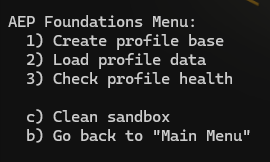
| 1 | Create profile base | Deploys identity namespaces, XDM field groups, schemas, datasets, merge policies, and audiences | — |
| 2 | Load profile data | Creates HTTP API connections and dataflows, then streams Depeche Mode profile data (traits and experience events) and lookup datasets |
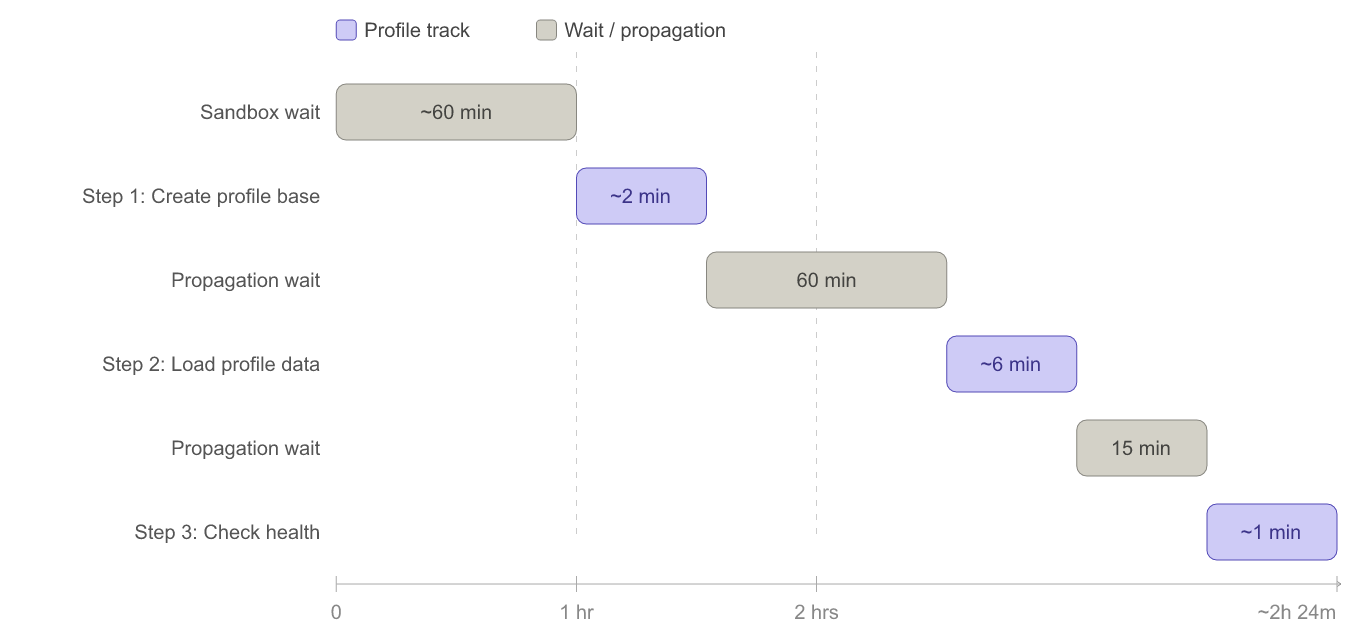
Create profile base must have completed; wait at least 60 minutes before running |
| 3 | Check profile health | Validates that all profile data is present in the Profile store using per-identity lookups and dataset diagnostics |
Load profile data must have completed; wait at least 15 minutes before running |
Terminal output
Total time: approximately 2 hours 24 minutes.
Note
The sandbox must be in a "Ready" state for at least 60 minutes before running Step 1. All wait times are minimums.
| Field | Description |
|---|---|
API_KEY |
Client ID from your Developer Console project |
CLIENT_SECRET |
Client Secret from your Developer Console project |
IMS_ORG |
Your IMS Organization ID (must end with @AdobeOrg) |
SANDBOX_NAME |
Target sandbox name (should be empty and of type dev) |
SCOPES |
Must include Experience Platform API scopes (e.g., openid, session, AdobeID, read_organizations, additional_info.projectedProductContext) |
- Administrative privileges for an IMS Org with Real-Time CDP entitlements
- Developer Console project with access to Adobe Experience Platform APIs
- An Adobe Experience Platform role with all permissions granted for the target sandbox
- Sandbox should be empty and of type
dev
Warning
Before running this step, ensure the sandbox has been in a "Ready" state for at least 60 minutes.
Takes approximately 2 minutes. Creates:
- Identity Namespaces (4): customerID, storeID, productID, planID
-
Schema Registry:
- Classes (1)
- Field Groups (13)
- Schemas (10)
- Identity Descriptors (12)
- Relationship/Reference Descriptors (6)
- Friendly Name Descriptors (3)
- Catalog: Datasets (10)
-
Profile Service:
- Merge Policies (2) — default merge policy + dep: No Stitch
- Audiences (1) — Any Event Streaming (within the hour)
Important
After this step completes, wait at least 60 minutes before running Step 2. This allows AEP to finish propagating schema and dataset metadata from the control plane to the data plane. The CLI automatically enforces this — if you run Step 2 too soon, it will block and tell you how many minutes remain.
Important
Wait at least 60 minutes after completing Step 1 before running this step. The CLI automatically checks dataset timestamps and will block with a message if the wait hasn't elapsed — no manual timing needed.
Takes approximately 6 minutes. Creates:
- An HTTP API base connection and 10 dataflows (one per dataset)
- Waits up to 5 minutes for all dataflows to reach an active state
- Streams the following data into the Profile store:
- Depeche Mode profile — traits (3 record datasets) and experience events (7 event datasets)
- Lookup data — 3 lookup datasets (store, product, plan)
Note
This step is idempotent — re-running it will overwrite existing trait records and skip duplicate events. It recreates the HTTP connection and dataflows fresh each time.
Important
Wait at least 15 minutes after completing Step 2 before running this step.
Nothing is created. The health check runs per-identity profile lookups and dataset diagnostics against the Profile store, returning a PASS or FAIL result for each identity. A successful run reports all identities passing.
| Error | Description | Corrective Action |
|---|---|---|
✗ Depeche Mode profile events / ✗ Health check failed — wait 15 minutes and retry.
|
Some profile fragments have not finished propagating or were not loaded successfully. The CLI shows which datasets have fewer events than expected. | Option 1: Wait another 15 minutes and re-run Check profile health. Option 2: Re-run Load profile data, wait 15 minutes, then re-run Check profile health. |