Emotion Recognition
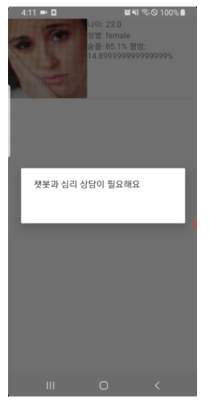
Emotion Recognition is used to analyze the user's facial expressions and to inform the user that if the sadness or anxiety value exceeds the standard, have to use our solution.
-
App analyze emotions through facial expressions by taking pictures with their cell phone's front camera.
-
App will use an
AsyncTaskand the Microsoft Face API to detect the faces in an image and get information about facial attributes such as age, gender, emotions
1. Azure API Key must be entered as required.
  @Override
            protected void onPostExecute(Face[] faces) {
                pd.dismiss();
                Intent intent = new Intent(getApplicationContext(), ResultActivity.class);
                Gson gson = new Gson();
                String data = gson.toJson(faces);
                if (faces == null || faces.length == 0) {
                    makeToast("No faces detected. You may not have added the API Key or try retaking the picture.");
                } else {
                    intent.putExtra("list_faces", data);
                    ByteArrayOutputStream stream = new ByteArrayOutputStream();
                    mBitmap.compress(Bitmap.CompressFormat.PNG, 100, stream);
                    byte[] byteArray = stream.toByteArray();

                    intent.putExtra("image", byteArray);
                    startActivity(intent);
                }

            }
        };
        detectTask.execute(inputStream);
    }
2. App need access to the user's cell phone camera.
  if (ContextCompat.checkSelfPermission(getApplicationContext(), Manifest.permission.CAMERA) != PackageManager.PERMISSION_GRANTED) {
                    ActivityCompat.requestPermissions(FaceRecognitionAcitivity.this, new String[]{Manifest.permission.CAMERA, Manifest.permission.WRITE_EXTERNAL_STORAGE}, 0);
                } else {

                    if (checkSelfPermission(Manifest.permission.WRITE_EXTERNAL_STORAGE)
                            == PackageManager.PERMISSION_GRANTED) { // contents }
                    else { // contents }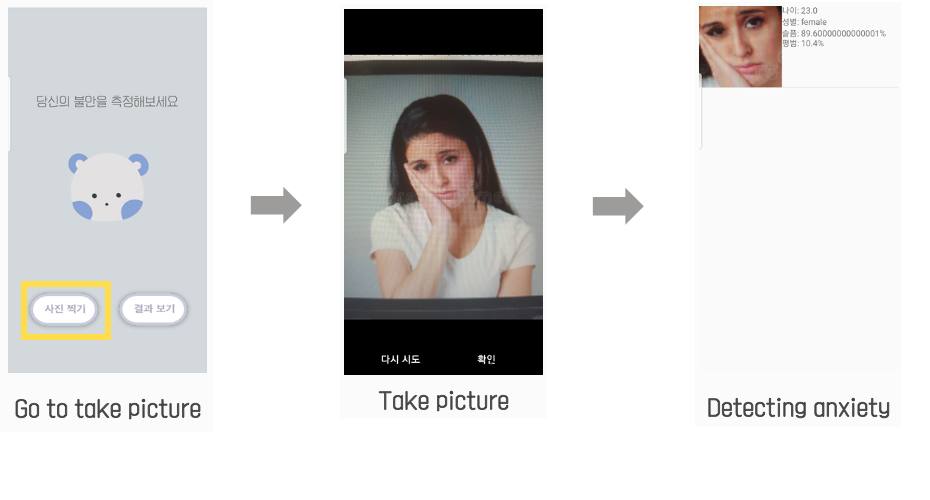
If the anxiety index is higher than the standard, a message indicates that consultation is needed.