Repository navigation
Development Lifecycle
Development Lifecycle is a set of opinionated workflows. It covers every phase of development. These phases range from ideation and design to implementation and deprecation. The agent saves its state to disk through AgentM's memory as it works. This lets you split a change across several agents. You can give different sessions different kinds of work. You might do research and design in one session. You can do implementation or cleanup in another. The agent always knows where it left off. Other crickets plugins enhance many of its steps when they are installed.
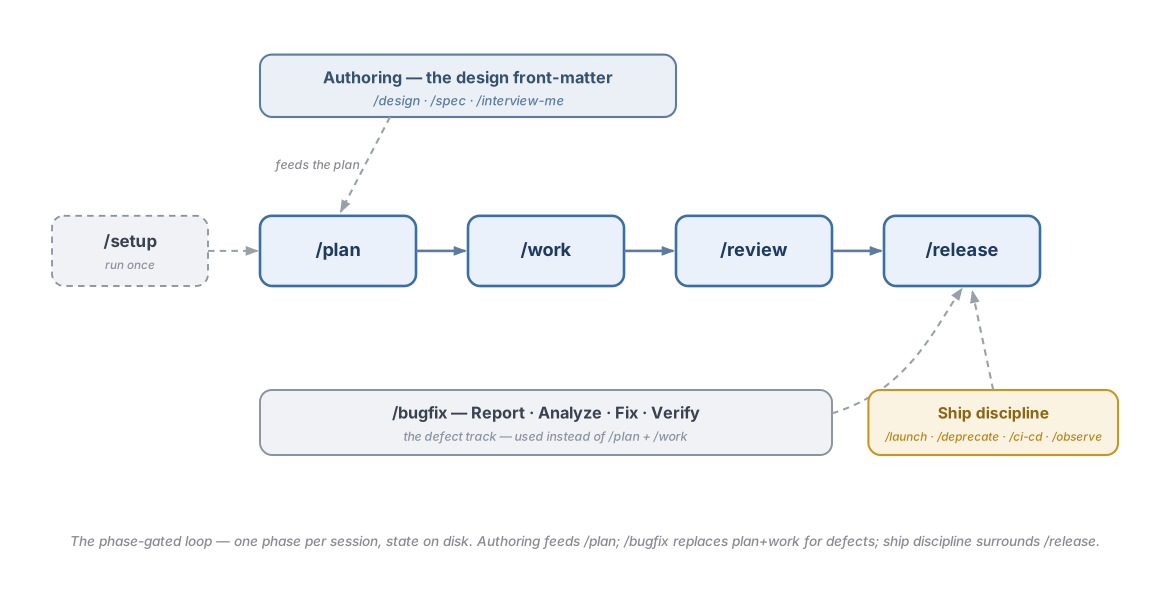
This diagram shows the workflow. It outlines the phase-gated loop. It includes the authoring feed. It displays the /bugfix track. It covers ship discipline.
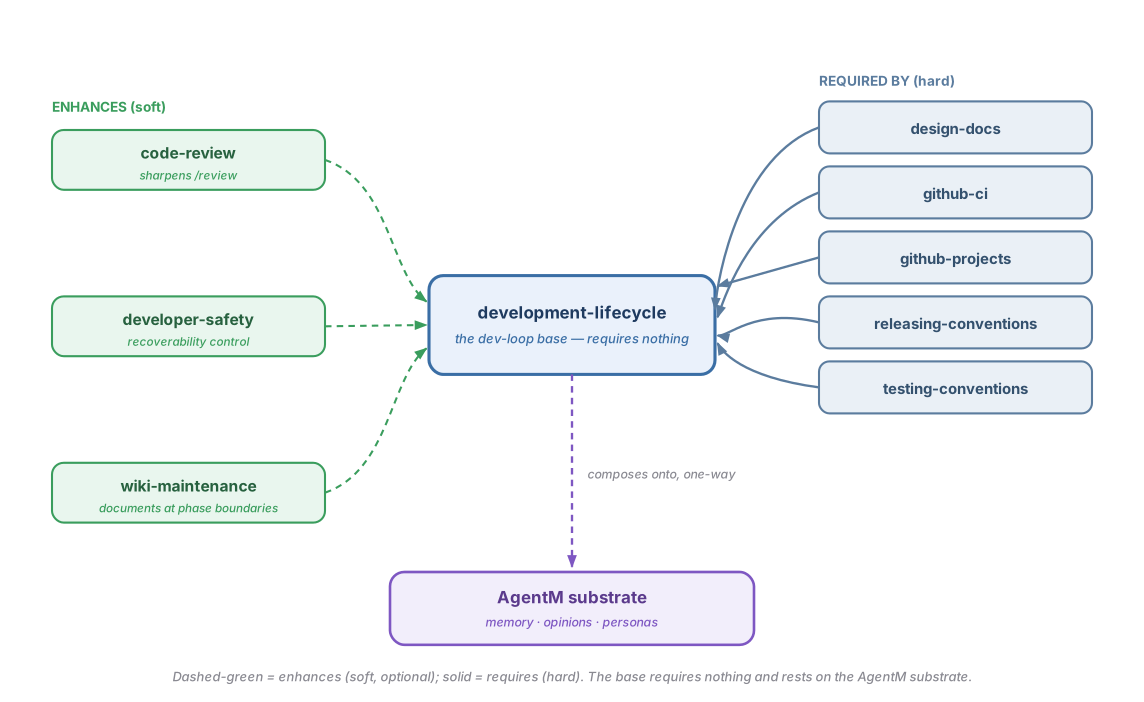
This diagram shows how the lifecycle composes. It details what enhances the loop. It lists what requires the loop. It illustrates the AgentM substrate it rests on.
Development Lifecycle moves a change from a rough idea to a shipped feature. It progresses one gated step at a time. Its commands map directly onto that flow.
You start with an idea. This can be a brief, a feature request, or a bug. You run /interview-me when the idea is still fuzzy. This command draws out what you actually want. Research then fills in what the agent hasn't seen. It performs a read-only sweep of the codebase. It searches the web when that helps. You move to architecture and design once the shape becomes clearer. The /spec command writes a short PRD. The /design command takes a design doc to a human-approved final state. It then splits that design into parts. Those parts become plans. The /plan command turns a brief into a plan of steps with pass/fail criteria, and opens the plan's tracker. A larger design fans out into several ordered, named plans. You then start the work. The /work command runs a plan's steps one at a time, keeping its tracker current. It stops only when a safety check fails or it needs a decision. For bigger efforts, /work spawns its own isolated worktree for the plan. It uses the host's native worktree primitive for this. It closes the worktree out with an auto-merging pull request. This happens when you configure isolation.mode: worktree-per-plan. It also happens when you ask for one explicitly. You do not need to run a separate spawn or integrate command. Every change is reviewed adversarially at /review. Every change is shipped through the /release gate. The /bugfix command provides a shorter track for defects. This track follows a Report → Analyze → Fix → Verify flow.
The whole loop runs on disk instead of in the conversation. The plan lives in files. Its progress lives in files. Its tracker, written by agentm, says where the plan stands. The project's state lives in files. This on-disk storage lets one plan span many sessions.
| Direction | Plugin | How |
|---|---|---|
| Enhances (soft) | — | None. Development Lifecycle is the base, not an enhancer. |
| Enhanced by (soft) | Code Review · Developer Safety · Wiki Maintenance | Code Review runs the adversarial reviewers at /review; Developer Safety adds its recoverability control across the loop; Wiki Maintenance dispatches the documenter at phase boundaries — each only when installed alongside. |
| Requires (hard) | — | None. Development Lifecycle is fully standalone (requires: []). |
| Required by (hard) | Design Docs · GitHub CI · GitHub Projects · Releasing Conventions · Testing Conventions | Each declares requires: [development-lifecycle] — they extend the phase loop and do not install without it. |
Development Lifecycle is opinionated about how a change should move from brief to merge. You should reach for something else if any of these apply:
- You already run a lifecycle you like. This could be your own scripts. It could be a CI-driven flow. It could be a different agent harness. You do not want a second set of phase commands layered on top.
- You prefer a freeform, single-pass style. The discrete
plan → work → review → releasegates are deliberate. They can feel heavier than the change warrants on a small or throwaway change. - You want the loop without agentm, or without its on-disk state contract. The plugin keeps each plan, its progress log and its tracker where agentm puts them, and treats them as the source of truth between sessions. With no agentm there is no plan, and the phases have nothing to run on.
Each primitive links to the source that implements it. The phase and ship commands are host-symmetric. The six agents are host-symmetric. The two hooks are Claude-only (Antigravity limitations).
| Primitive | Kind | What it does |
|---|---|---|
/setup |
command | First-time project scaffold — writes the repo's .harness/ tools, and seeds a plan only where agentm gives a path back. Run once. |
/plan |
command | Turn a brief into PLAN.md with per-step verification criteria, and open its tracker. No code. |
/work |
command | Work the plan's steps autonomously, single-threaded, safety-gated per step, keeping its tracker current. |
/review |
command | Adversarial review — gates first, then the deeper pass if available. Reports, never fixes. |
/release |
command | Pre-merge gate — the plan's status is done, gates green, run to completion under the recoverability gate. When a release's plan sets touches_architecture: true, close-out also asks whether the governing design needs its body and amendment log reconciled in the same landing. |
/bugfix |
command | Defect pipeline — Report → Analyze → Fix → Verify. Used instead of plan-plus-work. |
/design |
command | Author a design doc, translate it into parts, sequence them into named plans. |
/spec |
command | Write a PRD (objectives, UX, structure, tests, out-of-scope) before any code. |
/interview-me |
command | One-question interview loop to extract what an underspecified ask really wants. |
/queue-status-lite |
command | Read-only glance at every active plan and its latest progress line. |
/open (alias /orient) |
command | LOCATE a project by name (registered repos, vault projects/ tree, agentm recall), CONFIRM the match, then ORIENT: agentm's opening brief, the project's plans with their tracker status, recent progress, queued plans and board state. Read-only, same posture as /queue-status-lite. See Open a project by name. |
/observe |
command | Instrumentation discipline — structured logging, RED metrics, tracing, symptom alerts. |
/deprecate |
command | Deprecation lifecycle — compulsory vs advisory, zombie-code removal. |
/launch |
command | Pre-launch readiness gate — checklist, feature-flag lifecycle, monitoring first. |
/ci-cd |
command | CI/CD authoring discipline — Shift Left, quality-gate pipeline, failure feedback loops. |
/document-decision |
command | ADR trigger workflow — when to write a decision record and how to execute it. |
worker |
sub-agent | The autonomous executor of a named plan, one per worktree (Sonnet tier). |
tech-lead |
sub-agent | The /design → /plan author. |
researcher |
sub-agent | Read-only context gatherer — a thin skin over explorer plus light web fetch. |
project-manager |
sub-agent | Read-only glance over the active plans via /queue-status-lite. |
evaluator |
sub-agent | The /review rubric grader. |
explorer |
sub-agent | Read-only codebase fan-out for gathering context. |
harness-context-session-start |
hook | Injects harness context at session start (Claude-only). |
compact-nudge-resume |
hook | Nudges a resumed session to pick the loop back up from disk state (Claude-only). |
There is no plugin configuration. The phase commands read and write the project's on-disk state: the plan, progress, tracker and feature files, plus optional project settings. That is project state the loop maintains, not settings you configure up front. agentm decides where it lives, and the plugin asks. In a project bound to your vault, each plan is a numbered task (tasks/NNN-<slug>/) and features.json sits in the project's desk/. A repo with no vault keeps its plans and features.json repo-local under .harness/. The repo's own tools (init.sh, verify.sh, project.json) stay in .harness/ either way.
- Named plans · See every active plan — These documents cover the multi-plan surface.
-
Run a named plan · Run isolated tasks — These documents detail the worktree lifecycle. They include
/work's own auto-spawn and auto-close-out. -
Evaluator — This document explains the
/reviewgrader's dispatch contract. - Code Review · Developer Safety — These are the sibling plugins that enhance the loop.
- Why phase-gating · Why adversarial review — These documents explain why the loop is shaped this way.
- Development lifecycle design · Composition design — These documents detail the deeper design.