Repository navigation
Status Line Meter
Status Line Meter keeps a small live gauge in the corner of your Claude Code session, so you always have a rough sense of where you stand without pausing to run a report. At a glance you see how much of the context window you have burned through and roughly what the session is costing, updated after every response. It is the ambient, always-on companion to a full cost breakdown: not the detailed report, just the number you want in your peripheral vision while you work. Installing the plugin gets the script in place; because only one command can own Claude Code's status line at a time, you still point .claude/settings.json's statusLine at it yourself — a one-line, one-time step (see Wire The Status Line) — after which it quietly gains its cost readings when Token-Audit is installed alongside it.
How it composes — it stands alone on the Claude Code status line and enhances Token-Audit when both are installed:
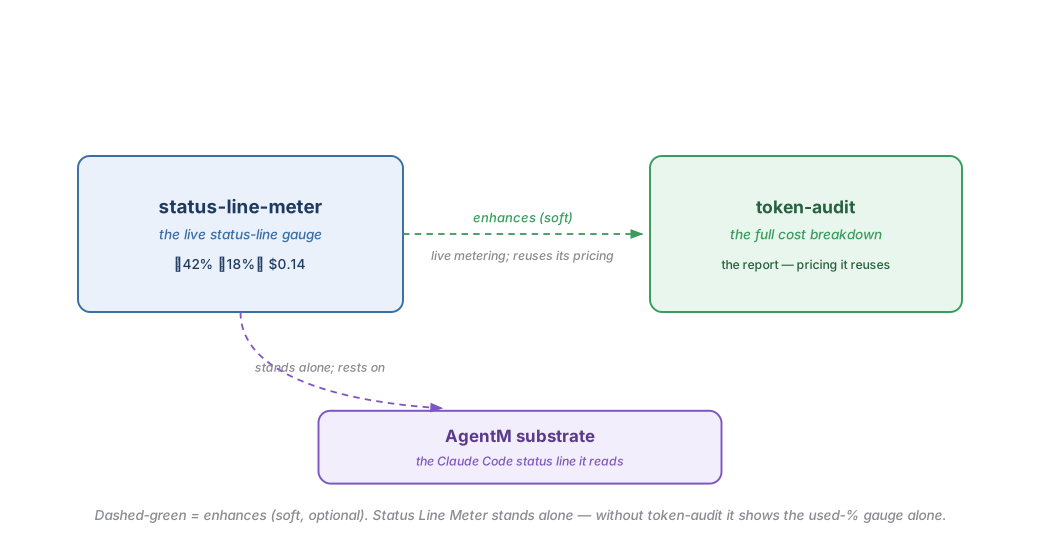
After each response, Claude Code hands the plugin a quick summary of the session and asks for one line of text back — that line becomes your status bar. The plugin renders up to four small badges into it: how much of the context window you have used, an estimate of what the session has cost so far, a share showing how much of that cost comes from the fixed overhead loaded into every prompt, and — once you set a budget ceiling — a rolling 5-hour and weekly spend readout against it. To keep up without slowing you down, it only looks at what is new since the last response rather than re-reading the whole conversation, and it starts over cleanly if the conversation is ever trimmed back.
The cost figures lean on Token-Audit's pricing, so the two cost badges appear only when that plugin is installed alongside; on its own, Status Line Meter still shows the context-window gauge. And whenever a number can't be worked out, it simply leaves that badge off rather than showing a broken or stale figure — so the bar stays honest and never gets in your way.
| Direction | Plugin | How |
|---|---|---|
| Enhances (soft) | Token-Audit | Adds live, continuous metering in the status line, reusing token-audit's pricing.py for the cost and floor-share badges — only when both are installed. |
| Enhanced by (soft) | — | None. |
| Requires (hard) | — | None. Status Line Meter is fully standalone; without token-audit it renders the used-percentage alone. |
| Required by (hard) | — | None. |
Status Line Meter is opinionated about what belongs in a status line, and it will not suit everyone. Reach for something else if:
- You prefer a quiet, empty status line, or you already run a custom status-line command you would rather not replace.
- You want a full cost breakdown — the per-message curve, the cache split. That is the
token-auditskill's job; this plugin is the glanceable live version (including a rolling 5-hour/weekly spend badge once you configure a ceiling), not the full report. - Your host is not Claude Code, or it predates the status-line JSON schema the script reads, so the used-percentage field is unavailable.
Each primitive links to the source that implements it.
| Primitive | Kind | What it does |
|---|---|---|
status_line_meter.py |
status-line script | Reads the per-response JSON payload and prints the used-%, floor-share, and cost badges — incrementally, with graceful-skip on any missing field. |
Two layers. The used-%, cost, and floor-share badges need no configuration beyond wiring the script into statusLine (see Wire The Status Line) — the script reads the status-line payload Claude Code hands it and discovers token-audit's pricing.py at runtime (token-audit unlocks the cost and floor-share badges; without it you still get the used-percentage). The fourth badge — the 5-hour/weekly budget readout — is opt-in on top of that: set CRICKETS_BUDGET_5H and/or CRICKETS_BUDGET_WEEKLY (USD ceilings) to turn it on; CRICKETS_SESSION_COST_LOG overrides where it reads logged per-message cost records from (a temp-dir default otherwise). No ceiling configured means the badge stays off, exactly like every other badge's graceful-skip.
-
Wire The Status Line — the one-time
.claude/settings.jsonstep every status-line plugin needs. - Token-Audit — the full cost-breakdown skill this plugin meters live.