homebridge
Welcome to the homebridge wiki!

Homebridge is a lightweight Node.js server you can run on your home network that emulates the iOS HomeKit API. It supports Plugins, which are community-contributed modules that provide a basic bridge from HomeKit to various 3rd-party APIs provided by manufacturers of "smart home" devices.
Since Siri supports devices added through HomeKit, this means that with Homebridge you can ask Siri to control devices that don't have any support for HomeKit at all. For instance, using just some of the available plugins, you can say:
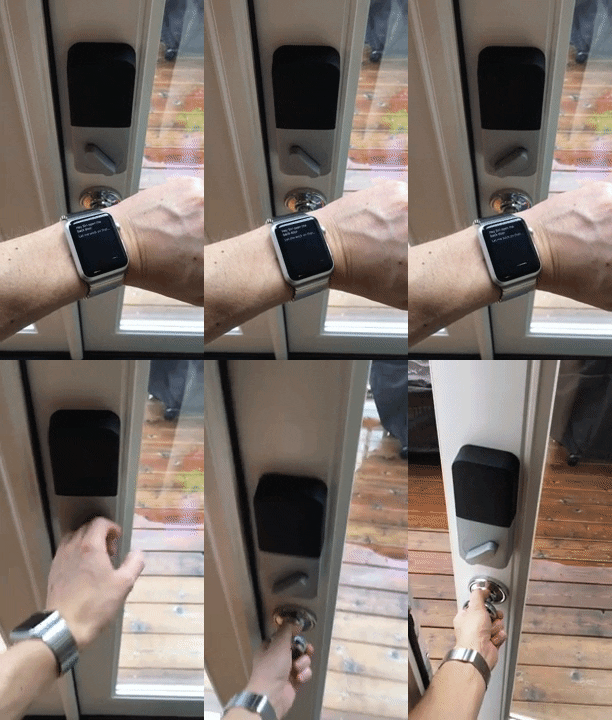
- Siri, unlock the back door. [pictured to the right]
- Siri, open the garage door.
- Siri, turn on the coffee maker.
- Siri, turn on the living room lights.
- Siri, good morning!
You can explore all available plugins at the NPM website by searching for the keyword homebridge-plugin.
The official Homebridge Discord server and Reddit community are where users can discuss Homebridge and ask for help.


HomeKit communities can also be found on both Discord and Reddit.

Official Homebridge Raspberry Pi Image
Install Homebridge on Raspbian

Debian or Ubuntu Linux |
Red Hat, CentOS or Fedora Linux | Arch / Manjaro Linux|Install Homebridge on Arch Linux


Install Homebridge on Windows 10 / 11 Using Hyper V

Install Homebridge on Docker
Synology | Unraid | QNAP | TrueNAS Scale
Install Homebridge on Synology DSM 7
- Open the Home
 app on your device.
 - Tap the Home tab, then tap
 .
. - Tap Add Accessory, then scan the QR code shown in the Homebridge UI or your Homebridge logs.
If the bridge does not have any accessories yet, you may receive a message saying Additional Set-up Required, this is ok, as you add plugins they will show up in the Home app without the need to pair again (except for Cameras and TVs).
Cameras and most TV devices are exposed as separate accessories and each needs to be paired separately. See this wiki article for instructions.
Once your device has been added to HomeKit, you should be able to tell Siri to control your devices. However, realize that Siri is a cloud service, and iOS may need some time to synchronize your device information with iCloud.
One final thing to remember is that Siri will almost always prefer its default phrase handling over HomeKit devices. For instance, if you name your Sonos device "Radio" and try saying "Siri, turn on the Radio" then Siri will probably start playing an iTunes Radio station on your phone. Even if you name it "Sonos" and say "Siri, turn on the Sonos", Siri will probably just launch the Sonos app instead. This is why, for instance, the suggested name for the Sonos accessory is "Speakers".
The https://developers.homebridge.io website contains the Homebridge API reference, available service and characteristic types, and plugin examples.
The Homebridge Plugin Template project provides a base you can use to create your own platform plugin.
There are many existing plugins you can study; you might start with the Homebridge Example Plugins or a plugin that already implements the device type you need.
When writing your plugin, you'll want Homebridge to load it from your development directory instead of publishing it to npm each time. Run this command inside your plugin project folder so your global installation of Homebridge can discover it:
npm linkYou can undo this using the npm unlink command.
Then start Homebridge in debug mode:
homebridge -DThis will start up Homebridge and load your in-development plugin. Note that you can also direct Homebridge to load your configuration from somewhere besides the default ~/.homebridge, for example:
homebridge -D -U ~/.homebridge-devThis is very useful when you are already using your development machine to host a "real" Homebridge instance (with all your accessories) that you don't want to disturb.
To fix this, Reset Homebridge.
Try the following:
- Swap between the
Bonjour HAPandCiaomDNS Advertiser options. See the wiki for more details. - iOS DNS cache has gone stale or gotten misconfigured. To fix this, turn airplane mode on and back off to flush the DNS cache.
- One bridge can only expose 150 accessories due to a HomeKit limit. You can however run your plugins as a Child Bridge or run Multiple Homebridge Instances to get around this limitation.
- Once an accessory has been added to the Home app, changing its name via Homebridge won't be automatically reflected in iOS. You must change it via the Home app as well.
Technically, the device manufacturers should be the ones implementing the HomeKit API. And I'm sure they will - eventually. When they do, this project will be obsolete, and I hope that happens soon. In the meantime, Homebridge is a fun way to get a taste of the future, for those who just can't bear to wait until "real" HomeKit devices are on the market.
Homebridge was originally created by Nick Farina.
The original HomeKit API work was done by Khaos Tian in his HAP-NodeJS project.
A http plugin with support of webhooks for Homebridge.
The plugin gets its states from any system that is calling the url to trigger a state change.
Currently supports contact, motion, occupancy, smoke sensors, switches, push buttons, lights (only on/off and brightness), temperature sensors, humidity sensors, thermostats, CO2 sensors and leak sensors.
- Install homebridge using:
npm install -g homebridge - Install this plugin using:
npm install -g homebridge-http-webhooks - Update your configuration file. See sample-config.json snippet below.
To retrieve the current state, you need to call the url http://yourHomebridgeServerIp:webhook_port/?accessoryId=theAccessoryIdToTrigger
The returned JSON format is:
    {
        "success": true,
        "state": cachedState
    }
To trigger a change of a boolean accessory you need to call the url http://yourHomebridgeServerIp:webhook_port/?accessoryId=theAccessoryIdToTrigger&state=NEWSTATE
Use only the text true or false. Do not use numbers 1 or 0.
For contact sensors the value for NEWSTATE is either true for contact or false for no contact. If autoRelease is used, then the state will be released after autoReleaseTime, if not set 5 seconds.
For motion sensors the value for NEWSTATE is either true for motion detection or false for no motion. If autoRelease is used, then the state will be released autoReleaseTime, if not set 5 seconds.
For occupancy sensors the value for NEWSTATE is either true for occupancy detection or false for no occupancy. If autoRelease is used, than the state will be released autoReleaseTime, if not set 5 seconds.
For smoke sensors the value for NEWSTATE is either true for smoke detection or false for no smoke.
For switches the value for NEWSTATE is either true for on or false for off.
For push buttons the value for NEWSTATE is true. The button will be released automatically.
For lights the value for NEWSTATE is either true for on or false for off.
For outlets the value for NEWSTATE is either true for on or false for off.
For outlets the additional state stateOutletInUse is available. The value for NEWSTATE is either true for on or false for off and
can be changed by calling the url http://yourHomebridgeServerIp:webhook_port/?accessoryId=theAccessoryIdToTrigger&stateOutletInUse=NEWSTATE
For fanv2 the value for NEWSTATE is either true for on or false for off.
For valves/faucets the value for NEWSTATE is either true for on or false for off.
For valves the additional state statusFault is available. The value for NEWSTATE is either true for on or false for off and
can be changed by calling the url http://yourHomebridgeServerIp:webhook_port/?accessoryId=theAccessoryIdToTrigger&statusFault=NEWSTATE
For switches you can call the url from any system to switch the switch on or off.
For push buttons you can call the url from any system to push the button. The button will be released automatically.
Doorbells require 2 parameters: accessoryId and the event to trigger:
- Single press = 0
- Double press = 1
- Long press = 2
http://yourHomebridgeServerIp:webhook_port/?accessoryId=theAccessoryIdToUpdate&event=EVENT
Examples:
- Ring the doorbell with a single button press:
http://yourHomebridgeServerIp:webhook_port/?accessoryId=theAccessoryIdToUpdate&event=0 - Ring the doorbell with a long button press:
http://yourHomebridgeServerIp:webhook_port/?accessoryId=theAccessoryIdToUpdate&event=2
Doorbells are shown as a stateless programmable switch. When the doorbell is rung by calling the webhooks url, it generates the notification "Roomname doorbell rang." and executes any actions which have been added in the Home app to the stateless programmable switch. When adding the doorbell to the Home app, it will ask for somme options to recognise familiar faces. These can be ignored, as no camera is associated with the doorbell.
For lights you can call the url from any system to switch the light on or off.
For outlets you can call the url from any system to switch the outlet on or off.
For fanv2 you can call the url from any system to switch the fanv2 on or off.
To update a numeric accessory, you need to call the url http://yourHomebridgeServerIp:webhook_port/?accessoryId=theAccessoryIdToUpdate&value=NEWVALUE
For temperature sensors the value for NEWVALUE is the new temperature reading.
For light sensors the value for NEWVALUE is the new light intensity in lux (as float).
For humidity sensors the value for NEWVALUE is the new relative humidity percentage reading.
For air quality sensors the value for NEWVALUE is the new air quality value (Between 1-5, 1 Excellent).
For a CO2 sensor the value for NEWVALUE is the new PPM reading.
For leak sensors the value for NEWVALUE is the new leak state value (1 for leak, 0 for dry).
For light brightness the value for NEWVALUE is the new light brightness (as integer, between 0 and 100 with respect to brightness factor).
To update a thermostat, you can update four different values:
- Current temperature reading:
http://yourHomebridgeServerIp:webhook_port/?accessoryId=theAccessoryIdToUpdate¤ttemperature=NEWVALUE - Target temperature:
http://yourHomebridgeServerIp:webhook_port/?accessoryId=theAccessoryIdToUpdate&targettemperature=NEWVALUE - Current state (Off=0 / Heating=1 / Cooling=2):
http://yourHomebridgeServerIp:webhook_port/?accessoryId=theAccessoryIdToUpdate¤tstate=NEWVALUE - Target state (Off=0 / Heat=1 / Cool=2 / Auto=3):
http://yourHomebridgeServerIp:webhook_port/?accessoryId=theAccessoryIdToUpdate&targetstate=NEWVALUE
To update the state of security, you can update two different values:
- Current state (Stay=0 / Away=1 / Night=2 / Disarmed=3 / Triggered=4):
http://yourHomebridgeServerIp:webhook_port/?accessoryId=theAccessoryIdToUpdate¤tstate=NEWVALUE - Target state (Stay=0 / Away=1 / Night=2 / Disarm=3):
http://yourHomebridgeServerIp:webhook_port/?accessoryId=theAccessoryIdToUpdate&targetstate=NEWVALUE
To update a garage door opener, you can update three different values:
- Current door state (Open=0 / Closed=1 / Opening=2 / Closing=3 / Stopped=4):
http://yourHomebridgeServerIp:webhook_port/?accessoryId=theAccessoryIdToUpdate¤tdoorstate=NEWVALUE - Target door state (Open=0 / Closed=1):
http://yourHomebridgeServerIp:webhook_port/?accessoryId=theAccessoryIdToUpdate&targetdoorstate=NEWVALUE - Obstruction detected (No=0 / Yes=1):
http://yourHomebridgeServerIp:webhook_port/?accessoryId=theAccessoryIdToUpdate&obstructiondetected=NEWVALUE
Stateless switches requires 3 parameters: accessoryId, buttonName and the event to trigger:
- Single press = 0
- Double press = 1
- Long press = 2
http://yourHomebridgeServerIp:webhook_port/?accessoryId=theAccessoryIdToUpdate&buttonName=theButtonName&event=EVENT
To update a lock mechanism, you can update two different values:
- Current lock state (unsecured=0 / secured=1 / jammed=2 / unknown=3):
http://yourHomebridgeServerIp:webhook_port/?accessoryId=theAccessoryIdToUpdate&lockcurrentstate=NEWVALUE - Target lock state (unsecured=0 / secured=1):
http://yourHomebridgeServerIp:webhook_port/?accessoryId=theAccessoryIdToUpdate&locktargetstate=NEWVALUE
To update a window covering you can update three different values:
- Current Position (%):
http://yourHomebridgeServerIp:webhook_port/?accessoryId=theAccessoryIdToUpdate¤tposition=%s(%s is replaced by corresponding current position) - Target Position (%):
http://yourHomebridgeServerIp:webhook_port/?accessoryId=theAccessoryIdToUpdate&targetposition=%s(%s is replaced by corresponding target position) Setting of target position you can realize by send link to: open, 20%, 40%, 60% 80% and close - Position State (Decreasing=0 / Increasing=1 / Stopped=2):
http://yourHomebridgeServerIp:webhook_port/?accessoryId=theAccessoryIdToUpdate&positionstate=0 (1 or 2)(position state is not mandatory and not fully tested yet)
If you don't use callbacks to let your covering give feedback of current position back to HomeKit you can set "auto_set_current_position" to true.
To update a fanv2 you can update five different values:
- Rotation Speed (%):
http://yourHomebridgeServerIp:webhook_port/?accessoryId=theAccessoryIdToUpdate&speed=%s(%s is replaced by fan's rotation speed) - Swing Mode (DISABLED=0 / ENABLED=1):
http://yourHomebridgeServerIp:webhook_port/?accessoryId=theAccessoryIdToUpdate&swingMode=0 (or 1)(To use this feature, "enableSwingModeControls" in config must be set to true.) - Rotation Direction (CLOCKWISE=0 / COUNTER_CLOCKWISE=1):
http://yourHomebridgeServerIp:webhook_port/?accessoryId=theAccessoryIdToUpdate&rotationDirection=0 (or 1) - Lock Physical Controls (DISABLED=0 / ENABLED=1):
http://yourHomebridgeServerIp:webhook_port/?accessoryId=theAccessoryIdToUpdate&lockstate=0 (or 1)(To use this feature, "enableLockPhysicalControls" in config must be set to true.) - Target Fan State (MANUAL=0 / AUTO=1):
http://yourHomebridgeServerIp:webhook_port/?accessoryId=theAccessoryIdToUpdate&targetState=0 (or 1)(To use this feature, "enableTargetStateControls" in config must be set to true.)
For valves/faucets you can call the url from any system to switch the valve on or off.
Example config.json:
{
"platforms": [
{
"platform": "HttpWebHooks",
"webhook_port": "51828",
"webhook_listen_host": "::", // (optional, default: "0.0.0.0")
"webhook_enable_cors": true, // (optional, default: false)
"cache_directory": "./.node-persist/storage", // (optional, default: "./.node-persist/storage")
"http_auth_user": "test", // (optional, only if you like to secure your api)
"http_auth_pass": "test", // (optional, only if you like to secure your api)
"https": true, // (beta state, optional, only if you like to secure your api using ssl certificate)
"https_keyfile": "/pathToKeyFile/server.key", // (beta state, optional, only if you like to secure your api using ssl certificate)
"https_certfile": "/pathToKeyFile/server.cert", // (beta state, optional, only if you like to secure your api using ssl certificate)
"sensors": [
{
"id": "sensor1",
"name": "Contact Sensor name 1",
"type": "contact",
"autoRelease": false, // (optional)
"autoReleaseTime": 7500 // (optional, in ms)
},
{
"id": "sensor2",
"name": "Motion Sensor name 2",
"type": "motion",
"autoRelease": false, // (optional)
"autoReleaseTime": 7500 // (optional, in ms)
},
{
"id": "sensor3",
"name": "Occupancy Sensor name 3",
"type": "occupancy",
"autoRelease": false, // (optional)
"autoReleaseTime": 7500 // (optional, in ms)
},
{
"id": "sensor4",
"name": "Smoke Sensor name 4",
"type": "smoke"
},
{
"id": "sensor5",
"name": "Temperature Sensor name 5",
"type": "temperature"
},
{
"id": "sensor6",
"name": "Humidity Sensor name 6",
"type": "humidity"
},
{
"id": "sensor7",
"name": "Air Quality Sensor name 7",
"type": "airquality"
},
{
"id": "sensor8",
"name": "Light Sensor name 8",
"type": "light"
},
{
"id": "sensor9",
"name": "Leak Sensor name 9",
"type": "leak"
}
],
"switches": [
{
"id": "switch1",
"name": "Switch name 1",
"rejectUnauthorized": false, // (optional)
"on_url": "your url to call when the switch is turned on", // (optional)
"on_method": "GET", // (optional)
"on_body": "{ \"on\" : true }", // (optional only for POST, PUT and PATCH; use "on_form" for x-www-form-urlencoded JSON)
"on_headers": "{\"Authorization\": \"Bearer ABCDEFGH\", \"Content-Type\": \"application/json\"}", // (optional)
"off_url": "your url to call when the switch is turned off", // (optional)
"off_method": "GET", // (optional)
"off_body": "{ \"on\": false }", // (optional only for POST, PUT and PATCH; use "off_form" for x-www-form-urlencoded JSON)
"off_headers": "{\"Authorization\": \"Bearer ABCDEFGH\", \"Content-Type\": \"application/json\"}" // (optional)
}
],
"pushbuttons": [
{
"id": "pushbutton1",
"name": "Push Button name 1",
"rejectUnauthorized": false, // (optional)
"push_url": "your url to call when the pushbutton is pushed", // (optional)
"push_method": "GET", // (optional)
"push_body": "{ \"push\": true }", // (optional only for POST, PUT and PATCH; use "push_form" for x-www-form-urlencoded JSON)
"push_headers": "{\"Authorization\": \"Bearer ABCDEFGH\", \"Content-Type\": \"application/json\"}" // (optional)
}
],
"doorbells": [
{
"id": "doorbell1",
"name": "Doorbell name 1",
"double_press": false, // (optional, set to true to enable this action if desired)
"long_press": false // (optional, set to true to enable this action if desired)
}
],
"lights": [
{
"id": "light1",
"name": "Light name 1",
"rejectUnauthorized": false, // (optional)
"on_url": "your url to call when the light is turned on", // (optional)
"on_method": "GET", // (optional)
"on_body": "{ \"on\" : true }", // (optional only for POST, PUT and PATCH; use "on_form" for x-www-form-urlencoded JSON)
"on_headers": "{\"Authorization\": \"Bearer ABCDEFGH\", \"Content-Type\": \"application/json\"}", // (optional)
"off_url": "your url to call when the light is turned off", // (optional)
"off_method": "GET", // (optional)
"off_body": "{ \"on\": false }", // (optional only for POST, PUT and PATCH; use "off_form" for x-www-form-urlencoded JSON)
"off_headers": "{\"Authorization\": \"Bearer ABCDEFGH\", \"Content-Type\": \"application/json\"}", // (optional)
"brightness_url": "your url to call when the light brightness is changed", // (optional)
"brightness_method": "GET", // (optional)
"brightness_body": "{ \"on\" : %statusPlaceholder, \"bri\" : %brightnessPlaceholder}", // (optional only for POST, PUT and PATCH; use "brightness_form" for x-www-form-urlencoded JSON, variables are replaced on the fly)
"brightness_headers": "{\"Authorization\": \"Bearer ABCDEFGH\", \"Content-Type\": \"application/json\"}", // (optional)
"brightness_factor": 2.55 // (optional to convert homekit brightness to target system brightness)
}
],
"thermostats": [
{
"id": "thermostat1",
"name": "Thermostat name 1",
"minTemp": 15, // (optional)
"maxTemp": 30, // (optional)
"minStep": 0.5, // (optional)
"rejectUnauthorized": false, // (optional)
"set_target_temperature_url": "http://127.0.0.1/thermostatscript.php?targettemperature=%f", // %f is replaced by the target temperature
"set_target_temperature_method": "GET", // (optional)
"set_target_temperature_body": "{ \"on\" : true }", // (optional only for POST, PUT and PATCH; use "set_target_temperature_form" for x-www-form-urlencoded JSON)
"set_target_temperature_headers": "{\"Authorization\": \"Bearer ABCDEFGH\", \"Content-Type\": \"application/json\"}", // (optional)
"set_target_heating_cooling_state_url": "http://127.0.0.1/thermostatscript.php?targetstate=%b", // %b is replaced by the target state
"set_target_heating_cooling_state_method": "GET", // (optional)
"set_target_heating_cooling_state_body": "{ \"on\" : true }", // (optional only for POST, PUT and PATCH; use "set_target_heating_cooling_state_form" for x-www-form-urlencoded JSON)
"set_target_heating_cooling_state_headers": "{\"Authorization\": \"Bearer ABCDEFGH\", \"Content-Type\": \"application/json\"}" // (optional)
}
],
"co2sensors" : [
{
"id": "co2sensor1",
"name": "CO2 Sensor name 1",
"co2_peak_level": 1200
}
],
"outlets": [
{
"id": "outlet1",
"name": "Outlet name 1",
"rejectUnauthorized": false, // (optional)
"on_url": "your url to call when the outlet is turned on", // (optional)
"on_method": "GET", // (optional)
"on_body": "{ \"on\" : true }", // (optional only for POST, PUT and PATCH; use "on_form" for x-www-form-urlencoded JSON)
"on_headers": "{\"Authorization\": \"Bearer ABCDEFGH\", \"Content-Type\": \"application/json\"}", // (optional)
"off_url": "your url to call when the outlet is turned off", // (optional)
"off_method": "GET", // (optional)
"off_body": "{ \"on\": false }", // (optional only for POST, PUT and PATCH; use "off_form" for x-www-form-urlencoded JSON)
"off_headers": "{\"Authorization\": \"Bearer ABCDEFGH\", \"Content-Type\": \"application/json\"}" // (optional)
}
],
"security": [
{
"id": "security1",
"name": "Security System name 1",
"rejectUnauthorized": false, // (optional)
"set_state_url": "http://localhost/security/mode/%d", // %d is replaced by the target state
"set_state_method": "GET", // (optional)
"set_state_body": "{ \"on\": true }", // (optional only for POST, PUT and PATCH; use "set_state_form" for x-www-form-urlencoded JSON)
"set_state_headers": "{\"Authorization\": \"Bearer ABCDEFGH\", \"Content-Type\": \"application/json\"}" // (optional)
}
],
"garagedooropeners": [
{
"id": "garagedooropener1",
"name": "Garage Door Opener name 1",
"rejectUnauthorized": false, // (optional)
"open_url" : "your url to call when the garage door is opened", // (optional)
"open_method" : "GET", // (optional)
"open_body": "{ \"open\": true }", // (optional only for POST, PUT and PATCH; use "open_form" for x-www-form-urlencoded JSON)
"open_headers": "{\"Authorization\": \"Bearer ABCDEFGH\", \"Content-Type\": \"application/json\"}", // (optional)
"close_url" : "your url to call when the garage door is closed", // (optional)
"close_method" : "GET", // (optional)
"close_body": "{ \"open\": false }", // (optional only for POST, PUT and PATCH; use "close_form" for x-www-form-urlencoded JSON)
"close_headers": "{\"Authorization\": \"Bearer ABCDEFGH\", \"Content-Type\": \"application/json\"}" // (optional)
}
],
"statelessswitches": [
{
"id": "statelessswitch1",
"name": "Stateless Switch name 1",
"buttons": [//the buttons of the switch
"name": "Stateless Switch 1",
"buttons": [ //the buttons of the switch
{
"name": "Button1" // (The name does not appear in Home app but appear in Eve app)
"double_press": false, // (optional, set to true to enable this action if desired)
"long_press": false // (optional, set to true to enable this action if desired)
},
{
"name": "Button2", // (The name does not appear in Home app but appear in Eve app)
"double_press": false, // (optional, set to true to enable this action if desired)
"long_press": false // (optional, set to true to enable this action if desired)
}
]
}
],
"windowcoverings": [
{
"id": "windowcovering1",
"name": "Window Covering name 1",
"rejectUnauthorized": false, // (optional)
"open_url" : "http://your.url/to/open",
"open_method" : "GET", // (optional)
"open_body": "{ \"open\": true }", // (optional only for POST, PUT and PATCH; use "open_form" for x-www-form-urlencoded JSON)
"open_headers": "{\"Authorization\": \"Bearer ABCDEFGH\", \"Content-Type\": \"application/json\"}", // (optional)
"open_80_url" : "http://your.url/to/open80%",
"open_80_method" : "GET", // (optional)
"open_80_body": "{ \"open\": true }", // (optional only for POST, PUT and PATCH; use "open_80_form" for x-www-form-urlencoded JSON)
"open_80_headers": "{\"Authorization\": \"Bearer ABCDEFGH\", \"Content-Type\": \"application/json\"}", // (optional)
"open_60_url" : "http://your.url/to/open60%",
"open_60_method" : "GET", // (optional)
"open_60_body": "{ \"open\": true }", // (optional only for POST, PUT and PATCH; use "open_60_form" for x-www-form-urlencoded JSON)
"open_60_headers": "{\"Authorization\": \"Bearer ABCDEFGH\", \"Content-Type\": \"application/json\"}", // (optional)
"open_40_url" : "http://your.url/to/open40%",
"open_40_method" : "GET", // (optional)
"open_40_body": "{ \"open\": true }", // (optional only for POST, PUT and PATCH; use "open_40_form" for x-www-form-urlencoded JSON)
"open_40_headers": "{\"Authorization\": \"Bearer ABCDEFGH\", \"Content-Type\": \"application/json\"}", // (optional)
"open_20_url" : "http://your.url/to/open20%",
"open_20_method" : "GET", // (optional)
"open_20_body": "{ \"open\": true }", // (optional only for POST, PUT and PATCH; use "open_20_form" for x-www-form-urlencoded JSON)
"open_20_headers": "{\"Authorization\": \"Bearer ABCDEFGH\", \"Content-Type\": \"application/json\"}", // (optional)
"close_url" : "http://your.url/to/close",
"close_method" : "GET", // (optional)
"close_body": "{ \"open\": false }", // (optional only for POST, PUT and PATCH; use "close_form" for x-www-form-urlencoded JSON)
"close_headers": "{\"Authorization\": \"Bearer ABCDEFGH\", \"Content-Type\": \"application/json\"}", // (optional)
"auto_set_current_position": true // (optional, default: false)
}
],
"lockmechanisms": [
{
"id": "lockmechanism1",
"name": "Lock Mechanism name 1",
"rejectUnauthorized": false, // (optional)
"open_url" : "your url to unlock the lock mechanism", // (optional)
"open_method" : "GET",// (optional)
"open_body": "{ \"open\": true }", // (optional only for POST, PUT and PATCH; use "open_form" for x-www-form-urlencoded JSON)
"open_headers": "{\"Authorization\": \"Bearer ABCDEFGH\", \"Content-Type\": \"application/json\"}", // (optional)
"close_url" : "your url to lock the lock mechanism", // (optional)
"close_method" : "GET", // (optional)
"close_body": "{ \"open\": false }", // (optional only for POST, PUT and PATCH; use "close_form" for x-www-form-urlencoded JSON)
"close_headers": "{\"Authorization\": \"Bearer ABCDEFGH\", \"Content-Type\": \"application/json\"}" // (optional)
}
],
"fanv2s": [
{
"id": "fanv21",
"name": "Fanv2 name 1",
"rejectUnauthorized": true, // (optional)
"on_url": "your url to call when the fanv2 is turned on",
"on_method": "GET",
"on_body": "{ \"on\" : true }",
"on_headers": "{\"Authorization\": \"Bearer ABCDEFGH\", \"Content-Type\": \"application/json\"}",
"off_url": "your url to call when the fanv2 is turned off",
"off_method": "GET",
"off_body": "{ \"off\" : true }",
"off_headers": "{\"Authorization\": \"Bearer ABCDEFGH\", \"Content-Type\": \"application/json\"}",
"speed_url": "your url to call when the fanv2 speed is changed",
"speed_method": "GET",
"speed_body": "{ \"on\" : %statusPlaceholder, \"speed\" : %speedPlaceholder}",
"speed_headers": "{\"Authorization\": \"Bearer ABCDEFGH\", \"Content-Type\": \"application/json\"}",
"speed_factor":2.55,
"enableLockPhysicalControls": true,
"lock_url": "your url to call when the fanv2's physical controls are locked",
"lock_method": "GET",
"lock_body": "{ \"physicalLock\": true }",
"lock_headers": "{\"Authorization\": \"Bearer ABCDEFGH\", \"Content-Type\": \"application/json\"}",
"unlock_url": "your url to call when the fanv2's physical controls are unlocked",
"unlock_method": "GET",
"unlock_body": "{ \"physicalLock\": false }",
"unlock_headers": "{\"Authorization\": \"Bearer ABCDEFGH\", \"Content-Type\": \"application/json\"}",
"enableTargetStateControls": true,
"target_state_url": "your url to call when the fanv2's target state is changed",
"target_state_method": "GET",
"target_state_body": "{ \"mode\": %targetState }",
"target_state_headers": "{\"Authorization\": \"Bearer ABCDEFGH\", \"Content-Type\": \"application/json\"}",
"enableSwingModeControls": true,
"swing_mode_url": "your url to call when the fanv2's swing mode is changed",
"swing_mode_method": "GET",
"swing_mode_body": "{ \"swing_mode\": %swingMode }",
"swing_mode_headers": "{\"Authorization\": \"Bearer ABCDEFGH\", \"Content-Type\": \"application/json\"}",
"rotation_direction_url": "your url to call when the fanv2's rotation direction is changed",
"rotation_direction_method": "GET",
"rotation_direction_body": "{ \"rotation_direction\": %rotationDirection }",
"rotation_direction_headers": "{\"Authorization\": \"Bearer ABCDEFGH\", \"Content-Type\": \"application/json\"}"
}
],
"valves": [
{
"id": "valve1",
"name": "Valve name 1",
"type": "generic valve", // (optional)
"rejectUnauthorized": false, // (optional)
"on_url": "your url to call when the valve is turned on", // (optional)
"on_method": "GET", // (optional)
"on_body": "{ \"on\" : true }", // (optional only for POST, PUT and PATCH; use "on_form" for x-www-form-urlencoded JSON)
"on_headers": "{\"Authorization\": \"Bearer ABCDEFGH\", \"Content-Type\": \"application/json\"}", // (optional)
"off_url": "your url to call when the valve is turned off", // (optional)
"off_method": "GET", // (optional)
"off_body": "{ \"on\": false }", // (optional only for POST, PUT and PATCH; use "off_form" for x-www-form-urlencoded JSON)
"off_headers": "{\"Authorization\": \"Bearer ABCDEFGH\", \"Content-Type\": \"application/json\"}" // (optional)
}
]
}
]
}
The cache directory is used to cache the state of the accessories. It must point to a valid and empty directory and the user that runs homebridge must have write access.
If you want to create a secure connection for the webhooks you need to enable it by setting https to true. Then a self signed ssl certificate will be created automatically and a secure connection will be used. If you want to use your own generated ssl certificate you can do this by setting the values for https_keyfile and https_certfile to the corresponding file paths.