Repository navigation
Engine Monitoring
Engine readings are drawn by four gauge instruments: vertical bars, horizontal
bars, arcs and plain numbers. On the bench panel the Engine tab holds a
row of four CHT bars over a row of four EGT bars. The stock EMS screens use
the same gauges. The instrument types are vertical_bar_gauge,
horizontal_bar_gauge, arc_gauge and numeric_display.
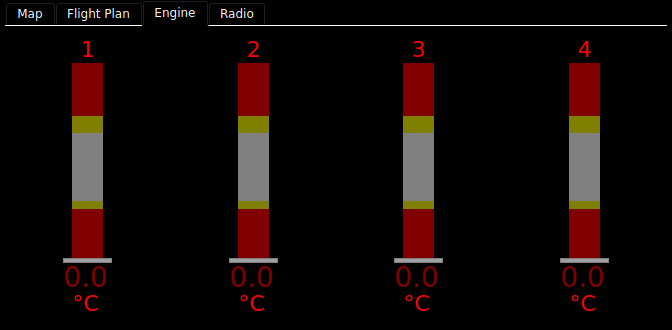
The bench simulator sends no engine data, so the picture above shows every gauge in its no-data state. With live data the bands are bright green, yellow and red, and the readout is white.
Each gauge shows one FIX value against its normal range and its limits.
| Part | What it shows |
|---|---|
| Band | The range, coloured green where normal, yellow inside the warning limits and red inside the alarm limits. |
| Indicator | A white line across a bar, or a pointer on an arc, at the current value. |
| Readout | The value, white when normal, yellow past a warning limit, red past an alarm limit. Units follow it when the gauge shows them. |
| Name | The label you gave it, such as CHT, OIL P or a cylinder number. |
A segmented gauge draws its band as blocks, like an LED bar, and dims the part beyond the value instead of drawing an indicator line.
Where the range and limits come from. Not the panel: they are the
aircraft's numbers. Each gauge's range is its FIX item's minimum and maximum,
and its limits are the item's lowAlarm, lowWarn, highWarn and
highAlarm values. Enter them under
Aircraft parameters in the
configurator and copy the aircraft.ini to the device. A limit left blank
draws no band for it.
| You see | It means |
|---|---|
| Dark grey, dark yellow and dark red bands, grey text | The value is old or bad. |
xxx (or X in every digit), with the indicator at zero |
The value has failed. |
| A red name and units | The item is annunciating. |
The configurator palette has ready-made groups in its engine category: CHT —
4 cyl, EGT — 4 cyl, CHT — 2 cyl, EGT — 2 cyl, and Engine — 4
cyl (CHT+EGT), which is CHT over EGT as on the bench. A group drops in as one
unit, scales as one, and can be ungrouped. Its bars read CHT11..CHT14 and
EGT11..EGT14 and are named 1 to 4.
A vertical bar set up for it (egt_mode_switching: true) responds to four EGT
buttons. The stock EMS screens carry them; a configurator panel gets them by
adding buttons with the action Set EGT mode.
| Button | What it does |
|---|---|
| Normalize | Takes each cylinder's present EGT as its reference and shows the change from there, across normalize_range (the shipped bars use 400). Use it to compare cylinders. |
| Peak | Tracks each cylinder's peak and draws a magenta mark at it. Once a cylinder has fallen 10° or more below its peak, its readout shows how far below, in magenta. |
| Lean | Resets the peaks and turns on Normalize and Peak together: the usual leaning view. |
| Reset Peak | Starts the peaks again from the present values. |
Choosing one clears the others, and the active button is green. In Normalize the colour bands stay on the absolute scale, and the indicator turns blue.
Hottest cylinder. Give a bar a highlight_key, such as EGTMAX1 or
CHTMAX1, and it draws a magenta ball at its foot while it is the hottest. The
palette groups do not set one.
On the stock screens, the EMS button turns red while any CHT or EGT is annunciating, so you can see from the PFD that the engine wants a look. Touch it to go to the EMS screen.
A gauge can also set the value it shows. Give it an encoder_set_key and select it with the knob: turn to change it, push to
keep it. Leave it and it goes back to where it was. With touch_edit on, a
touch selects it too. A selected bar or arc turns orange.
| Option | Bar gauges | Arc | Numeric | What it does |
|---|---|---|---|---|
FIX key (dbkey) |
The value shown. | |||
Name (name) |
— | The label. | ||
Decimal places (decimal_places) |
1 | 1 | 1 | |
Show units (show_units) |
on | off | off | |
Segments (segments) |
0 | 0 | — | 0 draws a solid band; more draws that many blocks. |
Name location (name_location) |
— | top |
— |
top or right. |
Font mask (font_mask) |
— | — | 000 |
The widest value the readout makes room for. |
The configurator also shows each gauge's range and limits, read-only, because they are set in the aircraft parameters, not on the panel.
The EGT mode, highlight and editing options (egt_mode_switching,
normalize_range, highlight_key, encoder_set_key, touch_edit) are not in
the configurator's list. Add them in the YAML pane; pyEFIS applies them and logs
that they are undeclared.
One bench CHT bar, and a leaning-ready EGT bar:
- type: vertical_bar_gauge
  options:
    dbkey: CHT11
    name: '1'
- type: vertical_bar_gauge
  options:
    dbkey: EGT11
    name: '1'
    egt_mode_switching: true
    normalize_range: 400
    highlight_key: EGTMAX1
The stock screens build their cylinder rows from the shipped
includes/bars/vertical/ files; see Customizing Beyond the Configurator.
Each gauge reads its own FIX key, with the item's minimum, maximum and four
limits. EGTMAX1 and CHTMAX1 are needed only for the hottest-cylinder ball.
The EGT buttons write EGTBTN1..EGTBTN4. See
FIX Database Keys.
- Engine & Data Gauges: every option
- Designing Your Panel