Repository navigation
Widgets Flight Instruments
Airspeed, altitude, vertical speed, heading, the HSI, the turn coordinator and wind. The tapes and the HSI each have a page on how they read and fly, linked under their headings; this page is the full option list, with the older dials too. Each table is generated from pyEFIS's instrument registry; see Widget Reference.
type: |
What it is |
|---|---|
airspeed_tape |
Scrolling airspeed tape with V-speed bands and a trend arrow. |
airspeed_dial |
Round airspeed dial. |
airspeed_box |
Airspeed readout switching TAS / GS / IAS (hidden). |
airspeed_trend_tape |
Standalone airspeed-trend bar. |
altimeter_tape |
Scrolling altitude tape with selected altitude and altimeter setting. |
altimeter_dial |
Round altimeter. |
altimeter_trend_tape |
Vertical-speed scale for beside the altitude tape. |
vsi_dial |
Round vertical-speed dial. |
vsi_pfd |
Compact vertical-speed strip. |
horizontal_situation_indicator |
The HSI. |
heading_tape |
Scrolling heading tape. |
heading_display |
Boxed digital heading (hidden). |
turn_coordinator |
Rate-of-turn and slip. |
wind_display |
Head/tail and cross wind components. |
The altitude tape's altimeter-setting and selected-altitude boxes can be
selected with the knob; give the tape an encoder_order. The other flight
instruments are not on the knob.
Airspeed Tape · palette category airspeed
How it reads and flies: Airspeed, Altitude and Vertical Speed.
FIX keys it reads by default: IAS.
| Option | Configurator label | Default | Values | What it does |
|---|---|---|---|---|
edge_fade |
Fade tape edges | off | on / off | alpha-fade the top and bottom of the scrolling scale into the background (SVS shows through) |
show_tas |
Show TAS box | on | on / off | show the true-airspeed readout box (from TAS) |
show_trend |
Show trend arrow | on | on / off | show the acceleration trend vector along the tape |
trend_lookahead |
Trend look-ahead (s) | 6 |
seconds ahead the trend vector projects current accel |
Values it reads from the FIX item, set in fix-gateway (the aircraft parameters), not on the panel:
| Value | From | Meaning |
|---|---|---|
Vs |
aux | Stall, clean (Vs) (kt) |
Vs0 |
aux | Stall, landing (Vs0) (kt) |
Vno |
aux | Max cruise (Vno) (kt) |
Vne |
aux | Never-exceed (Vne) (kt) |
Vfe |
aux | Flaps-extended (Vfe) (kt) |
The green band starts at Vs0, not Vs (#396).
A round airspeed dial, 0 to 140 kt, with its arcs drawn from the same V-speeds
as the tape. XXX on failure; a grey needle when old or bad.

Airspeed Dial · palette category airspeed
FIX keys it reads by default: IAS.
| Option | Configurator label | Default | Values | What it does |
|---|---|---|---|---|
bg_opacity |
Background opacity (%) | 100 |
0 to 100, step 1 | 0 = transparent (show what's behind), 100 = solid |
Values it reads from the FIX item, set in fix-gateway (the aircraft parameters), not on the panel:
| Value | From | Meaning |
|---|---|---|
Vs |
aux | Stall, clean (Vs) (kt) |
Vs0 |
aux | Stall, landing (Vs0) (kt) |
Vno |
aux | Max cruise (Vno) (kt) |
Vne |
aux | Never-exceed (Vne) (kt) |
Vfe |
aux | Flaps-extended (Vfe) (kt) |
A readout that shows TAS, GS or IAS. The Set airspeed mode action steps
through them (empty argument) or picks one (0 TAS, 1 GS, 2 IAS). XXX on
failure, blank when old or bad. Replaced in the palette by value_text.
Airspeed Box · palette category airspeed · hidden from the palette, still loads in existing panels
FIX keys it reads by default: IAS, GS, TAS.
No options in the configurator beyond the ones every instrument takes.
A white bar that grows up from the centre line while IAS is increasing and
down while it is decreasing. Its length is the IAS rate of change over the
last 3 seconds, and it reaches the top or bottom edge at 5 kt/s. The bar is
not drawn while IAS is flagged bad, failed or old. Before
#403 was fixed the widget
read no FIX key and the bar never moved.
Airspeed Trend Tape · palette category airspeed
FIX keys it reads by default: IAS.
No options in the configurator beyond the ones every instrument takes.
Altimeter Tape · palette category altitude
How it reads and flies: Airspeed, Altitude and Vertical Speed.
FIX keys it reads by default: ALT.
| Option | Configurator label | Default | Values | What it does |
|---|---|---|---|---|
edge_fade |
Fade tape edges | off | on / off | alpha-fade the top and bottom of the scrolling scale into the background (SVS shows through) |
dbkey |
FIX key | ALT |
FIX key | FIX key driving the tape (default ALT) |
maxalt |
Max altitude | 50000 |
top of the tape's altitude range (ft) | |
majorDiv |
Major division | 200 |
altitude between labelled tape ticks (ft) | |
minorDiv |
Minor division | 100 |
altitude between the small tape ticks (ft) | |
total_decimals |
Total digits | 5 |
number of digits in the altitude readout | |
font_mask |
Font mask | 00000 |
widest string the readout reserves space for (sizing) | |
round_to |
Round readout to | 0 |
round the readout to this increment (0 = none) | |
numeric_box |
Show numeric box | on | on / off | show the boxed numeric altitude over the tape |
font_scale |
Scale-number font scale | 1 |
multiplier on the tape scale-number font size | |
show_baro |
Baro setting box | on | on / off | touch-selectable altimeter setting box at the bottom of the tape (on for an ALT tape unless the screen has its own BARO readout; off for a VS tape) |
altsel_box |
Selected-altitude box | on | on / off | touch-settable ALTSEL box at the top of the tape (on for an ALT tape, off for a VS tape) |
alt_bug_enabled |
Altitude bug | on | on / off | draw the selected-altitude bug on the scale (follows the box unless set) |
alt_bug_color |
Altitude bug color | #00ffff |
colour | colour of the selected-altitude box text and bug |
alt_bug_alert_color |
Altitude alert color | #ffb000 |
colour | box text and bug colour while fix-gateway flags an altitude deviation (the key's annunciate flag) |
alt_bug_dbkey |
Selected-altitude key | ALTSEL |
FIX key | FIX key holding the selected altitude (default ALTSEL) |
With altitude: true the Units button switches it between ft and m. The
same type draws a vertical-speed tape when its dbkey is VS; the trend
arrow, altimeter setting and selected-altitude box are then off unless set.
A round three-pointer altimeter.

Altimeter Dial · palette category altitude
FIX keys it reads by default: ALT.
| Option | Configurator label | Default | Values | What it does |
|---|---|---|---|---|
bg_opacity |
Background opacity (%) | 100 |
0 to 100, step 1 | 0 = transparent (show what's behind), 100 = solid |
Altimeter Trend Tape · palette category altitude
How it reads and flies: Airspeed, Altitude and Vertical Speed.
FIX keys it reads by default: VS.
| Option | Configurator label | Default | Values | What it does |
|---|---|---|---|---|
maxvs |
Range (ft/min) | 2500 |
500 to 10000, step 100 | full scale, plus and minus; pick to suit the airplane's climb/descent performance (AC 23.1311-1C 8.11) |
minorDiv |
Tick interval (ft/min) | 100 |
25 to 1000, step 25 | minor tick mark every N ft/min |
numberedDiv |
Numbered interval (ft/min) | 200 |
50 to 2000, step 50 | numbered graduation every N ft/min (labels print in hundreds: 2400 ft/min prints as 24) |
bg_color |
Background | #000000 |
colour | tape face colour |
bg_opacity |
Background opacity (%) | 100 |
0 to 100, step 1 | 0 = transparent (show what's behind), 100 = solid |
A round vertical-speed dial. The needle sweeps 170 degrees each way for 2,000
ft/min. XXX on failure; a grey needle when old or bad.

VSI Dial · palette category vertical_speed
FIX keys it reads by default: VS.
No options in the configurator beyond the ones every instrument takes.
Values it reads from the FIX item, set in fix-gateway (the aircraft parameters), not on the panel:
| Value | From | Meaning |
|---|---|---|
Min |
min | Range minimum (ft/min) |
Max |
max | Range maximum (ft/min) |
A narrow strip with a dot that rides up and down with the rate, on a scale that spreads out the low rates. The dot is grey when old or bad; a red X replaces it on failure.

VSI (PFD) · palette category vertical_speed
FIX keys it reads by default: VS.
No options in the configurator beyond the ones every instrument takes.
Horizontal Situation Indicator (HSI) · palette category navigation
How it reads and flies: The HSI.
FIX keys it reads by default: COURSE, CDI, GSI, HEAD, BRG1, BRG2, BRG1SRC, BRG2SRC.
| Option | Configurator label | Default | Values | What it does |
|---|---|---|---|---|
cdi_enabled |
CDI | on | on / off | show the lateral course-deviation needle (CDI) |
gsi_enabled |
Glideslope | on | on / off | show the vertical glideslope needle (GSI) |
fg_color |
Foreground | #ffffff |
colour | compass card, ring and text colour |
bg_color |
Background | #000000 |
colour | compass-disc fill colour |
bg_opacity |
Background opacity (%) | 100 |
0 to 100, step 1 | 0 = transparent (show what's behind), 100 = solid |
needle_color |
Needle color | #ffff00 |
colour | colour of the CDI/GSI deviation needles |
needle_width |
Needle width | 3 |
1 to 10, step 1 | width of the CDI/GSI deviation needles (px) |
course_color |
Course pointer color | #ff00ff |
colour | selected-course pointer (the magenta CRS triangle) |
source_auto_color |
Source auto-color | on | on / off | colour the course pointer and CDI by nav source -- magenta for GPS, the VOR/LOC colour for a VOR/LOC source (from NAVSRC) |
vloc_color |
VOR/LOC color | #00ff00 |
colour | course pointer / CDI colour for a VOR or localizer source when source auto-color is on |
source_label_enabled |
Source label | on | on / off | show the nav-source annunciation (GPS / VLOC1 / VLOC2, or VOR/LOC when NAVTYPE is available) on the rose face |
heading_bug_enabled |
Heading bug | off | on / off | show the cyan heading bug at the selected heading (HEADBUG) |
heading_bug_color |
Heading bug color | #00ffff |
colour | heading-bug colour |
touch_edit |
Touch to set HDG / CRS | on | on / off | touch the HDG or CRS readout, then turn the knob to set it: HDG sets HEADBUG, CRS sets NAV1CRS or NAV2CRS for the selected VLOC source (not editable on GPS). Inner ring 1 deg, outer ring 10 deg; push syncs HDG to the heading or centres the CDI on CRS |
track_indicator_enabled |
Track diamond | on | on / off | show the magenta GPS ground-track diamond (TRACK), above the speed gate |
track_color |
Track diamond color | #ff00ff |
colour | GPS ground-track diamond colour |
track_min_speed |
Track min speed (kt) | 5 |
0 to 50, step 1 | hide the track diamond below this groundspeed (kt) |
center_symbol |
Center symbol | aircraft |
aircraft, none
|
fixed ownship symbol at the rose centre; 'aircraft' is a silhouette (deliberately not a triangle -- a triangle reads as the TO/FROM / course indicator) |
readout_layout |
Readout layout | top_panel |
top_panel, corners, split, none
|
placement of the integral actual-heading (HEAD), selected-heading (HEADBUG) and course (COURSE) readouts. top_panel = one sectioned panel across the top (outside the rose); corners = selected-heading + course boxes in the top corners; split = heading box above the rose, course/bug in the bottom corners |
numeral_scale |
Numeral size | 1.5 |
0.5 to 3, step 0.1 | compass-rose numeral/letter size as a multiple of the base tick font (larger = bigger rose numbers) |
depth_rings |
Depth rings | off | on / off | faint concentric rings inside the rose (a light structural cue; real depth comes from the translucent face over the map, so these are off by default) |
shadow_enabled |
Drop shadow | off | on / off | soft drop shadow on the static elements -- the rose disc and the readout panel -- for a raised, layered look; off by default |
orientation |
Orientation | heading_up |
heading_up, north_up, track_up, arc
|
compass presentation. heading_up/north_up/track_up show the full 360 rotating rose (today's look); arc shows an expanded forward ~120 sector (finer resolution on the tracked heading, decluttered of the rear rose) |
bearing1_enabled |
Bearing pointer 1 | off | on / off | show the single-bar RMI bearing needle (BRG1), pointing to the pointer-1 source (VOR1/VOR2/GPS via BRG1SRC) |
bearing2_enabled |
Bearing pointer 2 | off | on / off | show the double-bar RMI bearing needle (BRG2), pointing to the pointer-2 source (VOR1/VOR2/GPS via BRG2SRC) |
bearing_color |
Bearing pointer color | #00ffff |
colour | generic bearing-needle colour used when the source is unknown; a needle with a known source is coloured by it (magenta GPS / green VOR) |
The HSI needs fix-gateway's compute plugin to route the selected nav source
into the keys it draws; see The HSI.
A scrolling compass tape, cardinal letters in cyan and numbers in white. A red
boxed XXX on failure; greyed with an amber HDG box when old or bad.

Heading Tape · palette category navigation
FIX keys it reads by default: HEAD.
No options in the configurator beyond the ones every instrument takes.
A boxed heading, three digits and a degree sign (003°). Blank when old or bad,
XXX on failure. Replaced in the palette by value_text with a HDG prefix.

Heading Display · palette category navigation · hidden from the palette, still loads in existing panels
FIX keys it reads by default: HEAD.
| Option | Configurator label | Default | Values | What it does |
|---|---|---|---|---|
fg_color |
Foreground | #ffffff |
colour | heading-text colour |
bg_color |
Background | #000000 |
colour | background-box fill colour |
bg_opacity |
Background opacity (%) | 100 |
0 to 100, step 1 | 0 = transparent (show what's behind), 100 = solid |
A small aircraft banks with the rate of turn (ROT, held to +/-5) over a
slip/skid ball driven by ALAT. The ball turns amber near the end of its
travel. Each element shows XXX if its key fails and greys if it is old or bad.

Turn Coordinator · palette category attitude
FIX keys it reads by default: ROT, ALAT.
No options in the configurator beyond the ones every instrument takes.
The ball's gain and smoothing are screen settings, not instrument options:
alat_multiplier and alat_filter_depth at the screen level.
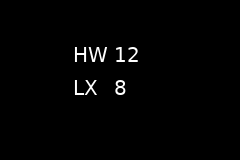
Wind Display · palette category wind
How it reads and flies: The Panel at a Glance.
FIX keys it reads by default: HWIND, XWIND.
No options in the configurator beyond the ones every instrument takes.
| Row | Positive | Negative |
|---|---|---|
Top, from HWIND
|
HW, headwind |
TW, tailwind |
Bottom, from XWIND
|
RX, from the right |
LX, from the left |
Values are whole knots without a sign. The label changes only past +/-0.5 kt, so
noise around zero does not flicker it. An orange X means bad; a grey ---
means failed or not published. To make it optional, give the entry
disabled: WIND_DISPLAY and set that preference.