Repository navigation
Tutorials Walkthrough
This hands-on guide walks you through finding, inspecting, and fixing real parallel C++ and MPI bugs in GridLock. Every lab uses a runnable program from the tutorial/ folder, shows the exact C++ code from disk, and tells you each button, tab, and line number to click.
If you have never used a multi-process debugger before, start here. Unlike a single-process program, an MPI job runs multiple copies of your binary at the same time, numbered Rank 0, Rank 1, Rank 2, and so on. GridLock lets you pause all of them (or just one rank), compare their variables side by side, and step line by line.
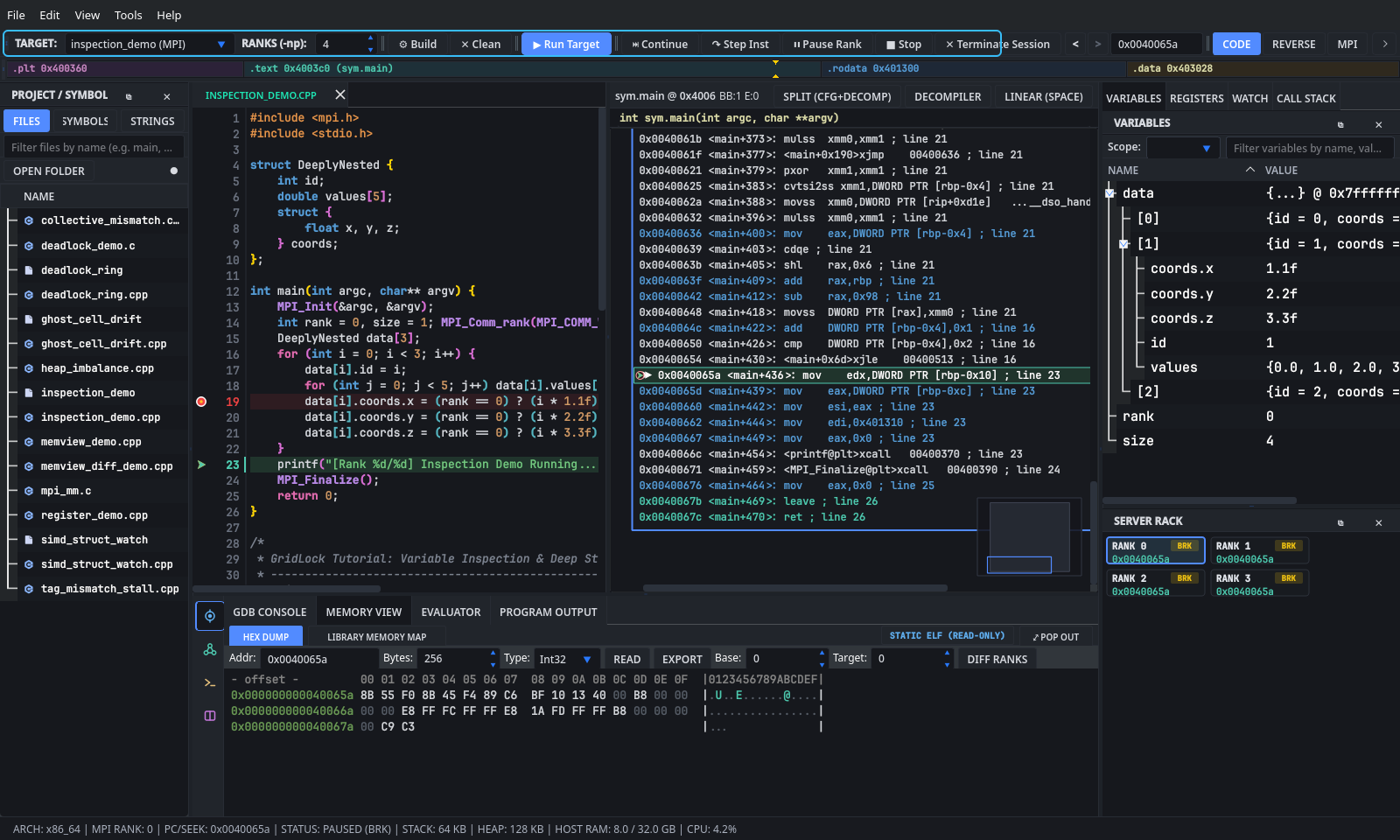
Look at the top-left of the main toolbar (outlined in cyan above):
- Click the
TARGET:dropdown. The bundled MPI showcase tutorials (inspection_demo (MPI)throughsimd_struct_watch (MPI)) are pre-listed, andtutorial/catchpoint_exceptions.cpp(Tutorial 8) can be opened viaFile -> Open Source FileorCtrl+P. Selecting a target opens its.cppsource file in the center editor.- To open your own file or binary instead, choose
Open ELF / Binary...at the bottom ofTARGET:, or useFile -> Open Source File.
- To open your own file or binary instead, choose
- Click
⚙ Buildon the toolbar (or pressCtrl+B, or chooseTools -> Build Target) to compile the target with debug symbols (mpicxx -g -O0). Clicking▶ Run Targetalso compiles any unbuilt tutorial file automatically.
- Next to
TARGET:, find theRANKS (-np):spinbox. - Set it to
4(you can choose anywhere from1to256processes). - Look at the
SERVER RACKpanel in the bottom-right corner: it immediately displays 4 cards labeledRANK 0throughRANK 3.
- Look at the numbered gray gutter along the left edge of the source code editor (
SourceCodeView). -
Left-click next to any executable line number (for example, line
23ininspection_demo.cpp). A red circle appears: every MPI rank will pause when it reaches this line. Left-click the red circle again to remove it. -
Right-click a line number in the gutter (for example, line
19) to open the Conditional Breakpoint Popover:- Type
rank == 2intoCondition:(or pick a preset fromPresets ▾) and clickDone. - Now only Rank 2 stops at line 19, while Ranks 0, 1, and 3 run past it without pausing.
- Type
- Click the blue
▶ Run Targetbutton on the top toolbar (or pressAlt+R). - Read the status badges in
SERVER RACK(bottom-right):-
RUN(green): That rank is currently executing code. -
BRK(amber): That rank is paused at a breakpoint, step, or manual pause, showing its current instruction address (0x...). -
IDLE(gray): No session is running, or that rank has exited.
-
- Click any card in
SERVER RACK(for exampleRANK 2) to focus it. TheVARIABLES,REGISTERS, andCALL STACKtabs in the top-right dock immediately update to show Rank 2's local state. - Use the stepping controls to move forward from a paused line:
-
Step Over (
F10): Runs the current C++ line and pauses on the next line in the same function. -
Step Into (
F11): Enters inside a function call on the current line. -
Step Inst (
↷ Step Inston toolbar): Advances by a single CPU assembly instruction and updates both the editor and theDisassemblygraph. -
Continue (
⏭ ContinueorF5): Resumes execution until the next breakpoint or program exit. -
Pause / Stop (
⏸ Pause Rank/■ Stop): Interrupts a stuck rank or ends the debugging session.
-
Step Over (
tutorial/inspection_demo.cpp initializes an array of 3 nested C++ structs (DeeplyNested data[3]) on every MPI rank. Each struct holds an integer id, a 5-element double values[5] array scaled by (rank + 1), and an inner coords struct whose x, y, z floats intentionally differ between Rank 0 and worker ranks (Rank 1..N-1).
struct DeeplyNested {
    int id;
    double values[5];
    struct {
        float x, y, z;
    } coords;
};

int main(int argc, char** argv) {
    MPI_Init(&argc, &argv);
    int rank = 0, size = 1; MPI_Comm_rank(MPI_COMM_WORLD, &rank); MPI_Comm_size(MPI_COMM_WORLD, &size);
    DeeplyNested data[3];
    for (int i = 0; i < 3; i++) {
        data[i].id = i;
        for (int j = 0; j < 5; j++) data[i].values[j] = (rank + 1) * (i * j);
        data[i].coords.x = (rank == 0) ? (i * 1.1f) : (i * 1.5f);
        data[i].coords.y = (rank == 0) ? (i * 2.2f) : (i * 2.5f);
        data[i].coords.z = (rank == 0) ? (i * 3.3f) : (i * 3.5f);
    }
    printf("[Rank %d/%d] Inspection Demo Running...\n", rank, size);
    MPI_Finalize();
    return 0;
}
- In
TARGET:on the top toolbar, selectinspection_demo (MPI), and setRANKS (-np):to4. -
Left-click the editor gutter at line
23(printf(...)) so every rank pauses right after theforloop finishes fillingdata. - Click
▶ Run Target. Wait a moment forRANK 0throughRANK 3inSERVER RACKto turn amber (BRK). - In the top-right dock, click the
VARIABLEStab:- Click the disclosure arrow next to
datato expand[0],[1], and[2]. - Expand
[1], then expandcoords. OnRANK 0, you will seex = 1.1,y = 2.2,z = 3.3, andvalues[4] = 4((0 + 1) * (1 * 4)).
- Click the disclosure arrow next to
- Now click
RANK 2inSERVER RACK:- Watch
VARIABLESupdate to Rank 2's memory:data[1].coordsis nowx = 1.5,y = 2.5,z = 3.5, anddata[1].values[4] = 12((2 + 1) * (1 * 4)).
- Watch
- Compare all 4 ranks at once without clicking back and forth:
- Click the
WATCHtab (next toVARIABLESandREGISTERSin the top-right dock). - Type
data[1].coords.xinto theNew watch expression...box and click+ Watch(or pressEnter). - Add
data[2].values[4]the same way. - Notice that
Rank 0'sdata[1].coords.xcell (1.1) turns light red because it differs from the1.5consensus shared by Ranks 1, 2, and 3.
- Click the
- Click
■ Stopon the top toolbar to end the session.
In tutorial/deadlock_ring.cpp, every rank tries to pass a 64 KB std::vector<int> (16384 * 4 bytes) to its right neighbor (next_rank) using a synchronous-mode blocking MPI_Send before calling MPI_Recv from its left neighbor (prev_rank). Small MPI messages often fit inside an internal library buffer ("eager" protocol) and return immediately, hiding the bug. Once the payload exceeds that threshold (typically 4 KB to 32 KB), MPI_Send switches to the "rendezvous" protocol and blocks until the receiver posts MPI_Recv. Because every rank is stuck on line 34 waiting for the next rank in the ring, nobody ever reaches line 36.
    const int next_rank = (rank + 1) % size;
    const int prev_rank = (rank + size - 1) % size;
    const int tag = 100;

    // Allocate a payload exceeding the eager-to-rendezvous threshold so
    // blocking MPI_Send stalls until the destination rank posts MPI_Recv.
    std::vector<int> send_buf(16384, rank * 10 + 1);
    std::vector<int> recv_buf(16384, 0);

    // Circular wait-for deadlock: every rank blocks inside MPI_Send waiting
    // for next_rank to enter MPI_Recv.
    MPI_Send(send_buf.data(), static_cast<int>(send_buf.size()), MPI_INT,
             next_rank, tag, MPI_COMM_WORLD);
    MPI_Recv(recv_buf.data(), static_cast<int>(recv_buf.size()), MPI_INT,
             prev_rank, tag, MPI_COMM_WORLD, MPI_STATUS_IGNORE);

    printf("[Rank %d/%d] Received payload=%d from Rank %d\n",
           rank, size, recv_buf[0], prev_rank);
- Select
deadlock_ring (MPI)inTARGET:, setRANKS (-np):to4, and clear any previous breakpoints. - Click
▶ Run Target. Notice the program never prints"Received payload=..."and never exits: all 4 ranks stay stuck. - Click
⏸ Pause Rankon the top toolbar to interrupt the hung processes and inspect where they are blocked. - Open the Deadlock Analyzer:
- Click the
MPIbutton on the far-right of the top toolbar (or pressAlt+3, or click the second icon on the bottom-left vertical tool rail viaAlt+5and select theMPI Diagnosticstab). - Make sure
DEADLOCK ANALYZERis selected in the panel header.
- Click the
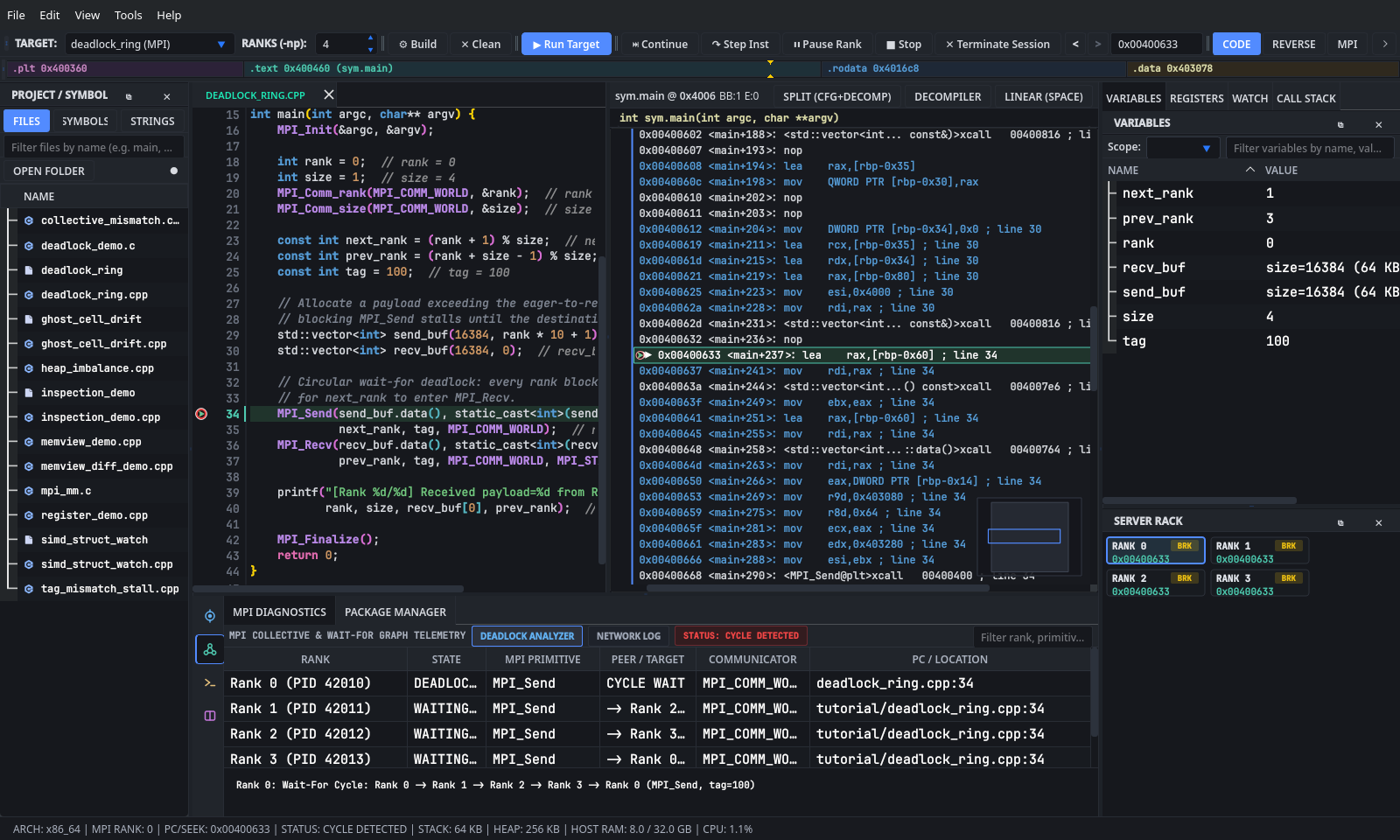
- Read what GridLock found:
- The status pill turns red:
STATUS: CYCLE DETECTED. - All 4 rows (
Rank 0throughRank 3) showMPI_Sendstalled atdeadlock_ring.cpp:34, forming the closed wait ringRank 0 -> Rank 1 -> Rank 2 -> Rank 3 -> Rank 0. - Double-click any row in the Deadlock Analyzer table to jump the editor and
CALL STACKdirectly to that rank'sMPI_Sendcall site.
- The status pill turns red:
-
How to Fix the Bug:
- Click
■ Stop. Replace the separateMPI_SendandMPI_Recvcalls (lines34-37) with a single pairedMPI_Sendrecvcall (or post a non-blockingMPI_Isend+MPI_Recv+MPI_Wait):MPI_Sendrecv(send_buf.data(), static_cast<int>(send_buf.size()), MPI_INT, next_rank, tag, recv_buf.data(), static_cast<int>(recv_buf.size()), MPI_INT, prev_rank, tag, MPI_COMM_WORLD, MPI_STATUS_IGNORE); - Press
Ctrl+Sto save, pressCtrl+Bto rebuild, and click▶ Run Targetto confirm all 4 ranks print their received payloads and exit cleanly. (UseCtrl+Z+Ctrl+Safterward if you want to restore the original tutorial file.)
- Click
MPI collective routines (MPI_Bcast, MPI_Barrier, MPI_Reduce, MPI_Allreduce) require every rank in MPI_COMM_WORLD to call the same collective routine in the same order. In tutorial/collective_mismatch.cpp, an if (rank % 2 == 0) branch sends even ranks (0, 2) into MPI_Bcast on line 50 while odd ranks (1, 3) enter MPI_Barrier on line 60. Neither collective can complete while half of the communicator is inside a different collective operation.
    // BREAKPOINT TARGET (Line 46): Rank parity causes divergent collective calls!
    if (rank % 2 == 0) {
        // Even ranks participate in MPI_Bcast expecting all ranks in MPI_COMM_WORLD.
        cfg.rank_branch_tag = 100 + rank;
        MPI_Bcast(&cfg.broadcast_seed, 1, MPI_INT, 0, MPI_COMM_WORLD);
        for (size_t i = 0; i < local_work.size(); ++i) {
            local_work[i] += static_cast<double>(cfg.broadcast_seed);
        }
    } else {
        // Odd ranks take a divergent branch and enter MPI_Barrier instead of MPI_Bcast.
        cfg.rank_branch_tag = 200 + rank;
        for (size_t i = 0; i < local_work.size(); ++i) {
            local_work[i] *= 0.5;
        }
        MPI_Barrier(MPI_COMM_WORLD);
    }
- Select
collective_mismatch (MPI)inTARGET:and setRANKS (-np):to4. - Click
▶ Run Target, wait one second for the mismatch stall to occur, and click⏸ Pause Rank. - Inspect the divergent call stacks across ranks:
- Click
CALL STACKin the top-right dock. - Click
RANK 0inSERVER RACK: the backtrace showsMPI_Bcastcalled fromcollective_mismatch.cpp:50. - Click
RANK 1inSERVER RACK: the backtrace showsMPI_Barriercalled fromcollective_mismatch.cpp:60.
- Click
- Open
MPI Diagnostics(Alt+3):- In
DEADLOCK ANALYZER, the status badge readsSTATUS: COLL DIVERGENCE(Collective Divergence: Rank 0 in MPI_Bcast vs Rank 1 in MPI_Barrier). - Click
NETWORK LOGin theMPI Diagnosticsheader bar and set the filter dropdown toCollectivesto review the mismatched collective entries across even and odd ranks.
- In
- Visualize the branch split on the Control Flow Graph:
- Click
REVERSEon the top toolbar (Alt+2). Even rank badges ([R0],[R2]) sit on the basic block callingMPI_Bcast, while odd rank badges ([R1],[R3]) sit on the sibling block callingMPI_Barrier.
- Click
-
How to Fix the Bug: Move
MPI_Bcast(&cfg.broadcast_seed, 1, MPI_INT, 0, MPI_COMM_WORLD);aboveif (rank % 2 == 0)so all ranks execute the broadcast unconditionally before doing rank-specific work onlocal_work.
Not all MPI bugs hang; silent numerical corruption is often harder to catch. tutorial/ghost_cell_drift.cpp runs 5 timesteps of a 1D 3-point Jacobi heat-diffusion stencil across a periodic ring of ranks. Each rank exchanges its leftmost and rightmost values (send_left, send_right) with its neighbors via MPI_Sendrecv. On step == 3, faulty_rank (Rank 2 when running 4+ ranks) overwrites send_right with an IEEE-754 quiet NaN, poisoning Rank 3's left_ghost and spreading nan into neighboring stencil cells on the next timestep.
    for (int step = 0; step < 5; ++step) {
        double send_left = domain.front();
        double send_right = domain.back();

        // Inject a corrupted NaN ghost-cell boundary value on iteration 3 on the faulty rank.
        if (step == 3 && rank == faulty_rank) {
            send_right = std::numeric_limits<double>::quiet_NaN();
        }

        // Exchange left and right boundary cells with periodic ring neighbors.
        MPI_Sendrecv(&send_right, 1, MPI_DOUBLE, right_neighbor, 10 + step,
                     &left_ghost, 1, MPI_DOUBLE, left_neighbor, 10 + step,
                     MPI_COMM_WORLD, MPI_STATUS_IGNORE);
        MPI_Sendrecv(&send_left, 1, MPI_DOUBLE, left_neighbor, 20 + step,
                     &right_ghost, 1, MPI_DOUBLE, right_neighbor, 20 + step,
                     MPI_COMM_WORLD, MPI_STATUS_IGNORE);

        // Compute 3-point 1D Jacobi heat diffusion update across interior cells.
        for (size_t i = 0; i < domain.size(); ++i) {
            const double left_val = (i == 0) ? left_ghost : domain[i - 1];
            const double right_val = (i + 1 == domain.size()) ? right_ghost : domain[i + 1];
            next_domain[i] = 0.25 * left_val + 0.50 * domain[i] + 0.25 * right_val;
        }
        domain.swap(next_domain);

        // BREAKPOINT TARGET (Line 69): Inspect left_ghost, right_ghost, and stencil_center across ranks.
        stencil_center = domain[domain.size() / 2];
        std::printf("[Rank %d/%d] Step %d: left_ghost=%.3f center=%.3f right_ghost=%.3f\n",
                    rank, world_size, step, left_ghost, stencil_center, right_ghost);
    }
- Select
ghost_cell_drift (MPI)inTARGET:and setRANKS (-np):to4(pressAlt+1first if you are still in theREVERSEview). - Skip the healthy iterations (
step = 0, 1, 2) automatically using a conditional breakpoint:-
Right-click the gutter next to line
69(stencil_center = domain[domain.size() / 2];). - In
Condition:, typestep == 3(or leaveCondition:empty and setIgnore:to3hits) and clickDone.
-
Right-click the gutter next to line
- Set up the cross-rank
WATCHtable (DifferentialGrid) in the top-right dock:- Click the
WATCHtab. - Add
step,send_right,left_ghost, andstencil_centerone by one inNew watch expression...(+ Watch).
- Click the
- Click
▶ Run Target. All 4 ranks run steps 0, 1, and 2 at full speed and pause together at line 69 onstep == 3.
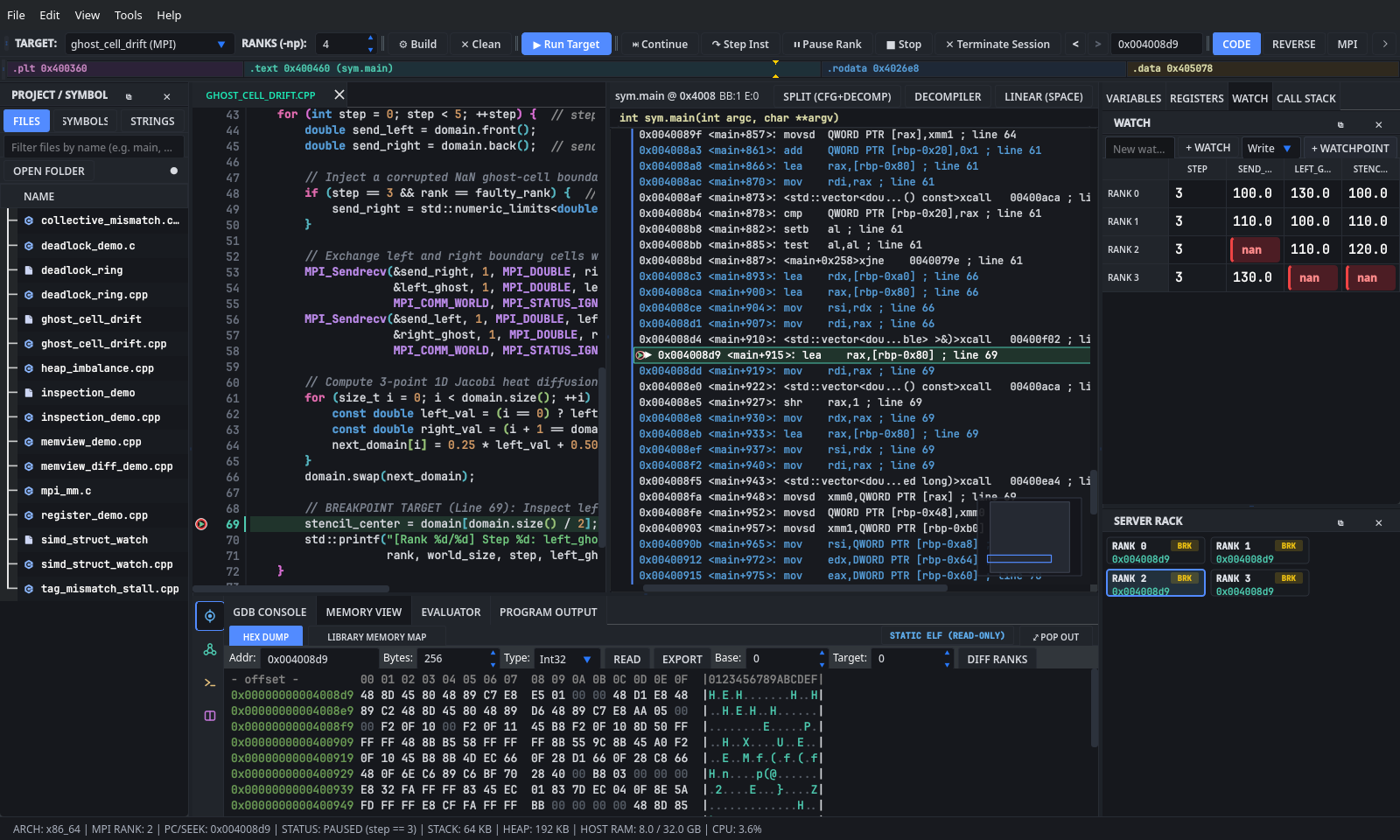
- Pinpoint the exact origin and spread of the
NaN:- In
WATCH, look atRank 2:send_rightisnan, whileleft_ghostonRank 2is still a valid number (110.0). - Look one row down at
Rank 3(Rank 2's right neighbor):Rank 3'sleft_ghosthas just turnednanbecause line 53 receivedsend_rightfrom Rank 2! - Click
⏭ Continue(F5) once (if you usedIgnore: 3rather thanstep == 3) to advance tostep == 4and watchnanpropagate inward acrossdomain.
- In
-
How to Fix the Bug: Delete the
if (step == 3 && rank == faulty_rank)block on lines48-50(and in real stencil codes, verify boundary indices0anddomain.size() - 1never read one element past the local buffer).
On HPC clusters, an Out-Of-Memory (OOM) kill on a single node often brings down an entire multi-node job because one rank allocated far more heap or stack memory than its peers. tutorial/heap_imbalance.cpp scales heap_buffer quadratically with (rank + 1)^2 and recurses 2 + rank * 2 stack frames deep before hitting MPI_Barrier.
double recurseWithStackFrame(int rank, int current_depth, int target_depth,
                             const std::vector<double>& heap_buffer) {
    // Allocate a 256-byte stack frame buffer per recursion level to grow active stack usage.
    double stack_scratch[32];
    for (int i = 0; i < 32; ++i) {
        stack_scratch[i] = static_cast<double>(rank * 100 + current_depth * 10 + i);
    }

    if (current_depth < target_depth) {
        return stack_scratch[0] * 0.01 +
               recurseWithStackFrame(rank, current_depth + 1, target_depth, heap_buffer);
    }

    // BREAKPOINT TARGET (Line 41): Compare stack depth, RSP, and heap_buffer size across ranks!
    const double leaf_checksum =
        std::accumulate(heap_buffer.begin(), heap_buffer.begin() + 16, stack_scratch[31]);
    return leaf_checksum;
}
    // Scale heap buffer size asymmetrically: Rank 0 allocates 4K doubles, higher ranks allocate much more.
    const size_t element_count = static_cast<size_t>(4096) * static_cast<size_t>((rank + 1) * (rank + 1));
    std::vector<double> heap_buffer(element_count, static_cast<double>(rank) + 0.5);
    for (size_t i = 0; i < 64 && i < heap_buffer.size(); ++i) {
        heap_buffer[i] = static_cast<double>(rank * 1000 + static_cast<int>(i));
    }

    // Recurse to a rank-dependent stack depth before synchronizing across the cluster.
    const int target_stack_depth = 2 + rank * 2;
    const double total = recurseWithStackFrame(rank, 0, target_stack_depth, heap_buffer);

    MPI_Barrier(MPI_COMM_WORLD);
- Select
heap_imbalance (MPI)inTARGET:and setRANKS (-np):to8(so Rank 0 allocates32 KBwhile Rank 7 allocates2,048 KB, a 64x spread). -
Left-click the gutter at line
41(const double leaf_checksum = ...) and click▶ Run Target. - Compare stack depths and status-bar telemetry:
- Click
RANK 0inSERVER RACKand openCALL STACK:recurseWithStackFrameis only 3 frames deep (depth 0..2). - Click
RANK 7inSERVER RACK:CALL STACKjumps to 17recurseWithStackFrameframes (depth 0..16), and the bottom status bar ribbon shows a largerSTACKandHEAPfootprint.
- Click
- Inspect the visual Memory Map Profiler (
MemoryProfilerWidget):- In the bottom dock (
Alt+4->Memory View), clickLIBRARY MEMORY MAPin the top header bar (or click⤢ POP OUTto open it in a large standalone window). - Ensure
Track Heap Callers (LD_PRELOAD)is checked so dynamic allocations>= 4 KBare attributed to their C++ call site. - Use the
Rankselector dropdown at the top-left of the profiler to switch betweenRank 0,Rank 3, andRank 7, watching theHeap / Call Sitetreemap tile and theLive / RSS (MB)/Private Dirty (MB)columns in the bottom breakdown table grow with(rank + 1)^2.
- In the bottom dock (
Point-to-point MPI_Recv matches incoming messages on three envelope fields: source rank, tag, and communicator. In tutorial/tag_mismatch_stall.cpp, Rank 0 sends a 56-byte TelemetryPacket to Rank 1 with send_tag = 100 (line 53), while Rank 1 calls MPI_Recv from Rank 0 demanding expected_tag = 200 (line 61). Meanwhile, worker ranks (Rank 2..N-1) finish their local loop and block inside MPI_Finalize on line 73 waiting for Rank 1.
    if (world_size >= 2) {
        if (rank == 0) {
            // Rank 0 transmits the packet to Rank 1 with tag 100.
            const int send_tag = 100;
            std::printf("[Rank 0] Sending TelemetryPacket (seq=%d) to Rank 1 with tag=%d\n",
                        pkt.sequence_id, send_tag);
            // BREAKPOINT TARGET (Line 53): Inspect send_tag (100) before transmission.
            MPI_Send(&pkt, sizeof(TelemetryPacket), MPI_BYTE, 1, send_tag, MPI_COMM_WORLD);
        } else if (rank == 1) {
            // BUG: Rank 1 listens for expected_tag = 200 instead of 100, stalling point-to-point progress!
            const int expected_tag = 200;
            MPI_Status status{};
            std::printf("[Rank 1] Waiting in MPI_Recv from Rank 0 with mismatched expected_tag=%d...\n",
                        expected_tag);
            // BREAKPOINT TARGET (Line 61): Inspect expected_tag (200) vs Rank 0's send_tag (100).
            MPI_Recv(&pkt, sizeof(TelemetryPacket), MPI_BYTE, 0, expected_tag, MPI_COMM_WORLD, &status);
            std::printf("[Rank 1] Received packet with status.MPI_TAG=%d\n", status.MPI_TAG);
        } else {
            // Ranks 2..N-1 perform independent local reduction and proceed to finalize.
            double sum = 0.0;
            for (double v : pkt.readings) sum += v;
            std::printf("[Rank %d/%d] Worker finished local pass (sum=%.2f)\n", rank, world_size, sum);
        }
    }
- Select
tag_mismatch_stall (MPI)inTARGET:and setRANKS (-np):to4. -
Left-click the gutter at line
53(MPI_Send) and line61(MPI_Recv), then click▶ Run Target. - Inspect both sides of the mismatched envelope:
- Click
RANK 0inSERVER RACK(paused at line 53): inVARIABLES,send_tagis100andpkt.payload_tagis100. - Click
RANK 1inSERVER RACK(paused at line 61): inVARIABLES,expected_tagis200.
- Click
- Click
⏭ Continue(F5) so the ranks enter the MPI calls, then click⏸ Pause Rankafter a moment:- Open
MPI Diagnostics(Alt+3):Rank 1remains stuck insideMPI_Recvat line 61 whileRanks 0, 2, 3have moved on toMPI_Finalize(line 73). - Click
NETWORK LOGin theMPI Diagnosticsheader bar and set the traffic dropdown toPoint-to-Pointto compare theTAG / COMMcolumn between Rank 0's send (tag=100) and Rank 1's unmatched receive (tag=200).
- Open
-
How to Fix the Bug: Change line
56fromconst int expected_tag = 200;toconst int expected_tag = 100;(orMPI_ANY_TAGif Rank 1 accepts any tag and checksstatus.MPI_TAGafterward), save (Ctrl+S), and rebuild (Ctrl+B).
tutorial/simd_struct_watch.cpp defines a 16-byte-aligned binary packet (struct alignas(16) SimdMatrixPacket, 112 bytes total) with a 4-byte magic signature ({0xCA, 0xFE, rank, world_size}), a uint32_t packet_id, uint64_t flags, a float matrix[4][4], and double lane_Norms[4], then sums the matrix diagonal into global_trace via MPI_Allreduce. Use this lab to practice low-level register, struct-graph, and raw byte inspection.
struct alignas(16) SimdMatrixPacket {
    uint8_t magic[4];       // Byte signature: {0xCA, 0xFE, rank, world_size}
    uint32_t packet_id;     // Little-endian packet sequence identifier
    uint64_t flags;         // Bitmask flags for SIMD lane activity
    float matrix[4][4];     // 4x4 row-major single-precision transformation matrix
    double lane_Norms[4];   // Per-row Euclidean norm accumulator
};
    SimdMatrixPacket packet{};
    packet.magic[0] = 0xCA;
    packet.magic[1] = 0xFE;
    packet.magic[2] = static_cast<uint8_t>(rank & 0xFF);
    packet.magic[3] = static_cast<uint8_t>(world_size & 0xFF);
    packet.packet_id = 0x1000U + static_cast<uint32_t>(rank);
    packet.flags = 0xABCD000000000000ULL | static_cast<uint64_t>(rank);

    // Populate the 4x4 matrix and row norms with rank-distinct floating-point values.
    for (int r = 0; r < 4; ++r) {
        double row_sum_sq = 0.0;
        for (int c = 0; c < 4; ++c) {
            const float val = (r == c)
                                  ? static_cast<float>((rank + 1) * 10 + r)
                                  : static_cast<float>(rank) * 0.25f + static_cast<float>(r * 4 + c);
            packet.matrix[r][c] = val;
            row_sum_sq += static_cast<double>(val) * static_cast<double>(val);
        }
        packet.lane_Norms[r] = row_sum_sq;
    }

    // BREAKPOINT TARGET (Line 60): Inspect &packet in MemView, toggle DIFF RANKS, and test EXPORT!
    double local_trace =
        packet.matrix[0][0] + packet.matrix[1][1] + packet.matrix[2][2] + packet.matrix[3][3];
    double global_trace = 0.0;
    MPI_Allreduce(&local_trace, &global_trace, 1, MPI_DOUBLE, MPI_SUM, MPI_COMM_WORLD);
- Select
simd_struct_watch (MPI)inTARGET:, setRANKS (-np):to4, and left-click the gutter at line62(MPI_Allreduce(...)) and line64(std::printf(...)). - Click
▶ Run Targetto pause at line62right afterpacketandlocal_traceare computed.
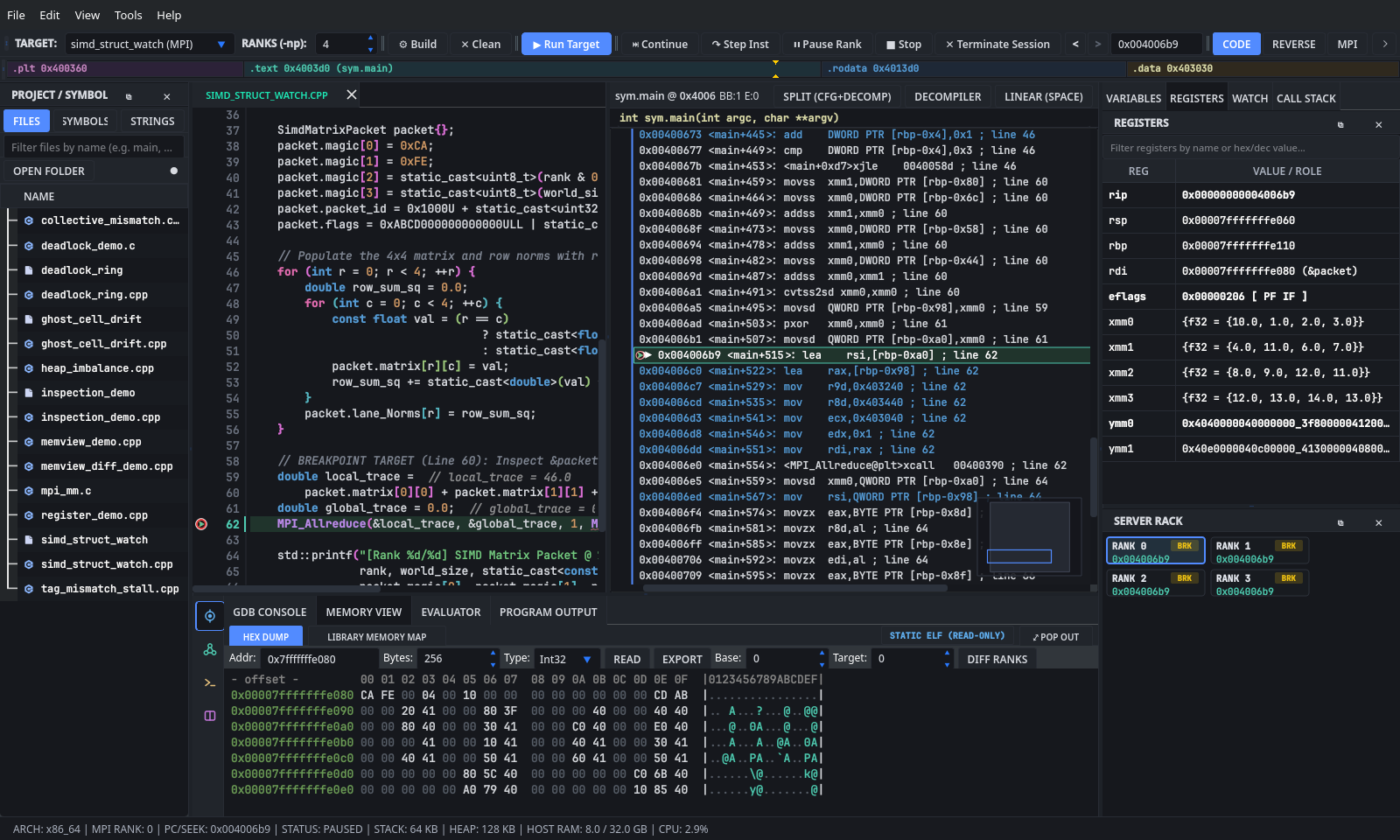
- Inspect CPU & SIMD registers (
RegisterView):- Click the
REGISTERStab in the top-right dock. - Verify
rsp/&packetalignment (a16-byte aligned address ends in0, such as0x...e080). - Type
xmmorymmintoFilter registers by name or hex/dec value...(or step single instructions inside the matrix loop with↷ Step Inst) to watch floating-point registers mutate in bold red as diagonal elements are accumulated.
- Click the
- Visualize the struct card (
PointerGraphDialog):- Switch to
VARIABLES, right-clickpacket, and selectVisualize in Pointer / Struct Graph...(or chooseTools -> Pointer & Struct Graph Visualizer..., typepacket, and clickGraph Expression) to inspect all fields ofSimdMatrixPacketon the 2D canvas.
- Switch to
- Inspect raw byte offsets, diff ranks, and export (
MemView):- Open
Memory Viewin the bottom dock (Alt+4->HEX DUMP). - Type
&packetintoAddr:, setBytes:to112, and clickRead. - Verify the byte layout:
- Offset
+0x00..0x03:CA FE 00 04(magic[0..3]on Rank 0 with 4 ranks). - Offset
+0x04..0x07:00 10 00 00(packet_id = 0x1000in little-endian). - Offset
+0x08..0x0F:00 00 00 00 00 00 CD AB(flags = 0xABCD000000000000in little-endian). - Offset
+0x10..0x4F: 64 bytes of IEEE-754float matrix[4][4]. - Offset
+0x50..0x6F: 32 bytes of IEEE-754double lane_Norms[4].
- Offset
- Set
Base:to0andTarget:to1, then clickDiff Ranks: rank-invariant bytes (CA FE,04, upper flag bytes) stay normal, while every rank-dependent byte (magic[2],packet_id,flagslow byte,matrix,lane_Norms) lights up in red. - Set
Type:toFloatand clickExportto write the slice to.csvor.bin, then pressF5to hit line 64 and verifyglobal_tracematches across all 4 ranks.
- Open
tutorial/catchpoint_exceptions.cpp is a 4-rank MPI target designed to practice Debug -> Signals & Catchpoints... (Ctrl+Alt+S):
-
Rank 0 calls
open("/dev/null", O_RDONLY)(openatsyscall), allocates a 4096-byte anonymousmmapscratch page, and sends itselfSIGUSR1(std::raise(SIGUSR1)). -
Rank 1 throws and recovers locally from a benign
MeshBoundaryExceptioninsidevalidateHaloExchange(). -
Rank 2 throws a critical
SolverConvergenceException, logs its residual norm insidesolveSubdomain(), and rethrows it (throw;) to the outer driver.
void validateHaloExchange(int rank) {
  if (rank == 1) {
    throw MeshBoundaryException("Rank 1 east ghost-layer index out of bounds (clamped to boundary)");
  }
}

void solveSubdomain(int rank) {
  try {
    if (rank == 2) {
      throw SolverConvergenceException("Rank 2 BiCGSTAB residual exceeded tolerance (1.42e+03)", 1420.0);
    }
  } catch (const SolverConvergenceException& ex) {
    std::printf("[Rank %d] Inner solver catch logged residual=%.2f; rethrowing to driver...\n",
                rank, ex.residualNorm());
    throw;  // Rethrow site targeted by GDB `-catch-rethrow`
  }
}

void performCoordinatorSyscallAndSignalProbe(int rank) {
  if (rank != 0) return;

  // Trigger `openat` syscall catchpoint on Rank 0.
  const int fd = ::open("/dev/null", O_RDONLY);
  if (fd >= 0) {
    ::close(fd);
  }

  // Trigger `mmap` syscall catchpoint on Rank 0.
  void* scratchPage = ::mmap(nullptr, 4096, PROT_READ | PROT_WRITE,
                             MAP_PRIVATE | MAP_ANONYMOUS, -1, 0);
  if (scratchPage != MAP_FAILED) {
    *static_cast<int*>(scratchPage) = 42;
    ::munmap(scratchPage, 4096);
  }

  // Trigger `SIGUSR1` disposition matrix handling on Rank 0.
  std::signal(SIGUSR1, handleSigUsr1Heartbeat);
  std::raise(SIGUSR1);
}
- Open
tutorial/catchpoint_exceptions.cpp(File -> Open Source FileorCtrl+P->catchpoint_exceptions.cpp), setRANKS (-np):to4, and pressCtrl+B(Tools -> Build Target) if not yet compiled. - Press
Ctrl+Alt+S(or chooseDebug -> Signals & Catchpoints...) to openSignalCatchpointDialog.

- Configure
SIGUSR1in theSignal Disposition Matrixtab:- Type
SIGUSR1in the filter box and uncheckStopwhile leavingPrintandPasschecked (or clickHPC Quiet Defaultsto quietSIGUSR1,SIGUSR2, andSIGPIPEin one click). - Rank 0's
raise(SIGUSR1)telemetry heartbeat will now pass through tohandleSigUsr1Heartbeatwithout stalling the parallel run.
- Type
- Add exception and syscall rules in the
Catchpointstab:- Select C++
throw, typeSolverConvergenceExceptioninto the regex filter box, and clickAdd C++ Catchpoint(-catch-throw -r SolverConvergenceException). Rank 1's benignMeshBoundaryExceptionis skipped while Rank 2 pauses at line80. - Select C++
rethrowand clickAdd C++ Catchpoint(-catch-rethrow) so Rank 2 also pauses at line85(throw;) before unwinding out ofsolveSubdomain(). - Toggle the
openatormmappreset chip under Linux Syscalls and clickAdd Syscall Catchpoint(catch syscall openat) to intercept Rank 0 insideperformCoordinatorSyscallAndSignalProbe().
- Select C++
- Click
▶ Run Target(Alt+R) and step through the triggered catchpoints:- Inspect
CALL STACKon Rank 2 at line80and line85, then clickRemovenext to each catchpoint rule inSignalCatchpointDialogand pressF5(⏭ Continue) so all 4 ranks passMPI_Barrierand printSIGUSR1 heartbeats=1inProgram Output.
- Inspect
Five smaller C and C++ micro-demos are also included in tutorial/ (and in ./builddir/gridlock --tutorial-mode):
| File | Compile Command | Run / Inspect |
|---|---|---|
tutorial/deadlock_demo.c |
mpicc -g -O0 tutorial/deadlock_demo.c -o tutorial/deadlock_demo |
-np 2: 2-rank synchronous MPI_Ssend deadlock on lines 25 and 28. |
tutorial/register_demo.cpp |
mpicxx -g -O0 tutorial/register_demo.cpp -o tutorial/register_demo |
-np 2: Break at line 24, click ↷ Step Inst, and watch %eax / rax update in REGISTERS. |
tutorial/memview_demo.cpp |
mpicxx -g -O0 tutorial/memview_demo.cpp -o tutorial/memview_demo |
-np 2: Break at line 25 and read memory_block (256 bytes: 0xAA, 0xBB, and "Hello, MemView!" at +16) in Memory View. |
tutorial/memview_diff_demo.cpp |
mpicxx -g -O0 tutorial/memview_diff_demo.cpp -o tutorial/memview_diff_demo |
-np 2: Break at line 30 and click Diff Ranks (0 vs 1) on array (40 bytes) to spot array[5] = 999 on Rank 1. |
tutorial/mpi_mm.c |
mpicc -g -O0 tutorial/mpi_mm.c -o builddir/mpi_mm (built by Meson)
|
-np 4: Master/worker 500x500 dense matrix multiply (MPI_Send / MPI_Recv at lines 84, 99, 114, 130). |