Kneeboards
The fork reworks the generated kneeboard deck so a pilot can actually brief off it in the cockpit: a single cover page always leads the deck, an optional compact 3–4 page deck replaces the old ~10-page sprawl, and you can import your own kneeboard images per campaign. This page explains what each pilot gets and the settings that control it.
In DCS, kneeboards are scoped per airframe: every pilot flying a given type sees all of that type's flight decks stacked together. The fork's layout is built around that fact.
Every flight's deck now opens on a dedicated cover page that consolidates, in one sheet:
- Operation / turn / date header — every deck tells you what op and which turn it is.
- Campaign SITREP — a "what happened last turn" digest (see below).
- Shared-airframe flight index — when 2+ client flights share the airframe, a callsign / task / start-page index so you can find your flight in the stacked deck (a lone flight skips it).
- Friendly-package list — in compact mode the coalition package list rides here.
Because the cover is page 1, the flight's own pages start on page 2 (the index's page numbers account for this).
compact_kneeboard folds the optional kneeboard content into at most four pages instead of the
old ~10-page deck:
| Page | Contents |
|---|---|
| P1 — Brief Sheet | The consolidated one-pager (below). |
| P2 — Threats & Targets | Target ALIC over the enemy air-defense threat cards, colour-coded. |
| P3 — Comms & Coordination | Radios + AWACS/tanker/JTAC + code words + brevity. |
| P4 — Flex | The recon target photo when target-recon imagery is on, otherwise the Fuel Ladder. |
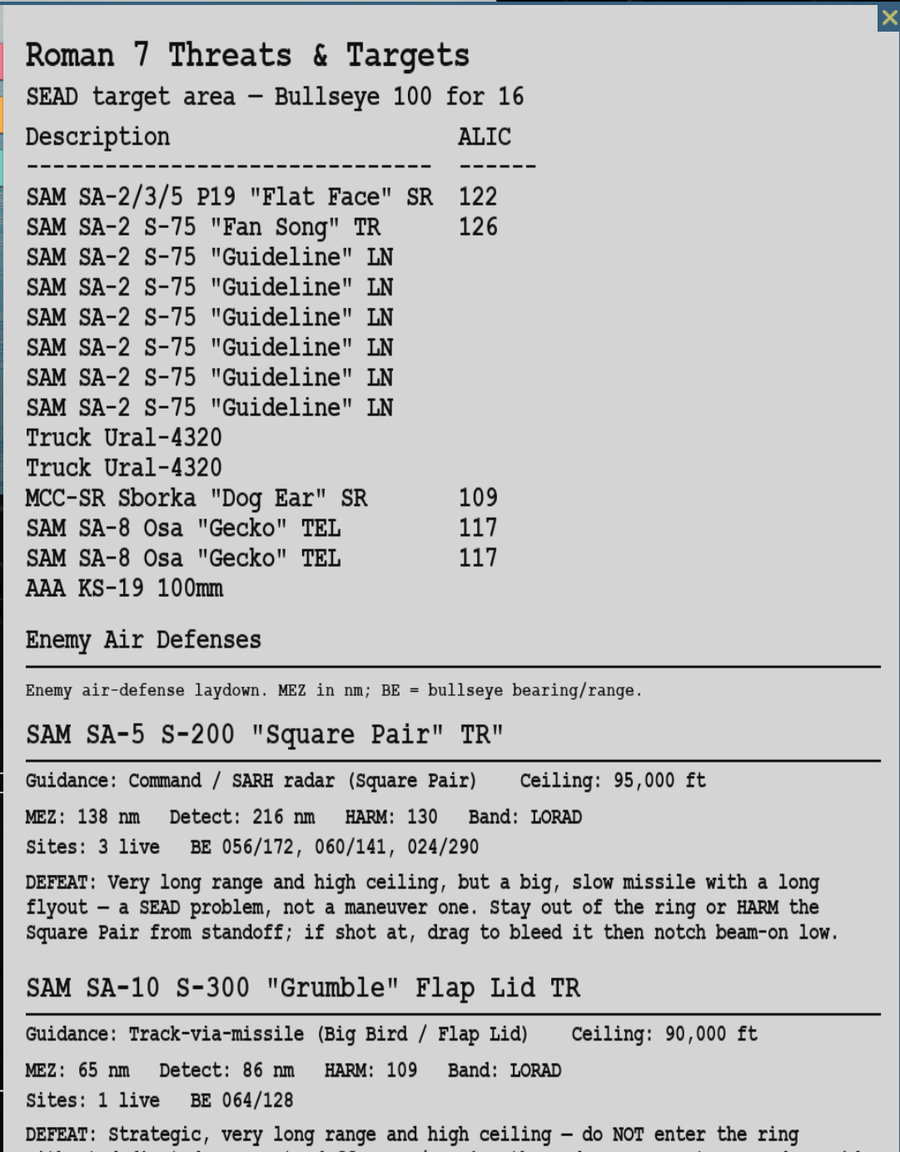
A generated Threats & Targets page (P2): the target ALIC over the enemy-AD threat cards. In the compact deck these cards are colour-coded (amber MEZ/detect, blue HARM/cues); the shot above is from the full deck.
Turning compact_kneeboard off restores the full multi-page deck byte-for-byte — the map
image and Notes page come back, and each section gets its own page again. The compact deck is a
separate assembly path, so nothing is lost by switching.
The compact deck's lead page is a single scannable Brief Sheet modelled on a printed squadron
one-pager: header, mission, a labelled route with steerpoint numbers
(HOLD 1 → JOIN 2 → IP 3 → TGT 5 → EGRESS 6), admin, threats (air + SAM), game plan, comms, code
words, bullseye, fields (RWY/ATC/TCN), loadout, laser, and Combat SAR — auto-filled from the
flight plan, the jet's pylons, and the enemy faction. Empty fields render a ______ fill-in blank
like a real template, so the layout never collapses.
A theme-aware four-colour scheme runs across the compact deck — blue nav/comms, amber threats/fuel, green success, red abort — so P1, the P2 threat cards, and the P3 code words read as one product.
One glanceable Fuel column (planned remaining) per steerpoint, with the RTB surplus — surfaced once, replacing the old redundant Plan/Min/Margin trio. Aircraft with no fuel-burn data get a sanity-banded estimate rather than a blank.
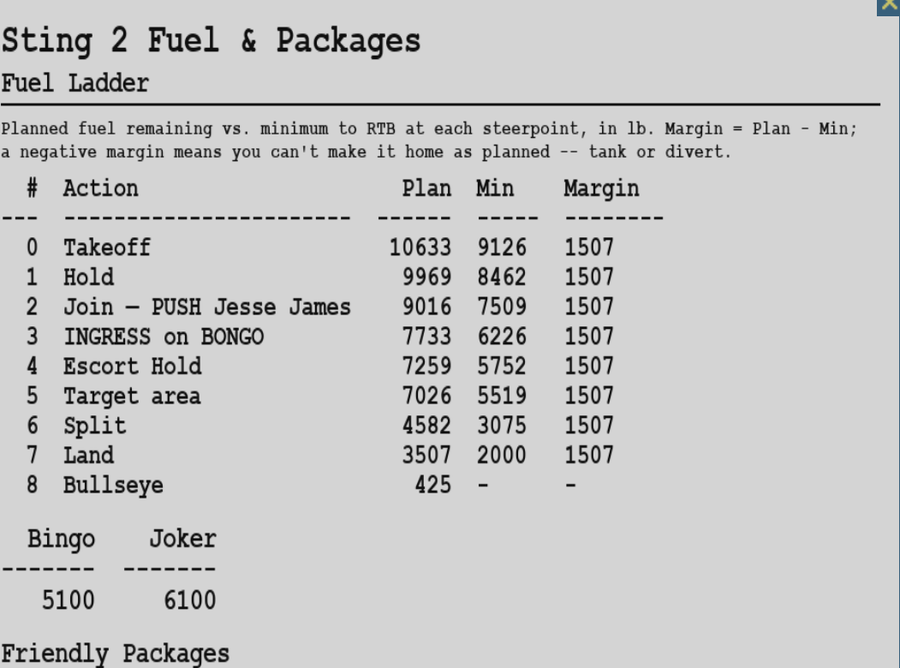
The Fuel Ladder: planned fuel remaining at each steerpoint against minimum-to-RTB, with the surplus margin and Bingo/Joker.
After a turn is resolved, the next mission's cover page carries a "SITREP — Turn N" digest — a cockpit intel brief of what happened last turn: per-side losses, base captures, and Combat SAR rescues. Enemy losses are framed as "claimed" to respect the recon-fog model (you don't get perfect BDA for free). It's hidden on turn 1, on a quiet turn, or when the toggle is off.
You can add your own kneeboard pages per campaign — a squadron SPINS card, a target photo, a comms ladder, anything:
- Open the Kneeboards toolbar action (
QCustomKneeboardsWindow). - Import an image once. It's stored in the campaign save (name + PNG + optional airframe), so it
travels with the campaign and never leaks across campaigns the way the global
Kneeboards/folder does. - At generation it's injected into every client flight (or just one airframe, if you scoped it).
Old saves migrate automatically (no custom kneeboards until you add them).
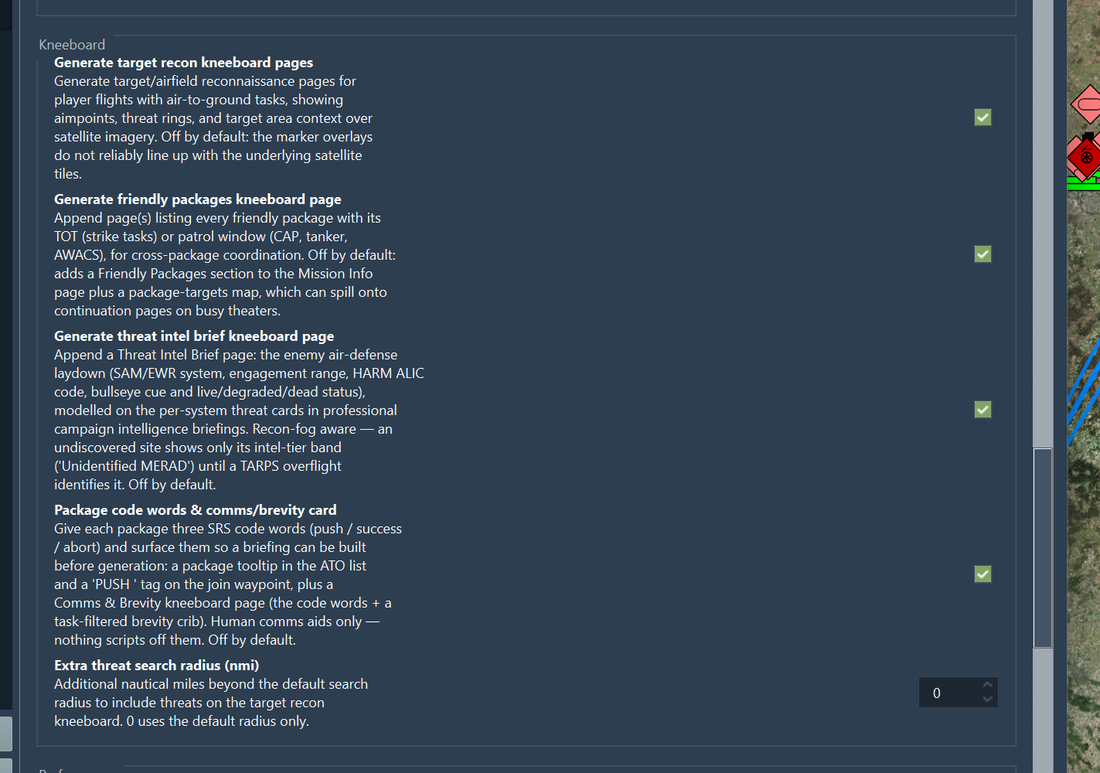
The Kneeboards settings page — the toggles that decide which optional pages the compact deck folds in.
| Setting | Page | Default | Effect |
|---|---|---|---|
compact_kneeboard |
Kneeboards | ON | Fold the optional deck into ≤4 pages; off = full multi-page deck |
generate_sitrep_kneeboard |
Kneeboards | ON | Add the previous-turn SITREP band to the cover page |
| Custom kneeboards | Kneeboards toolbar | — | Import per-campaign images injected into client flights |
In-game-pass status: the cover-page render and the compact deck are cockpit-confirmed; the SITREP number accuracy across turns and the shared-airframe index still warrant an eyeball on a live multi-flight deck.
- Your First Operation — opening the kneeboard in the cockpit
- Fog of War and Reconnaissance — approximate-mode kneeboard pages
- Mission Planning — packages, comms, and code words that feed the deck
- Combat SAR — the Combat SAR kneeboard page