Repository navigation
Operations
The Jarl menu groups the server tabs (Console, Arquivos, Mundo, Server Config, Mod Config, Mod Manager), the site under Aparência (see Layout Editor), and Logs, Sagas, Tarefas, Backups, Auditoria and Sobre e atualizações. Actions that stop the game, delete or restore ask for confirmation in a dialog inside the panel, so a browser that blocks pop-ups does not skip it.
Open Server Config to edit the server name, world, port, public listing, crossplay, description and game password. The current password is never displayed. Leave the field empty to keep it. A password is required: it can be removed only when a passwordless-server mod (for example serverblankpassword) is installed, which shows the Servidor sem senha option. Valheim also rejects a password contained in the server name. The description goes into the site's status feed; Valheim has no dedicated description startup flag. Opções de
inicialização shows the resulting startup arguments, one per line and
read-only, with the password hidden.
Changes to game arguments require a game restart. The panel offers Restart to apply when the game is running. Changing the world name can create a new world at next startup. Reinstall server requires the panel administrator password, stops the game if it is running, then verifies official files through SteamCMD. Saves, configurations and mods live separately. Make a backup first. The game remains stopped after reinstalling.
Version 1.3.0 or newer. The Endereço card changes the website and panel address and the connection address the website shows players to join Valheim (blank uses the website's). Saving updates everything that depends on them: the website server's configuration, the website's own link and, on Windows, the app's buttons. The website server tests the new name first; if it refuses, nothing changes. The game does not restart, and the connection address shows on the website at the next status update, within a few minutes.
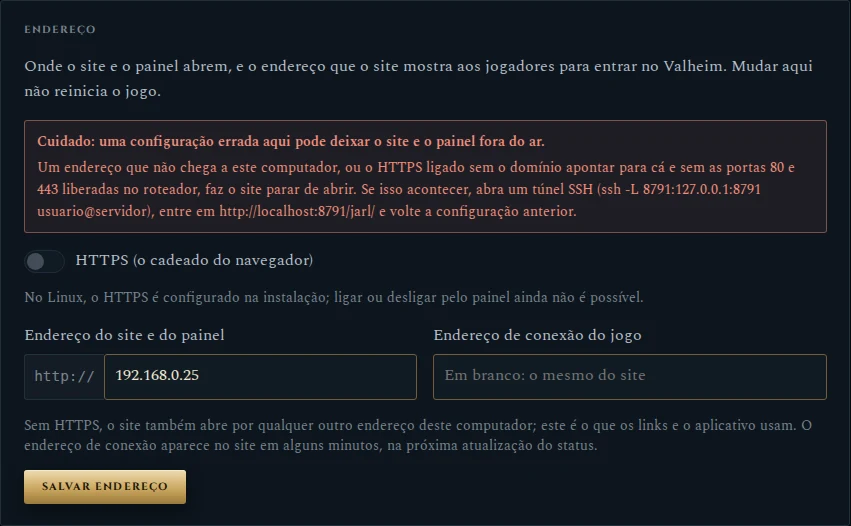
The HTTPS switch shows http:// or https:// in front of the address:
- On Windows, it really turns HTTPS on and off. On, the address must be a domain pointing at the computer, with TCP ports 80 and 443 forwarded by the router, and the card asks for the certificate's e-mail; Caddy requests and renews it by itself. The panel restarts once to switch its cookies.
- On Linux, it shows how the website was installed and stays locked: turning HTTPS on or off from the panel is not possible yet. A website with HTTPS also keeps its domain, since its certificate belongs to that name.
Caution
A wrong address takes the website and the panel offline, and the card warns
about it in red. To get back in, reach the panel directly, without the website
server: on Windows, open http://localhost:8791/jarl/ on the computer itself;
on Linux, open a tunnel with ssh -L 8791:127.0.0.1:8791 user@server and go to
http://localhost:8791/jarl/. Then put the previous settings back.
Mundo replaces the world. Wipe can reset the world, the characters or
both: choose the new world name, a seed (Sortear draws one) and the
modifiers (combat, death penalty, resources, raids, portals), type the current
world name to confirm and press Fazer wipe. A backup is made first. Usar
um mundo gerado no jogo installs a world uploaded as a .zip of its .db
and .fwl. Wipes anteriores lists past wipes. In both cases the server
stays stopped: start it from Console when ready. The site map follows the
new world after its first save.
Mod Config is the mod settings editor. Files remain under BepInEx/config. Many mods read their settings only at startup, so restart the game after saving when appropriate.
Mod Manager installs, updates and removes mods from Hexium or Thunderstore; a package found in both stores appears once, from the store with the newer version. Every change stops the game if it is running, keeps a copy of what it replaces and leaves the game stopped, so you can finish several changes before starting it again from Console.
Logs shows the in-game chat and administration actions recorded by the server, one session per restart, with filters for everything or chat only. Spawn, god and fly run on the client and never reach the server, so they do not appear here.
In the Tarefas tab, a routine has a name and five cron fields. Use Adicionar tarefa to add its ordered tasks; each task can wait a few seconds before running. Allowed actions are start, stop, restart and create backup; arbitrary shell commands are unavailable. Times use the operating system's timezone. 0 4 * * * runs daily at 04:00. Only when server is online skips an occurrence when the game is stopped; Routine enabled pauses it without deleting. heimdall-schedule.timer checks schedules once per minute.
Create backup now archives saves, configuration and launch settings. If the game is running, it stops for a consistent copy and stays stopped: start it again from Console. You can download, restore, lock and delete backups. Locked archives cannot be deleted by the panel. A restore first makes a safety backup of the current state. Mod maintenance archives are available for download, but only world archives can be restored from this page.
Use Jarl → Sobre e atualizações: check the installed version, choose the
update channel (the stable main branch, or a dev/… branch to try
changes before they are released), run Procurar atualizações and review
the change list before approving Atualizar. The progress bar
shows stages and elapsed time. Success fades out; failures remain visible
with an HN-… code, guidance and a copyable technical log. Valheim is not
restarted automatically. If the Sagas bridge changed, restart the game later.

The screenshot uses illustrative data.
If that tab is not available yet, update once from a terminal:
cd ~/Heimdall-Nexus
git fetch origin
git switch main
git pull --ff-only origin main
sudo ./deploy/update.sh
update.sh replaces the panel and tool code in /opt/heimdall-nexus, refreshes the site's helper scripts, republishes the site and restarts the panel. Worlds, mods, game settings, site pages and identity stay as they are, and the Valheim server is not restarted.
On Windows, the equivalent runs in PowerShell as administrator, from the folder you installed from:
cd C:\HeimdallNexus-src
git pull --ff-only
& "$env:ProgramFiles\HeimdallNexus\venv\Scripts\python.exe" deploy\windows\update.py
It runs the same steps. The one difference: for a few seconds the panel, executor and job services pause, because Windows cannot replace a library a running service uses. Valheim keeps running.
These commands erase that installation's worlds, backups, site and settings. Run them only on your test VM. The Git checkout and APT packages remain:
cd ~/Heimdall-Nexus
sudo ./deploy/reset-vm.sh --check
sudo ./deploy/reset-vm.sh --purge
sudo ./deploy/install.sh
The reset works on a complete installation or on one that stopped midway, and asks you to type RESET HEIMDALL VM. It removes the dedicated panel Linux account so you can choose the same name again, while keeping the valheim account.
On Windows, in PowerShell as administrator:
cd C:\HeimdallNexus-src
powershell -ExecutionPolicy Bypass -File .\deploy\windows\uninstall.ps1 -RemoveData
git pull --ff-only
powershell -ExecutionPolicy Bypass -File .\deploy\windows\install.ps1
The uninstaller asks you to type REMOVE. Heimdall's private Python stays, which makes reinstalling faster; add -RemovePython to remove it too. See the other options in Installation on Windows.
A server with unpublished mods can use a .zip modpack in the Hexium/Thunderstore package layout:
manifest.json          author, name, version_number, description, dependencies
plugins/<Mod>/...      DLLs of private or modified mods
patchers/<Mod>/...     BepInEx patchers, if any
config/...             configuration (optional)
dependencies lists public mods as Owner-Name-Version; they are downloaded from Hexium or Thunderstore during installation. Each bundled mod keeps its own folder under BepInEx/plugins.
To build one from an existing server:
sudo python3 ferramentas/criar-modpack.py /var/lib/heimdall-nexus/modpacks/MyServer-1.0.0.zip \
  --author MyTeam --name MyServer --version 1.0.0
On Windows, in PowerShell as administrator, from the Heimdall folder:
& "$env:ProgramFiles\HeimdallNexus\venv\Scripts\python.exe" ferramentas\criar-modpack.py `
  C:\ProgramData\HeimdallNexus\state\modpacks\MyServer-1.0.0.zip --author MyTeam --name MyServer --version 1.0.0
The generator compares each installed mod with the official package of the same version. When every DLL is identical, the mod becomes a dependency; unpublished or modified mods are bundled. Configuration is included only with --with-config, and the AzuAntiCheat folder and files named like webhook, token or password are always left out.
To install, upload the .zip to the server and enter its full path (for example /root/MyServer-1.0.0.zip) in the wizard's Modpack field. The progress log lists the SHA-256 of each bundled DLL. A .zip runs code on the server: only use packs from a trusted source. Mods that are also needed on clients must still reach players another way.