Repository navigation
Installation
This page covers how to build and install Mess on your system.
Requirements differ by operating system. Follow the section for the system where you will run Mess.
Linux requires a C++17 compliant compiler and system utilities for thread pinning, memory binding, and hardware performance monitoring.
Mess requires a valid C++17 compliant compiler.
-
Tested Compilers:
- GCC 9+ (Recommended)
- Intel OneAPI (ICX)
- Clang 10+
- AOCC (AMD Optimizing C/C++ Compiler)
Installation (GCC):
- Debian/Ubuntu:
sudo apt install build-essential - RHEL/CentOS:
sudo yum install gcc-c++
To use a specific compiler, override the CXX variable during build:
make CXX=icpxPrecise thread pinning and memory binding are essential for accurate memory benchmarking.
-
numactl: Required for memory binding on NUMA systems.
- Debian/Ubuntu:
sudo apt install numactl - RHEL/CentOS:
sudo yum install numactl
- Debian/Ubuntu:
-
taskset: Preferred for core pinning.
- Usually pre-installed (part of
util-linux). - If missing:
sudo apt install util-linux(Debian/Ubuntu) orsudo yum install util-linux(RHEL/CentOS).
- Usually pre-installed (part of
Pinning Fallback Strategy: The system determines the best available tool for core pinning in the following order:
tasksetMPInumactl
Note: If no pinning tool is detected, the benchmark will not run.
Mess interfaces with hardware performance counters. Use the tool best suited for your environment.
| Tool | Status | Notes |
|---|---|---|
| perf | Supported |
Recommended. Low overhead.sudo apt install linux-tools-common linux-tools-$(uname -r)
|
| likwid | Supported | Good for HBM/Uncore counters. |
| Intel PCM | Supported | Intel Process Counter for CXL Monitor. |
| Intel VTune | Supported | Driverless alternative for explicit --measurer=vtune runs. Requires vtune in PATH. |
| PAPI | Planned |
If you would like support for other tools, please email: mess@bsc.es
- Python 3: Required for the Plotter visualization tools.
Mess requires an Apple Silicon M-series Mac. It reads bandwidth from the Apple memory controller through IOReport; Intel Macs do not have a supported counter backend.
The Xcode Command Line Tools provide Apple Clang with C++17 support and the CoreFoundation and IOKit frameworks used by Mess.
xcode-select --installThe standard Make build does not require CMake. Install CMake 3.21+ only if you intend to use the macos-cmake preset.
macOS does not provide Linux's taskset or numactl interfaces. Mess uses the built-in taskpolicy command to influence traffic-generator placement.
NUMA memory-node binding is not available, so the --bind option is unsupported. No additional pinning utility needs to be installed.
Mess reads bandwidth directly from the Apple memory controller through /usr/lib/libIOReport.dylib.
| Tool | Status | Notes |
|---|---|---|
| IOReport | Supported | Built into macOS and selected automatically on Apple Silicon |
No driver, elevated prompt, or counter permission change is required. Intel Macs do not expose a supported memory-bandwidth backend.
Limitations:
--bind,--inst-lat, and--add-countersare unavailable on macOS. Latency is measured through pointer chasing.
- Python 3: Required for the Plotter visualization tools.
- Homebrew: Optional package manager used by the command below.
brew install cmake python3If you use the standard Make build and already have Python 3, CMake is not required.
Windows uses a native CMake build and platform-specific mechanisms for placement and performance counters.
Install MSYS2 and use its UCRT64 environment. Mess requires:
- GCC for UCRT64 with C++17 support
-
CMake 3.21+ for the
windows-mingwpreset - Ninja as the preset's build generator
Install the build toolchain from an MSYS2 shell:
pacman -S mingw-w64-ucrt-x86_64-gcc mingw-w64-ucrt-x86_64-cmake ninjaKeep C:\msys64\ucrt64\bin before other MinGW installations in PATH. Mixing the UCRT64 compiler with libraries from mingw64 can cause compilation to fail.
Windows does not require taskset or numactl. Mess uses native Windows facilities, including Job Objects and processor affinity, to place traffic-generator threads on the selected cores.
Memory-node selection is handled by the Windows implementation where available, the Linux pinning fallback sequence does not apply.
Windows does not expose memory-bandwidth counters directly to normal programs. Install the appropriate tool for your CPU and run Mess from an Administrator prompt.
| CPU | Counter backend | Notes |
|---|---|---|
| AMD | AMD uProf | Its installer provides the signed driver used by AMDuProfPcm
|
| Intel Ice Lake / 10th generation or newer | Intel VTune Profiler | Available standalone or through oneAPI |
| Intel 9th generation or older |
Intel PCM with msr.sys
|
Requires the driver to be built, self-signed, installed, and started |
Limitations:
--inst-latis unavailable on Windows. The Intel PCM driver is the most involved counter option because itsmsr.sysdriver must be built, self-signed, and installed.
- Python 3: Required for the Plotter visualization tools.
- Git: Required when cloning Mess rather than using an existing checkout.
- PowerShell: Used for the configured Windows build and verification commands below.
Clone with submodules (required):
git clone --recursive https://github.com/bsc-mem/Mess
cd Mess
Important: The
--recursiveflag is required to download the submodules that Mess depends on.
If you forgot --recursive, initialize submodules manually:
git submodule update --init --recursiveMess automatically detects your system architecture and configures itself accordingly.
make
make installThe standard Make build uses the same commands:
make
make install
Alternatively, use the macOS CMake preset:
cmake --preset macos-cmake
cmake --build --preset macos-cmake
./build/bin/generate_code
This generates the following binaries in build/bin/:
-
mess- The core benchmark (Mess Benchmark) -
mess-profiler- Memory bandwidth profiler (Mess Profiler) -
generate_code- Kernel generator;make installruns it to emit the traffic generator
The standalone traffic generator is written to src/traffic_gen/traffic_gen_multiseq.x.
Run the following commands from PowerShell:
$env:PATH="C:\msys64\ucrt64\bin;$env:PATH"
cmake --preset windows-mingw
cmake --build --preset windows-mingw
build\bin\generate_code.exe
This generates the following binaries in build/bin/:
-
mess.exe- The core benchmark (Mess Benchmark) -
mess-profiler.exe- Memory bandwidth profiler (Mess Profiler) -
generate_code.exe- Kernel generator;make installruns it to emit the traffic generator
Keep C:\msys64\ucrt64\bin first on PATH.
For convenient access, add the bin directory to your PATH:
export PATH=$PATH:$(pwd)/build/binTo make this permanent, add the line to your shell configuration (~/.bashrc or ~/.zshrc).
The benchmark requires access to hardware performance counters. On Linux, you may need to adjust perf_event_paranoid:
# Check current setting
cat /proc/sys/kernel/perf_event_paranoid

# Allow access (temporary, resets on reboot)
echo 0 | sudo tee /proc/sys/kernel/perf_event_paranoid

# Or for permanent change, add to /etc/sysctl.conf:
# kernel.perf_event_paranoid = 0
Values:
-
3= No access (most restrictive) -
2= User-space only, no kernel profiling -
1= Kernel profiling for root only -
0= Allow all users (recommended for Mess) -
-1= No restrictions
For more accurate measurements, enable huge pages:
# Allocate huge pages (temporary)
echo 1024 | sudo tee /proc/sys/vm/nr_hugepages

# Verify
cat /proc/meminfo | grep HugeNote: Even if Huge Pages are not enabled, Mess automatically compensates for page walk latency to ensure accuracy. For more details on why they are still recommended, see Huge memory pages.
No additional counter configuration is required. IOReport is part of macOS and Mess opens it directly without administrator privileges.
The Linux settings kernel.perf_event_paranoid and /proc/sys/vm/nr_hugepages do not exist on macOS. Mess uses the page and scheduling facilities provided by the operating system.
Open PowerShell with Run as administrator before verifying or running Mess. The Intel and AMD bandwidth backends use privileged drivers that a normal process cannot access.
-
AMD uProf installs its signed driver with the application.
-
Intel VTune installs its sampling drivers with the profiler. Current versions target Ice Lake and newer processors.
-
Intel PCM requires the
msr.sysservice to be installed and running. Start an installed service from an Administrator prompt with:sc.exe start msr
If Windows virtualization-based security hides the uncore counters, a backend may be installed correctly but still return no usable events. Run build\bin\mess.exe --dry-run --verbose=2 to see the detected backend and the closest known failure reason.
Windows uses 4 KB pages unless the account has the Lock pages in memory right. To enable large pages:
- Press
Win+Rand runsecpol.msc. - Open Local Policies → User Rights Assignment.
- Open Lock pages in memory and add your user.
- Sign out and sign back in.
Administrator privileges alone do not grant this right. Windows Home does not include secpol.msc. Mess can still run with standard pages and records that huge pages were unavailable.
After installation, verify everything works:
# Check version
./build/bin/mess --version

# Dry run to see system detection
./build/bin/mess --dry-run --verbose=2Run the equivalent commands from an Administrator PowerShell prompt:
build\bin\mess.exe --version
build\bin\mess.exe --dry-run --verbose=2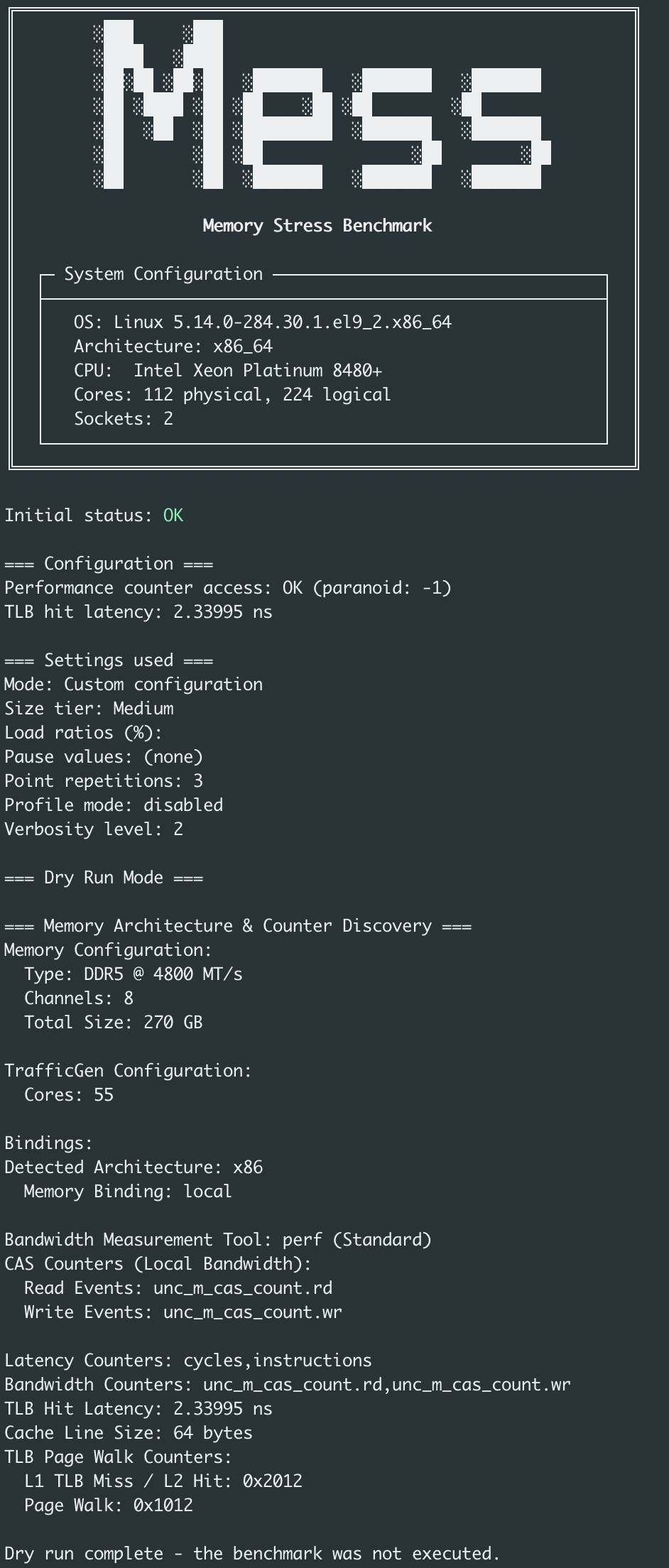
See FAQ for common installation issues.
Build errors? Please report issues via:
- Email: mess@bsc.es
- GitHub: Issues