Advanced configuration
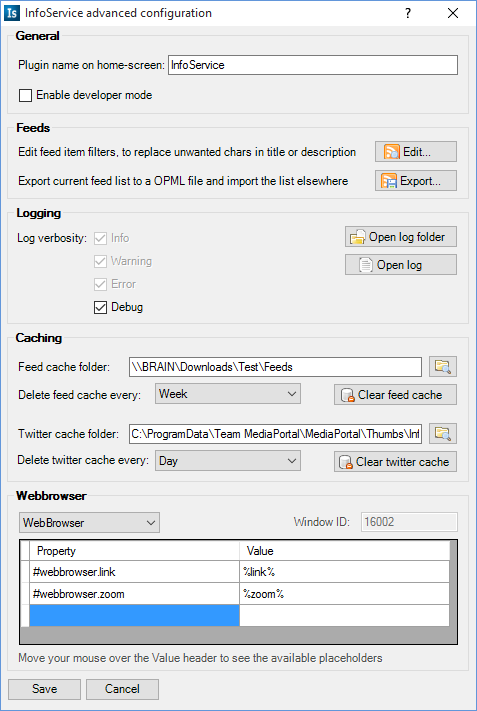
Here you can setup some settings, which the normal user doesn't need.
This sets the name of the plugin in the normal home screen on MediaPortal. This setting doesn't apply on the Basichome screen of MediaPortal.
This enables the developer mode. When enabled, it is easier to skin the NotifyBar (infoservice.notifybar.xml) because the NotifyBar dialog will be displayed every 25 seconds with an 20 seconds timeout. The text in this dialog will be created randomly. Also if you click ok on the NotifyBar you will directory to random feed or to a random twitter timeline.
This sets the logging control of InfoService. Informations should be always logged, so it's disabled. Waring and Error are default enabled but can be disabled. The debug logging should only be enabled if you have some problems with the plugin and search for a solution. If the debug option is enabled the log size grows extremely, so i suggest to disable this option if you have no problems.
Normally the cache folder is set to "%PROGRAMDATA%\Team MediaPortal\MediaPortal\thumbs\InfoService". But you can change this location to another folder. For example if you want to reduce writings on your SSD drive, or if you use a centrilized database of MediaPortal on a slower network drive.
Since InfoService 1.5, InfoService will cache all downloaded feed images on the HDD. To let the size of the cache folder not grow extremely, InfoService deletes the whole cache every Day, Week or Month. The default setting is Week, but if you have many feeds added, then i would suggest to delete the cache every day.
Since InfoService 1.5, InfoService will cache all downloaded twitter user images on the HDD. To let the size of the cache folder not grow extremly, InfoService deletes the whole cache every Day, Week or Month. The default setting is Day, but if you don't use your twitter account every day, then i would suggest to delete the cache every week.
Here you can set your favorite webbrowser plugin you want to use with InfoService. You can use properties for other webbrowser plugins (Attention: They have to use the same interface to InfoService like the GeckoBrowser or the WebBrowser plugin, so it's up to the plugin developer of the webbrowser plugin if he wants to support InfoService).