Skin developer guide
Display background image for feed/twitter selection screen. It's not needed, but to have a nicer skin looking on click on the InfoService home menu button, please add that skin file to your skin.
| Filename | Window ID |
|---|---|
| infoservice.xml | 16000 |
No Controls. Needs only a background image.
Important: The skin file needs at least the "defaultcontrol" otherwise you will get a "Missing or invalid skin file" message.
In this file (infoservice.xml) skinner can also choose weather to include and define skin settings for the plugin. There are many of them available, if and which of the settings are needed is for skinner to decide. Skin settings are not persistent, they will override user settings for the plugin while MediaPortal is running but are not saved in configuration XML on MediaPortal exit. Skin settings are defined in tags of the XML file, and in MediaPortal skin XML files they are in the main section of the file:
<window>
    <id>16000</id>
    <defaultcontrol>0</defaultcontrol>
    <allowoverlay>yes</allowoveray>
    <define>...</define>
    <define>...</define>
    ...
</window>
The property names are self-explained. Available skin settings are:
 <define>#InfoService.SkinSettings.Feeds.Enabled:yes</define>
 <define>#InfoService.SkinSettings.Feeds.General.RefreshFeedEvery:15</define>
 <define>#InfoService.SkinSettings.Feeds.Layout.ShowFeedItemPublishTime:no</define>
 <define>#InfoService.SkinSettings.Feeds.Layout.ItemPublishTimeAllFeeds:PublishTime OR FeedName OR Both</define>
 <define>#InfoService.SkinSettings.Feeds.Layout.MaxItemsPerFeedForAllFeeds:6</define>
 <define>#InfoService.SkinSettings.Feeds.Layout.MaxItemsForFeedTicker:10</define>
 <define>#InfoService.SkinSettings.Feeds.TickerLayout.TickerMask:%itemtitle%</define>
 <define>#InfoService.SkinSettings.Feeds.TickerLayout.Separator:::</define>

 <define>#InfoService.SkinSettings.Weather.Enabled:yes</define>
 <define>#InfoService.SkinSettings.Weather.General.RefreshWeatherEvery:45</define>

 <define>#InfoService.SkinSettings.Twitter.Enabled:no</define>
 <define>#InfoService.SkinSettings.Twitter.General.RefreshTwitterEvery:25</define>
 <define>#InfoService.SkinSettings.Twitter.Layout.MaxItemsForTwitterTicker:5</define>
 <define>#InfoService.SkinSettings.Twitter.TickerLayout.TickerMask:%message%</define>
<define>#InfoService.SkinSettings.Twitter.TickerLayout.Separator:::</define>Display feed items and change feed on home screen.
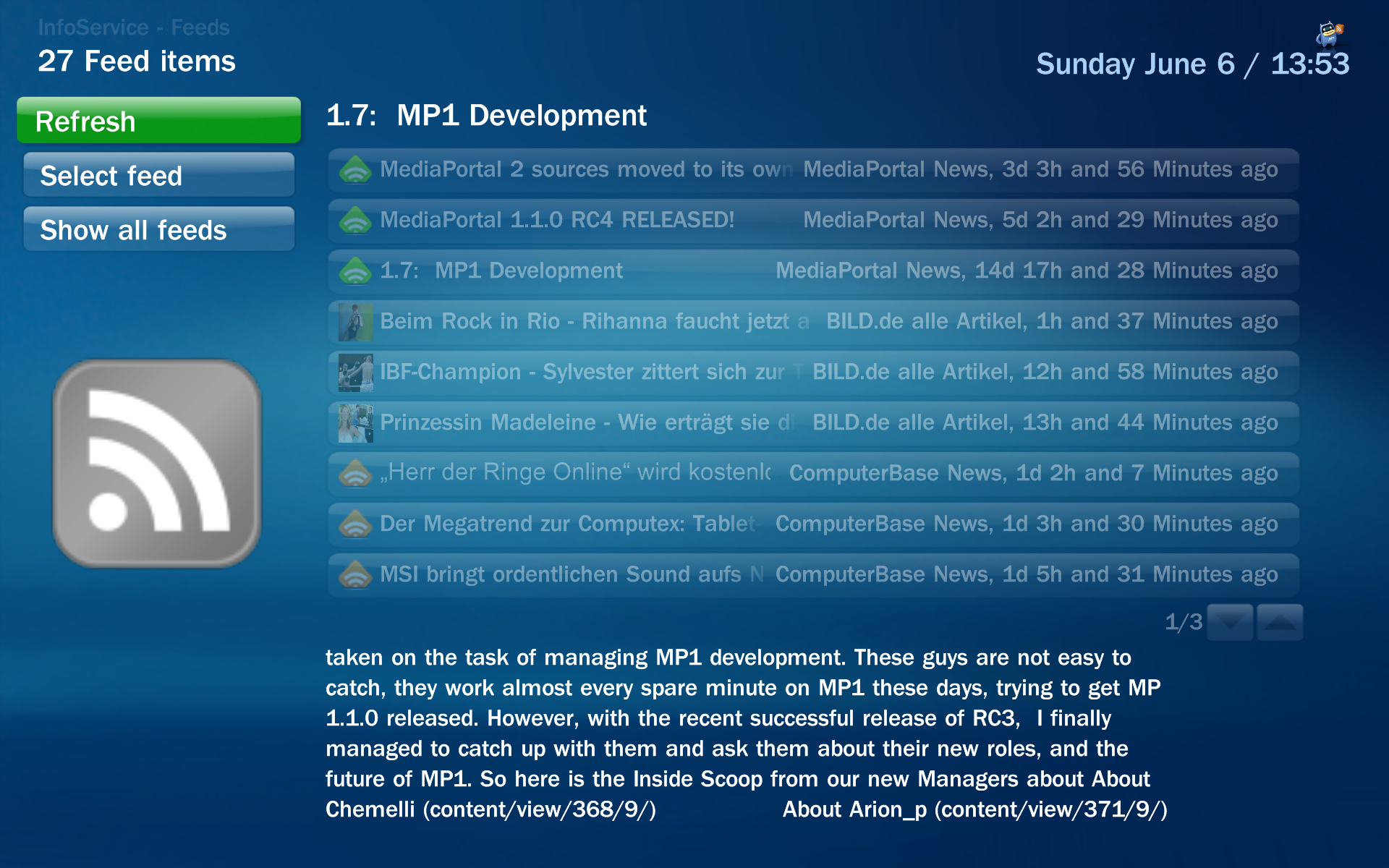
| Filename | Window ID |
|---|---|
| infoservice.feeds.xml | 16001 |
| Control | Control ID | Description |
|---|---|---|
| Button | 2 | Refresh all feeds |
| Button | 4 | Change feed on home screen and on window |
| Button | 5 | Set all feeds on home screen |
| Listcontrol | 50 | Shows all feed items in a list |
Display twitter timelines and change timeline on home screen.
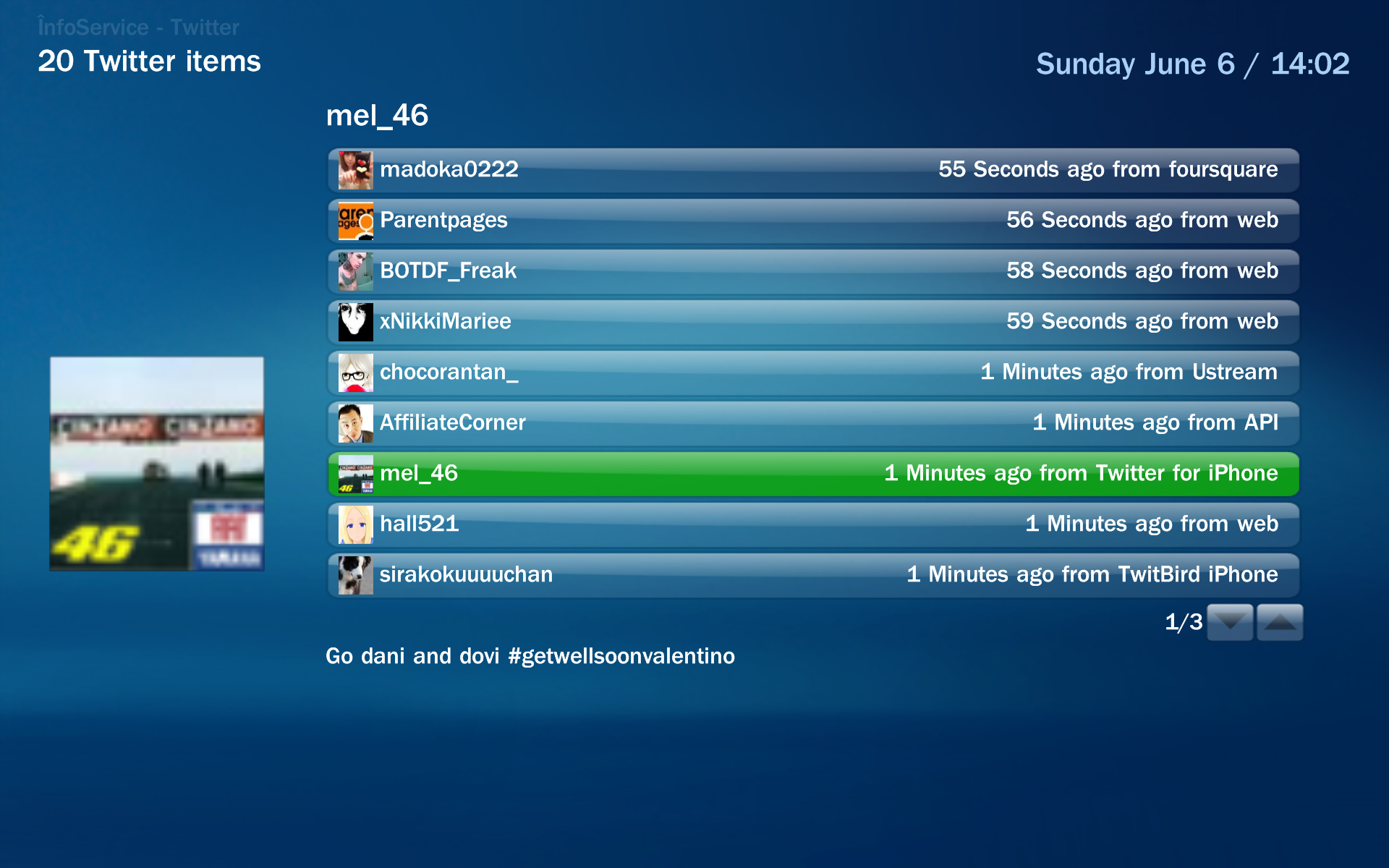
| Filename | Window ID |
|---|---|
| infoservice.twitter.xml | 16003 |
| Control | Control ID | Description |
|---|---|---|
| Button | 2 | Refresh twitter timelines |
| Button | 4 | Change timeline on home screen and on window |
| Button | 5 | Update twitter status |
| Listcontrol | 50 | Shows all twitter messages in a list |
Display news or new tweets in a dialog.
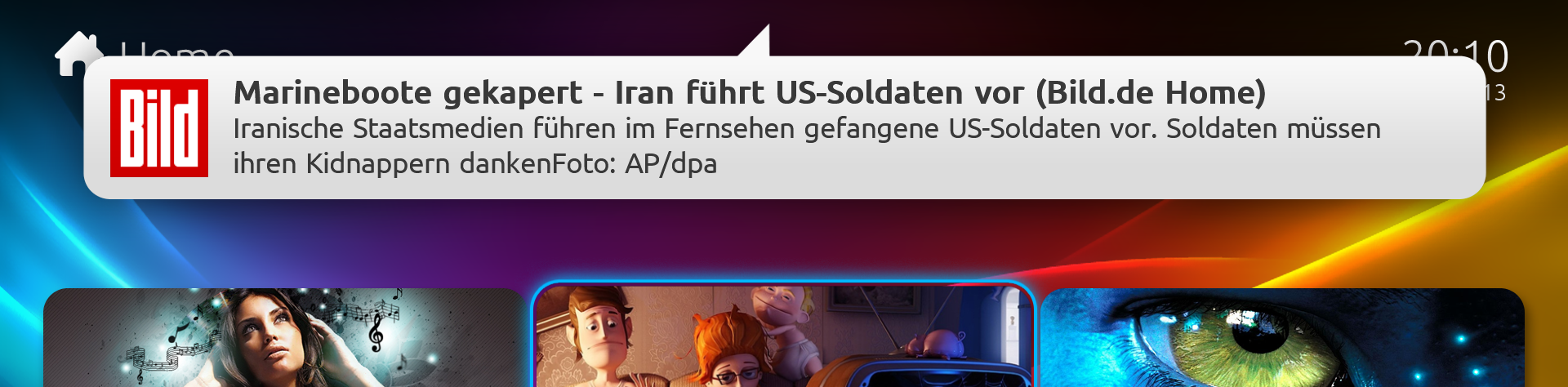
| Filename | Window ID |
|---|---|
| infoservice.notifybar.xml | 16004 |
| Control | Control ID | Description |
|---|---|---|
| Button | 4 | Close button |
| Button | 7 | Ok button (jumps to the news or to the new tweet in infoservice) |
| Label | 3 | Header text of news or tweet user who has tweeted |
| Image | 5 | Image of the feed or image of the user who has tweeted |
| Textboxscrollup | 6 | Details news text or tweet text |
To show informations from InfoService on the home screen.
| Property name | Description |
|---|---|
| #infoservice.twitter.enabled | Indicates wether the TwitterService is enabled or disabled. e.x. False |
| #infoservice.twitter.messages | A line of your twitter friends timelime separated by a separator thats set in the options |
| #infoservice.twitter.selected.username | The selected username in the twitter listcontrol |
| #infoservice.twitter.selected.userpicture | The path to the picture of the selected user in the twitter listcontrol |
| #infoservice.twitter.selected.mediaimage | The path to the media imgage of the selected tweet in the twitter listcontrol |
| #infoservice.twitter.selected.timeline | The selected timeline |
| #infoservice.twitter.itemtype | Translated label for "Feed items" header |
| #infoservice.twitter.itemcount | Twitter items count in a timeline |
| #infoservice.twitter.selected.index | Current selected index in the listcontrol |
| #infoservice.twitter.separator | Separator string e.x. :: |
| #infoservice.twitter.lastupdated.message | Last updated time of twitter as a message. Ex. "Last update of feeds on 20.02.2010 17:39" |
| #infoservice.twitter.lastupdated.datetime | Last updated time of twitter as date/time. Ex. "20.02.2010 17:39" |
RDF/RSS/ATOM feeds
| Property name | Description |
|---|---|
| #infoservice.feed.enabled | Indicates wether the FeedService is enabled or disabled. e.x. False |
| #infoservice.feed.titles | A line of your feed messages separated by a separator thats set in the options |
| #infoservice.feed.alltitles | A line of all feed messages separated by a separator thats set in the options |
| #infoservice.feed.isalltitles | Indicates if the all feeds ticker is shown on basichome or not. Ex. False or True |
| #infoservice.feed.img | A image link for the rssfeed. e.x. C:\Temp\microsoft.jpg |
| #infoservice.feed.selected.itemimg | A image link for an item of a feed (only RSS2.0) |
| #infoservice.feed.selected.index | Current selected index in the listcontrol |
| #infoservice.feed.selected.feed | Current viewed feed name |
| #infoservice.feed.selected.title | Current selected tilte in the listcontrol |
| #infoservice.feed.selected.type | Current viewed feedtype ex. RSS / RDF / Atom |
| #infoservice.feed.selected.itemage | Time from feed publish date till now |
| #infoservice.feed.selected.description | Description of a feed item |
| #infoservice.feed.selected.sourcefeed | Current viewed feedname (when in all feeds view this holds source feed view, otherwise it's the same as #infoservice.feed.selected.feed property) |
| #infoservice.feed.itemtype | Translated label for "Feed items" header |
| #infoservice.feed.itemcount | Feed items in the listcontrol |
| #infoservice.feed.separator | Separator string e.x. :: |
| #infoservice.feed.lastupdated.message | Last updated time of feeds as a message. Ex. "Last update of feeds on 20.02.2010 17:39" |
| #infoservice.feed.lastupdated.datetime | Last updated time of feeds as date/time. Ex. "20.02.2010 17:39" |
Please provide some default images for your skin to InfoService. InfoService will load them from {SKINNAME}\Media\InfoService.
| Image filename | Property | Description |
|---|---|---|
| defaultFeedALL.png | #infoservice.feed.img | Will be set when the users selected the all feeds ticker. |
| defaultFeedAtom.png | #infoservice.feed.img | Will be used if the selected feed has no default image and no user image is in the configuration set. Will be set when the users selected a ATOM feed. |
| defaultFeedRDF.png | #infoservice.feed.img | Will be used if the selected feed has no default image and no user image is in the configuration set. Will be set when the users selected a RDF feed. |
| defaultFeedRSS.png | #infoservice.feed.img | Will be used if the selected feed has no default image and no user image is in the configuration set. Will be set when the users selected a RSS feed. |
| defaultFeedItemAtomBig.png | #infoservice.feed.selected.itemimg | Will be used if the selected feed item has no own image. Will be set if the selected feed item changes. |
| defaultFeedItemRDFBig.png | #infoservice.feed.selected.itemimg | Will be used if the selected feed item has no own image. Will be set if the selected feed item changes. |
| defaultFeedItemRSSBig.png | #infoservice.feed.selected.itemimg | Will be used if the selected feed item has no own image. Will be set if the selected feed item changes. |
| defaultFeedItemAtom.png | - | Will be used as a thumbnail in the feed list control if the feed item has no own image. |
| defaultFeedItemRDF.png | - | Will be used as a thumbnail in the feed list control if the feed item has no own image. |
| defaultFeedItemRSS.png | - | Will be used as a thumbnail in the feed list control if the feed item has no own image. |
| defaultTwitter.png | - | No Property is used. Should be used on the basichome if the twitter timeline is shown. |
Just add an item on your basichome. For exampe a Fadelabel and set it up as shown below:
<control><description>Feed Items</description>
    <type>fadelabel</type>
    <id>1</id>
    <width>1160</width>
    <height>50</height>
    <posX>130</posX>
    <posY>505</posY>
    <font>mediastream12</font>
        <textcolor>ff000000</textcolor>
    <label>#infoservice.feed.titles</label>
    <visible>plugin.isenabled(InfoService)</visible>
</control>
If you want to give the users of your skin the possibility to change the feed, add the hyperlink tag with 16001 to your button. Example:
<control><description>feed image</description>
    <type>button</type>
    <id>1111</id>
    <width>70</width>
    <height>28</height>
    <posY>505</posY>
    <posX>60</posX>
    <onup>1702</onup>
    <hyperlink>16001</hyperlink>
    <textureFocus>#infoservice.feed.img</textureFocus>
    <textureNoFocus>#infoservice.feed.img</textureNoFocus>
    <visible>plugin.isenabled(InfoService)</visible>
</control>
If you want to give the user the possibility to show his twitter timelines, use the same example shown above, but use in the hyperlink tag 16003.