Twitter configuration
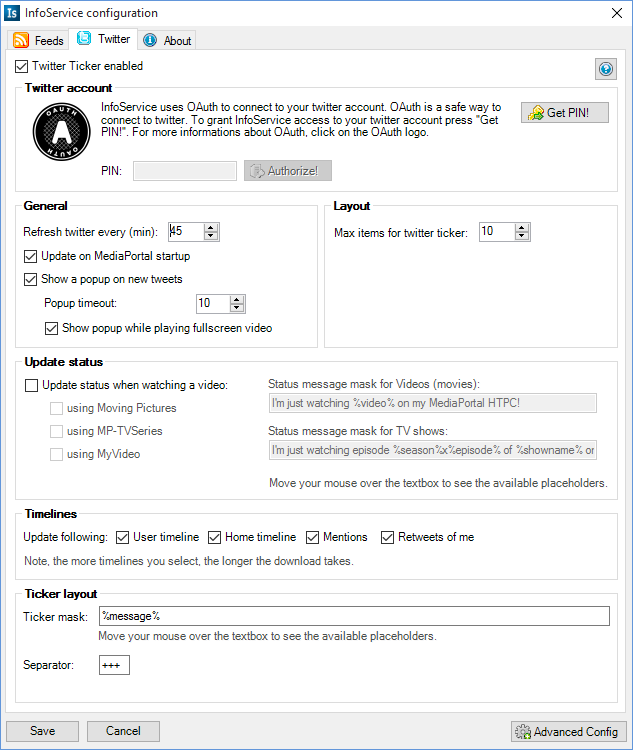
Here you can setup your twitter account. To connect to your twitter account, InfoService uses OAuth. OAuth is a save way to connect to your twitter account. Also this gives much more possibilites for InfoService.
To get your Twitter pin, just press the "Get PIN!" button. Here you have to click yes. A browser window will open with a 7-digit pin. Copy this pin into the "PIN:" textbox and press "Authorize!".
This determines when InfoService should update your twitter timelines. If you set it to 30 minutes, InfoService look for twitter updates every 30 minutes. Don't set it too low, because if InfoService is updating the InfoService MediaPortal screen is locked.
Check if you wan't that InfoService updates the twitter timelines when you start MediaPortal. Uncheck it if don't want to. This could be necessary if you have a slow internet connection.
If a twitter timeline has more than the items you've set here, then InfoService will cut the other items. This applys only for the ticker, not for the twitter view in the InfoService MediaPortal GUI. There you will see all items of a twitter timeline.
One of the new features of InfoService is that it can post a twitter update when you watching a video with MediaPortal. You can turn off to post updates when you, for example, watching a video that you started in the MyVideo section of MediaPortal. Also you can change the message that is posted when you start watching a video. Move the mouse over the "Status message mask for Videos (movies)" or "Status message mask for TV Shows (series)" to see the available placeholders.
Here you can setup which timeline should be downloaded on a update. This gives you the possibility to speed up the download of twitter. For example, the public timeline takes the longest time to download, because nearly all of the posted messages have a user picture which is also download. So i would recommend to desselcted the public timeline.
Here you can set the layout of the ticker line. Move your mouse over the Ticker mask textbox and a little popup raises with the available placeholders.
This is the separator string between each user message.