Repository navigation
Models
Juvin does not include a model. It sends your draft and its thread to one you choose, in one of two modes. Switch between them in Settings, Models.
Your email goes to a model server on this computer or on another computer on your own network, and nowhere else. If that server cannot be reached, Juvin tells you; it never tries a server on the internet instead.
Any server that speaks the OpenAI-compatible API works:
| Server | Usual address | Notes |
|---|---|---|
| Ollama | http://localhost:11434 |
Juvin finds it on this computer by itself. |
| LM Studio | http://localhost:1234 |
Start its local server first. Juvin finds it by itself. |
llama.cpp llama-server
|
http://localhost:8080 |
Type the address in. |
For a server on another computer, type its address, such as http://192.168.1.20:11434, in Server address and press Enter. The server must listen on the network, not only on its own machine; for Ollama, set OLLAMA_HOST=0.0.0.0 on that computer.
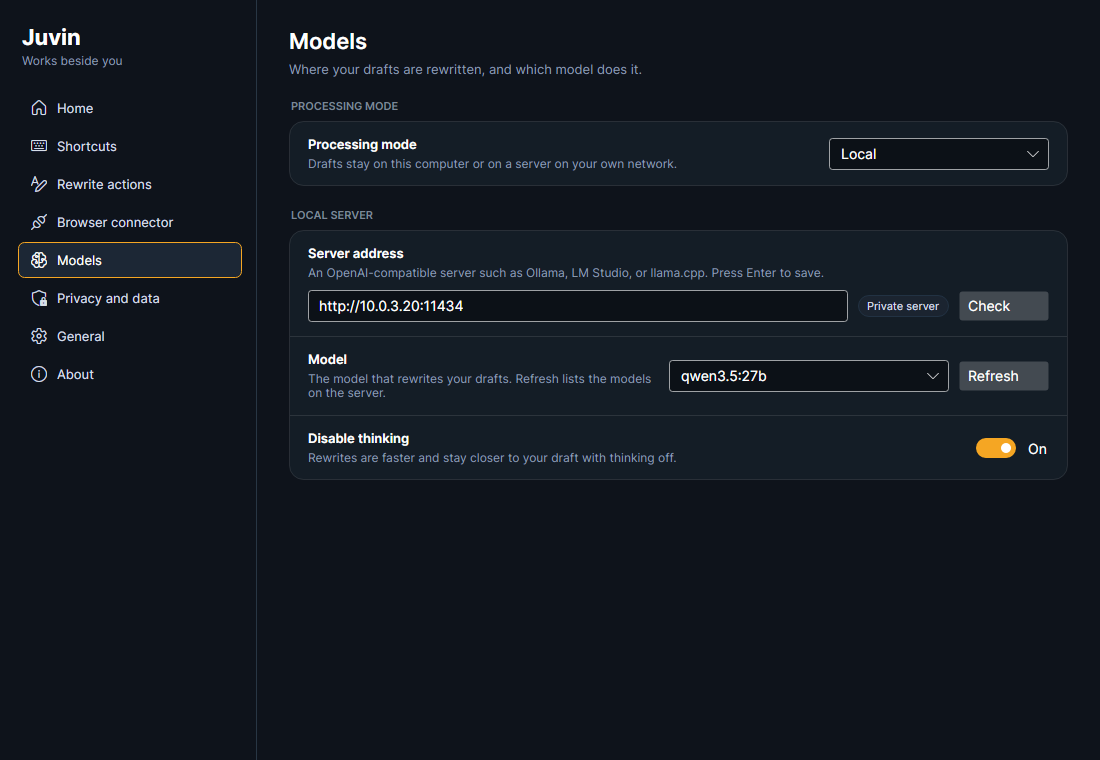
Which model? Rewriting an email takes a good instruction-following model. Models of 12 billion parameters and up give reliable rewrites; smaller ones are faster but miss more often, and Juvin marks them fast, lower quality and suggests a bigger one when your server has one. Refresh lists the models on your server.
Disable thinking is on by default. Reasoning models then answer directly, which is faster and keeps the rewrite closer to your draft.
Juvin runs the Codex CLI you have installed and signed in to, and uses your ChatGPT subscription. Your draft and the email thread then go to OpenAI under your account. Juvin stores no API key.
- Install the Codex CLI and run
codex loginin a terminal. - In Settings, Models, choose Codex. Juvin checks that the CLI is installed and signed in.
Juvin runs Codex in a read-only sandbox for each rewrite, and keeps nothing between runs.