Taxonomic Classification
Taxonomic classification will be carried out using Kraken2 on the filtered/demultiplexed reads and the metagenomes.
flowchart LR
subgraph Kraken/Bracken
	kb0[Metagenomes]
	kb01[Unaligned Reads]
	kb1{cDNA or DNA}
	kb2{Assembly or Reads}
	kb3[Kraken taxonomic classification]
	kb4[Bracken re-estimation]
end
subgraph Functions in Tools.py
	t7[krakBrak: do kraken \nand bracken for reads \nand assembly]
end
kb0 --> kb1
kb01 --> kb1
kb1 --cDNA--> kb2
kb1 --DNA--> kb2
kb2 --Assembly--> kb3
kb2 --Reads--> kb3
kb3 --> kb4
t7 -..-> kb3
t7 -..-> kb4
linkStyle 0 stroke: #008000
linkStyle 1 stroke: #008000
linkStyle 2 stroke: #008000
linkStyle 3 stroke: #008000
linkStyle 4 stroke: #008000
linkStyle 5 stroke: #008000
linkStyle 6 stroke: #008000
linkStyle 7 stroke: #ed9121
linkStyle 8 stroke: #ed9121
- During configuration, the user can choose to carry out taxonomic classification on the reads, the metagenome or both
- In the main
NanoMetaPipe.pyscript, the functionkrakBrakis used to carry out taxonomic classification -
krakBrakis housed in theTools.pyscript and it takes in:- the path to the kraken2 package (or kraken2 in the $PATH as in the configuration file)
- the path to the kraken DB
- the path to the bracken package
- the isolate name
- the assembly or reads file
- the output directory
- the bracken threshold length
- the kraken threshold
- the bracken similarity threshold
- the number of threads
- Within the
krakBrakfunction, firstly, taxonomic classification is carried out using kraken2. Example:
# kraken2 command using reads. assembly.fasta is used for assemblies
kraken2 --db path/to/krakenDB path/to/reads.fasta --threads threads --output path/to/output/Kraken/All_classifications.tsv --report path/to/output/Kraken/FULLreport.txt --use-names --unclassified-out path/to/output/Kraken/unclassified.fastq --classified-out path/to/output/Kraken/classified.fastq --minimum-hit-groups kraken_threshold --report-minimizer-data- The
FULLreport.txtgenerated in the kraken command contains too much information for bracken to use and as such, requires some manipulation
# remove the unnecessary information from the kraken report to use for bracken
cut -f1-3,6-8 path/to/output/Kraken/FULLreport.txt > path/to/output/Kraken/ClassicFullReport.txt
# carry out bracken -- bracken example command
bracken -d path/to/krakenDB -i path/to/output/Kraken/ClassicFullReport.txt -o path/to/output/Kraken/bracken_report.txt -t threads -w path/to/output/Kraken/bracken_KrakenReport.txt -r bracken_length_threshold- Once kraken and bracken is completed, the report is then converted to a HTML interactive pie chart using Krona. Example commands are:
# convert the report to krona format
kreport2krona.py -r path/to/output/Kraken/bracken_KrakenReport.txt -o path/to/output/Kraken/bracken_KrakenReport.krona
# convert the krona to html format
ktImportText path/to/output/Kraken/bracken_KrakenReport.krona -o path/to/output/Kraken/bracken_KrakenReport.html- The generated HTML file can be opened in a browser to view the taxonomic classification of the community.
- Example output of the HTML file is:
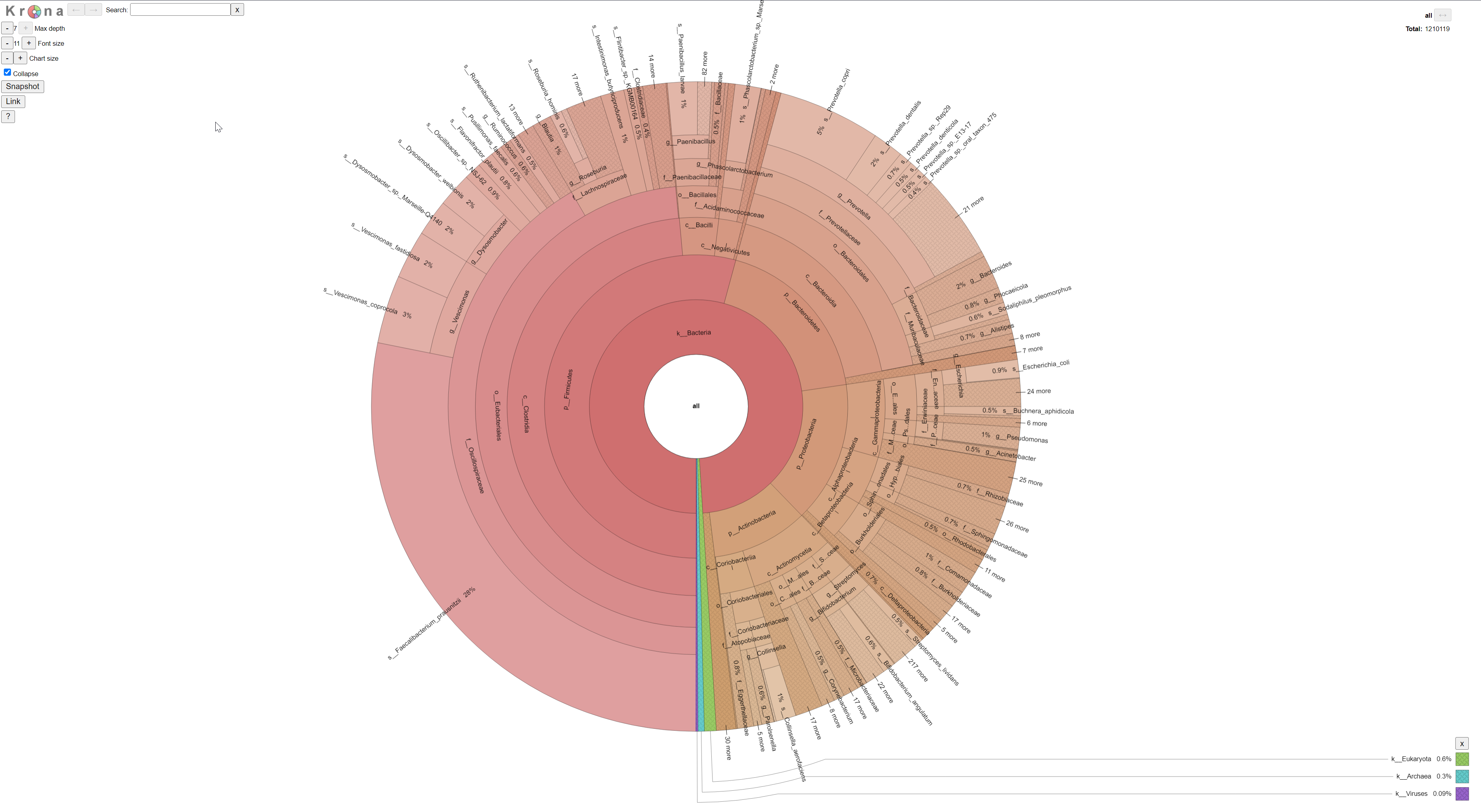
Reads or metagenomes are taxonomically classified using kraken2 and bracken re-estimation. Kraken2 can be carried out using all complete genomes on RefSeq from bacteria, archaea, viruses, protozoa, eukaryota, plasmid and fungi organisms. A user-derived threshold of hit groups are required to place a read into a specific taxa. A hit group is a group of overlapping kmers which match the database at a given taxa. The constituent overlapping kmers of a group must share a common minimizer (i.e. a kmer of a group of kmers). Bracken re-estimates the classification done by kraken to provide a more accurate representation of the number of reads that support a particular classification. Due to how kraken works, not all reads will be classified down to a species level -- even if other reads are able to be classified as such. Bracken is able to then accurately estimate where the reads which are the phylum (or similar) levels would be at the genus or species level. This is done using a combination of statistical methods, the kraken outputs and the sequence database. However, for each species/genus re-estimation done by bracken, at least 10 or more reads must support the re-estimation. The outputs of kraken/bracken were then visualised using krona and converted into an html file for interaction and exploration.
For more information on this, please look at the documentation and published articles on both Kraken and Bracken