


Easing Lab is a small Python easing library with a Pygame curve designer for seeing, shaping, and exporting motion.
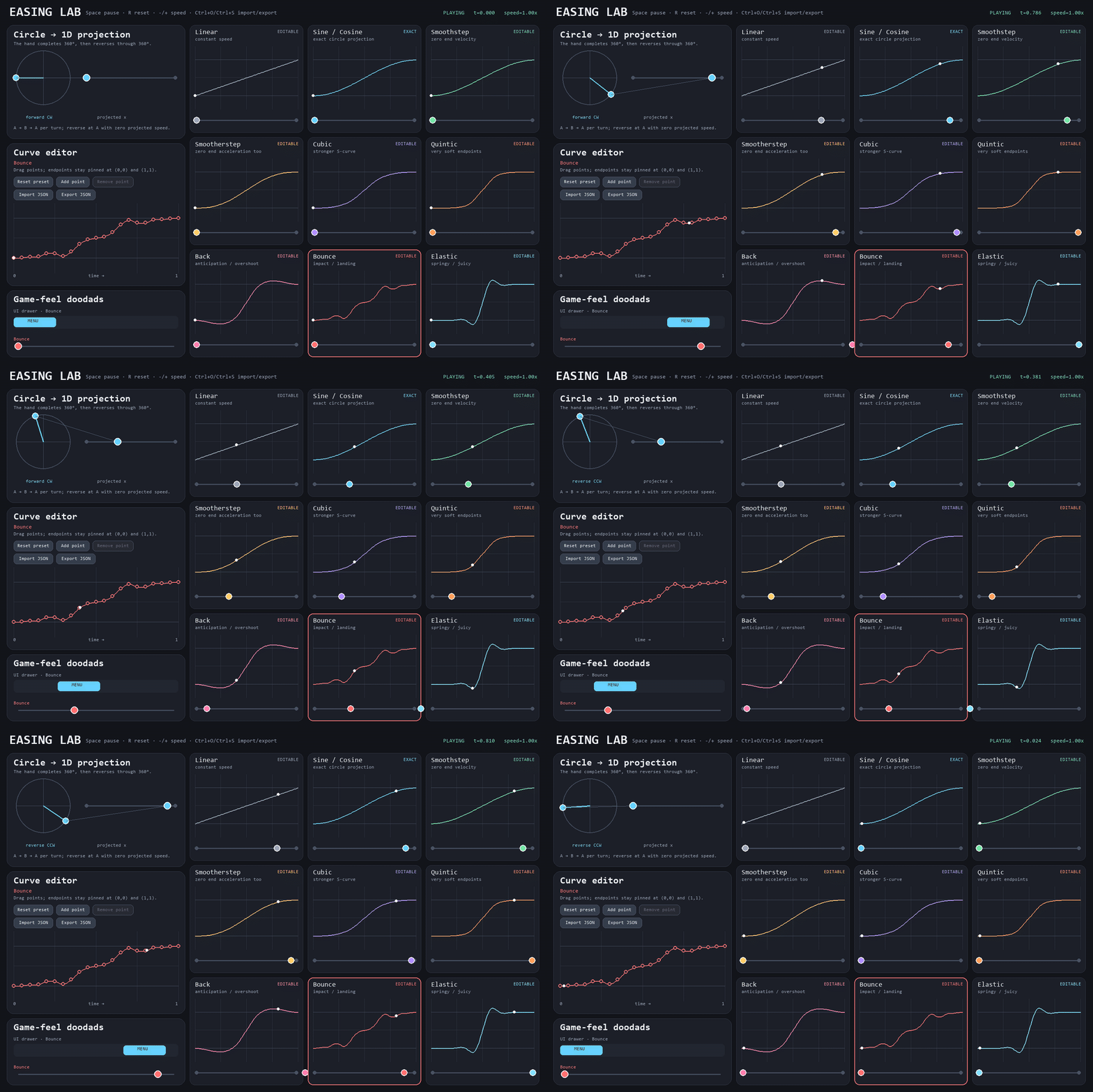
The designer compares nine starting curves and lets you reshape eight of them.
pip install easing-labHere is a complete animation using only the standard library and Easing Lab:
import turtle
from easing_lab import interpolate, ping_pong
dot = turtle.Turtle("circle")
dot.penup()
def animate(frame=0):
    dot.setx(interpolate(-200, 200, ping_pong(frame / 60), "sine"))
    turtle.ontimer(lambda: animate(frame + 1), 16)
animate()
turtle.done()
Easing remaps time: instead of moving at one constant speed, an object can start gently, land with weight, overshoot, bounce, or settle like a spring.
Install the optional Pygame app and run it:
pip install "easing-lab[app]"
easing-lab
python -m easing_lab opens the same designer. Use easing-lab --help for window size,
startup file, screenshot, and version options.
The app keeps a focused 3×3 set of starting points. The library also provides separate In, Out, and In-Out variants for the Sine, Cubic, Quint, Back, Bounce, and Elastic families.
| Curve | Feel |
|---|---|
| Linear | Constant speed |
| Sine / Cosine | Smooth circular projection; kept exact and locked |
| Smoothstep | Arrives and leaves at rest |
| Smootherstep | Softer endpoint acceleration |
| Cubic | A stronger S-curve |
| Quintic | Very soft endpoints |
| Back | Anticipation and overshoot |
| Bounce | Impact and landing |
| Elastic | Spring and settle |
| Action | Mouse / keyboard |
|---|---|
| Select a curve | Click its card |
| Move a control point | Drag it in the editor |
| Add a point | Click Add point, then click the graph |
| Remove an internal point | Right-click it, press Delete, or use Remove point |
| Reset the selected curve | Reset preset |
| Import / export JSON | Buttons or Ctrl+O / Ctrl+S |
| Pause / reset time | Space / R |
| Change speed | - / +, or 1 / 2 / 3 for 0.5× / 1× / 2× |
| Quit | Escape or close the window |
Select an editable card before importing a custom curve. The import replaces only that card's working curve.
The repository includes a small playable Pygame game that puts the easing functions into motion. Move between five lanes to collect motion cores, dodge red glitches, and spend a limited safety pulse when a lane gets crowded. Falling pieces name the curve driving them, while lane changes, spawn effects, particles, score feedback, and the pulse use additional easings from the library.
python examples/easing_gauntlet.pyUse A/D or the arrow keys to move, Space to pulse, P to pause, and R to restart. Install
the app extra first if Pygame is not already available.
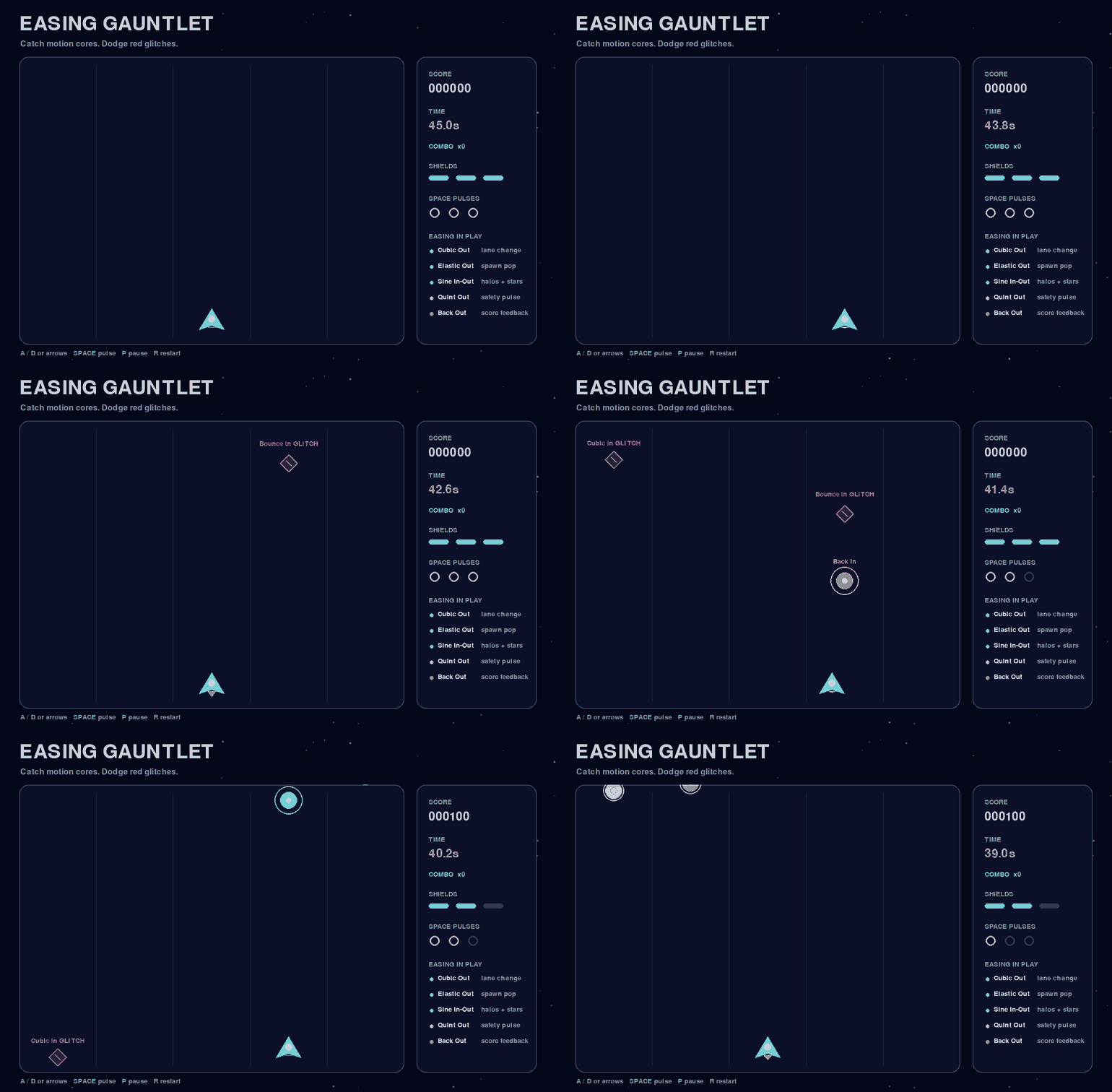
Every falling piece names its motion curve while the sidebar identifies the easings used for player movement and visual feedback.
The math library does not import Pygame or open a window. Inputs are normalized to 0..1,
and evaluate and interpolate clamp that input range by default.
from easing_lab import evaluate, interpolate

progress = evaluate("ease_out_cubic", 0.35)
x = interpolate(40.0, 600.0, 0.35, "back")
Back and Elastic curves can move outside the start/end range by design. Pass
clamp_input=False when you also want to evaluate time outside 0..1.
The stable family-first keys are:
linear,smoothstep, andsmootherstepsine_in,sine_out, andsine_in_outcubic_in,cubic_out, andcubic_in_outquint_in,quint_out, andquint_in_outback_in,back_out, andback_in_outbounce_in,bounce_out, andbounce_in_outelastic_in,elastic_out, andelastic_in_out
The names used by easings.net are available in Python form too:
ease_in_sine, ease_out_cubic, ease_in_out_back, and the matching names for every
listed family. Short names such as sine, cubic, quintic, back, bounce, and
elastic select the In-Out version. EASINGS exposes the full built-in registry.
import pygame
from easing_lab import interpolate

start = pygame.Vector2(80, 240)
end = pygame.Vector2(720, 240)
position = interpolate(start, end, 0.4, "elastic_out")
interpolate works with any value type that supports subtraction, multiplication by a
float, and addition. Pygame's Vector2 follows that small protocol, but Pygame is not
required for floats or other compatible types.
from easing_lab import load_easing

ease = load_easing("my_jump.json")
height = ease(0.45)
See the versioned JSON format, the minimal Pygame integration, and the playable Easing Gauntlet example.
- The visual designer needs Pygame and a desktop supported by SDL; the math library does not.
- JSON format version 1 stores named built-ins or piecewise cubic Hermite curves. It is not a general animation timeline or keyframe format.
- CI covers Windows and Linux on Python 3.10 and 3.13. macOS is not part of the current automated matrix.
git clone https://github.com/deviousname/easing-lab.git
cd easing-lab
python -m venv .venv
python -m pip install -e ".[dev]"
ruff format --check .
ruff check .
pytest
python -m build
The GIF can be reproduced with python tools/render_readme_gif.py. Read
CONTRIBUTING.md before opening a pull request. Exact test conditions,
artifact checks, dependency boundaries, and provenance are recorded in
docs/verification.md.
The Back, Bounce, and Elastic families descend from Robert Penner's easing equations. The curve names and visual comparisons follow the conventions collected by easings.net.
Your exported curve data is unrestricted. JSON files created or exported with Easing Lab may be used, modified, redistributed, and sold in open- or closed-source projects, including commercial games, without attribution and without including Easing Lab's license. This permission applies to the exported curve data. If you copy or redistribute Easing Lab's application or library code, the MIT License still applies to that code.
Easing Lab's source is available under the MIT License. Pygame is an optional, separately licensed dependency used by the designer and Pygame example.