BFF Demo Walkthrough
This page documents the live Croesus BFF demonstration from the top of the repository README. It walks the whole flow in deployment order, with a screenshot at each step: the Azure resources, the two Microsoft Entra app registrations, the App Service configuration, the sign-in, the evidence the BFF and the API each produce, and the telemetry in Azure Monitor.
It is written for a technical audience, including the Desjardins identity team and the Croesus engineering team, as a reference for how to build a Backend-for-Frontend properly on Microsoft Entra ID and ASP.NET Core.
Every screenshot was taken against the live deployment in the PoC tenant MngEnvMCAP675646. Nothing here is a mock-up, and no secret value appears in any image.
| Topic | Link |
|---|---|
| The pattern, its trade-offs, and when to use it | Backends for Frontends pattern - Azure Architecture Center |
| The Microsoft-supported implementation shape with YARP and Aspire | Secure an ASP.NET Core Blazor Web App with OpenID Connect (OIDC) |
The demo applies both: the pattern from the first article, and the OIDC-plus-YARP implementation approach from the second, hosted on Azure App Service instead of Aspire.
Does the browser ever hold an OAuth token, or does a backend redeem the authorization code, retain the tokens, and mediate every downstream call?
Croesus asserts the second shape for GPD Central. This demo deploys a working instance of that shape and produces evidence from two independent vantage points, the BFF and the downstream API, so the claim can be checked instead of argued. The result maps to open questions Q7, Q8, and Q15 in the three-way session findings.
sequenceDiagram
    autonumber
    participant B as Browser
    participant BFF as BFF (.NET 10, YARP)
    participant E as Microsoft Entra ID
    participant API as Owned API (.NET 10)

    B->>BFF: GET /bff/login
    BFF-->>B: 302 to Entra (code, form_post, PKCE)
    B->>E: Authenticate (MFA, Conditional Access)
    E-->>B: Auto-posted form with code to /signin-oidc
    B->>BFF: POST /signin-oidc (code)
    BFF->>E: Redeem code with client secret (server to server)
    E-->>BFF: ID token, access token, refresh token
    BFF-->>B: Set-Cookie __Host-Croesus.BffYarp.Session (opaque, HttpOnly)
    B->>BFF: GET /api/profile (cookie only)
    BFF->>BFF: Guard checks, acquire delegated token for the API
    BFF->>API: GET /api/profile (Authorization: Bearer, no cookie)
    API-->>BFF: 200 JSON (audience, scopes, azp, receivedCookie=false)
    BFF-->>B: 200 JSON
The browser only ever holds the opaque session cookie. Tokens stay on the server.
Four Windows App Service sites share one B1 plan in the resource group croesus-bff-poc-rg (Canada East), together with a workspace-based Application Insights component, a Log Analytics workspace, and two metric alert rules.
| Site | Runtime | Role |
|---|---|---|
croesus-bff-a3v24wppuvd34-bff |
.NET 10 | The BFF. Holds the session, redeems the code, acquires and forwards downstream tokens through YARP. |
croesus-bff-a3v24wppuvd34-api |
.NET 10 | The owned downstream API. Validates audience and delegated scope on its own. |
croesus-bff-a3v24wppuvd34-modern |
.NET 10 | Supported destination of the R8/R9 comparison. |
croesus-bff-a3v24wppuvd34-legacy |
.NET Framework 4.8 | Classic half of the R8/R9 comparison. |
The resource group with the four sites, the App Service plan, Application Insights, the Log Analytics workspace, and the alert rules:

The BFF site overview, showing the default hostname, runtime stack, and App Service plan:

- PowerShell 7 on Windows, Azure CLI signed in to the intended tenant, .NET SDK 10.
- Permission to create applications and service principals in the tenant.
- An Azure subscription where you can create a resource group, an App Service plan, and the monitoring resources.
The provisioning scripts use az account show and az rest against Microsoft Graph. They do not create subscription-scope role assignments and they do not use az ad sp create-for-rbac. The full prerequisite list is in the classic .NET BFF PoC guide.
Two registrations carry the flow. Keeping them separate is what makes the audience boundary real.
| Registration | Client ID | Kind | Purpose |
|---|---|---|---|
croesus-bff-a3v24wppuvd34-web |
3ee7b866-1d40-4746-a880-f7fda6d2d53e |
Confidential web client |
The BFF identity. Holds a client secret that never leaves the server. |
croesus-bff-a3v24wppuvd34-api |
7c2e2d88-88c1-4c3a-a317-5eac41200a80 |
Resource (API) | Publishes the access_as_user scope and pre-authorizes only the web client. |
Overview of the web registration: display name, application (client) ID, directory (tenant) ID, and supported account types set to single tenant:

Authentication: a single Web platform with the three /signin-oidc redirect URIs and implicit grant disabled. There is no Single-page application platform and public client flows are off:

Settings that matter, and why:
- Platform type
Web, notSPA. A backend that redeems the code with a secret is a confidential client regardless of what the UI looks like. - Implicit grant for access tokens and ID tokens both off. Tokens are never issued to the browser from the authorization endpoint.
- Redirect URI is the BFF host plus
/signin-oidc. The BFF requestsresponse_mode=form_post, so the code travels in a POST body, not in a URL.
Certificates and secrets: one client secret registered, value never displayed after creation:

The secret is created short-lived by the provisioning script, passed to Bicep as a secure parameter, and stored only as an App Service application setting. It is never committed, written to a state file, or placed in a workflow output.
Token configuration: the optional claims auth_time and amr requested on the ID token:

These two claims let the evidence page report how and when the user authenticated, not merely that they did.
API permissions: the delegated access_as_user permission on the owned API, consented:

Expose an API: Application ID URI api://7c2e2d88-..., one delegated scope access_as_user, and exactly one authorized client application, the web client:

The resource registration also sets requestedAccessTokenVersion to 2. As a result the aud claim is the bare client ID rather than the api:// URI, and the issuer is the v2.0 endpoint. The API validates against exactly those values.
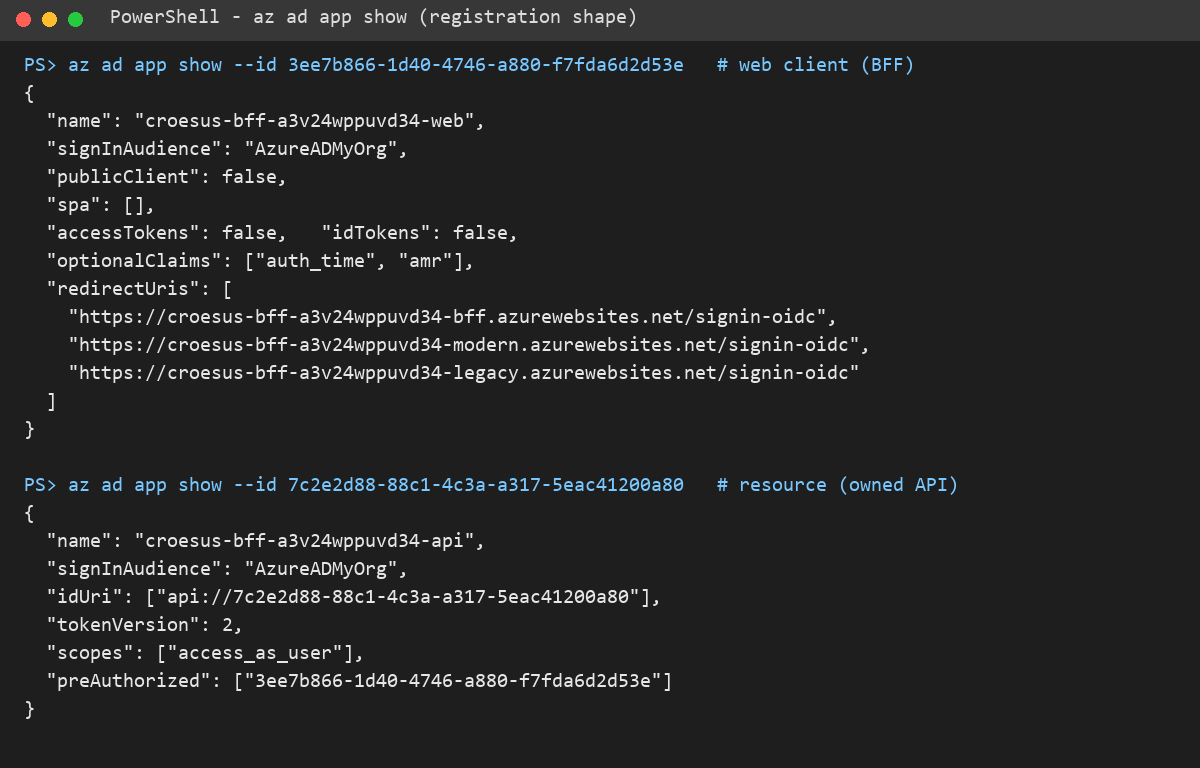
Use this output when you need to compare a registration against what the portal shows, or to hand the shape to another team without screenshots.
az ad app show for both registrations:
The provisioning is scripted and repeatable. The sequence below is the one the repository uses.
# 1. Create or converge the confidential web registration (short-lived secret in the process environment only)
pwsh scripts/provision-classic-net-bff-deployment.ps1 -DisplayName 'croesus-bff-web' `
  -LegacyCallbackUri 'https://<legacy-host>/signin-oidc' `
  -ModernCallbackUri 'https://<modern-host>/signin-oidc'

# 2. Create the owned API registration (scope, v2 tokens, pre-authorized client)
pwsh scripts/provision-owned-api-registration.ps1

# 3. Deploy the infrastructure (plan, four sites, App Insights, Log Analytics, alerts)
az deployment group create -g croesus-bff-poc-rg -p infra/poc/main.bicepparam

# 4. Publish and deploy the BFF package (runtime identifier is pinned to win-x64 in the project)
dotnet publish poc/bff-yarp-net10/Croesus.BffYarp.csproj -c Release -o publish
Add https://<bff-host>/signin-oidc to the web registration redirect URIs when the BFF shares the registration with the comparison sites, because main.bicep points all of them at the same client ID. The classic .NET BFF PoC guide documents the GitHub Actions route, classic-net-bff-poc, which does the same through a protected poc-demo environment and OIDC federation with no stored deployment secret.
Environment variables of the BFF site: tenant and client IDs, downstream scope, proxy destination allowlist, YARP cluster address, Data Protection key ring path, and the Application Insights settings. Secret values are masked by the portal:

| Setting | Purpose |
|---|---|
DownstreamApi__Scopes__0 |
The delegated scope the BFF requests, api://<API app ID>/access_as_user. |
ProxyPolicy__AllowedDestinationOrigins__0 |
Origin allowlist enforced before anything is forwarded. |
ReverseProxy__Clusters__owned-api__Destinations__primary__Address |
YARP destination for the owned API. It must be in the allowlist. |
DataProtection__KeyRingPath |
Persisted key ring under D:\home\data so cookies survive restarts. |
DistributedCache__Redis__ConnectionString |
Shared ticket and token cache. Required for more than one instance outside Development and PoC. |
Authentication__AllowedTenantIds__0 |
Single-tenant issuer allowlist. |
APPLICATIONINSIGHTS_CONNECTION_STRING |
Telemetry sink. |
The complete catalog is in the configuration contract.
Configuration, General settings: Windows runtime stack, platform bitness, HTTPS Only on, minimum TLS version, and FTP state:

HTTPS Only must be on. The host-prefixed cookie __Host- requires the Secure attribute, which the browser refuses to honor over plain HTTP.
The commands and URLs below use the live deployment. Each step states the expected result and what it proves.
The BFF landing page returns HTTP 200 with no redirect to the identity provider:

A BFF that redirects every anonymous byte cannot serve a landing page and looks identical to a broken one. This is the health baseline.
/api/profile without a cookie returns HTTP 401 with a bounded JSON body naming interaction_required, not a 302 to login.microsoftonline.com:

The cookie scheme is the default challenge, so an unauthenticated fetch receives a machine-readable refusal instead of an HTML sign-in page parsed as JSON.
The API answers 401 on its own, with WWW-Authenticate: Bearer:

This is the first negative control. The API is independently protected, not merely hidden behind the proxy. Without this step a proxied success would prove only that the proxy forwards traffic.
The same three calls from PowerShell:

Browse to https://croesus-bff-a3v24wppuvd34-bff.azurewebsites.net/bff/login.
The BFF answers with a redirect to the Entra authorize endpoint carrying response_type=code, response_mode=form_post, PKCE, and a single-tenant authority:

The Microsoft Entra sign-in prompt for the web client. No consent or configuration error means the registration, redirect URI, and scope are wired correctly:

form_post is a requirement, not a preference. IIS rejects any query string over 2048 bytes with HTTP 404.15 before .NET sees the request, and an authorization code carrying custom API scopes crosses that limit.
/api/profile after sign-in returns the API's own account of the call:

{
  "audience": "7c2e2d88-88c1-4c3a-a317-5eac41200a80",
  "issuer": "https://login.microsoftonline.com/aa93b9d9-037d-4f08-a26d-783cff0e2369/v2.0",
  "callingApplicationId": "3ee7b866-1d40-4746-a880-f7fda6d2d53e",
  "scopes": [ "access_as_user" ],
  "receivedCookie": false
}| Field | What it establishes |
|---|---|
audience |
The token was minted for the owned API, not Graph and not the web app. |
issuer |
The v2.0 endpoint of the expected tenant. |
callingApplicationId |
The azp claim: exactly which application called. |
scopes |
A delegated custom scope, so the call carries user context. |
receivedCookie |
false. The session cookie never reached the API. The BFF terminated it and minted a fresh bearer token for the hop. |
receivedCookie: false separates a genuine BFF from a reverse proxy that relays browser credentials downstream.
Before forwarding, ProxyBoundaryMiddleware runs these checks in order: the path is a guarded route, the method is on the allowlist, the caller is authenticated, state-changing methods carry a valid antiforgery token, and a delegated token was acquired. Only then does YARP forward, and only to an allowlisted origin.
/bff/evidence: token custody, cookie hardening flags as configured, authentication method and time from amr and auth_time, granted delegated scopes, and one sanitized record per token acquisition:

Run step 3.5 first. Acquisition records are per session and per process, so Granted delegated scopes reads none recorded until a proxied call has acquired a token, and a deployment restart empties them.
The page is an allowlist. It omits access tokens, refresh tokens, authorization codes, client secrets, ID token fragments, and cookie values, and it does not claim an On-Behalf-Of exchange, because this application performs none.
The browser holds one cookie, __Host-Croesus.BffYarp.Session: HttpOnly, Secure, SameSite=Lax, host-prefixed, with an opaque value that is a key into a server-side ticket store. No token is in the cookie, in localStorage, or anywhere JavaScript can reach.
The BFF's account and the API's account come from separate processes with separate code paths, and they agree.
POST /bff/logout with an antiforgery token from /bff/antiforgery. The server-side ticket is destroyed, so a previously captured cookie stops working even though the browser still holds the same bytes. Session lifetime is a server decision.
Application Insights croesus-bff-poc-ai: failed requests, server response time, and server requests from all four sites. The instrumentation key and connection string are redacted:

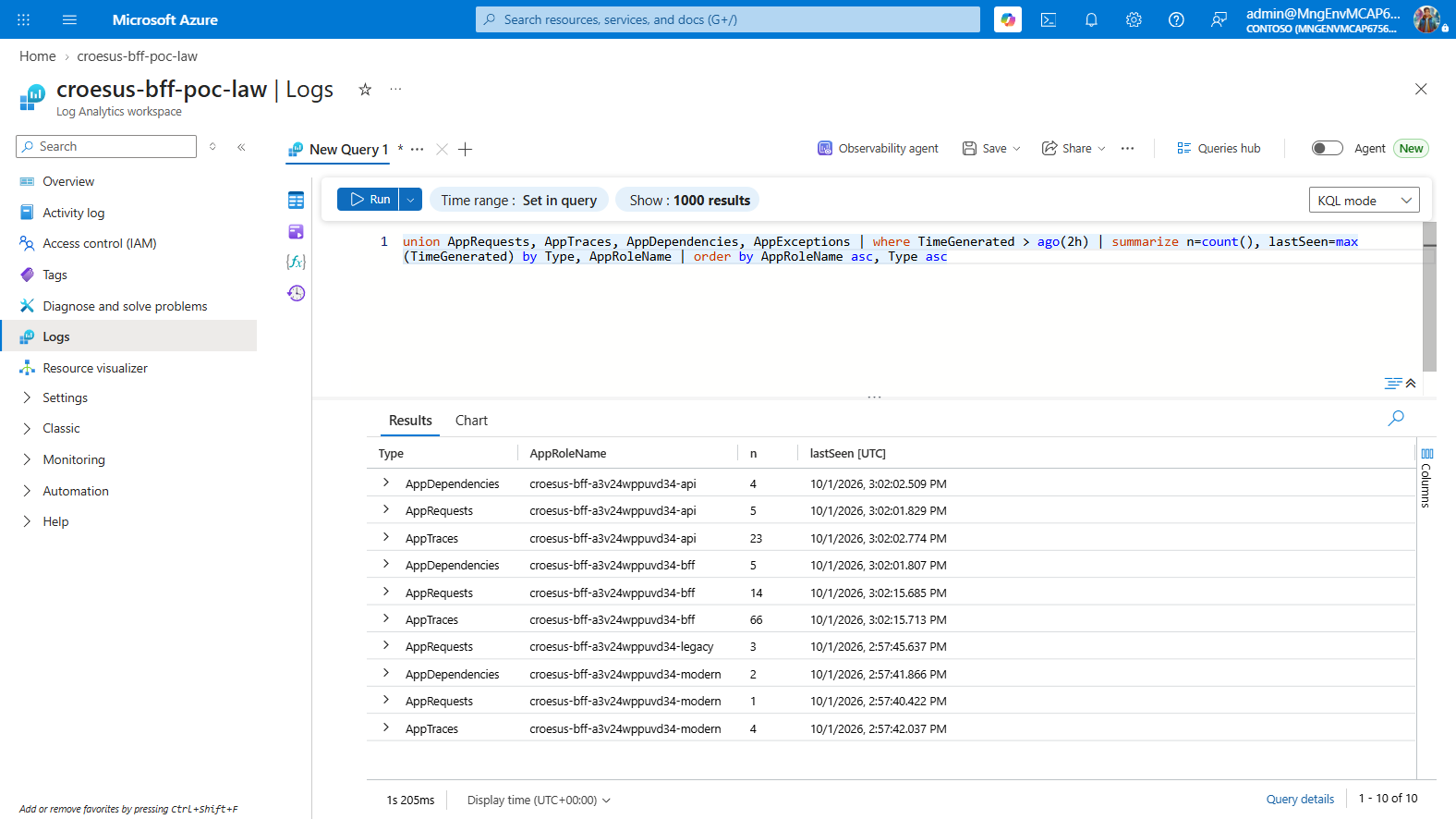
Query the Log Analytics workspace directly. A workspace-based component returns no rows from az monitor app-insights query, which looks like missing telemetry when the real cause is the wrong query target.
union AppRequests, AppTraces, AppDependencies, AppExceptions
| where TimeGenerated > ago(2h)
| summarize n=count(), lastSeen=max(TimeGenerated) by Type, AppRoleName
| order by AppRoleName asc, Type asc
The query run in croesus-bff-poc-law: requests, dependencies, and traces per site. The BFF shows AppDependencies, which are the outbound calls to the API:
From the command line:
$wsid = az monitor log-analytics workspace show -g croesus-bff-poc-rg -n croesus-bff-poc-law --query customerId -o tsv
az monitor log-analytics query -w $wsid --analytics-query "union AppRequests,AppTraces,AppDependencies,AppExceptions | where TimeGenerated > ago(30m) | summarize n=count(), lastSeen=max(TimeGenerated) by Type, AppRoleName" -o tableTwo metric alert rules, croesus-bff-poc-failed-requests and croesus-bff-poc-server-exceptions, fire on failed requests and server-side exceptions. They exist because every ingress check in this repository once passed against a site that was returning HTTP 500.
The failed-requests alert rule, severity 2 (Warning), scoped to the Application Insights component:

pwsh scripts/verify-ingress.ps1 `
  -ResourceGroupName croesus-bff-poc-rg `
  -AppName croesus-bff-a3v24wppuvd34-bff `
  -ExpectedClientId 3ee7b866-1d40-4746-a880-f7fda6d2d53e `
  -ChallengePath /bff/login
Eight checks pass: DNS, TLS, application liveness, challenge shape, and ingress posture:

The verifier separates DNS, routing, authorization, challenge shape, ingress posture, and application liveness, because those six failures otherwise look identical to an operator. The liveness check exists because a deployment once reported success while every request returned HTTP 500 and the other checks stayed green.
dotnet test poc/bff-yarp-net10/Tests/Croesus.BffYarp.Tests.csproj
dotnet test poc/owned-api-net10/Tests/Croesus.OwnedApi.Tests.csproj
83 BFF tests and 27 owned-API tests pass:

| Defect | Symptom | Control |
|---|---|---|
| Query-mode callback over 2048 bytes | HTTP 404.15 at sign-in, synthetic tests green |
response_mode=form_post, pinned by a regression test |
IDW10503 at request time |
Token acquisition throws because the default scheme is Cookies
|
Token acquisition names the OpenID Connect scheme explicitly. The test double now refuses an unnamed scheme. |
| DPAPI key ring encryption failure | HTTP 500 on /bff/login, ingress checks green |
DPAPI is opt-in and off by default. Liveness is a verifier check. |
amr reported as absent |
Claim renamed to a SOAP-era URI by the inbound claim type map | Both static claim type maps are cleared at startup, and the test asserts the maps, not the option. |
| Telemetry appears missing | Empty results from az monitor app-insights query
|
Query the Log Analytics workspace. |
Three of these four reached production because the suite was built entirely on test doubles. Live execution against real Entra is treated as mandatory, not confirmatory.
- No On-Behalf-Of exchange occurs. The BFF acquires a delegated token for the owned API directly.
- The PoC tenant is not the customer tenant. Nothing here changes Desjardins Conditional Access.
- The session and token cache are in-process on this deployment. Outside Development and PoC the configuration validator requires Redis.
- The synthetic protocol tests replace Microsoft.Identity.Web's code redemption, so they say nothing about Entra's single-use enforcement of an authorization code.
- Ingress is public by design for this PoC.
| Area | Do |
|---|---|
| Registration | One confidential web registration for the backend that redeems the code. Use a spa registration only for a browser public client. |
| Tokens | Keep access, refresh, and ID tokens on the server. The browser holds only an opaque session cookie. |
| Cookie |
__Host- prefix, HttpOnly, Secure, SameSite, server-side ticket store, persisted Data Protection key ring. |
| Callback |
response_mode=form_post and PKCE. |
| API boundary | A separate resource registration, delegated custom scope, v2 tokens, a pre-authorized client, and token validation inside the API. |
| Proxy | Route allowlist, method allowlist, antiforgery on state-changing calls, destination origin allowlist. |
| Secrets | Short-lived secret, secure deployment parameter, never in a file or an output. Prefer a certificate or federated credential for production. |
| Evidence | An allowlisted evidence surface on the BFF and an independent account from the API. |
| Operations | Telemetry in a workspace, alerts on failed requests and exceptions, an ingress verifier that includes liveness. |