Repository navigation
BIOS
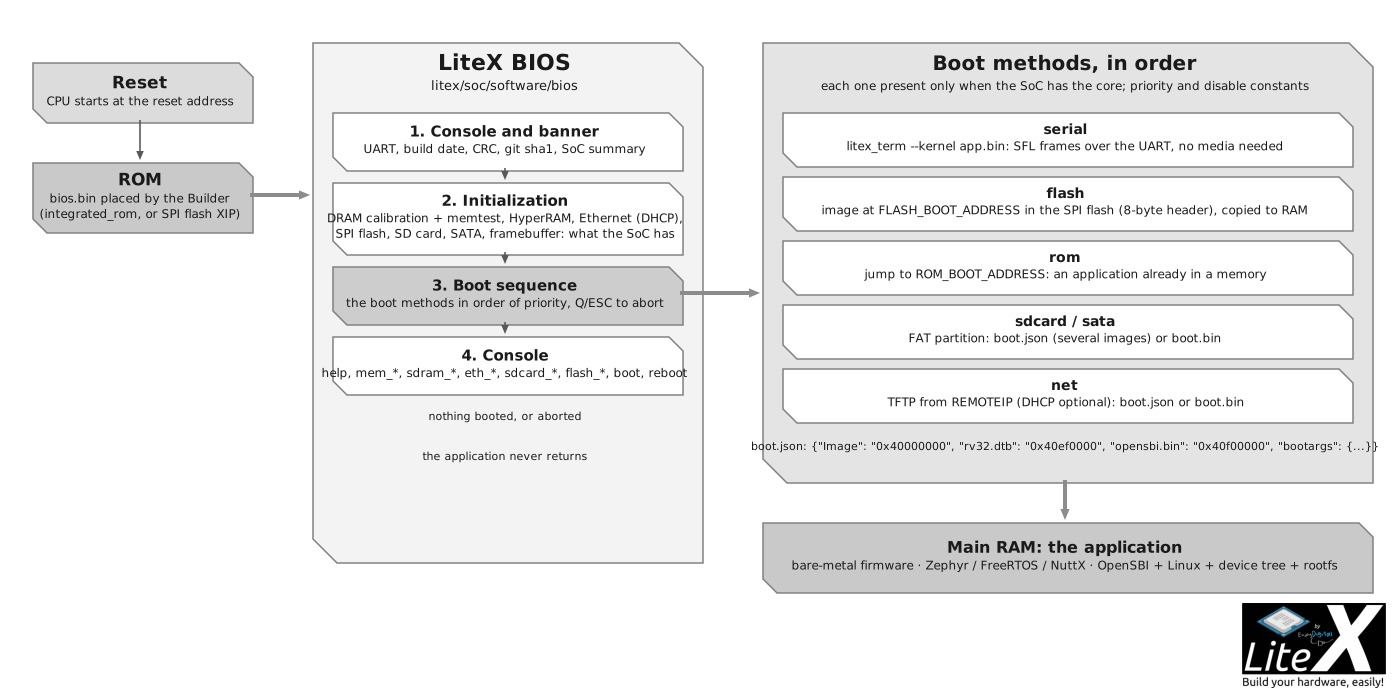
The BIOS is the first thing that runs on your SoC and the first thing you talk to on a new
board. The Builder compiles it for every SoC with a CPU (litex/soc/software/bios/, C on
picolibc); it brings up the DRAM and the peripherals, gives you a console on the UART, then
loads your application through one of the boot methods. Your own firmware is built the same
way, against the same csr.h (Write firmware for it).
litex_sim --with-sdram # the BIOS on a SoC with a DRAM model: calibration, memtest, boot, console
- Enables the interrupts and the UART (the console), the I2C controllers.
- Prints the banner: build date, BIOS CRC, LiteX git sha1, the SoC summary (CPU, bus, CSR, memories, DRAM configuration).
- Initializes the memories and peripherals the SoC has: HyperRAM, SFP, Ethernet (with DHCP when enabled), SPI RAM, then the DRAM (LiteDRAM calibration, memtest and memspeed; a plain memtest when the main RAM is a block RAM), the SPI flash, the video framebuffer.
- Runs the boot sequence (below). If nothing boots, or after
Q/ESC, it drops to the console.
Commands have help (help, help <command>), history and completion. The common ones:
| Group | Commands |
|---|---|
| System |
help, ident, uptime, crc, leds, buttons, reboot, flush_cpu_dcache, flush_l2_cache
|
| Memory |
mem_list, mem_read, mem_write, mem_copy, mem_test, mem_speed
|
| Boot |
boot <addr>, serialboot, netboot, flashboot, romboot, sdcardboot, sataboot
|
| DRAM (LiteDRAM) |
sdram_init, sdram_cal, sdram_test, sdram_bist, sdram_hw_test, sdram_spd, sdram_debug
|
| Ethernet (LiteEth) |
eth_local_ip, eth_remote_ip, eth_mac_addr, eth_dhcp, ping, mdio_read, mdio_write
|
| Storage |
sdcard_init, sdcard_read, sdcard_write; sata_init, sata_read, sata_write
|
| Flash (LiteSPI) |
flash_write, flash_erase_range, flash_from_sdcard
|
| I2C |
i2c_dev, i2c_scan, i2c_read, i2c_write, i2c_reset
|
help <command> gives the arguments (mem_write <addr> <value> [count] [size], netboot [manifest]...); the DRAM group also has the sdram_force_* and sdram_rst_* delay and
bitslip controls and sdram_mr_write, the Ethernet group mdio_dump and the sfp_mdio_*
commands and sfp, the storage group sdcard_detect, sdcard_freq, sata_sec2mem, sata_mem2sec and sata_rwtest.
Only the commands of the cores present in the SoC are compiled in.
The BIOS tries the methods available in the SoC in this order (each has a priority that a constant can change, and can be disabled):
| Priority | Method | Present when | What it does |
|---|---|---|---|
| 0 | serial | a UART | Prints the magic string and waits for litex_term --kernel to upload an image; times out otherwise. |
| 10 | flash | FLASH_BOOT_ADDRESS |
Reads an image (length and CRC header) at that offset, copies it to RAM or runs it in place. |
| 20 | rom | ROM_BOOT_ADDRESS |
Jumps to code already in a memory (an application linked in the ROM with the BIOS). |
| 30 | sdcard | LiteSDCard or SPI SD card | Mounts the FAT partition, loads boot.json or boot.bin (below). |
| 40 | sata | LiteSATA | The same with the SATA disk. |
| 50 | net | LiteEth MAC | TFTP from REMOTEIP (DHCP first when enabled): loads boot.json or boot.bin. |
boot.bin is loaded at the main RAM origin and executed. boot.json describes several images
and where to put them (Linux: OpenSBI, the kernel, the device tree, the rootfs):
{
    "Image":     "0x40000000",
    "rv32.dtb":  "0x40ef0000",
    "rootfs.cpio": "0x41000000",
    "opensbi.bin": "0x40f00000",
    "bootargs": {"addr": "0x40f00000", "r1": "0x40ef0000"}
}
Without bootargs, the BIOS jumps to the last image. The complete description of the manifest,
the flash image bounds and the SRAM boot buffers is in
doc/bios_config.md;
the practical page is Write firmware for your SoC.
The BIOS reads the generated soc.h: a core present in the SoC enables its commands and its
boot method, and a target tunes the BIOS with soc.add_constant()/soc.add_config():
| Constant or config | Effect |
|---|---|
ROM_BOOT_ADDRESS, FLASH_BOOT_ADDRESS
|
Enable the ROM and flash boots (add_spi_flash targets set the flash one). |
FLASH_BOOT_MAX_SIZE, FLASH_BOOT_REGION_BASE, FLASH_BOOT_REGION_SIZE
|
The bounds of the flash image. |
<METHOD>_BOOT_PRIORITY, <METHOD>_BOOT_DISABLE
|
Reorder or disable a boot method (SERIAL, FLASH, ROM, SDCARD, SATA, NET). |
LOCALIP1..4, REMOTEIP1..4, MACADDR1..6, TFTP_SERVER_PORT
|
The network boot parameters (add_ethernet(local_ip=..., remote_ip=...) sets them). |
ETH_DYNAMIC_IP, ETH_WITH_DHCP, ETH_NETBOOT_SKIP_JSON
|
Change the addresses from the console, use DHCP, skip boot.json. |
CONFIG_BIOS_NO_PROMPT, CONFIG_BIOS_NO_DELAYS, CONFIG_BIOS_NO_BOOT
|
Trim the BIOS: no banner, no delays (simulation), no boot sequence. |
CONFIG_BIOS_NO_BUILD_TIME, CONFIG_BIOS_NO_CRC
|
Reproducible builds, no CRC check. |
CONFIG_MAIN_RAM_INIT (set by --integrated-main-ram-init) |
Skip the memtest of a preloaded main RAM. |
UART_POLLING |
Set automatically when the CPU has no interrupts. |
The Builder options shape the binary: --bios-console {full,no-history,no-autocomplete,lite,disable}
and --bios-no-ansi for the console, --bios-format {integer,float,double} for printf,
--bios-lto and --libc-mode {minimal,full} for the size, --bios-stack-margin to fail the
build when the stack room is too small, and the BIOS_ROM_BUDGET/BIOS_SRAM_BUDGET
environment variables to enforce a footprint. The ROM is resized to the BIOS automatically
(--no-integrated-rom-auto-size keeps the requested size); Memtest, Memspeed and the
console take most of the space: a lite console and minimal libc fit small FPGAs.
-
litex/soc/software/bios/main.c: the start-up and the console;boot.c: the boot methods;cmds/cmd_*.c: the commands of each core. -
litex/soc/software/libbase/,liblitedram/,libliteeth/,liblitesdcard/,liblitesata/,liblitespi/: the libraries the BIOS and your firmware share (console, memtest, DRAM calibration, UDP/TFTP, FAT access, flash). -
litex/soc/software/include/generated/: the headers generated per SoC. -
litex/soc/software/demo/: the bare-metal application template (litex_bare_metal_demo --build-path=build/<board>).
- Write firmware for it: what the BIOS boots, and how to load it.
- Create a complex SoC: the DRAM, Ethernet and storage the BIOS initializes.
-
SoC builder reference: the
--bios-*options. -
Run Linux on your SoC: the four images a
boot.jsonloads.