Repository navigation
install USB gadget
The USB gadget allows to present the RPi as an audio DAC.
The audio path considered here is the one of a multiroom streamer which also acts as a local player:
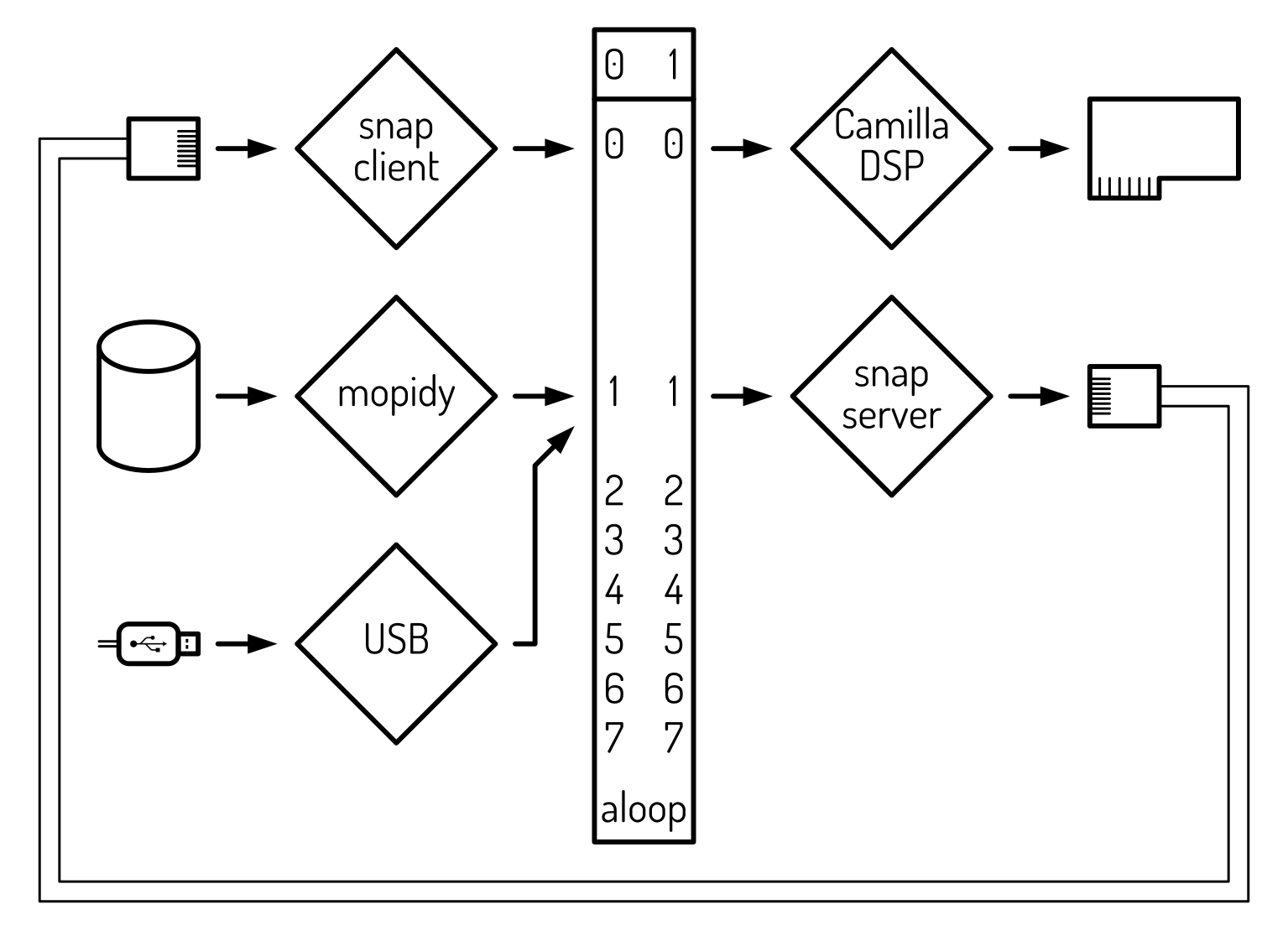
The digital signal processing (DSP) is not mandatory: the snapclient can stream directly to the audio (amplifier) output.
In the case of a simple multiroom audio receiver, the mopidy sound source and the snapserver audio streamer are absent. In this case, the USB reciever has to be multiplexed to the snapclient output.
Add the USB On-The-Go (OTG) functionality:
sudo nano /boot/firmware/config.txtand add:
# Enable DWC2 USB OTG driver
dtoverlay=dwc2
Load the audio modules at boot:
sudo nano /etc/modules-load.d/g_audio.confand add:
# Enable USB gadget audio
dwc2
g_audio
Specify the audio parameters:
sudo nano /etc/modprobe.d/g_audio.confand add:
# c_ssize sets the capture rate format offered to the USB host 4 = S32_LE
# c_chmask sets the number of capture channels format is 2^(number of channels) - 1
#   therefore, 3 = 2 channels, 63 = 6 channels and 255 = 8 channels
# p_chmask sets the number of playback channels offered to the RPi
#   this is set to 0 as as the gadget is typically only used as a capture device
options g_audio c_srate=48000 c_ssize=4 c_chmask=3 p_chmask=0
Reboot.
Check if the audio device has been loaded:
arecord -l | grep ^card
There should be a card named UAC2Gadget.
Connect a computer to the RPi's USB port and test the audio loop (adapt the playback device):
alsaloop -C hw:UAC2Gadget -P dmix:$ALSA_LOOPBACK_CAPTURE_DEVICE,$SNAPSERVER_LOOPBACK_SUBDEVICE -c 2 -f S32_LE -r 48000 -t 30000
Once this works, edit a service definition (adapt the playback device):
echo "dmix:$ALSA_LOOPBACK_CAPTURE_DEVICE,$SNAPSERVER_LOOPBACK_SUBDEVICE"
sudo nano /lib/systemd/system/dac-usb.service
and write (adapt the playback device):
[Unit]
Description=USB Gadget Audio Loopback Service
After=sound.target
Requires=sound.target

[Service]
Type=simple
ExecStart=/usr/bin/alsaloop -C hw:UAC2Gadget -P dmix:Loopback,0,1 -c 2 -f S32_LE -r 48000 -t 30000
Restart=always
RestartSec=2

[Install]
WantedBy=multi-user.target
Enable the service:
sudo systemctl enable --now dac-usb.service