Repository navigation
install snapclient
Install the Snap client:
sudo apt install -y snapclient
sudo chgrp users /etc/default/snapclient
sudo chmod 664 /etc/default/snapclient
Configure the client:
source ~/.bash_aliases
SNAPCLIENT_OPTIONS="--host localhost --soundcard $AMPLIFIER_SOUNDCARD --sampleformat $AUDIO_RATE:$AUDIO_BIT_NB:*"
ORIGINAL='SNAPCLIENT_OPTS=""'
REPLACEMENT="# $ORIGINAL\nSNAPCLIENT_OPTS=\"$SNAPCLIENT_OPTIONS\""
sudo sed -i "s/$ORIGINAL/$REPLACEMENT/" /etc/default/snapclient
Restart the snap client:
sudo service snapclient restart
Check how it is working:
ps aux | grep snap | grep -v grep
sudo service snapclient status | cat
When everything is fine, enable the service:
sudo systemctl enable snapclient
Changing the snapcast stream can be done by modifying the settings and restarting snapclient:
MULTIROOM_SNAPCAST_SERVER='AnotherRPi.local'
sudo sed -i "s/(^[^#].*)--host [^ ]*/\1--host $MULTIROOM_SNAPCAST_SERVER/" /etc/default/snapclient
sudo service snapclient restart

sudo sed -i "s/(^[^#].*)--host [^ ]*/\1--host localhost/" /etc/default/snapclient
sudo service snapclient restart
In the repository:
-
configuration.bashallows to specify the multiroom server's name (source the script after modification) -
Snapcast/changeServer.bashexecutes the afore mentioned commands.
The present installation is presented hereafter:
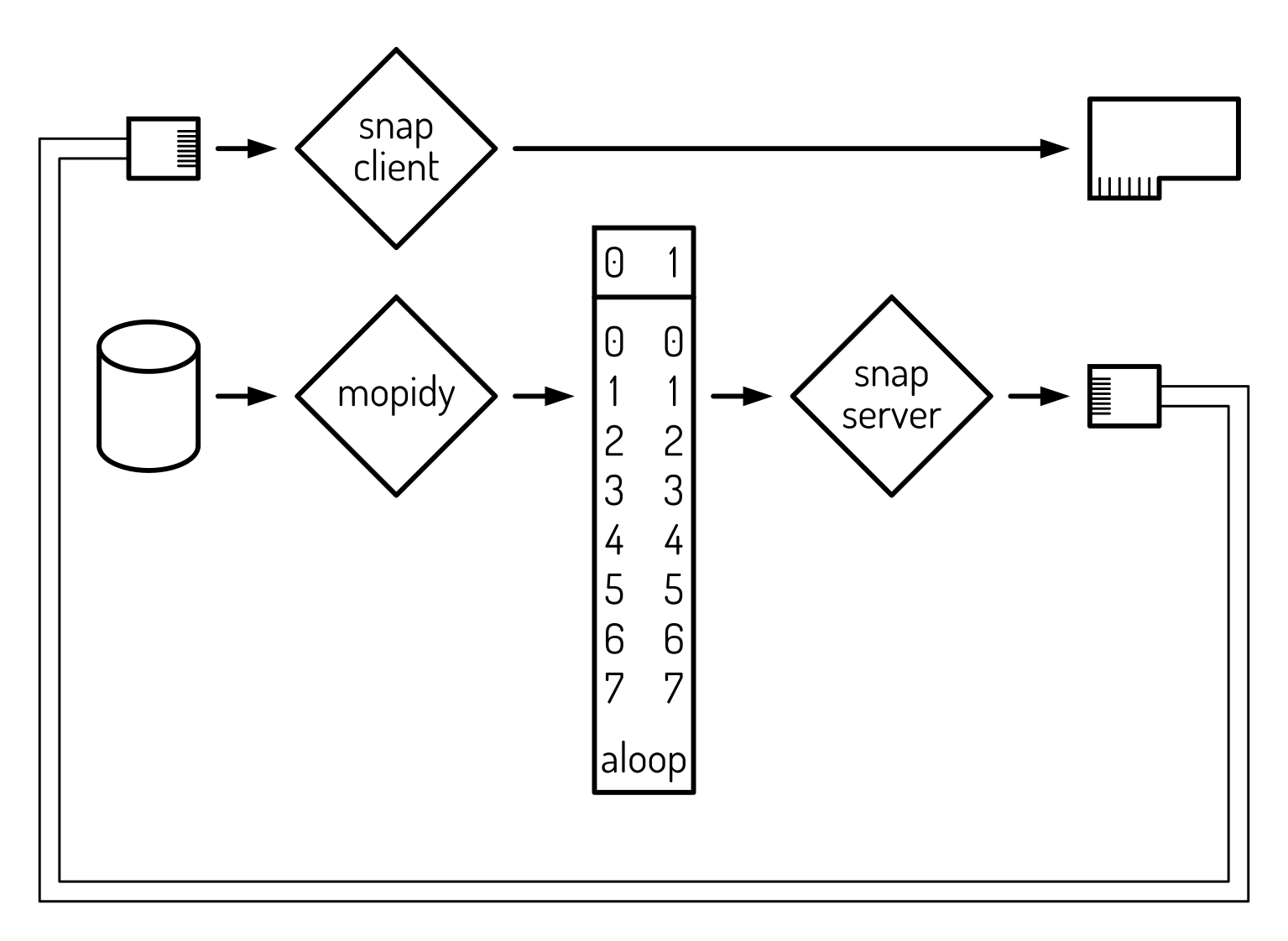
Mopidy reads music from the disk and sends it to the loopback device. Snapserver reads music from the loopback device and sends it to the Ethernet port. Snapclient reads music from the the Ethernet port and sends it to the soundcard.
Other snapclients on other RPis can receive the same music and play it locally. The local RPi can also play music streamed by another server.
With this, one has a functional multiroom device. A basic usage is to use it as a room amplifier, receiving music from a central server and yet capable to fall back to local music.
Further options are available in the installation process.