Repository navigation
CSV Import and Export
Station lists can be exported as CSV files, edited in a spreadsheet and imported again. This is useful for bulk editing, for copying a list to another player, and for adding stations by hand.
Find it in the Station Manager under Maintenance > Import / Export Stations.
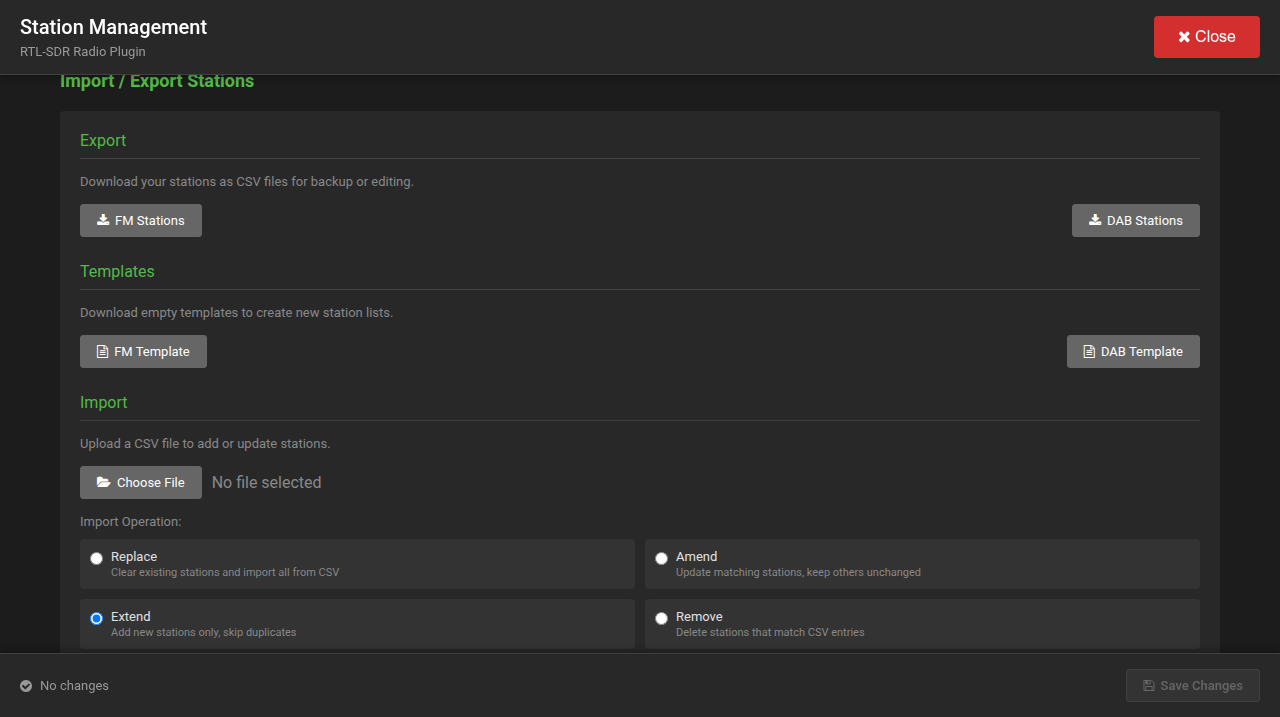
- Export: FM Stations and DAB Stations download your current lists.
- Templates: FM Template and DAB Template download empty files with the right header line and an example.
FM stations:
frequency,name,customName,favorite,hidden,notes
94.9,BBC Radio London,My BBC,true,false,Optional notes
DAB stations:
channel,exactName,name,customName,ensemble,serviceId,favorite,hidden,notes
12C,BBC Radio 1,BBC Radio 1,,London 1,0,true,false,Optional notes| Column | Meaning |
|---|---|
frequency |
FM frequency in MHz. It must lie inside the band of the region set in the plugin. |
channel |
DAB channel, for example 12C. |
exactName |
The service name as the ensemble transmits it. This is what the decoder is asked for. |
name |
The station's name as found by a scan. |
customName |
A name of your own; shown in place of name when set. |
ensemble, serviceId
|
The ensemble's name and the service's identifier, as found by a scan. |
favorite, hidden
|
true or false. |
notes |
Free text. |
- Choose the file.
- Validate. The file is checked line by line and every problem is listed with its line number. Nothing is changed yet.
- Choose the operation.
- Import Stations.
| Operation | What it does |
|---|---|
| Replace | Clears the list of that kind (FM or DAB) and imports the file as the new list |
| Amend | Updates the stations in the file that are already in the list (FM by frequency, DAB by channel and exactName); others stay as they are. Play counts and dates are kept. |
| Extend | Adds the stations in the file that are not yet in the list; existing ones are skipped |
| Remove | Marks the stations in the file as deleted (they go to the Recycle Bin) |
- Export before a large edit; an export is also a simple copy of the list.
- DAB stations are best added by a scan, which takes their names and identifiers from the broadcast. The CSV file is for editing what you see: names of your own, favourites, hidden, notes.
- To add a single FM station by hand, import a file with its one line using Extend.