User Guide Finding Your Way
The module navigation, grouped by domain. What you see depends on your permissions : an entry you cannot read is absent rather than disabled.
| Section | Contains |
|---|---|
| Governance | Organization (scopes, issues, stakeholders, objectives, SWOT), roles, activities, indicators (organizational and technical), strategy (reports, management reviews) |
| Assets | Goods (essential assets, support assets, asset groups), sites, suppliers and supplier types, documents (contracts, certificates), dependencies and the dependency graph |
| Risk management | Assessments and criteria, the register (risks, treatment plans, acceptances, ISO 27005 analyses), catalogs (threats, vulnerabilities) |
| Compliance | Frameworks, requirements, audits and compliance, nonconformities, mappings, action plans |
| Incidents | Incidents, security events, notification obligations, response plans, and the configuration (reporting authorities, obligation templates) |
| Administration | General (company, tags, lifecycles, calendar subscriptions, Trust Center), access (users, groups, permissions), Ask Cairn feedback, logs |
Every page carries a breadcrumb built from this same tree, so a detail page
always tells you where it sits : Governance > Organization > Stakeholders > STKH-1.
The search box in the header looks across every module you have access to : scopes, assets, risks, requirements, incidents, suppliers, and the rest. Results are grouped by type, and they are filtered by your permissions and scopes, so search never reveals a record a list would have hidden.
Searching by reference is the fastest way to reach a known record. Every
record carries one, and they are stable : RISK-42, INCD-7, ASST-15.
The palette is the keyboard route to anything. Open it from the header, type, and it matches both navigation targets and records.
If Ask Cairn is enabled, the palette also takes questions in plain language : "Which decisions were made at the last management review?". The answer cites real records, and it can only cite records you were already allowed to read.
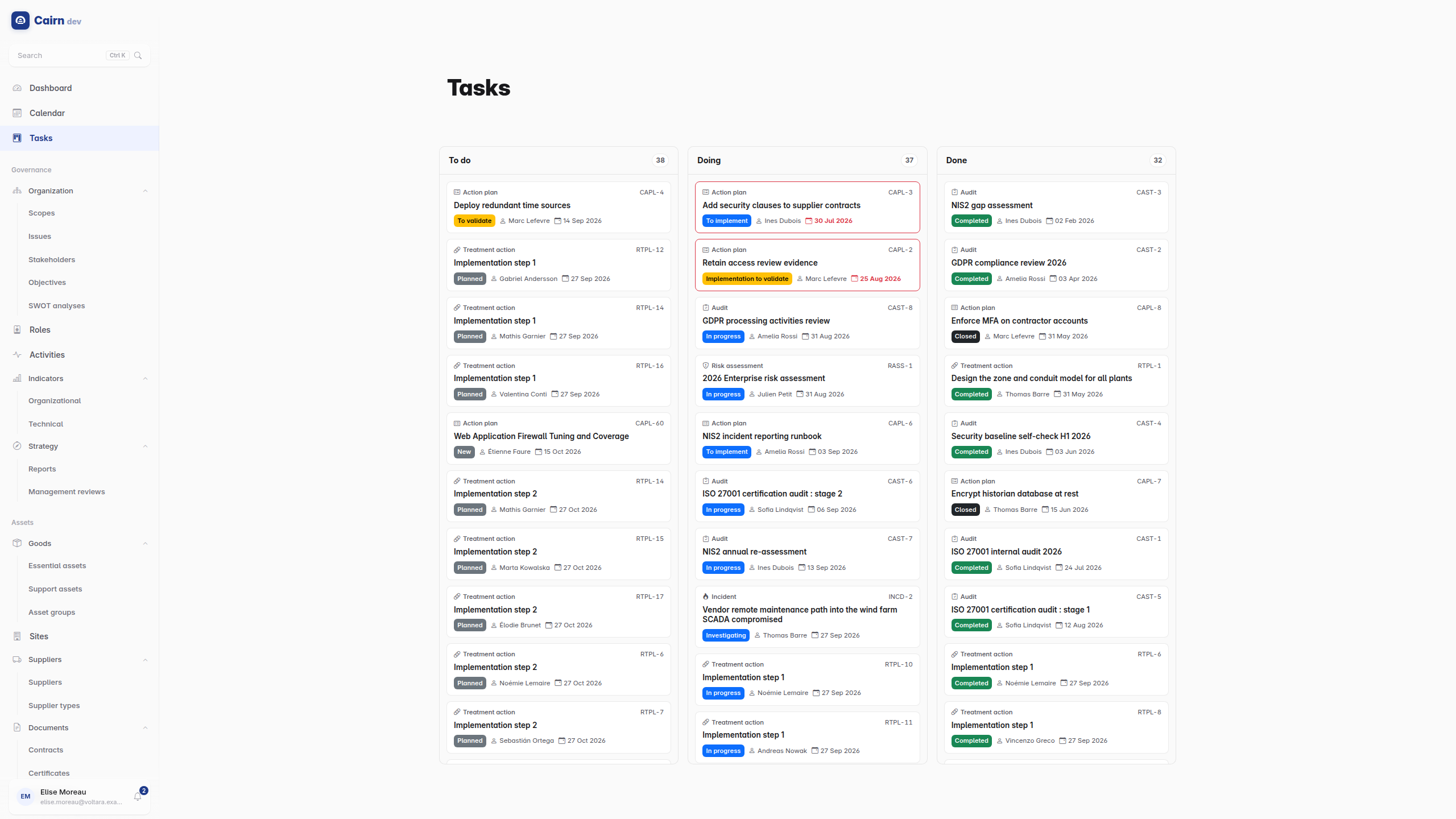
A single To do / Doing / Done board that aggregates the work items scattered across modules : compliance action plans, risk treatment actions, audits, risk assessments and incidents. It is the answer to "what is actually on my plate", which no single module can give you because the work is spread across five of them.
The board is deliberately read-only. There is no drag-and-drop, because a card's column is derived from the real record's status or lifecycle step, and moving work is a governed transition that belongs on the record's own page where the permission gate and the comment requirement live. Click a card to go there.
Cancelled and archived items drop off the board entirely rather than piling up in a fourth column.
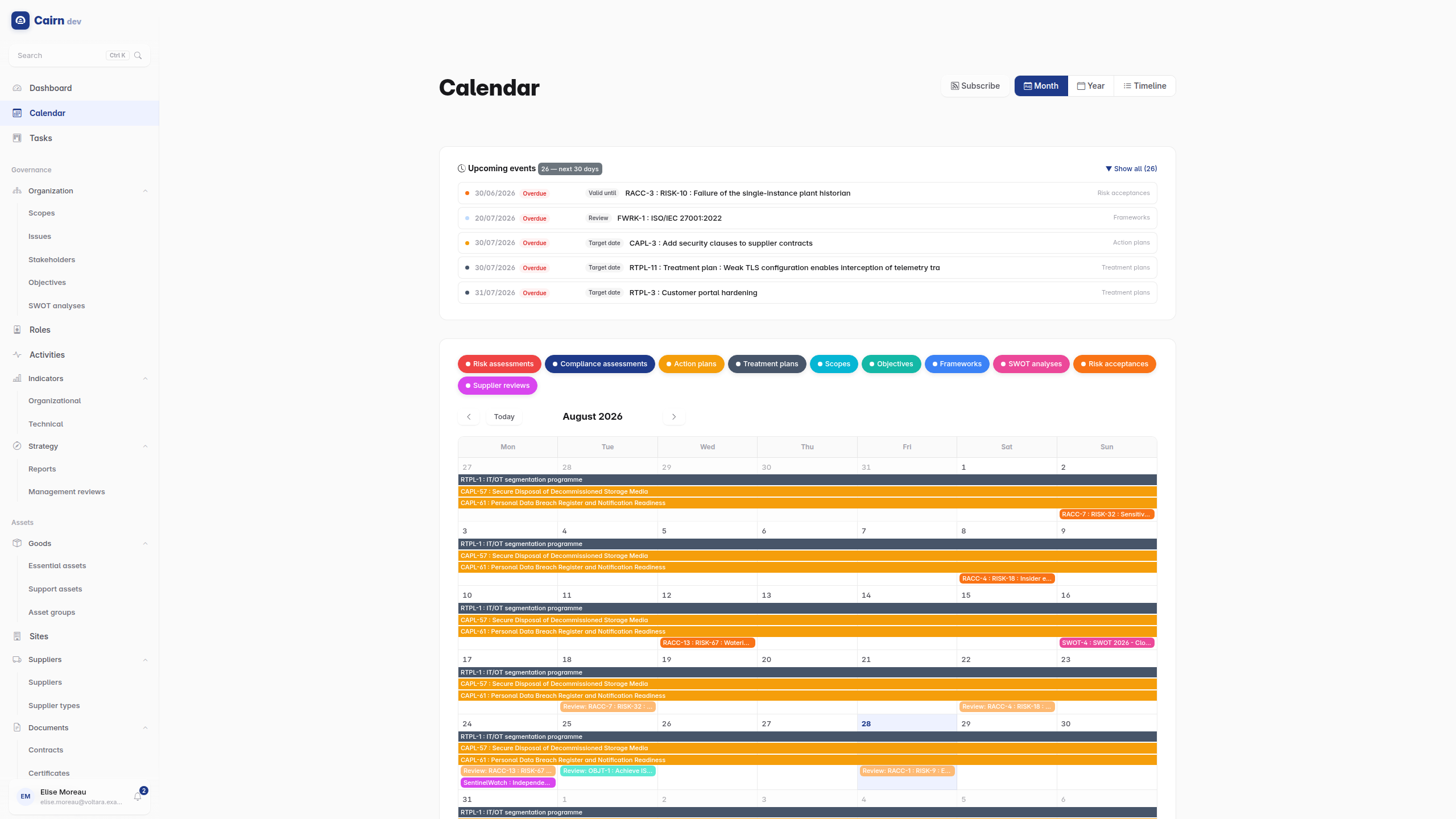
Dated obligations, in one place : review dates, audit windows, target dates, acceptance expiries, notification deadlines.
It can be subscribed to rather than merely read. Administration -> Calendar subscriptions issues a personal iCal feed you can add to Outlook, Google Calendar or Apple Calendar, so deadlines appear where you already look for them. The feed is tied to a token; revoking the subscription invalidates it.
Every list supports search, column sorting and filtering. Two behaviours are worth knowing.
Sorting is remembered. Your choice of column and direction is stored on your account per list, so a list you always read by target date stays that way across sessions and devices.
Filters can be saved. A filter combination you use repeatedly can be named and kept, and optionally shared with everyone. Saved filters turn "the query I rebuild every Monday" into one click.
The bell in the header. Cairn notifies you about things that need a decision from you : an element pending validation, a Trust Center document request. It does not notify you about everything that changes, which is deliberate : a notification stream nobody reads is worse than none.
Every record has a History view showing its complete change trail : field differences, approvals and lifecycle transitions, with who and when.
This is not a debugging aid, it is the audit surface. When an auditor asks "who validated this and on what date", this is the screen that answers.
The theme follows your operating system by default, and can be pinned to light or dark from your profile. The language is English or French, stored on your account.
Note that the data is not translated. A requirement written in French stays in French for an English user; only the interface changes.